
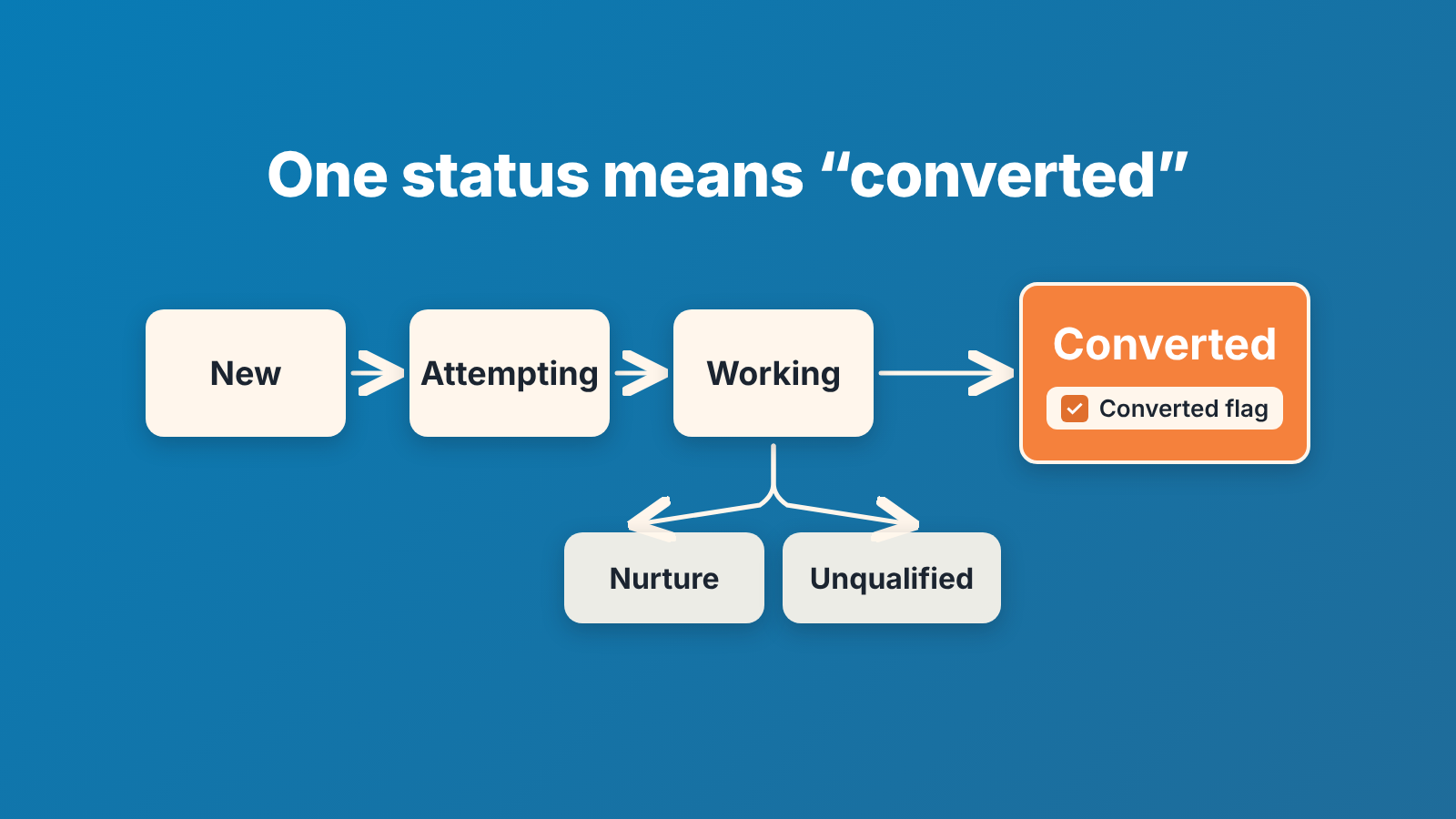
Lead Status in Salesforce is the picklist on the lead that says where the lead is in the rep’s work, and some of its values carry a Converted flag. A lead can only be converted into a value with that flag (Salesforce Help: Setup and display of converted Lead status values). A team of five reps needs five or six values, and exactly one of them should mean “this lead became a contact, an account and a deal”. Below: that list, why one converted value is enough, and the weekly report that shows which leads have been sitting in a status for too long.
What the Lead Status field is for (and what it is not)
Lead Status answers one question: has anyone worked this lead, and how did it end? That is the whole job. It is not a lead score (scoring has its own manager check), it is not the stage of a deal, and it is not the place to record why a prospect is interesting.
The field lives on the Lead object only. When a rep converts the lead, Salesforce creates or updates an account and a contact, and by default creates an opportunity named after the lead’s company (Salesforce SOAP API Developer Guide: convertLead()). From then on the deal has stages and the lead record is finished. If the question is “how far along is this deal”, you want Opportunity Stage, not Lead Status.
People try to push two other things into Lead Status. Fit (“good company, bad timing”) belongs in one Nurture value with a follow-up date, not in three shades of “Interested”. Source (“came from the webinar”) is the Lead Source field, which already exists. What travels from the lead to the new records at conversion, and what gets lost, is in what to map so the deal keeps its context.
HubSpot teams have the same mix-up between lead status and lifecycle stage. If you have worked in both CRMs, the HubSpot version of this distinction puts it in those terms.
A six-value Lead Status list for five reps
A fresh org usually comes with four values: Open – Not Contacted, Working – Contacted, Closed – Converted and Closed – Not Converted (Marcloud Consulting: Salesforce lead status). Salesforce’s own API guide uses “Closed – Converted” as the converted status in its sample code (convertLead() page). Our list keeps all four ideas and renames them: Open – Not Contacted becomes New, Working – Contacted becomes Working, Closed – Converted becomes Converted, Closed – Not Converted becomes Unqualified. Then it adds two values a small team actually needs.
Here are the six picklist values we would give a team with no admin. Rename what your org came with, retire the rest, and move existing leads over before the first Monday report.
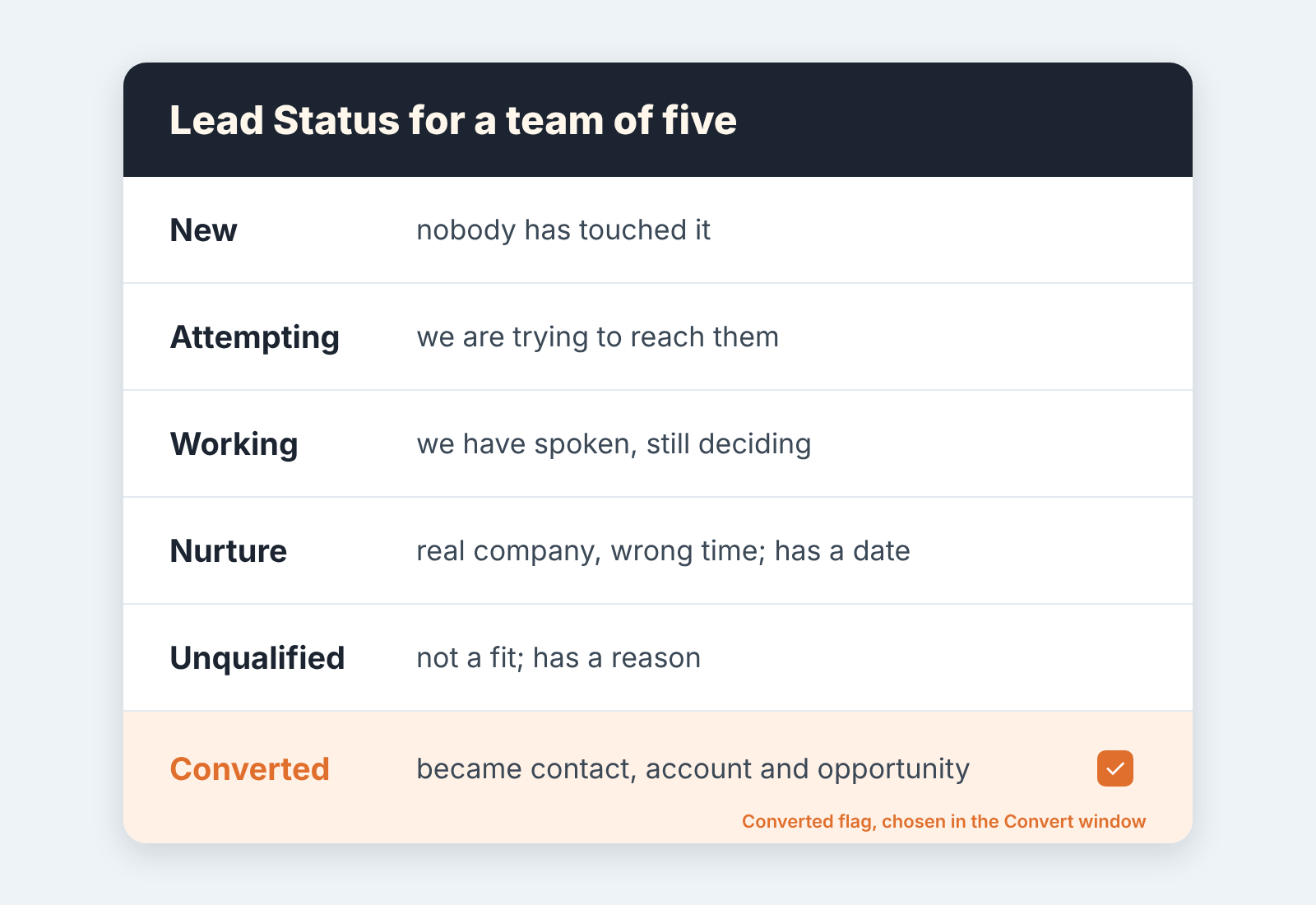
- New. The lead arrived and nobody has acted on it. Every lead starts here, whether it came from a web form, an import or a rep typing it in. If inbound leads land in a queue first, the handoff from queue to rep is covered in the web-to-lead queue check and our lead assignment rules audit.
- Attempting. A rep has called or emailed and hasn’t reached a person yet. This value tells a manager “unreachable” apart from “ignored”. Keep it only if someone will look at it; a team that never reports on reach rate can fold it into Working and run with five.
- Working. The rep has spoken to the prospect and the conversation is open. Nothing more granular. “Demo booked” and “Proposal” are deal activity, and a booked demo usually means a real opportunity you want to forecast. That is the point at which Salesforce itself says a lead is typically converted (convertLead() page).
- Nurture. Real company, real contact, wrong time. The lead stays open with a task dated for the next touch. Without the date this value turns into a graveyard.
- Unqualified. Not a fit, with a reason: no budget, wrong size, competitor, spam. Closed is closed.
- Converted. The one value with the Converted flag. The rep chooses it in the Convert window, as the converted status, when the lead becomes an account, a contact and an opportunity.
Five of these describe work. One describes an outcome that created other records, and that asymmetry is why the list holds up.
The Converted flag: one status, one meaning
A converted status is a value with the Converted checkbox ticked, not a value that happens to be called “Converted”. You could name it “Closed – Won Lead” and it would still be the converted status; you could name another value “Converted” without the tick and the Convert window would ignore it.
The flag lives on the picklist value in Setup. The default Lead Status value cannot be marked Converted, and if the rep doesn’t pick a value with the checkbox, the lead cannot be converted (Salesforce Help: Setup and display of converted Lead status values). The API says the same thing from the other side. The converted status is a required field, it must be a Lead Status value valid for a converted lead, and the list comes from the LeadStatus object (convertLead() page). In plain words the convert window offers every value you flagged, and the rep picks one.
Can more than one value carry the flag? Yes. The LeadStatus reference says outright that multiple values can represent a converted lead (Salesforce Object Reference: LeadStatus). We still insist on exactly one, because every extra flagged value is a second way to say the same thing, and every second way ends up in a report. We have seen orgs with “Closed – Converted”, “Qualified – Converted” and “Converted to Opportunity” all flagged, each used by a different rep, and a lead report where three rows had to be added up to get the conversion count. One flagged value gives “how many leads converted this month” a one-row answer. Converted leads also drop out of the standard Leads list view, so for the detail use the report type Leads with converted lead information, which joins each converted lead to the account, contact and opportunity it became (Salesforce Help: Create a report on converted leads).
Some AI answers suggest putting the flag on “Qualified”. We wouldn’t. In the orgs we look at, Qualified is exactly where leads stop moving (more on that below), so flagging it gives the parking lot an official exit and the rep still never clicks Convert.
If your team works leads from the Path on the lead record, one more thing. Path moves a lead through statuses, but it does not convert the lead by itself. Without the Convert button on the lead page layout, reps run into the “This Lead is not yet converted” error (Salesforce Help: “This Lead is not yet converted” error). Put the button on the layout and treat the Converted step as “open the Convert window”, not as a stage. We wrote up how we set Sales Path guidance per stage so the path helps rather than misleads.
Statuses that hide stuck leads
Most of the damage from a long status list is quiet. Nobody complains, the pipeline report looks fine, and three months later a manager finds forty leads that were “Qualified” in July.
The worst offender is a status that sounds finished but is not. “Qualified” is the classic. A rep marks it, feels done, and moves on; no one converts, so no opportunity exists, and the deal never reaches the forecast. The fix is not a better name, it is removing the value, so that a qualified lead has exactly one place to go, which is Convert. The second offender is a status with no exit. “Contacted” with no Nurture or Unqualified to move to becomes the catch-all for anything that didn’t go anywhere, and the lead stays open, counts as pipeline, and ages. The third is a default that doubles as a working value. If reps leave leads in the first value of the picklist while they work them, the manager can’t tell untouched from in progress, and the untouched ones are the the ones that cost money.
Our rule of thumb: if a value can be sat in for a month without anyone noticing, it is a parking lot, not a status. Either it gets a date, like Nurture, or it goes.
A weekly view: lead age by status
One report, read on Monday, ten minutes. Build a leads report, filter out converted leads, group it by Lead Status, and show Created Date, Last Modified Date and Owner on each row, oldest first.
For age, skip the custom field on the lead (that needs an admin, which is the thing this team doesn’t have). Add a row-level formula in the report itself, from the Columns section: TODAY() - DATEVALUE(CREATED_DATE), output type Number. DATEVALUE turns the created date-time into a date so the subtraction works, the same way Salesforce’s own Trailhead project does it for time to close (Trailhead: Optimize Sales Cycle with Row-Level Formulas). Call the column Lead Age and nobody has to do date arithmetic across forty rows.
Then read it per status, with a different question for each. New: anything older than the first-touch time you promised inbound leads is a routing or capacity problem, not a rep problem. Attempting and Working: sort by Last Modified Date, a lead nobody has touched in weeks is either Nurture or Unqualified and should be moved today. Nurture: look for rows with no open task, because a Nurture lead without a date is an Unqualified lead that hasn’t admitted it yet. Unqualified: skip, it’s closed.
The manager’s job in this view is to ask, not to move. “This one has been Working since September, what happened?” is a fair question on a Monday. Moving the lead yourself teaches reps that status is the manager’s field, not thier own.
A disclosure, since this is where a tool comes up: we build SalesBond, a sales management layer on top of the CRM a team already uses, and it works with Pipedrive, HubSpot, Salesforce and Zoho CRM. Its Deal Health picks up once the lead has converted and checks every opportunity against more than 20 rules; the lead side stays this Salesforce report. If the deals your converted leads become are the part you can’t keep up with, check your CRM with SalesBond.


