
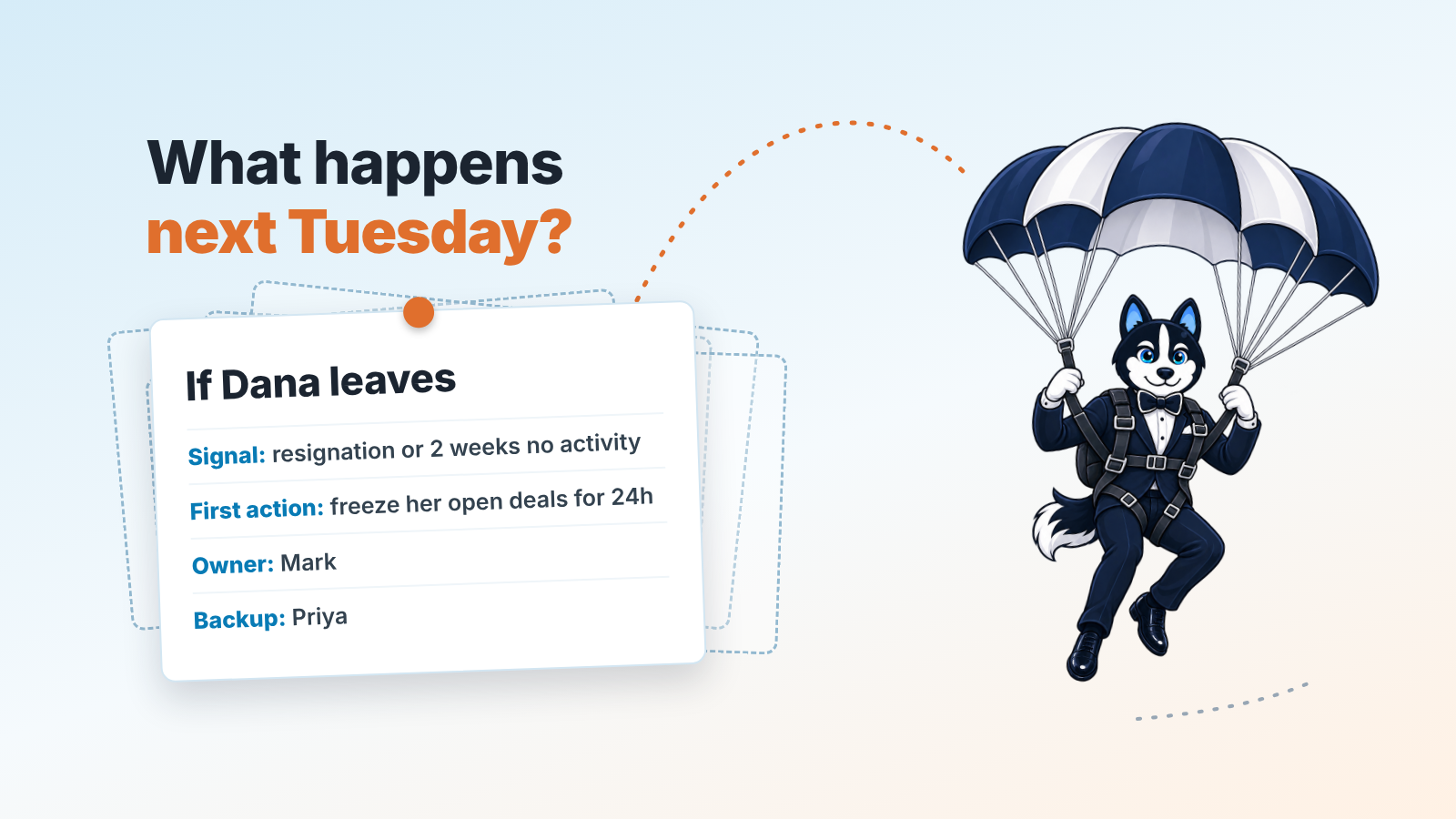
A contingency plan, a business’s Plan B, is a written set of steps you take if a specific event happens: “if this, then we do that, and this person does it first.” For an owner with a sales team it fits on one page. It’s a table of scenario, signal, first action and who owns it, written and tested before anything goes wrong. Generic guides stop before the commercial side of the business, where the scenarios are your best rep resigning, leads drying up, a big customer leaving, the CRM going down, the quarter slipping, or you yourself being unreachable.
What a contingency plan is, and what it is not
Several documents get mixed up here, and the mix-up is why so many small-business plans are never used.
A contingency plan is scenario-specific and short-term: the actions you take in the first hours and days after a disruptive event, to stabilise and limit damage. A business continuity plan is the broader thing, how essential functions keep running during and after a disruption. Disaster recovery is the IT subset: getting systems and data back. GoDaddy’s small-business guide draws exactly these lines and points to ISO 22301 for continuity and to NIST for the IT part (GoDaddy: Your business contingency plan). NIST’s own document is written for federal information systems, and the useful bit for a small company is that it ships a free Business Impact Analysis template (NIST SP 800-34 Rev. 1). You won’t follow a federal IT standard to plan for a rep quitting. You can borrow its habit of naming a trigger and an owner for every scenario.
The fourth document is the risk register: the list of what could go wrong, ranked by likelihood and impact. That is a separate job, and we walk through it in risk management for a small business with a sales team. A contingency plan starts after the ranking is done, on the day a risk actually fires.
So a contingency plan answers one question per row: “It happened. What now, and who?”
Why an owner with a sales team needs one of these
Most contingency guides are about floods, outages and data breaches. Real risks, and insurance and your lawyer handle large parts of them. The scenarios that quietly cost a 5-to-20-person company its year are commercial, and nobody writes them down because they don’t feel like disasters. A rep resigns on a Friday with 40 open deals. The inbound form breaks and nobody notices for nine days. The customer who is a third of revenue signs with somebody else.
None of those triggers an alarm. They show up as a slightly worse month, then a bad quarter and by then the first days, when a fast response would have saved most of the damage, are long gone.
The pattern we see on CRM data is that the owner responds eventually, but improvises. Deals get reassigned by whoever is in teh office. Someone decides to “just call all the leads” without knowing which ones went cold. A plan speeds things up because the decision was already made, in a calm week, by someone who wasn’t angry or scared.
GoSafeguard’s advice for the owner’s own absence applies to every row: write everything down as if someone else will have to follow it and you won’t be there to answer questions (GoSafeguard: Small business contingency planning). That is the standard for the whole table.
Step 1: Write down what would actually hurt revenue
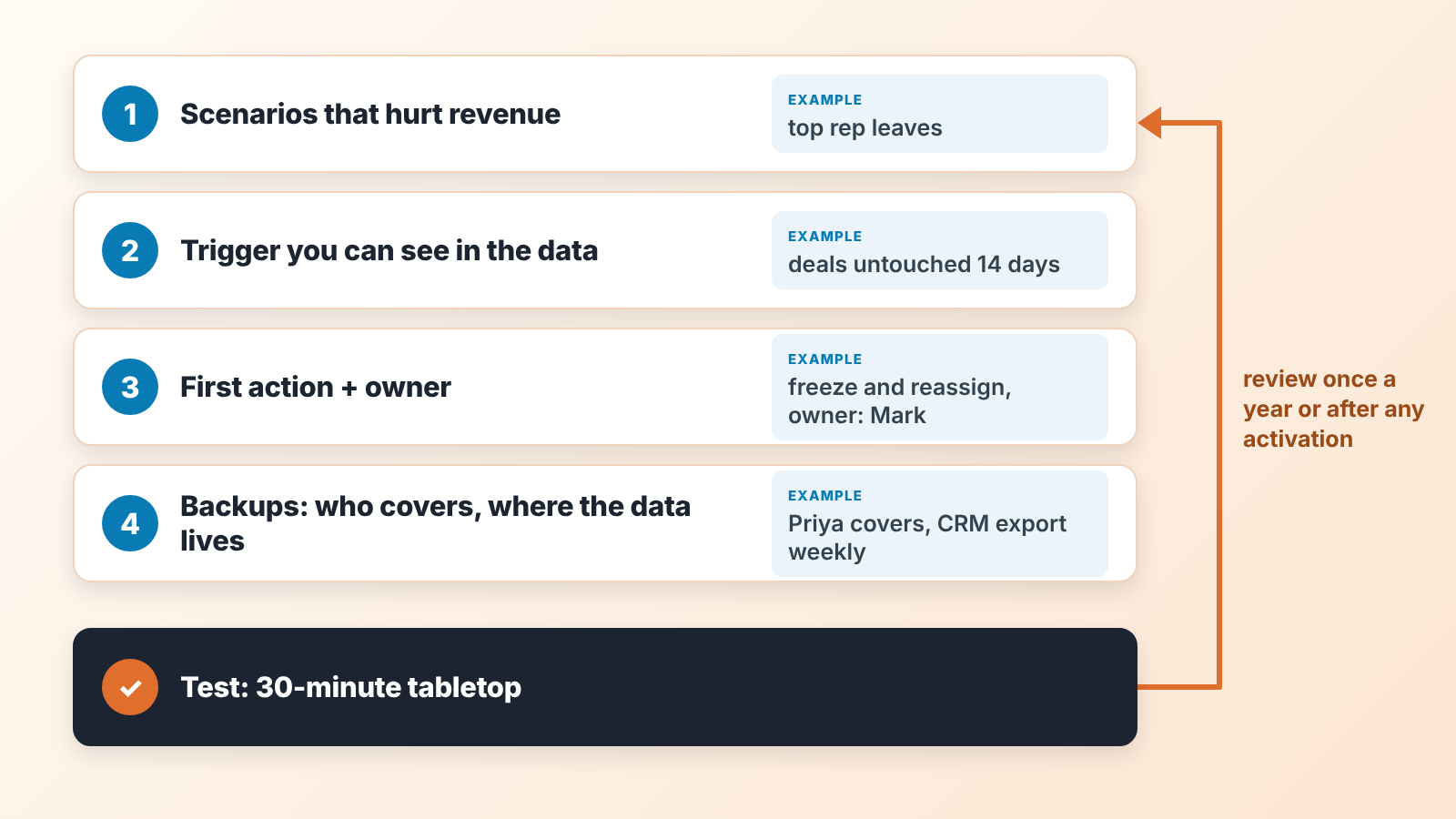
Start from money; categories come later. Open your CRM and ask one question per thing you see: if this disappeared tomorrow, how much of next quarter goes with it?
In Pipedrive that is three reports you can pull in ten minutes, and the same views exist in HubSpot, Salesforce and Zoho CRM: open deal value by owner, won revenue by organisation for the last twelve months, and new deals created per week by source. The first tells you how exposed you are to any one rep. The second tells you whether one customer is carrying you (if so, read about customer concentration risk in Pipedrive before you do anything else). The third shows how much of your pipeline hangs on one channel.
Then list what can break around those numbers. Our short list for a sales team has six scenarios: the top rep leaves or stops working their deals, lead flow drops, a large customer churns or stops ordering, the CRM or email or phones are down, the quarter is clearly going to miss, and the owner is unreachable because of illness, travel or family.
Resist adding fifteen more, because a six-row plan is one people will actually read.
Step 2: Pick a trigger you can see in the data
This is the step the generic guides skip and it is the one that makes the plan fire on time.
A trigger is a condition you can check in the CRM, something a report can show. GoDaddy’s matrix calls them activation triggers: predetermined conditions that formally start the plan, and it gives examples like “key role vacant with less than 24 hours’ notice” or “revenue drops more than 20% month over month” (GoDaddy). Those are fine for the general case. For a sales team the triggers need to be earlier, because by the time revenue is down 20% the quarter is gone.
What works is a threshold on a leading number, checked on a fixed day:
- Rep risk: a rep’s open deals with no activity scheduled, or no update in the last two weeks, above a number you set. In Pipedrive this is a filter: open deals owned by the rep where the next activity date is empty or the deal hasn’t been updated in 14 days. A resignation is also a trigger, obviously, but the data trigger catches the quieter version where someone has checked out before they resign.
- Lead flow: new deals created in the last two weeks against your own trailing average. Pick the threshold yourself. We like “below the worst two weeks of the last six months”, because then the trigger means something specific to your business rather than a textbook number.
- Customer risk: a top-10 customer with no won deal and no scheduled activity past their usual reorder interval.
- CRM outage: anything longer than a working day. Anything shorter is an annoyance.
- Quarter risk: weighted pipeline for the quarter (each open deal’s value multiplied by its probability, then added up) below the remaining target two weeks in a row, checked on the same weekday every week.
- Owner unavailable: no data trigger here. The trigger is the calendar: unreachable for more than two working days, and the backup knows it.
Put each trigger next to its scenario, with the name of the report or filter that shows it. If you can’t check it in under five minutes, pick a simpler signal.
One honest note on tooling. We build SalesBond, a sales management layer on top of the CRM a team already uses, and this is the step where the product and the article overlap. Deal Health checks every deal in the connected CRM against more than 20 rules covering activity, progression, data and ownership, and shows each violation with a recommended action, so the “rep risk” trigger above is one you don’t have to build as a filter. The Owner Dashboard, where it’s switched on for your account, shows plan attainment, forecast, the gap to target and revenue at risk without opening individual deals. That’s the quarter trigger. If you want to see those numbers once before deciding whether to set any of this up, the free CRM audit looks at the last 30 days of your CRM and sends a PDF with money at risk, deal health, the pipeline bottleneck and your top-10 clients; a second PDF a week later shows what changed. Check your CRM with SalesBond. A spreadsheet and a weekly calendar reminder also work. The point is that someone checks.
Step 3: The first action, and one name next to it
The first action is the single thing you do in the first 24 hours. Forget the whole recovery for now; this is the move that stops the bleeding and buys time for a proper decision. GoDaddy’s “first three actions” column is a good discipline. We go further and insist on a single first action of one to three steps, because under stress people do the first thing on the list and skip the rest anyway.
Each first action has an owner, and the owner is a named person. “Sales lead” is fine on an org chart and useless at 7 a.m. on a Saturday. GoDaddy calls this the incident lead and alternates: one person responsible, plus backups ready to take the role (GoDaddy). In a company of twelve, the alternate for every row the owner does not run is the owner, and the alternate for the owner row is whoever you named in the succession plan (we wrote about choosing that person here).
Write the action the way you’d say it to to that person on the phone. “Freeze all of Dana’s open deals, reassign nothing for 24 hours, export her deal list to the shared drive” is an action, and “Manage the transition” leaves the person on the phone without a first step.
Then add who tells whom. For each row, name the person who calls the affected customers and the person who tells the team, and draft the two lines they’ll say. Written in a calm week, that message takes five minutes. On the bad day it takes an hour and comes out wrong.
Contingency plan examples: six sales scenarios, response already written
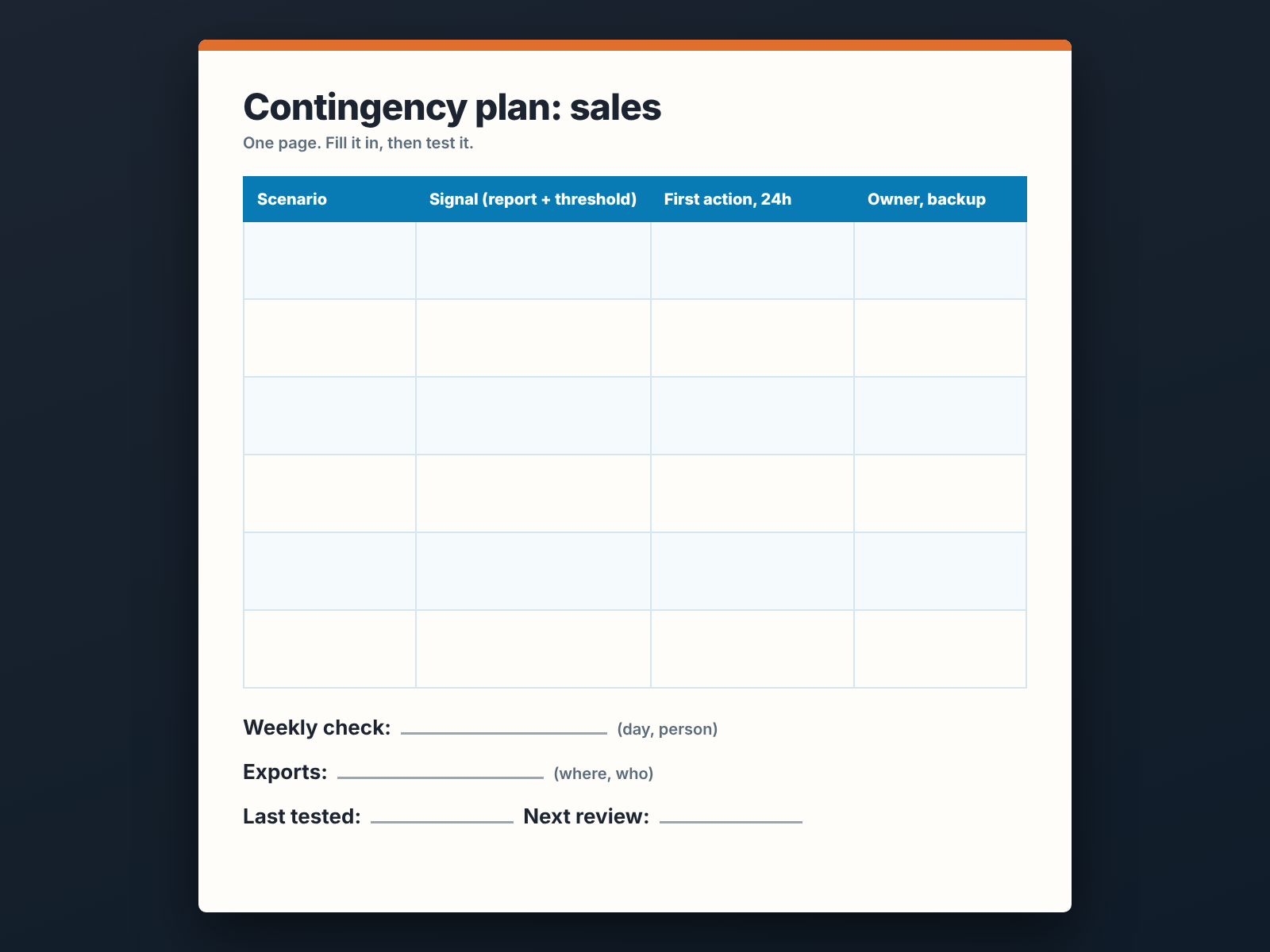
Here is the table we’d hand a new owner. The thresholds are examples; replace them with your own numbers from Step 2. The actions are the ones we’d take on day one, and the links go to the detailed playbooks where we have them, so this table stays short.
| Scenario | Signal in the data | First action (first 24 hours) | Owner / backup |
|---|---|---|---|
| Top rep leaves or disengages | Resignation, or their open deals with no activity above your threshold two weeks running | Freeze their open deals (no reassignment yet), export the deal list with notes, and call the five largest open deals personally to say who their contact is now. The full routine is in what to do with a rep’s open deals when they leave. | Owner / sales lead |
| Lead flow drops | New deals in the last two weeks below your floor | Check the plumbing first: forms, ad accounts, inbox rules, the integration into the CRM. Many lead-flow “crises” turn out to be a broken form. Only then pull a list of open deals with no next step and start working them. | Marketing owner / owner |
| A large customer leaves | Churn notice, or a top-10 customer past their reorder interval with nothing scheduled | Owner calls the decision maker within 24 hours to learn why, without trying to win them back on that call. Then recalculate the quarter without them and decide what gets cut. Do the five-whys root cause on the loss that same week, while it is fresh. | Owner / account lead |
| CRM, email or phone down | More than one working day without access | Switch to the last export: a spreadsheet of open deals with next steps, kept weekly. Reps work from that list and log in a shared doc; someone re-enters the activity when the system is back. If you have no export yet, this weekly backup routine is the Monday task. | Ops owner / owner |
| The quarter is going to miss | Weighted pipeline below remaining target on the weekly check, two weeks in a row | Stop forecasting and start a pipeline review the same day: every deal expected this quarter, one by one, with the rep, and the honest close date. Cut the forecast to what survives, then decide whether the gap is a rep problem or a pipeline problem before anyone gets a performance plan. | Sales lead / owner |
| Owner unreachable | More than two working days with no contact | The named backup takes over approvals and customer escalations, with a written limit on what they can sign. Customers and staff already know who that is, because you told them in advance. | Named backup / second backup |
Three things about that table.
The “top rep” row deliberately says freeze and leaves reassignment for later. Reassigning forty deals in an afternoon to whoever is free is the single most expensive mistake we see in CRM data after a departure: deals get a new owner who never reads the notes, and the customer gets a cold call from a stranger. The freeze gives you 24 hours to hand each account to someone who knows it (how to do the reassignment in Pipedrive).
The “quarter” row is the one owners skip, because it does not feel like a contingency. It is the most frequent one. If you already run a weekly pipeline review with your managers, the trigger is simply a line in that meeting. If you don’t, this row is the reason to start.
And the “owner” row has no clever data trigger. It has a name and a limit, which is more than most companies have. GoSafeguard puts it plainly: a small business needs a person or people you trust who can step in, and employees and clients must know who that is before it’s needed (GoSafeguard).
Step 4: Backups, in both senses
A contingency plan only works if two backups exist: a person who can cover, and data they can cover from. Neither exists by accident.
Who covers whom. For a sales team the honest version is a short list that names, for each rep, the one colleague who already knows their top accounts. If the answer is “nobody” that’s the finding, and the cheapest fix is to add the colleague as a follower on the rep’s five biggest deals so they see the updates from today. For the owner, it’s the named backup from the table, with the signing limit written down and told to the bookkeeper.
Where the data lives. The CRM is the system of record until the day it isn’t. A weekly export of open deals, contacts and activities to a place the backup can reach is the entire data side of this plan. Our recommendation is a fixed day and a fixed owner, same as the triggers, and the routine depends on your CRM: Pipedrive teams can do it this way, and Salesforce teams have a built-in weekly export service. The export is also what makes the “CRM down” row survivable.
One more thing that is technically a backup: the plan has to live somewhere people can find without you. Your head and your inbox don’t count. Use a one-page template in a shared document, with the table at the top and the exports linked below it.
Test it in 30 minutes, at a table
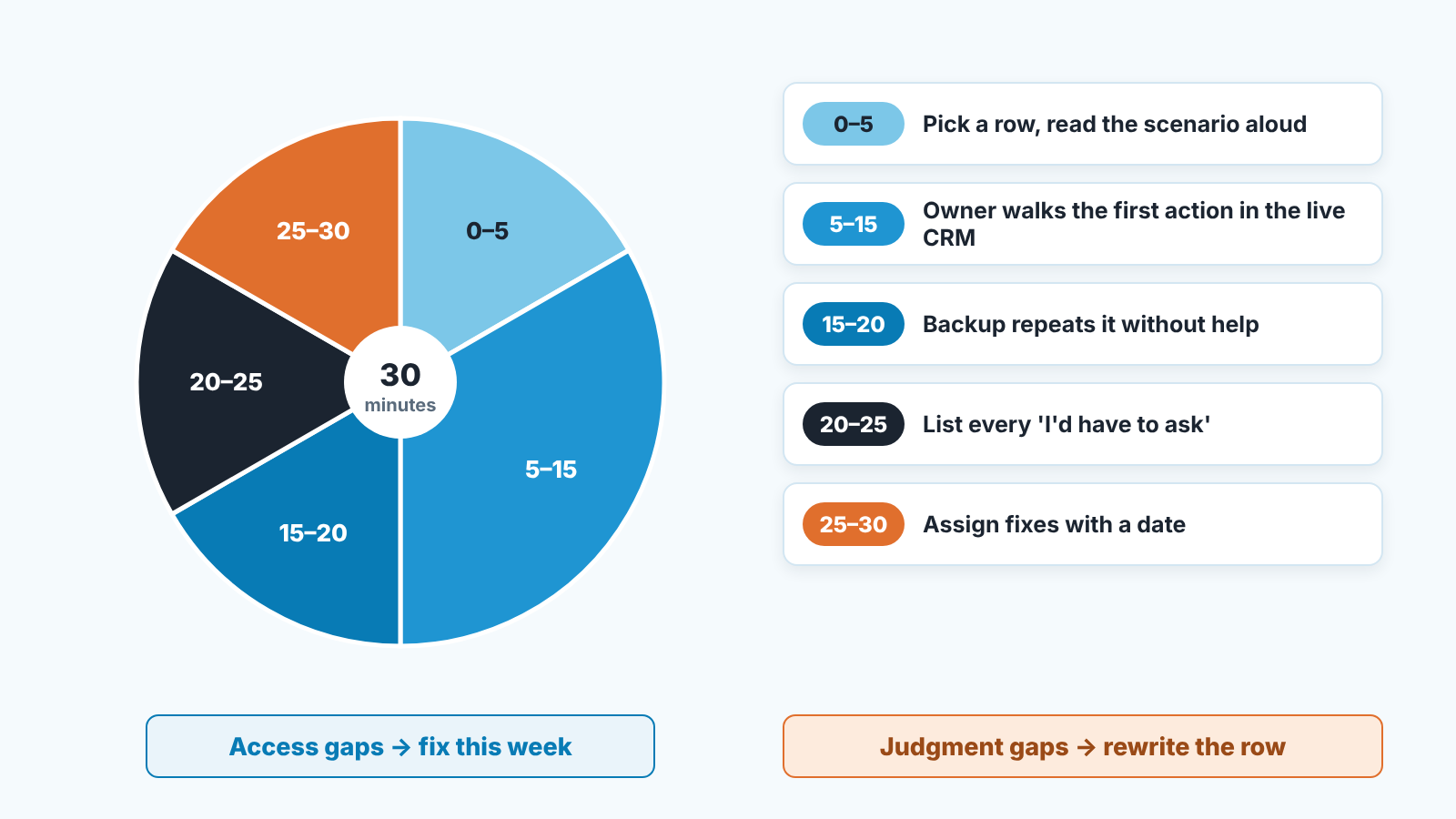
Test the plan before you need it. The test for a sales team doesn’t need a drill day. It needs half an hour, the plan, and the people named in it.
Pick one row. Say out loud: “It’s Monday, Dana resigned this morning, effective Friday.” Then the named owner walks through the first action, step by step, with the real CRM open. Can they actually run the filter? Do they have export rights? Is the shared drive folder there? Does anyone know Dana’s top five accounts without asking Dana? Every “I’d have to ask” is a gap, and you write it down.
Then run the owner row. The owner leaves the room. The backup opens the plan and says what they’d do in the first two hours. This one is uncomfortable, and its the row most worth testing, because it’s the one the owner can’t improvise through.
A tabletop finds two kinds of problems. Access problems (permissions, passwords, missing exports) get fixed that week. Judgment problems (“we’d reassign everything immediately”) are what the plan was for. GoDaddy’s advice is to practise whichever process you adopt at least monthly, because a plan only reviewed quarterly or yearly is one your team struggles to remember (GoDaddy). We think monthly is too much for a six-row plan in a small company. Our cadence is one row per quarter plus the weekly trigger check. Between tests, the weekly trigger check keeps the plan in use.
Review it once a year, and after every time you use it
Two moments change the plan. The first is the yearly review: re-read the six rows, confirm the names are still right (people leave, including the backups), reset the thresholds against the new baseline, and check that the exports have actually been happening. GoDaddy’s maintenance cadence puts the yearly step as revalidating owners and trigger conditions, and adds a post-mortem within five business days after any activation (GoDaddy). That second part is the one worth stealing.
Because the other moment is the week after a row fires. You used the plan. Something in it was wrong, or missing or slower than it needed to be. Fix the row while it still hurts. If the quarter row fired and the gap turned out to be one rep, the next step is probably a performance improvement plan for that rep, and the row should say so. If the lead-flow row fired and the cause was a broken form, add “check the form first” to the first action. The plan gets better the way a CRM gets better: by being used and corrected (CRM adoption works the same way).
None of this protects you from the event. The rep still leaves, the customer still goes. What the one-page table changes is the first 24 hours, and in a small company the first 24 hours are most of the outcome. If you want a starting point for the data side, start with SalesBond and let the free CRM audit show money at risk, deal health and your top-10 clients from the last 30 days of your CRM. Then write the table anyway, by hand, with real names in it.


