

A retrospective meeting is a regular session where a team looks back at the period that just ended, works out what went well and what did not, and decides what to change next time. The habit comes from software teams, who hold one after every sprint (Miro). For a sales team we run it once a quarter, and it is built on CRM data rather than on feelings: forecast against actual, lost deals by reason, deals that went quiet. The meeting ends with three changes, each with a name and a date next to it.
That is the whole idea. The rest of this guide is how we run it for a team of five to fifteen reps, what we pull from Pipedrive before the meeting (you can build the same reports in HubSpot, Salesforce and Zoho CRM), and the mistakes that turn a retrospective back into a quarterly report nobody reads.
What a retrospective meeting is
The word itself just means looking back. Museums hold retrospectives of an artist’s work, doctors run retrospective studies on records that already exist. Here it means one thing: a team meeting about how the team worked.
Miro puts it as a meeting where a team examines how it’s working together, with the goal of improving how it works next time, and it can be held remotely, in person or as a hybrid (Miro). In software the period is a sprint. Miro suggests two weeks as a starting point and says a sprint generally shouldn’t run longer than a month, so the meeting is short. Mural recommends 45 minutes or less when it is a weekly practice (Mural).
A sales team’s period is longer and noisier. Deals take weeks or months, a good month and a bad month can both be luck, and a two-week window tells you almost nothing about whether the process works. So we look back over a quarter. Sixty to ninety minutes, once every three months, with the numbers printed in advance.
A retrospective is a meeting about the team’s way of working, and individual results stay out of it. It also looks forward and ends with decisions about the next quarter.
We think the sales version is more useful than the software one for one reason: the data is already there. A software team has to collect opinions. A sales team has a CRM with every deal, its stages, its dates and its lost reason, and most of that record is never read after the quarter closes.
Retrospective, post-mortem, win-loss review: three different meetings
People use these names for the same thing, and then the meeting tries to be all three and does none of them well.
A post-mortem is about one event that went wrong: the biggest deal of the year lost in the final round, a quarter missed by a margin nobody saw coming. One case, deep, with a timeline. If you need that format, the five-whys debrief for a lost deal is that article. It takes an hour per deal, which is why two deals a quarter is as many as you can afford.
A win-loss review is a study of why customers buy or do not buy from you. The source is the customer, through interviews or a structured call after the decision, and the output is about positioning and product. We wrote about running it in a small team separately. It is a research exercise. Its findings can feed a retrospective later.
A retrospective is the team looking at its own process across all deals of the period. The question it asks sounds like this: “we lost eleven deals at the proposal stage this quarter and nine of them had no decision-maker on the record. What do we change?” It looks at patterns across many deals, and what comes out of it is a change to how the team works.
And the quarterly business review, the one most owners already have on the calendar? A QBR reports the quarter upward, to the owner, the board or the investors, and explains what happened. A retrospective looks at the quarter inward, with the team, and changes something. You can hold both in the same week. Run the retrospective first, so the QBR can say what the team is changing; we covered the other one in a QBR for a small sales team.
If you only have time for one of these, run the retrospective. The others get better once the team is used to looking at its own data without flinching.
Before the meeting: pull three reports from the CRM
The meeting is only as good as the pre-read. We pull three things, two days before, and send them as one page so that nobody opens a dashboard live and starts arguing with filters.
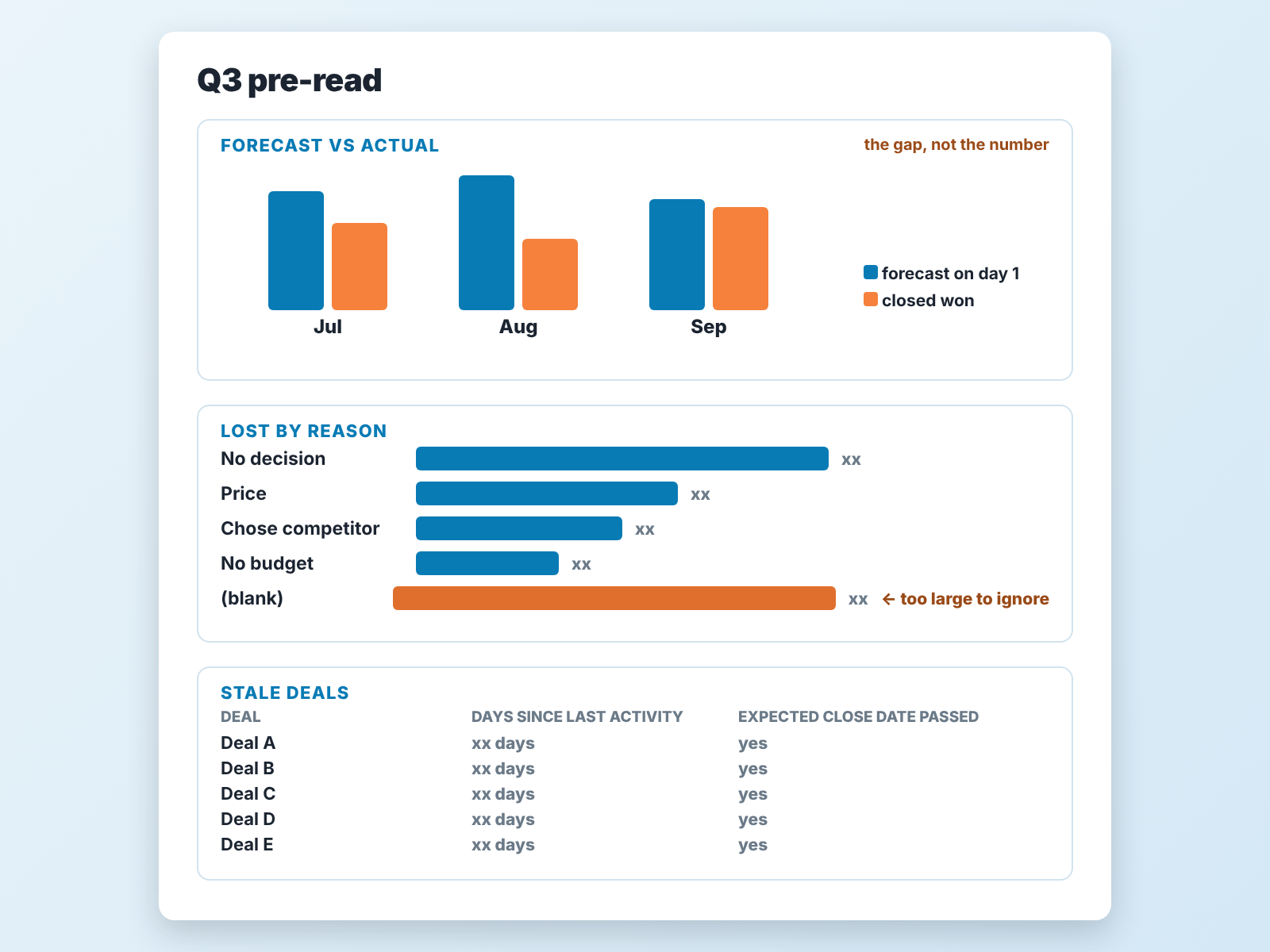
Forecast against actual. Take the forecast the team gave on the first day of the quarter and set it next to what closed. In Pipedrive that means the deals with an expected close date inside the quarter, compared with the deals marked won in the same period. A screenshot from day one saves you from “I never said that”. The number that matters is the gap and where it came from: deals that slipped to the next quarter, deals that were lost, deals that were never real. If the gap is big every quarter, that is a separate problem, and we wrote about forecast accuracy in small teams on its own.
Lost deals by reason. Filter deals lost this quarter and group them by lost reason. Pipedrive lets you use free-form reasons or a predefined list (Pipedrive), and the free-form kind is where trouble starts. Two problems show up almost every time. A reason called “Other”, or a blank, holds a third of the losses, which is itself a finding for the meeting. And the reasons describe the customer (“no budget”), never the team (“we never reached the person who had the budget”). Bring the list as it is. Cleaning it up is one of the changes the meeting might decide on.
Stale deals. Open deals with no activity for longer than your usual sales cycle, or with an expected close date in the past. Sort by value. The top ten are the ones the forecast was counting on and nobody has spoken to. In Pipedrive, a filter on last activity date and expected close date does it. Rotting is only a rough proxy here: Pipedrive counts the rotting period from the deal’s last update, and editing any detail of the deal resets it (Pipedrive). A deal a rep keeps tidying up never rots, even if nobody has called the customer.
That is enough. We tried adding activity counts per rep and conversion by stage, and the meeting became a lecture. Three reports, one page, and the question at the top: “What does this say about how we sell?”
What if the data is too messy to build any of this? Then the first pre-read is the mess itself: how many lost deals have a blank reason, how many open deals have a close date in the past, how many have no next activity. The three changes from that meeting will all be about the CRM, which is the right place to start. The quarter after, you will have real numbers.
A disclosure, since we are talking about pulling data: we build SalesBond, a sales management layer on top of the CRM a team already uses. Its free CRM audit reads the last 30 days of the connected CRM and sends a PDF with money at risk, deal health, the pipeline bottleneck and what to fix, then a second PDF seven days later showing what changed. Thirty days is the last third of a quarter, not the whole of it, so it does not replace the pre-read above. It is a fast way to get the stale-deals list and the bottleneck without building the filters yourself. Check your CRM with SalesBond if you want that part done for you.
The 60-minute agenda, in three blocks
We keep the structure boring on purpose. The content is where the surprises should be. Between a short opening read of the numbers and a five-minute close, the three blocks are the three retrospective questions every format uses in some form: what worked, what didn’t, what we change.
-
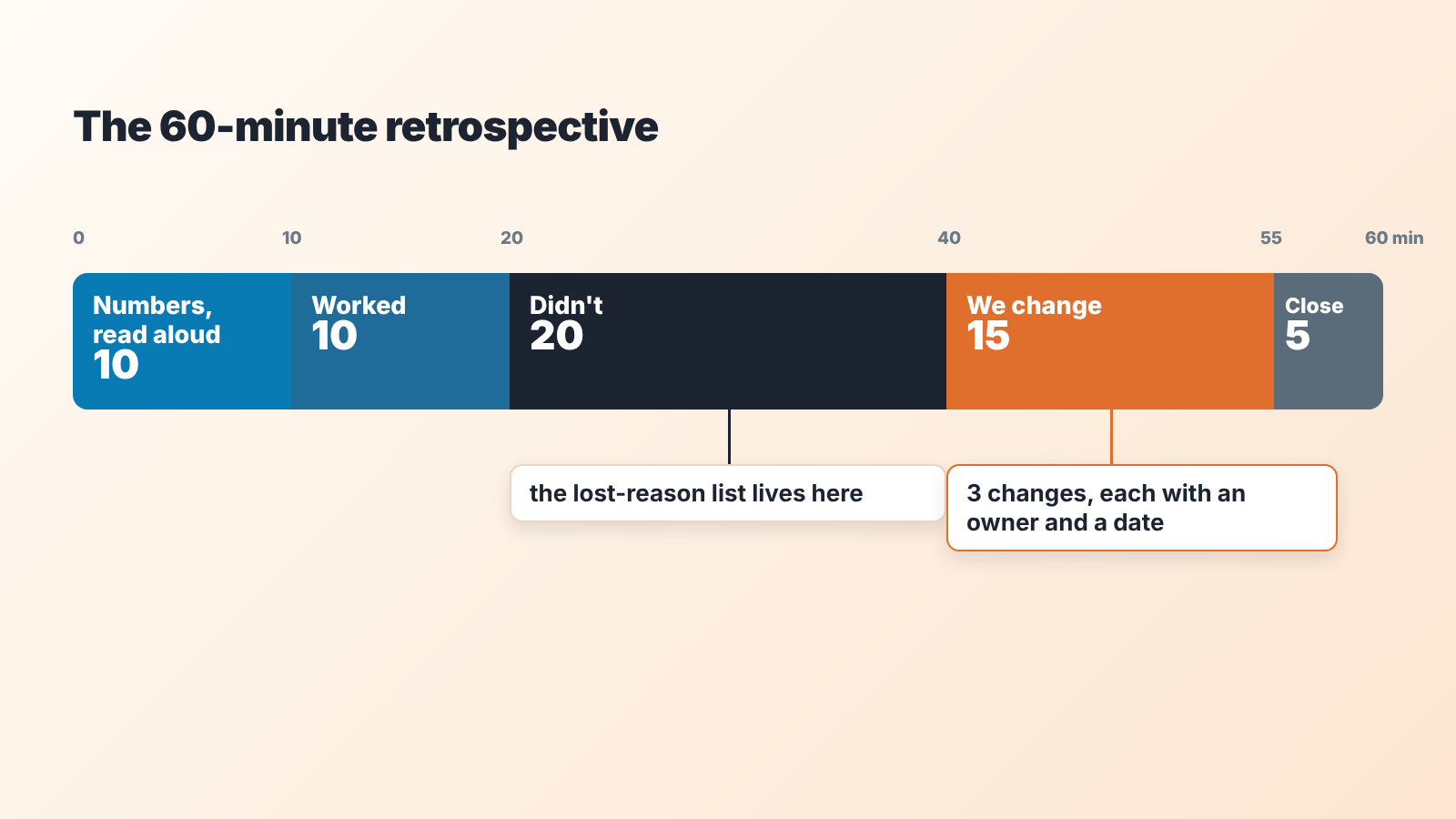
Open: the numbers, read aloud (10 minutes). The manager reads the one page. No commentary yet. Forecast was X, actual was Y, the gap is made of these slipped deals and these lost ones; here are the lost reasons; here are the ten stale deals. Reading it aloud sounds childish, and it is the step that stops the meeting turning into twelve people each defending their own memory of the quarter.
-
What worked (10 minutes). Each person names one thing that helped close a deal or move the pipeline, with a deal attached to it. “The demo-before-proposal order worked on the Harbor deal.” No abstractions. The manager writes them on the board under “Worked”. This block is short because teams are good at it, and because if it runs long the next block gets squeezed. Don’t skip it to save time, though: it is where repeatable wins get noticed.
-
What did not work (20 minutes). Same rule: one thing per person, attached to a deal or a pattern from the pre-read. This is where the lost-reason list earns its place. If a third of the losses are “Other”, somebody has to say what they were. If six deals slipped, somebody has to say whether the close dates were ever real. The manager keeps the board, not the microphone.
-
What we change (15 minutes). Pick three items from the “Didn’t” column, turn each into a change to the process, and write an owner and a date next to each.
-
Close (5 minutes). Read the three changes back. Confirm the owners heard their names. Set the date of the next retrospective.
Sixty minutes for a team of up to eight. For fifteen people, ninety, mostly in block three. More than fifteen in the room? Split by segment or region and run two.
Ground rules for honest talk
Boardmix lists lack of honesty among the usual pitfalls of a retrospective: people find it uncomfortable to share their opinions with the group (Boardmix). In a sales team the risk is sharper, because the numbers on the page have names on them. A rep whose three slipped deals are on the stale list knows everyone can see it.
We use four rules and say them out loud at the start of every retrospective, even the tenth one.
The numbers describe the process, and the person stays out of them. If the stale list has a rep’s name five times, the question is “what in our process lets a deal go quiet for weeks”, not “why did you let it”. If a person really is the problem, that is a one-to-one conversation and a performance plan, and it stays off the retrospective agenda.
Managers speak last in the “Didn’t” block. The moment the manager offers a view, half teh room adjusts to it. We have watched this happen with managers who thought they were being helpful. The same goes for the owner, who in a company of twenty people usually should be in the room: welcome, but last to speak.
Nothing from the board goes into a review, a bonus discussion or a one-to-one. Announcing it is not enough. It has to be true. The first time a “Didn’t” item shows up in somebody’s appraisal, the next retrospective is a ritual.
Every item gets attached to a deal or a number. “Marketing leads were bad this quarter” is an opinion. “Most of August’s inbound leads were lost at the first call with the reason ‘not a fit’” is a finding, and it is a finding about qualification, the step after marketing. The pre-read exists so that this rule costs nothing to follow.
One more thing we learned the slow way: the manager should put one of their own decisions on the “Didn’t” board before anyone else speaks. “I pushed the team to forecast high in July and we booked the gap in September.” It changes the temperature of the room more than any rule does.
From talk to three changes, with a name next to each
The output of a retrospective is three changes to the process, written in a specific form: what changes, who owns it, by when, and how we will know at the next retrospective.
Why three? We tried five and seven. At seven, nobody remembers the list by week three and the owner of item six has quietly dropped it. At three, each change gets a real owner who can be asked about it at the next pipeline review, and the team can see all three on one line of the template. If the discussion produced ten good ideas, keep the other seven in a parking lot for next quarter, some will solve themselves.
What a change looks like in that form, with example values:
“Every deal marked lost gets a reason from a short predefined list, with ‘Other’ removed and replaced by ‘No decision’ and ‘Went quiet’. Owner: the CRM admin. By: next Monday. Check: at the next retrospective, the blank count in the lost-reason list is close to zero.”
“Any deal with an expected close date in the current month and no next activity scheduled gets reviewed at the Monday pipeline meeting. Owner: the sales manager. By: this Monday. Check: the stale-deals list at the next retrospective is shorter than this one.”
“Demo before proposal on every deal above the team’s average size. Owner: the senior rep who did it on the Harbor deal, who writes up the sequence. By: end of the month. Check: proposal-stage losses next quarter, compared with this quarter.”
Each check is something the next pre-read will show without anyone having to remember, so the next retrospective opens with the results of this one’s changes.
The owner is one named person, which rules out “the team”. The date is a single calendar day, which rules out “Q4”. And the manager owns at most one of the three, otherwise the meeting has produced a to-do list for the manager and called it a team decision.
Once a quarter, and what happens in between
The quarterly meeting is the visible part. The cadence around it is what makes the changes stick. How the weekly and monthly meetings fit together is its own topic, covered in our sales meeting cadence guide; here we only care about the thread that runs from one retrospective to the next.
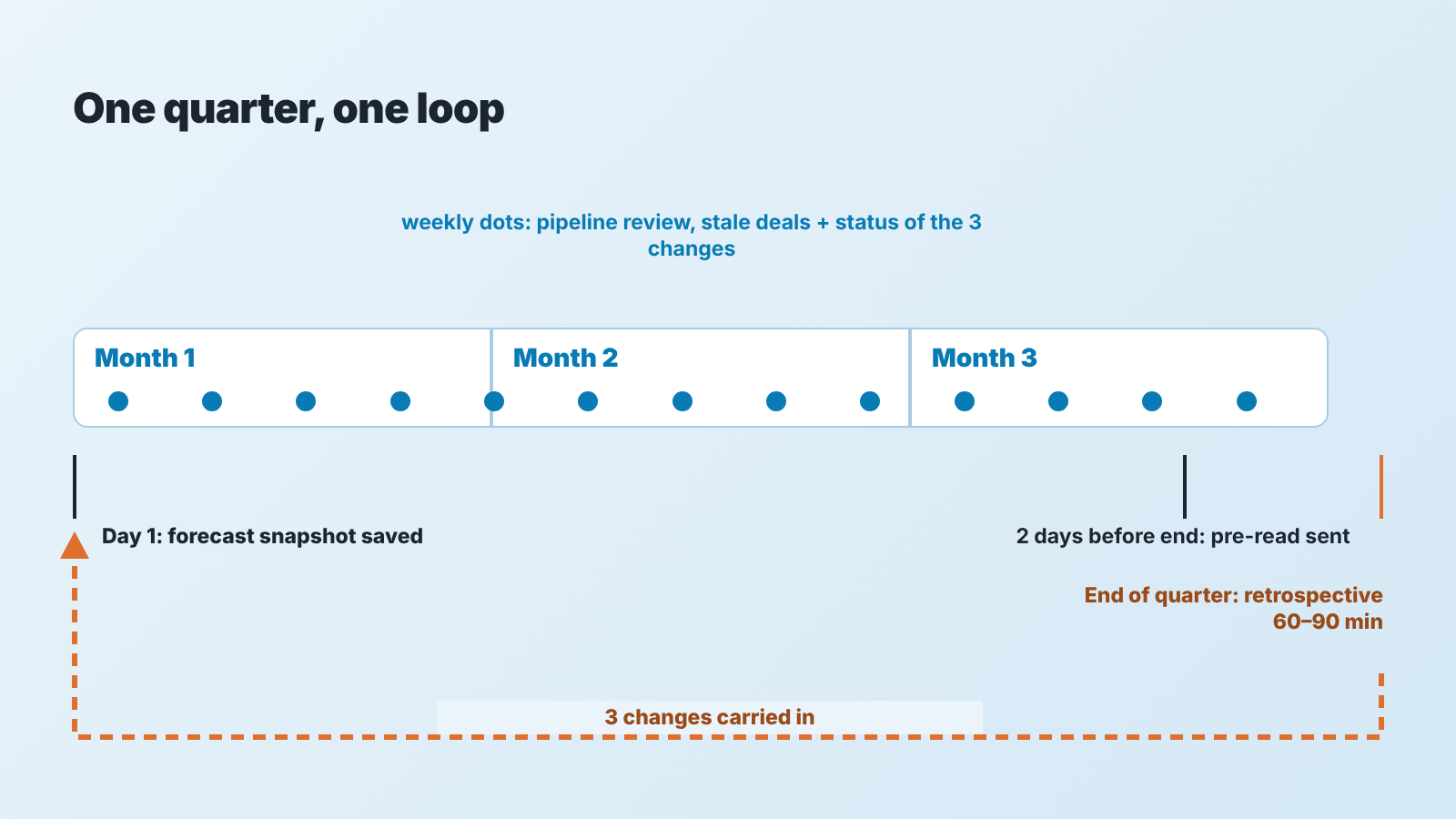
Day one of the quarter: save the forecast. A screenshot, an export, a number in a spreadsheet. Without it there is no “forecast versus actual” in twelve weeks, only a memory.
Weekly: the three changes get thirty seconds each at the pipeline review. Not a status meeting about them, just “is this done, is it stuck”. The pipeline review we run with sales managers already looks at stale deals every week, so the stale list in the retrospective pre-read should hold no surprises. If it does, the weekly review is the thing to fix.
Two days before the quarter ends: the manager pulls the three reports and sends the one-page pre-read. People read it. If they do not, the first ten minutes of the meeting cover for it.
Last working day of the quarter, or the first of the next: the retrospective itself. Then it starts again, with the three changes already on the board as the first thing to check.
For the view in between, the Team Performance tab of SalesBond’s Sales Dashboard shows per-rep execution for the head of sales, and it is what we glance at before the weekly pipeline review. It does not replace the quarterly pre-read, because the retrospective wants the quarter as a whole and the dashboard is a view of now.
We have also seen teams try a monthly retrospective. It works for a very short sales cycle, under three weeks. For anything longer, a month is too small a sample and the meeting ends up discussing the same six deals three times.
Sales retrospective template (one page)
The template is deliberately a single page, and it’s job is to hold the four things the meeting needs in a fixed order, so that next quarter’s page sits next to this one and the differences are visible.
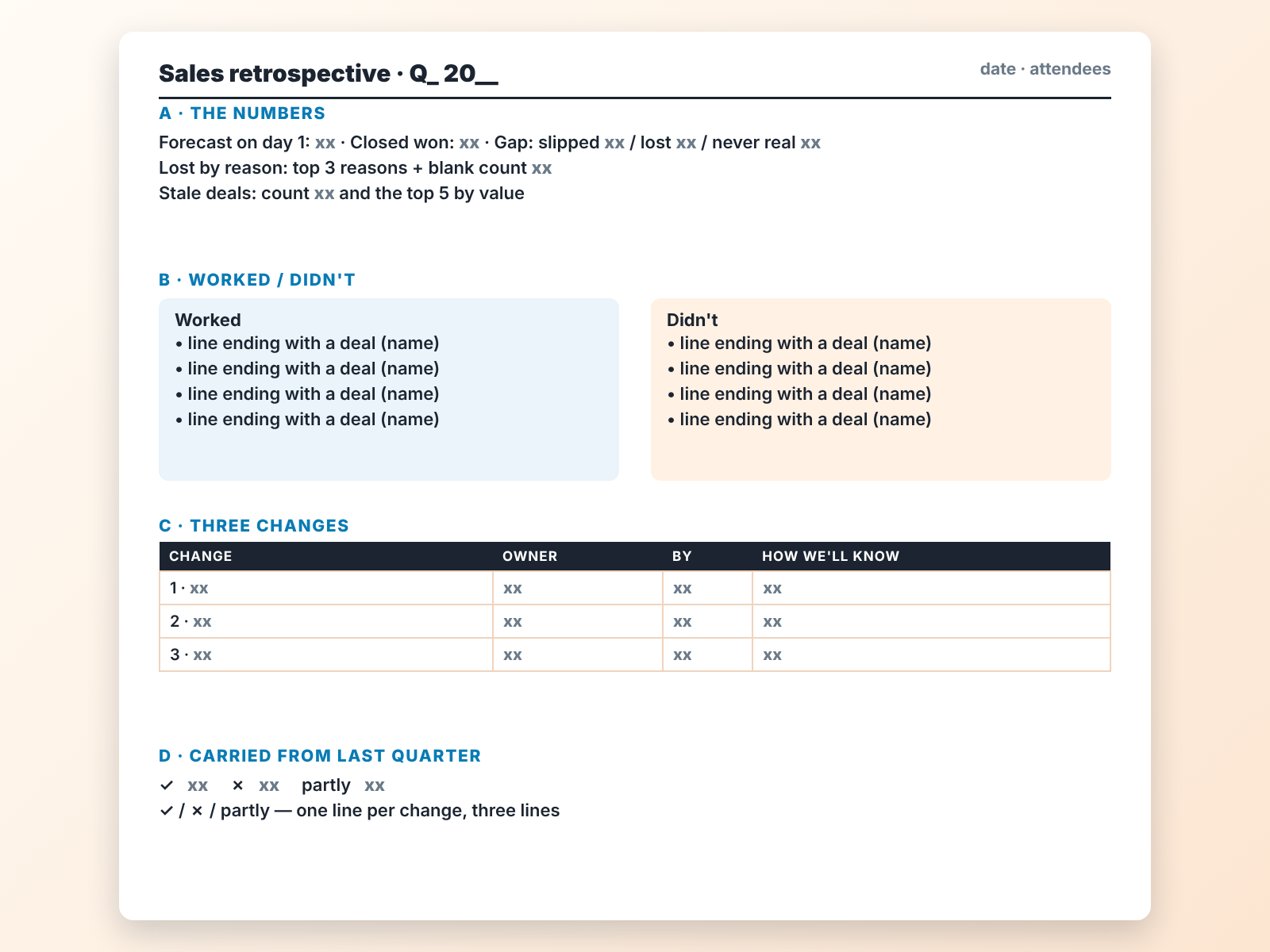
At the top, the numbers from the pre-read, condensed to three lines: forecast and actual with the gap split into slipped, lost and never real; the top three lost reasons with the blank count; the number of stale deals and the top five by value.
In the middle, two columns, “Worked” and “Didn’t”, filled during the meeting. Every line ends with a deal name or a number in brackets. A line without one gets a question mark and usually falls off the page on its own.
Below that, the three changes, each as one row: the change, the owner, the date, and how we will know at the next retrospective.
At the bottom, last quarter’s three changes with a tick, a cross or “partly” next to each. Most teams leave this part out, and it is the part that makes the meeting compound. A team that has done four retrospectives has twelve changes on paper and can see which ones held.
Keep it in a shared folder named by quarter. We tried putting it in the CRM as a note; nobody looked at it there. For a remote team, the two middle columns go in a shared document that everyone types into, so no single person controls the board.
Mistakes we have made (and seen)
Running it from a live dashboard. Someone changes a filter, someone disputes a date, and twenty minutes go to the tool. Print the page .
Letting the “Worked” block become a wrap party. Ten minutes, one item each, a deal attached. The pleasant part of the meeting expands if you let it, and the useful part shrinks.
Treating a slipped deal as a lost one, or the reverse. Slipped deals are a forecasting problem: the close date was wrong. Lost deals are a selling problem. They need different changes, and the the pre-read should split them.
Picking changes that are really wishes. “Qualify better” is a wish. “The decision-maker field is filled in before a deal moves to proposal” is a change, and it can be checked in the CRM with one filter. If a change cannot be checked in the CRM or on the template, it is probably a wish. The CRM adoption side of this is its own topic: a field only helps if the team actually fills it.
Giving all three changes to the manager. The team leaves with nothing to do and the manager leaves with a list.
Skipping the quarter when the numbers were good. A good quarter has as many lessons as a bad one, and the team is far more willing to look at its process when nobody is defensive. The “Worked” column from a strong quarter is where next year’s playbook comes from.
Running a post-mortem on one big loss and calling it the retrospective. The big loss deserves its own hour, as a lost-deal debrief. The retrospective is about the other forty deals.
If your quarter ends in the next few weeks, the only thing to do today is save the forecast number somewhere you will find it again. Everything else in this guide can wait until the pre-read. And if you want the stale-deals list and the bottleneck in hand before then, start with SalesBond a week or so before the pre-read is due.


