

A sales performance improvement plan is a written 30-60 day plan with two or three measurable targets, a weekly check-in and an honest exit in both directions. For a small team, pull the targets from the rep’s own Pipedrive history, and before you write anything, check that the deals this rep gets are not the actual problem.
Most of what ranks for this query is a template: fill in the name, set a quota percentage, sign. On a team of three to eight reps, though, the manager writing the sales PIP is also the person who built the pipeline the rep is failing in, and the plan has to account for that.
We leave out the employment side (contracts, notice periods, your HR process) because it varies by country and company. Everything below is the sales side.
Rule out the pipeline first
Before the plan exists, compare the rep with the rest of the team on the same four numbers: deals created, conversion between stages, time in each stage and lost reasons. The full method is in the rep-or-pipeline check, and it takes an afternoon. The short version: if every rep leaks at the same stage, you have a pipeline problem, and the plan would punish one person for a shared defect.
In Pipedrive this is the Deal conversion report with the Funnel conversion type, which shows the percentage of deals that reached each stage, filtered by deal owner (Pipedrive support). Run it once for the whole team, then once per rep. Two shapes that look the same mean the the stage is the problem. One shape that drops where the others hold is a person problem, and you now know which stage to coach. If you have never read these numbers stage by stage, start with stage conversion rates in Pipedrive.
Do the same for supply. The Deal performance report shows how many deals were started, won and lost (Pipedrive support). A rep who starts half as many deals as the others and closes the same share of them does not need a performance plan. They need leads, or a territory that is not dead. And before a PIP, check whether it is only a streak: a rep whose work matches their own normal months is not who the plan is for.
We think this check matters more than anything in the plan itself. A PIP built on a pipeline problem ends one of two ways: the rep hits targets that were never the issue, or they fail and leave, and the next hire fails at the same stage.
What goes in a 60-day sales PIP
Competitor guides put common PIP length at 60 to 90 days with weekly or biweekly check-ins (Livespace), and one vendor guide splits that by scenario: quota problems get a longer plan, activity problems a shorter one (Forecastio, vendor guidance). For a small team we settle on 60 days. Shorter than that and one slow month decides a person’s job. Longer, and the manager stops paying attention around week nine.
The document fits on one page. Here is the whole template:
| Part of the plan | What to write |
|---|---|
| The gap | One number against the team, not a feeling: “Your Proposal-to-Won conversion is X where the team is Y,” not “closing needs work.” |
| Targets | Two or three, each with a date. A rep who has to improve five things improves none of them. |
| What the manager will do | Time, deal reviews, call shadowing, whatever it is. A plan where only the rep has obligations is a dismissal letter with extra steps. |
| Weekly check-in | Day, time, length. |
| Exit criteria | Both directions, written before day one. |
Can the rep negotiate it? The targets are yours to set. What you commit to as their manager is open for discussion, and that is usually where the rep has the most useful input.
Targets come from the rep’s own Pipedrive history and from the team median, never from a round number someone liked. If the rep closed a certain share of comparable deals last year and closes a smaller share now, the target is the earlier figure, because they have already shown they can hit it. If they have never hit it, the target is where the next weakest rep sits. That is a target the rep can look at and believe.
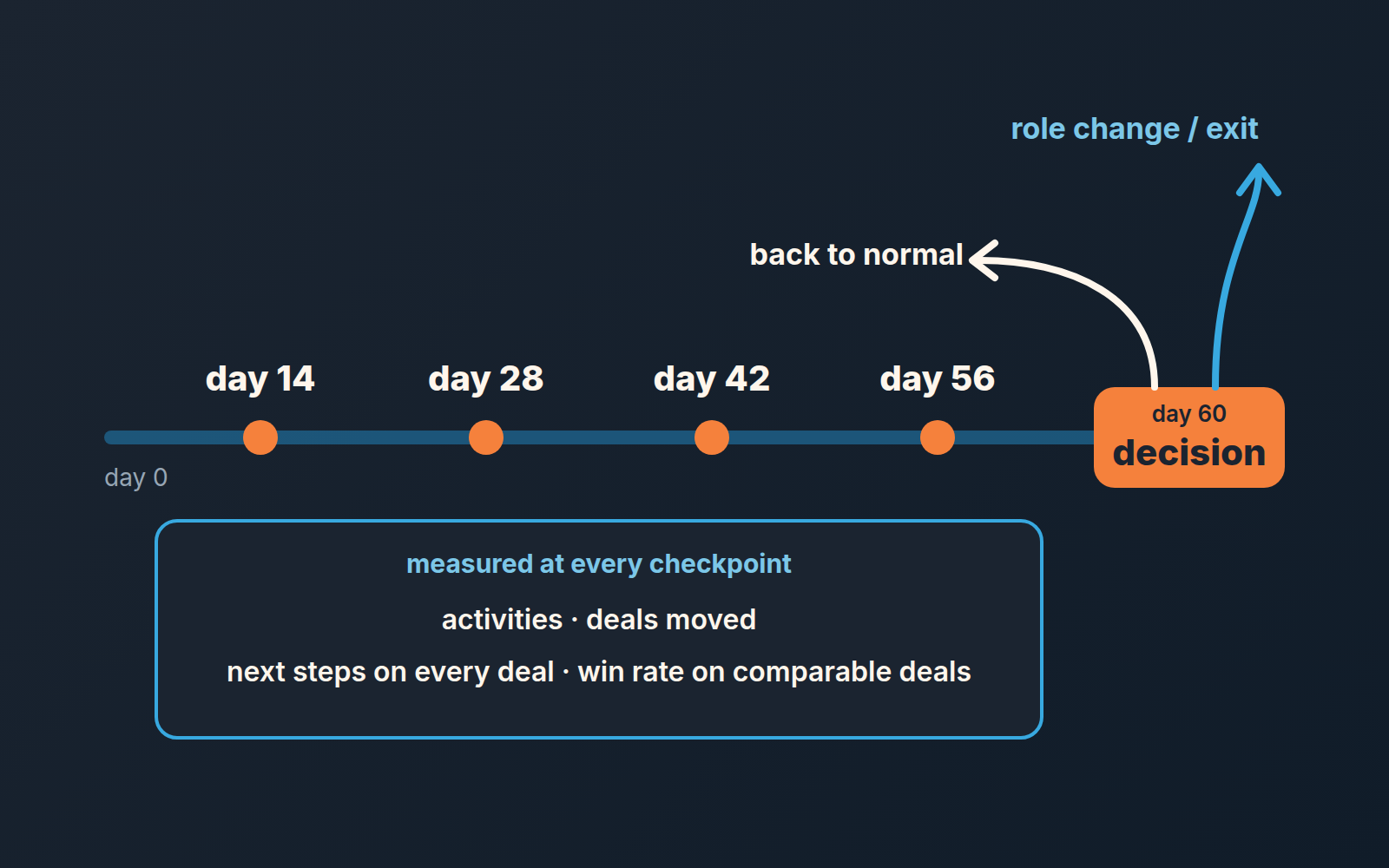
Metrics from Pipedrive for each checkpoint
Every checkpoint measures the same four things, so the rep sees the trend and not a new test each week. Naming the exact Pipedrive report means the manager and the rep look at the same screen and argue about the deal, not about the data.
Activities completed
The Activities performance report tracks completion of calls, meetings and tasks and can be filtered by Assigned to user, Type of activity and Marked as done time, with Number of activities as the metric (Pipedrive support). Emails count only if they were added as activities, per the same page. If your rep sells by email, agree in week one on what counts, or the number will be wrong in a way that feels unfair. Check the rep’s auto-log setting first, because it decides whether sent emails show up as activities at all. More on which activity numbers matter in activity metrics for a small team.
Deals moved forward
The Deal progress report shows deals entering each stage over a period and can be viewed by user (Pipedrive support). A deal that jumps from stage two to stage five is counted in every stage between, per the same page, so a rep who skips stages will look busier than they are. If that is a habit on your team, count deals entering the one stage that matters, usually Proposal or whatever your commit stage is.
Next-step coverage
Open the pipeline view. Deals with no activity scheduled carry a yellow warning, overdue ones a red arrow, and the view sorts deals by next activity date so the neglected ones float to the top (Pipedrive support). The target is simple: zero yellow warnings on the rep’s open deals at every check-in. Of the four numbers, this is the one that changes fastest and the one that predicts the others. More on setting it up in next activity in Pipedrive.
If you use deal rotting, a red tile is a second signal: the deal has not been updated for longer than the stage’s rotting period, counted from the deal’s last updated time, and a meeting booked for next quarter won’t stop it (Pipedrive support; our setup notes are in rotting deals in Pipedrive).
Win rate on comparable deals
The Deal conversion report, Win/Loss type, compares deals won against deals lost and can be filtered by deal owner and segmented by deal fields and labels (Pipedrive support). “Comparable” is the word that does the work. Compare the rep’s inbound deals with the team’s inbound deals, their small deals with everyone’s small deals. A win rate across everything mixes in the territory and the lead source, which was the whole point of the pipeline check. How to read that number without fooling yourself is in sales win rate in Pipedrive.
On a small team win rate moves slowly. Over 60 days a rep might close a handful of deals, so the number will swing. Read it as a trend across the four checkpoints and lean on the first three measures for the weekly decision.
The weekly check-in
Twenty minutes, same day every week, with Pipedrive open and nothing else. The manager pulls the four numbers before the meeting, not during it, and sends them to the rep an hour ahead so nothing is a surprise.
The agenda is short. Where are the four numbers against the checkpoint. Which deals moved and why. Which deals did not, and what the next step on each is. One thing the manager owes the rep this week. A manager who promised to join two calls and joined none has broken the plan as much as a rep who missed an activity target.
Keep this separate from the normal 1:1. The regular sales 1:1 agenda covers everything else; the check-in covers the plan and only the plan. Merge them and the plan quietly turns into “we talked about it” with no numbers written down.
Write two lines after every check-in: the four numbers, and what was agreed. Sixty days later those eight entries are the whole record. They are also what makes the ending fair, whichever way it goes.
How it ends
Decide the exit before the plan starts, and write both exits down. The rep should be able to read the document on day one and know exactly what day 60 looks like in each case.
The good ending is specific: four checkpoints hit, or three of four with the fourth trending up, and the rep is simply back on the normal cadence. Say that out loud and in writing, because a rep who has just come off a plan will assume they are still on probation for months unless told otherwise. Some managers extend a plan that is “almost there.” We would not. Either the targets were hit or they were not, and an extension says the targets were negotiable.
The other ending is also specific. Checkpoints missed with no trend, or the rep stopped engaging with thier check-ins. What happens then depends on your company: a different role, a different territory, or a parting. Either way, the decision is made on the eight lines from the check-ins, not on the mood of week eight. This is where the HR side comes in.
A quieter third ending exists. Around week three or four the numbers say the rep is working and the deals still are not closing, which means the pipeline check was wrong or incomplete. End the plan, say so, and fix the pipeline.
Two mistakes we keep seeing
Quota as the only target. Quota is a lagging number, and on a team where each rep closes a few deals a month its mostly noise over 60 days. A plan whose only measure is “reach X percent of quota” tells the rep what to want and nothing about what to do differently on Tuesday. Activities, deals moved and next-step coverage are things a person can change this week. Quota is what happens later if they do. If the quota itself is the problem, that is a different conversation, and how to set sales quotas is where we have it.
The other one comes from managers who are good at selling and new at managing: they write the plan, then do the rep’s job for them. They take over the big deal, rewrite the proposal, join every call. Sixty days later the numbers look fine and nothing has changed, because the numbers were the manager’s. Shadow the call. Do not run it.
The template is the least important part of all this, so start with the pipeline check and write the plan only if it points at the rep.


