

Risk management is a process: you identify what could hurt the business, estimate how likely each risk is and how much it would cost, decide what to do about each one, and go back to the list on a schedule. For an owner with a sales team, most of it is a short register of commercial risks (one big client, one strong rep, one channel, a forecast nobody trusts), and every risk on that register leaves a trace in the CRM before it goes off.
That last part is what the general guides skip. They are good on insurance and compliance and thin on the risks that actually close small companies: the customer who was most of the revenue and left, the rep who took the pipeline with her. This article is the register for those. The contingency plan, what you do once a risk fires, is a separate topic; here we stop at “we would know within a week.”
What risk management is, in plain terms
A risk is something that has not happened yet, might, and would cost you if it did. Risk management is the discipline of writing those things down before they happen instead of after. A risk register is the table where you write them: each risk with its likelihood, its impact, the response you chose, an owner and the date it was last reviewed.
The business guides agree on the shape of the process. Patriot Software lists four moves: identify potential risks, measure them, plan for them, revisit them as the business changes (Patriot Software). IONOS describes a control loop with four phases: risk identification, risk quantification, risk strategy, risk management (IONOS). Stacker, writing for NEXT, stretches it to six tasks by adding insurance and a written plan (Stacker).
The disagreement is about counting, not substance. We use four steps because an owner will do four and will not do six.
And the goal is not zero risk. IONOS is blunt about it: eliminating all threats is practically impossible, and the job is to get the relationship between opportunities and risks right (IONOS). A sales team with no concentration risk is usually a sales team with no big customers.
The four steps
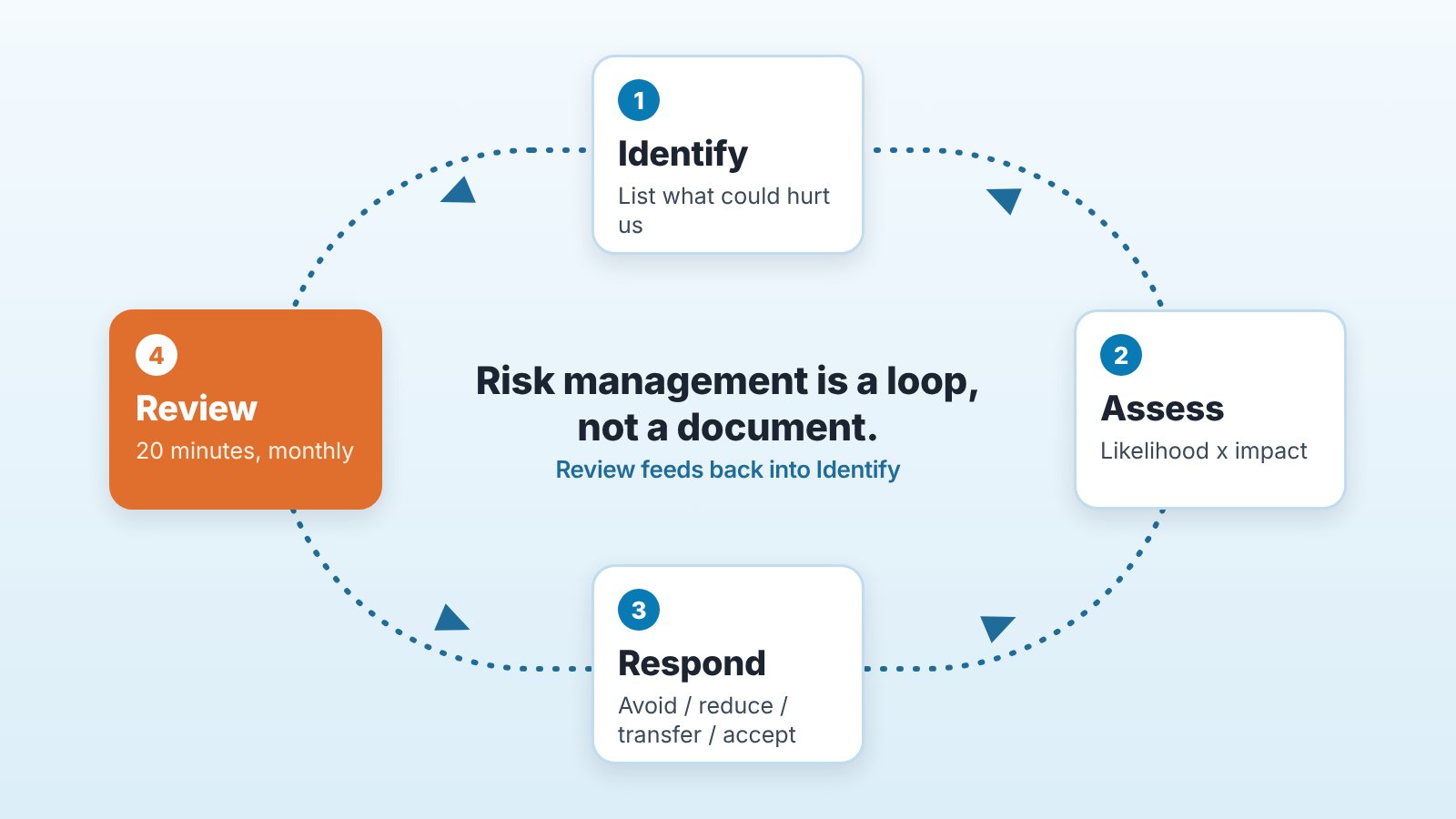
Identify. Write down everything that could hurt the company, without filtering yet. Owners stall here because the list feels endless. It isn’t: by the time you reach fifteen items you are repeating yourself. Do it with the head of sales in the room, because half the real risks live in the the pipeline and the owner does not see them.
Assess. For each risk, two questions: how likely, and how bad. Stacker’s example for a California coffee shop is the right level of precision: equipment breakdown, impact high, likelihood likely; earthquake, impact medium, likelihood likely; data breach, impact medium, likelihood low (Stacker). Three levels each. Nobody needs decimals here.
Respond. Pick one of four responses per risk: avoid it, reduce it, transfer it, accept it. More on each below.
Review. The step everyone skips. Stacker suggests setting a specific time, such as every quarter or year, to assess the effectiveness of risk controls (Stacker). For commercial risks we think a year is far too long, and we will argue for a monthly 20 minutes further down.
Risk categories, and why the sales ones get missed
A business risk is anything outside or inside the company that could cut revenue, raise costs or stop you operating. Most guides sort them into the same buckets. Stacker names financial, operational, compliance, reputational and cybersecurity (Stacker). Patriot Software splits them into internal (payroll fraud, employee turnover, equipment repairs, technology malfunctions) and external (economic downturns, changes in laws, natural disasters) (Patriot Software). Either taxonomy works. The problem is what ends up inside the buckets.
Look at the two lists again. Nothing about customers. Nothing about the sales team. “Employee turnover” is as close as it gets, and it is written as an HR line, not as “our best rep owns most of the open pipeline and has no non-solicit.”
That is not carelessness on the authors’ side. Those guides are written for any small business, and a bakery’s main risk really is the oven. For a company that sells through a team the oven is the pipeline. So we keep the standard four categories (financial, operational, legal, strategic) for everything else, and add a fifth that gets its own register: commercial.
Commercial risks have one property the others lack: they show up in data you already collect. A fire does not announce itself in Pipedrive. A client drifting away does.
Your sales risk register: eight risks and the signal for each
Here is the register we would start with. Every row has a CRM signal, meaning a filter or report you can build in Pipedrive today, and the same in HubSpot, Salesforce or Zoho CRM. The thresholds are yours to set; the examples are examples.
| # | Risk | What it looks like | CRM signal | How to find it in the CRM |
|---|---|---|---|---|
| 1 | Revenue concentration | One client or two make up a share of revenue you could not survive losing | Won deals in the last 12 months, grouped by organization | Deals report: won deals, grouped by organization |
| 2 | Rep concentration | One rep carries most of the open pipeline or most of the wins | Open pipeline value grouped by owner; won value grouped by owner | Pipeline and deals reports, grouped by deal owner |
| 3 | Channel concentration | Most new deals arrive from one source (one partner, one ad account, one referrer) | Deals created in the period, grouped by source field | A lead-source field on every deal, deals report grouped by it |
| 4 | Empty forecast | Not enough pipeline to hit next quarter’s number | Open deals with expected close date in the quarter, weighted by stage, against target | Forecast or weighted pipeline report, filtered by expected close date |
| 5 | Stalled deals | Deals that have not moved stage or had activity for longer than your cycle allows | Deals with no activity in N days, by stage | Filter on last activity older than N days; in Pipedrive, rotting deals |
| 6 | Pushed close dates | Deals whose expected close date keeps moving, which hides a stall as a fresh deal | Deals where the close date has changed more than once | The deal’s changelog; a custom field “Times pushed” |
| 7 | Single point of contact | At a key account, you know one person; if they leave, the account goes dark | Organizations with exactly one linked person | Organization list with a count of linked people |
| 8 | CRM blind spot | Reps keep deals in their heads or in email, so every other row on this register is measured on bad data | Deals with no next activity; deals won with no stage history; fields left empty | Filter on open deals with no next activity; empty required fields |
A few notes on using it.
Row 8 goes first in practice. If the CRM is half-filled, rows 1 to 7 are measured on fiction. We wrote about getting the team to actually use the system in why CRM adoption fails and what fixes it, and the short version is: the register is a reason to fix adoption, not something to postpone until adoption is fixed.
Rows 1 and 4 are the owner’s rows. Rows 5, 6 and 8 are the sales manager’s rows and belong in the weekly pipeline review (five weekly CRM checks for managing your sales managers). Splitting them this way keeps the owner out of individual deals and the manager out of the P&L, which is what both of them want anyway.
Row 6 is the sneaky one. A rep who moves the close date is updating the deal, so a slipping deal can look perfectly fresh to any “last updated” filter. You need teh change history, or a field that counts pushes.
Concentration (rows 1 to 3) has a longer treatment in customer concentration risk in Pipedrive. Revenue at risk inside the pipeline, rows 4 and 5 together, is covered in revenue at risk in the sales pipeline. This register is the layer above both: not “is this deal at risk” but “is the business at risk, and from where.”
Score it: a 3×3 risk assessment matrix
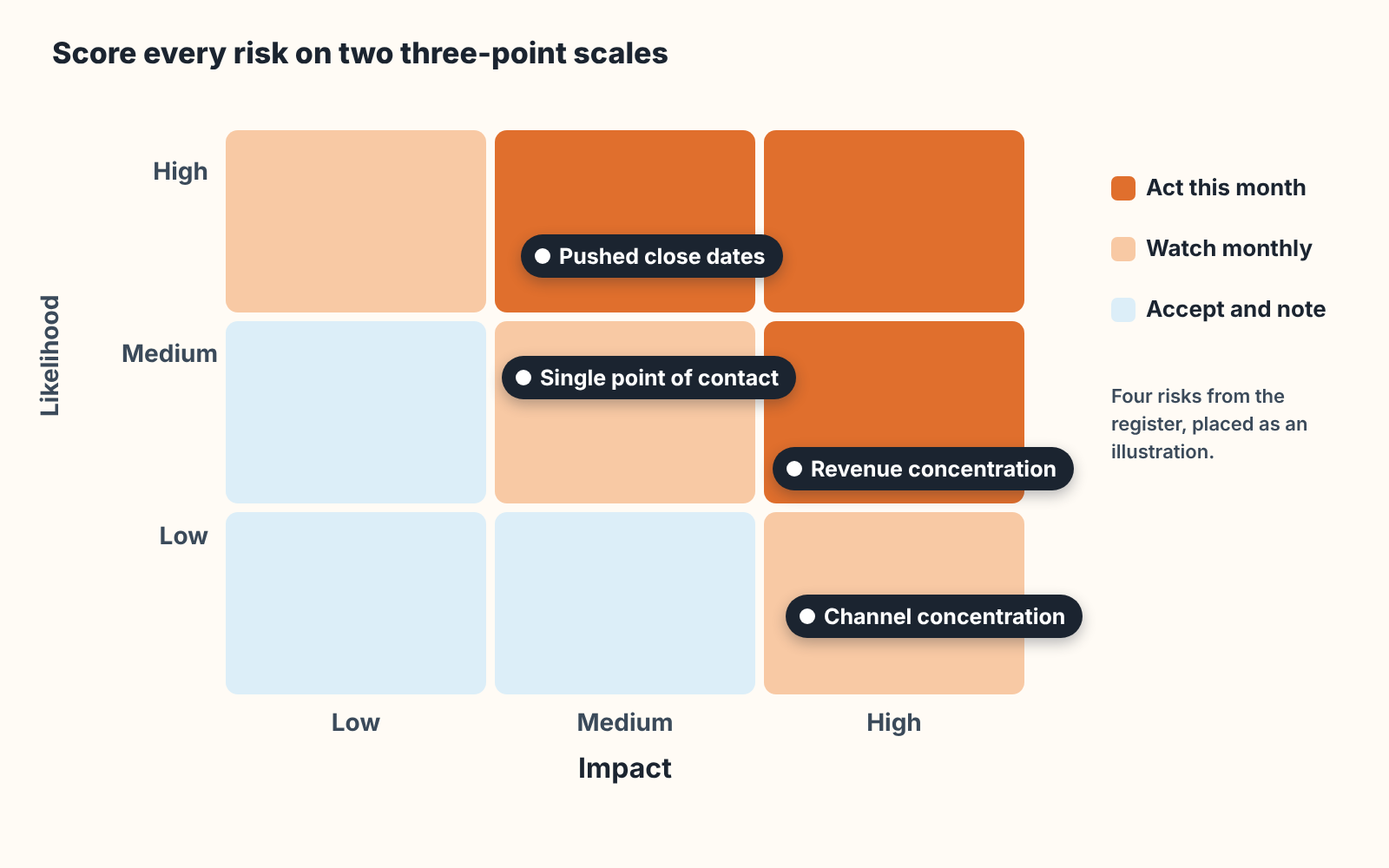
A risk assessment matrix scores each risk on two short scales, likelihood and impact, and puts it in one of nine cells. Three levels each way. That is the whole method. IONOS describes the quantification phase as assessing each risk for its probability of occurrence and its potential impact, and a small company does not need to go further than that (IONOS).
The matrix is not really for the score. It is for the argument you have with your head of sales while filling it in. “Rep concentration: how likely is it that Dan leaves this year?” is a question you have both been avoiding, and the matrix makes you answer it with a word. Likely, possible, unlikely. Write the word down with the date.
Impact is easier to pin down for commercial risks than for the others, because it is money you can read off the CRM. Revenue concentration: the client’s won value over the last twelve months. Rep concentration: that rep’s share of open pipeline. Empty forecast: the gap to target. Patriot Software suggests estimating financial damages per risk and ranking by likelihood, using historical data where you have it (Patriot Software). For the sales register, the CRM is that historical data.
Two rules we hold to when scoring. First, anything in the top-right three cells gets a named owner and a response this month, no exceptions, or the exercise was theatre. Second if a risk sits in the bottom-left for three reviews in a row, drop it from the active register. A list that only grows stops being read.
Four responses: avoid, reduce, transfer, accept
There are four ways to respond to a risk: avoid it, reduce it, transfer it or accept it. Stacker calls the second one “control”; we say reduce, same idea (Stacker). What matters is choosing one per risk and writing it in the register, because “we’re aware of it” is not a response. The register with a chosen response and an owner on every row is, in practice, your risk management plan.
Avoid means changing the business so the risk no longer exists. Stacker’s wording: “changing something in a business so the risk no longer exists.” For a sales risk this is rarer than it sounds. You cannot avoid revenue concentration by refusing the big client. You can avoid channel concentration by not signing an exclusive with the partner who brings all the leads.
Reduce is where most of the sales register lives. Second contact at every key account. Deals above a certain size co-owned by two reps. A lead-source field that is required at deal creation, so row 3 is measurable at all. Pipeline coverage reviewed weekly rather than discovered in the last month of the quarter. None of this is dramatic, and all of it is cheaper then the alternative.
Transfer means shifting the risk to a third party who agrees to carry it. Insurance is the classic form, and here we stop: which policies a small company needs is a question for your insurance agent and your accountant, not for a sales blog. The commercial version of transfer is contractual. A non-solicit clause for reps, a minimum term in the big client’s agreement, a partner contract with notice periods. Get a lawyer to read those; we have seen too many written from a template.
Accept is the honest answer for a lot of rows, and the guides treat it as a real option. Stacker: “Accepting risk means pre-budgeting for it or making a contingency plan.” Patriot Software lists building a cash reserve among the ways to prevent or plan for risks (Patriot Software). Accepting a risk is not ignoring it. It is deciding, on the record, that reducing it would cost more than the expected loss, and setting aside the money or the plan for when it fires.
The sentence to say at the next planning meeting: “For each of these eight, which of the four are we doing, and who owns it?” If the answer to any row is silence, that row is your first job.
Make it a habit: the monthly 20 minutes
A register that is reviewed yearly is a document. Reviewed monthly, it is a control.
Monthly is the right cadence for the commercial rows for one reason: the signals move monthly. A client’s share of revenue shifts with each invoice, a rep’s pipeline share with each quarter-end push. Quarterly, the shorter of the two intervals Stacker mentions, is fine for the legal and operational rows. For the sales rows, a quarter is long enough to lose the client.
The meeting is owner plus head of sales, 20 minutes, and it runs the same way each time:
- Pull the eight signals. If the filters are saved in the CRM, this is five minutes. If it takes longer, that is a row 8 finding and goes on the register.
- Re-score anything that moved. One word each for likelihood and impact, with the date.
- Check last month’s responses. Did the second contact at the key account get made? Was the non-solicit signed?
- Add or retire one risk, at most. A competitor hired your former rep, a partner changed its terms: new things come up, and old ones fade.
- Close with one sentence per red cell, owner and date.
That’s it. No slide deck. The register is a spreadsheet or a page in your wiki and the point is that it has a date on it from last month.
This is also the place where we should say what we build. SalesBond is a sales management layer on top of the CRM a team already uses, and several rows of this register are things it watches on its own. Deal Health checks every deal against more than 20 rules and shows the specific violations; its rules cover activity, progression, data and forecast, which is where rows 5, 6 and 8 show up. The Owner Dashboard shows forecast, gap to target and revenue at risk, which is row 4. If you want to see your own register before building the filters by hand, the free CRM audit does a first pass: SalesBond reads the last 30 days of your CRM and sends a PDF report (money at risk, deal health, managers, your top-10 clients), then a second PDF seven days later showing what changed. Check your CRM with SalesBond. It will not reduce any of these risks for you. It makes them visible on a schedule, which is the part owners skip.
Risk register template: eight columns
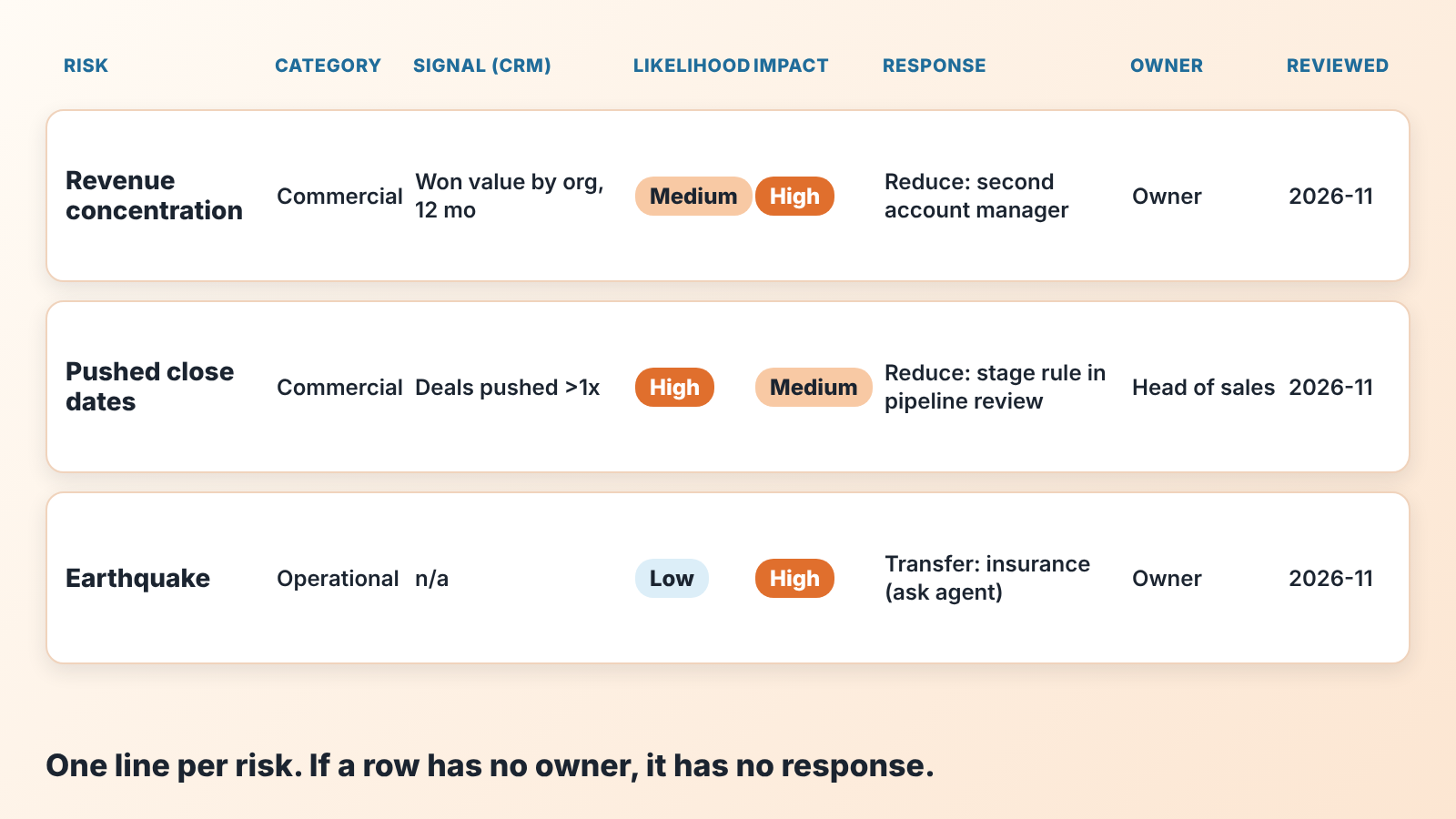
A risk register template needs eight columns: risk, category, CRM signal, likelihood, impact, response (avoid, reduce, transfer, accept), owner, last reviewed. One row per risk, starting with the eight above, plus whatever the standard categories add for your company: the lease, the key supplier, the licence that expires.
Keep it in the same place as the sales plan, because the two read together. The plan says what you expect to happen; the register says what could stop it. We have seen owners keep the register in a document nobody opens and the plan in a dashboard everyone opens. Put them side by side.
Two columns people want to add and should not: “mitigation detail” and “notes.” Both turn the register into a report. Detail lives in the contingency plan, which is where the if-then actions go; the register only needs to say which response was chosen and who owns it.
Risk management, contingency plan, forecast: three different questions
Owners mix these up, and the confusion is expensive, so a short separation.
The forecast says what will probably happen: this much revenue, from these deals, by this date. It is a single expected path. A good forecast already includes some risk thinking (weighted stages, slipped dates), but it’s output is one number.
The risk register says what could knock the forecast off its path, how likely, how bad, and what you have decided to do in advance. Its output is a ranked list with owners.
The contingency plan says what you will do on the day a specific risk fires: who calls the client, which costs get cut first, how the pipeline gets redistributed when the rep resigns. One page per red-cell risk, if-then form. We keep it out of here on purpose: an owner who tries to write the register and the contingency plans in the same sitting writes neither.
The order is forecast, then register, then plan. Most small companies have the first, skip the second, and improvise the third at 11 p.m. on the day. The register is the cheap middle step, and it is the one that tells you which contingency plans are worth writing at all.
If the register surfaces a risk that has already partly fired, say a rep who is clearly under target, the next step is diagnosis rather than another row: a performance improvement plan for a small team, and for deals already lost, a five-whys root cause analysis or a proper win/loss review. The register tells you where to look. It does not do the looking.


