

The Eisenhower matrix sorts tasks by two questions, is it urgent and is it important, into four boxes: do it now, schedule it, delegate it, drop it. For a business owner the method earns its place for one reason. It forces you to ask which of the “urgent” things on your plate can go to the sales manager or an assistant, so that the important work that never burns, the pipeline, the forecast, the hires, gets hours instead of leftovers.
This article takes the matrix off the personal to-do list and puts it on a real owner’s week with a sales team: the discount question, the deal review, the 1:1, the report. If you want the wider menu of methods (RICE, MoSCoW, value versus effort), that is a different article on how an owner or sales manager decides what goes first. Here we stay inside the four boxes.
How the Eisenhower matrix works
Two axes, four quadrants. Urgent and important: do it today, yourself. Important but not urgent: put it in the calendar and protect the slot. Urgent but not important: hand it to someone else, with the authority to finish it. Neither: stop doing it. You’ll also see it called the urgent-important matrix, the Eisenhower box or the Eisenhower decision matrix. Salesforce’s small-business blog labels the four boxes do, decide, delegate and delete (Salesforce); other guides say “schedule” for the second one and “eliminate” for the last. Whichever words you use, the rule attached to each box is what counts.
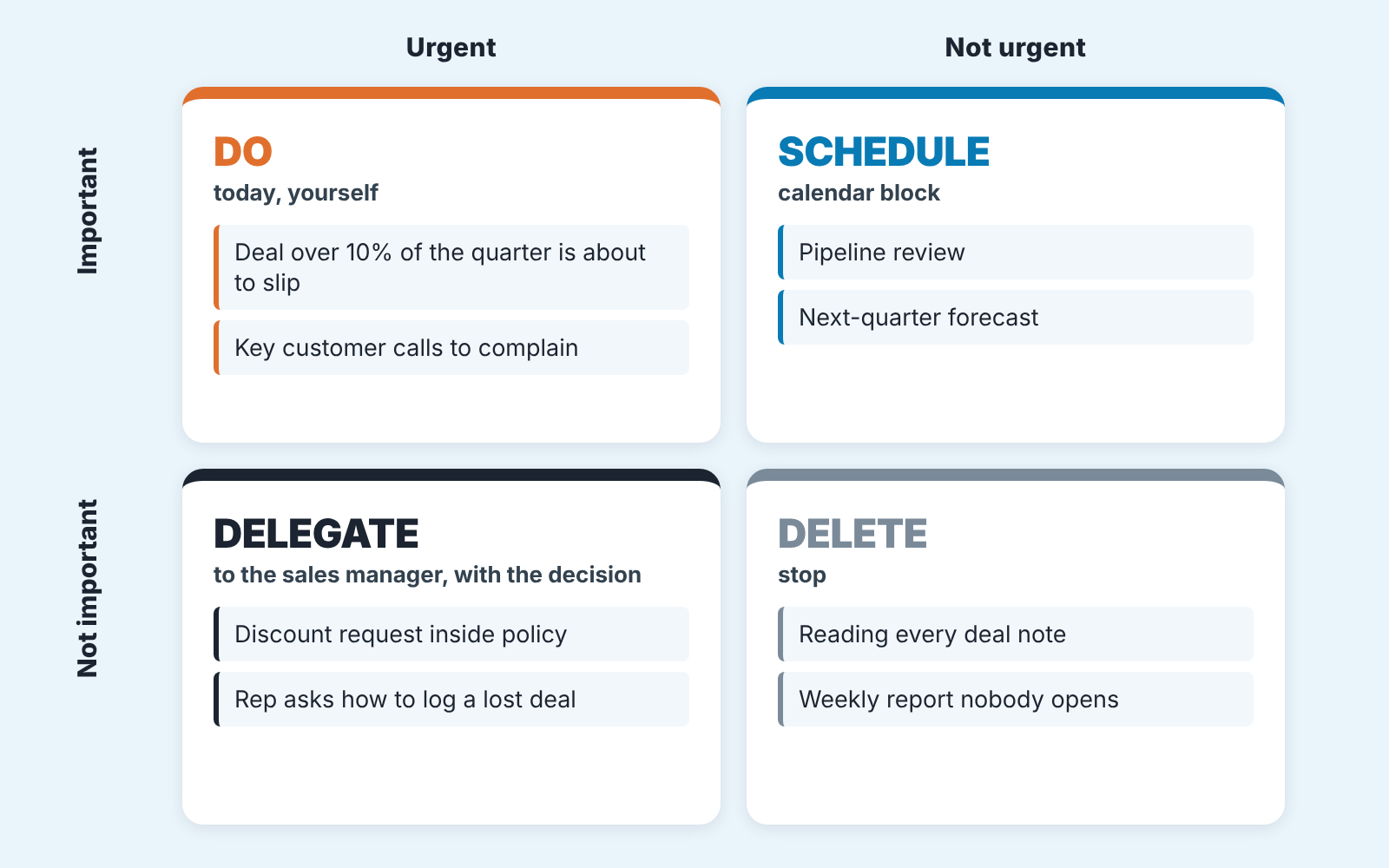
Use the grid above as a template: copy it onto a sheet of paper and fill it with your own week.
The name comes from a 1954 speech. Dwight Eisenhower, speaking in Evanston on August 19, 1954, quoted “a former college president”: “I have two kinds of problems, the urgent and the important. The urgent are not important, and the important are never urgent” (Quote Investigator). He did not claim the line as his own, and the “important is seldom urgent” version you see on posters is a paraphrase of it. Stephen Covey later popularized the idea as the urgent-important matrix (Duct Tape Marketing).
“Never urgent” is too strong for a sales business. A quarter-defining deal that slips is both, and it goes in the first box with no apology. But the president’s point survives: the two words describe different things, and an owner who treats them as one word works a sixty-hour week on other people’s deadlines.
Urgent versus important: why owners mix them up
Urgent means somebody is waiting. Important means the business changes depending on what you do. The two overlap less than your inbox suggests.
Owners confuse them for a specific reason. In a small company every urgent thing arrives through you. The rep who needs a discount answer pings you, because you are faster than any policy document. The customer with a billing question calls your mobile because that’s the number they have. Each interruption is small. None of them is important on its own. Together they fill the day, and the the important work, the thing only the owner can do, gets pushed to the evening or the weekend.
Homebase gives a useful test for the urgent axis: “Will there be a significant negative impact if I don’t address this within 24-48 hours?” (Homebase). We would add a test for the important axis that works for sales: if this goes badly, does it change the quarter’s number, a key customer’s relationship, or who works here? If none of the three, it is not important for the owner, whatever it feels like at 9:15 on a Monday.
The discount request is the cleanest example. A rep asks for 12% on a mid-size deal. It is urgent, the customer is waiting. Is it important? Only if your margin rule has no answer. If the rule says “up to 10% the rep decides, 10 to 15% the sales manager decides, above 15% the owner”, then the question belongs to the manager, and your part was writing the rule once. Much of an owner’s urgency works this way, reaching you because no rule answers the question.
A week of an owner’s tasks sorted into four boxes
Here is a sample week, twenty items, from an owner who also acts as head of sales for a team of five. Sort your own week the same way before you read the rules below; the point is the sorting itself; our list is only an example.
Do, today, yourself
- The largest deal of the quarter has a new competitor in the room and the rep asked for help on the call.
- A top-10 customer emailed to say the last delivery was late and they are “reviewing options”.
- A rep handed in notice; the handover of their open deals has to be decided this week.
- Payroll approval.
Schedule, in the calendar, with a protected slot
- The weekly pipeline review with the sales manager.
- Next-quarter forecast and the plan behind it.
- The job description for the second sales manager you keep saying you’ll hire (a sales manager job description built for a small team saves you the blank page).
- Reading the churn list from last month and calling two of the accounts.
- A 1:1 with the manager about their own development, with deals left for another meeting.
- Fixing the deal stages so “Proposal sent” stops meaning three different things.
Delegate, to the sales manager or an assistant, with the decision attached
- A discount request inside the policy range.
- A rep asking which field to use for lost reasons.
- Chasing a signed contract that is “with legal”.
- Approving an expense for a trade show the team already agreed to attend.
- Taking in an unscheduled delivery (Homebase uses exactly this example for “urgent, not important”, along with last-minute time-off requests).
- Scheduling the demo a prospect asked for.
Delete, stop doing it
- Reading every note on every deal.
- The Friday report nobody has opened since July.
- Sitting in the Monday stand-up “in case something comes up”.
- Re-formatting the proposal template for the fourth time this year.
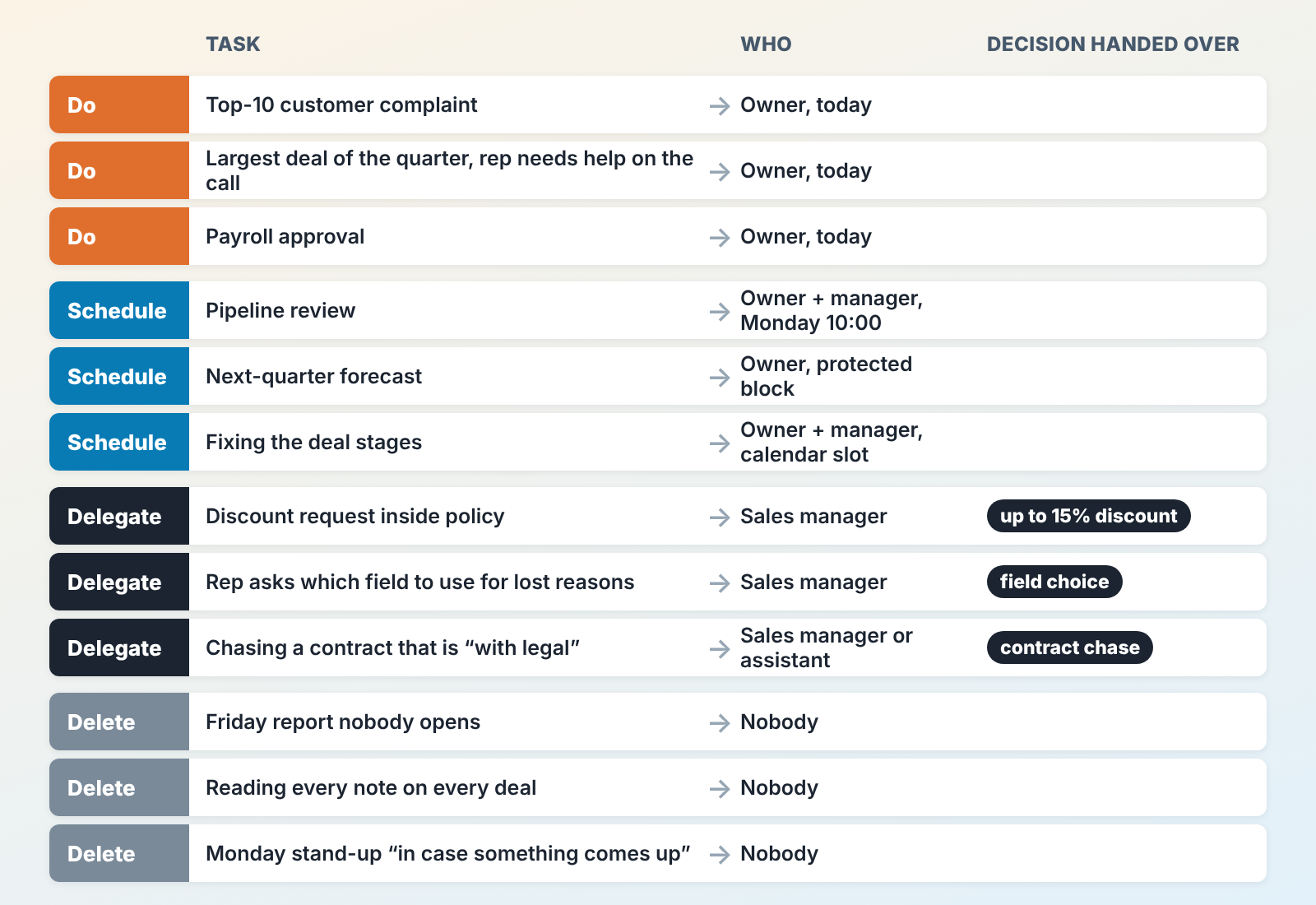
Two things stand out when owners do this. The “do” box is short, and every item in it involves serious money or a person leaving. The “delegate” box is the longest and almost every item in it was handled by the owner last week. That gap is where the hours are.
Homebase suggests limiting each quadrant to “3–5 daily tasks and weekly goals” (Homebase). For an owner we’d be stricter on the first box: more than three items in it on any single day means at least one of them is a disguised delegation.
Quadrant two is where your pipeline lives
Quadrant two of an owner’s matrix is mostly a handful of CRM lists.
Nothing in the second box ever rings your phone. That is the problem with it. Salesforce puts “optimizing sales pipeline processes” in the important-but-not-urgent quadrant (Salesforce), and its the right box. It just undersells how much of a sales owner’s quadrant two is sitting inside the CRM right now.
Open your CRM and build three views. The examples are from Pipedrive; HubSpot, Salesforce and Zoho CRM can do the same with their own filters.
Deals with no next activity. Open deals only, nothing scheduled next. Every row is a deal that nobody has committed to touching. None of them is urgent. Each one is a promise to a customer that is quietly expiring.
Large deals that have not moved. Filter by value above your “this matters to the quarter” threshold, then sort by the date of the last activity or the last stage change. A big deal that sat in “Proposal sent” for three weeks is quadrant two in its purest form: no one is calling you about it, and it decides whether you hit the number.
Deals past their expected close date. Still open, close date in the past. The rep pushed the date, or didn’t, and either way the forecast you showed the bank is wrong by that amount.
This is the quadrant we built SalesBond around, so a disclosure is fair here. Deal Health checks every deal in the connected CRM against a set of rules (more than 20, covering activity, progression, data, ownership and forecast), gives it a score and shows the specific violations on each deal. In practice, the manager gets one picture of pipeline quality instead of three saved filters. If you want to see your own quadrant two before you build anything, the free CRM audit does the first pass: SalesBond looks at the last 30 days of your CRM and sends a PDF with money at risk, deal health, the pipeline bottleneck and the top-10 clients, then a second PDF a week later with what changed. Check your CRM with SalesBond.
Tool or saved filter, the owner’s job here is the same: a fixed weekly slot to read the three lists with the manager. Defending that slot from the rest of the week is covered in time blocking for the owner and sales manager.
Delegate: the decision goes with the task
Delegating a task without the decision is forwarding. The rep still ends up at your desk, now with an extra hop in between.
So for every item in the third box, write two things: who owns it, and what they are allowed to decide without asking. Salesforce’s examples for this box (routine administrative work, non-critical email replies, meetings where your presence isn’t strictly necessary) are a fair start (Salesforce). With a sales team, it gets more specific.
Discounts: the manager decides up to a stated percentage, and above it brings you the deal with a recommendation already made. Rep questions about the CRM: the manager answers and writes the repeat ones into the team’s field guide. Deal reviews: the manager runs the weekly review and owns the stage definitions, and you join for deals above the threshold. If you are still running the review yourself, read managing sales managers through the CRM pipeline review first; the handover only works once the review has a fixed shape.
How to hand off in levels, what goes in the handoff note and how to check it in the CRM through the owner field is a topic of its own, covered in delegation for sales managers.
The hardest part, we think, is the owner’s reflex to answer anyway because the answer takes ten seconds. Forty of those answers a week, each with the interruption around it, is where the hour you said you didn’t have for the forecast goes.
Delete: things an owner should stop doing
The fourth box is where the matrix is most honest , and where most owners cheat. Nobody writes “scrolling LinkedIn” on the list; the real quadrant four items look like work.
Reading every deal note is the big one. A rep’s activity log is for the rep and the manager. The owner reads the exceptions, which is what the three quadrant-two views are for. The Friday report from the week above goes the same way: if you can’t name a decision that changed last month because of it, stop producing it.
Standing meetings you attend as insurance are next. If you are in the stand-up in case something comes up, you have told the team that the manager cannot run it. Leave, and ask for a two-line summary when something does come up.
Then there is re-doing the team’s work to your standard. Your version of the proposal template is a little better, and it costs the manager their ownership of it.
Say no to each of these once, out loud, in front of the manager. A task deleted silently comes back in a month.
Mistakes we see most often
Everything is urgent. The “do” box has eleven items and “delegate” has one. At that point the matrix is a to-do list drawn in a square. Usually the owner has no rule for what counts as important and uses “urgent” to mean “someone asked”. Go back to the money-or-person test and count the week again.
“The team handles discounts now.” Which person, with what limit? A task delegated to “the team” is back on your desk by the second week.
Quadrant two with no slot. The owner agrees that the forecast is important, puts it nowhere, and does it at 11pm the night before the board call. Without a block in the calendar it is not scheduled.
Using the matrix on deals. The four boxes sort an owner’s tasks. Put a whole pipeline through them and most deals land in “do”, which tells you nothing about the order to work them in. Deals and leads need a score that weighs the amount and the age of each deal, and that is a separate matrix for sales deals, leads and customers. The daily queue of a single rep is different again; that one is in how a sales rep decides what to do first.
Run the matrix weekly in fifteen minutes
Sorting twenty tasks once is a workshop exercise. Sorting them every Friday is a management habit. The loop that holds up for owners we have worked with looks like this:
- Friday, 15 minutes, before you close the laptop. Write down everything that came to you this week that someone else could have handled. This is a list of interruptions.
- Put each one in a box. Be hard on “do”: it needs the money or the person test from above.
- For every “delegate” item, name the owner and the decision, and change the owner field in the CRM where there is a deal or activity behind it.
- For every “schedule” item, put a block in next week’s calendar before anything else goes in. The pipeline review and the forecast go first.
- Monday morning, open the three quadrant-two views with the manager. Anything that appears for the second week in a row gets a decision in the meeting itself.
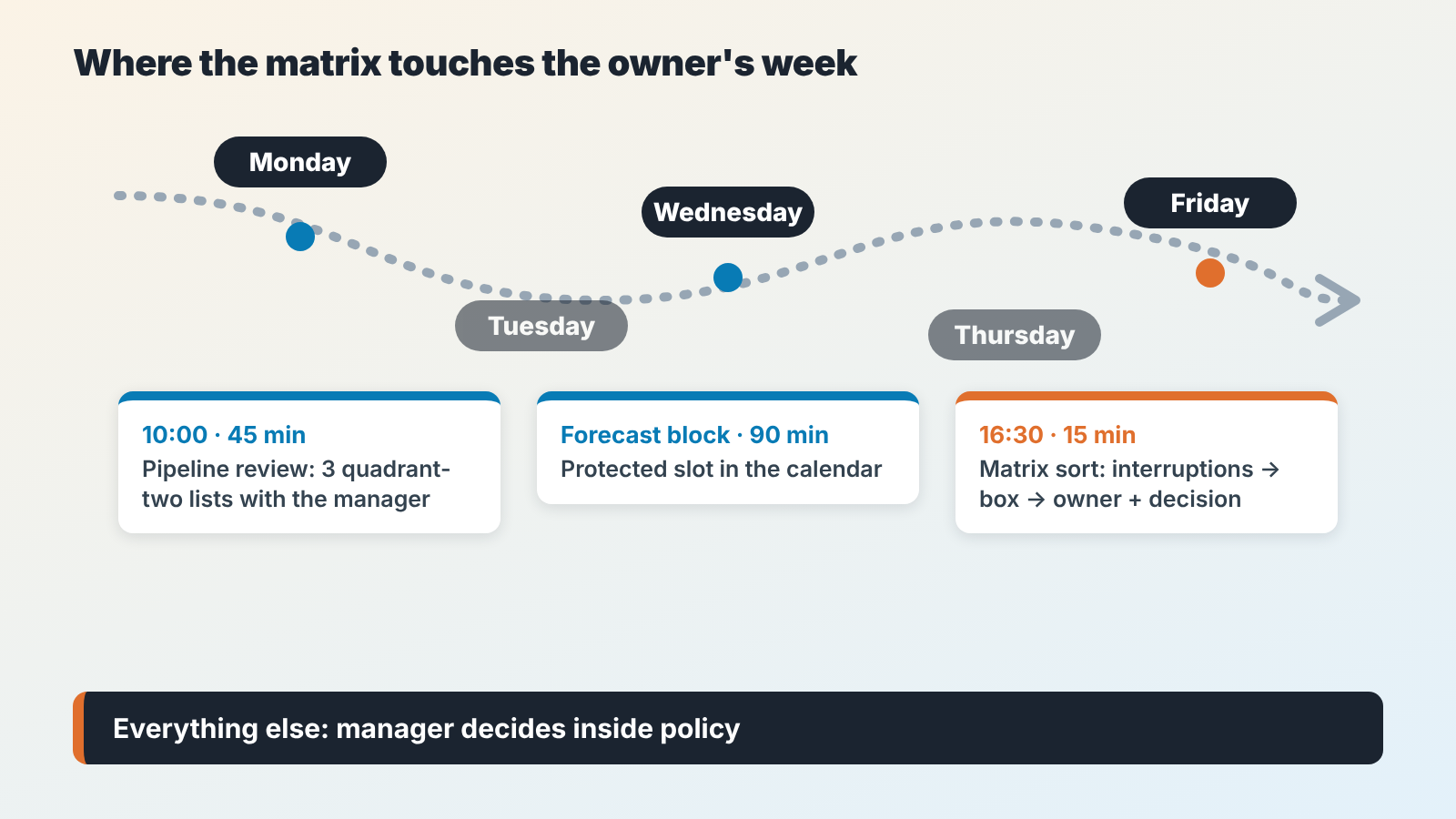
Start this week: before you close the laptop on Friday, write down the interruptions, and pick the one that goes to the manager on Monday with the decision attached.
FAQ
What are the four D’s of the Eisenhower matrix?
Do, decide (or defer), delegate, delete. They are the quadrant labels said out loud, so it’s the same grid with the same rules. Pick whichever wording your team remembers.
What is the 1-3-5 rule?
A daily list shape: one big task, three medium, five small. It says how much to carry; the matrix says what. Owners who like it sort with the matrix on Friday and size each day with 1-3-5.
What does the Eisenhower matrix help with?
For an owner with a sales team, it shows that most of the urgent week can be delegated, and that the important work is sitting unscheduled in the CRM. It won’t tell you which deal to call first, and it won’t run itself.


