

Task prioritization for a sales rep means putting today’s deals, leads and customers in order by how much is at stake, how urgent it is and how likely your action is to help. If you are wondering how to prioritize tasks when all three want the same morning, the short answer is a short daily list with a written reason next to each item. It beats a long list ranked by habit, every time we have watched both. Here is the routine by hand:
- Pick the items where something breaks if nobody acts today. Everything else waits.
- Rank them by what the break would cost, then by how many days you have left.
- Drop anything you cannot act on before tomorrow, however big it is.
- Stop at about fifteen.
- Write one line under each item that says why it is there.
- Work the list top down. When a new fire shows up mid-morning, it knocks something off the list instead of joining the bottom.
The hard part is step 2, because a deal, a lead and a customer are measured in different units.
Why generic methods fall short in sales: deals, leads and customers compete for the same morning
Most task prioritization advice assumes your tasks are the same kind of thing. Write the report, answer the email, prepare the slides. You can sort those by urgency and importance because they share a unit.
A sales rep’s morning does not. A deal has an amount, a stage and a close date. A lead has a source, an age and no amount yet. A customer who bought three times last year has a buying history and no open deal at all. Three different currencies, one budget of hours. Ranking the deals among themselves is easy. Deciding whether the overdue customer outranks the fresh inbound lead is the question no productivity framework answers, because the frameworks never had to.
Whatever a rep picks first has an opportunity cost: the next best deal waits.
Two more things make sales different. Items arrive during the day: a customer replies at 11:40 and is now waiting on you, and your list from 8:30 does not know. And the tasks already live in the CRM as activities with due dates, so a second list on paper becomes a copy that drifts. Within a week you trust neither.
Four prioritization techniques, used the sales way
The task prioritization methods in the productivity articles work once they are translated into sales terms, and each one has a point where it stops helping. The owner’s version, with projects and deals on the same list, is in prioritization methods for an owner or sales manager.
Start with Eisenhower: urgent against important, four boxes. In sales, “important” is money at stake and “urgent” is days left, such as a close date that has passed or a reply a customer is waiting for. The grid is good for a five-minute triage at 8:30 and useless the moment twelve items sit in the urgent-and-important box, because it says nothing about the order inside the box. We treat it as a filter only.
MoSCoW (must, should, could, won’t) was coined for software projects, and that is still where it fits: planning the week. The useful bucket is the one people skip. “Won’t this week” is the honest home for leads you are not going to touch, and writing it down stops them leaking back into Tuesday. Inside “must” there is still no order.
ABCDE is the closest of the four to a sales queue. You letter every item by the consequence of skipping it: A means something serious happens, B something mild, C nothing at all, D goes to someone else, E gets dropped. Then you number the A’s. “What happens if I skip it” is exactly the severity question. The failure mode is that every deal with a number on it becomes an A, and your back to sorting by amount.
Value versus effort puts payoff on one axis and work on the other, and you chase the quick wins. Fine for choosing which leads to work this week. Bad for deals, because a cheap task on a dying deal is still a wasted hour. “Effort” also hides the question that matters more: can you act on it today at all? If the proposal is sitting with the customer’s legal team, the effort is low and the doability is zero.
Ivy Lee, Eat the Frog and the 1-3-5 list show up in the same articles. They cap the day or fix the order of attack, which helps. None of them tells you which deal earns the first slot.
What all of them lack is one yardstick that works across a deal, a lead and a customer at once. The scoring grid that does that, with weights and a worked example, is in our sales prioritization matrix.
Five questions that rank any sales item
Any deal, lead or customer can be ranked against the others with the same five questions, asked in this order and answered from the CRM record, without a calculator.
How serious is it? What breaks if nobody acts today. A close date in the past, a deal with no next activity, a customer past the interval at which they normally reorder. If nothing breaks, the item belongs to another day.
How valuable is it? The measure is the amount relative to your other deals. A deal that is small for the company but the largest in your pipeline is still your largest. For a customer, their history of won deals is the value. A lead with no amount scores low here and earns its place on urgency and doability instead.
How urgent is it? Days. Days since the customer’s last message that you have not answered, days past the close date, days until the quarter ends. If you cannot name the deadline in days, it scores zero here.
How sure are you? A close date that has passed is a recorded signal, and an item built on a recorded signal outranks a hunch of the same size, because the hunch is the one you will argue yourself out of at four o’clock.
How doable is it today? Do you have what you need to act: a phone number, a decision-maker who is in the office, a proposal ready to send? A high-stakes deal you cannot move until Thursday is Thursday’s top item.
By hand, give each question a 0 to 3 and add them up. It is rough. Rough is enough to separate the top ten from the rest, and that separation is most of what prioritizing tasks in sales comes down to.
A short queue, and a reason next to every item
Fewer items than you think. Our default is fifteen, and we would rather a rep stop at ten than carry twenty-five. That number is a product decision with no research behind it, and the logic is plain: fifteen is a list a person finishes, and a finished list gets opened again tomorrow. A list of fifty gets its top three done and then becomes the place where items go to age.
The cap needs a stopping rule. When the queue is full, item sixteen waits. When a customer replies at 11:40 and jumps into the day, something at the bottom leaves, and you say which one.
A ranked item still needs a written reason before it gets worked. Three made-up examples, with no real amounts, in the form we insist on:
- Call the buyer at Northwind about the proposal. Reason: close date passed, no next activity scheduled.
- Reply to the Contoso contact, whose last message has sat unanswered since yesterday.
- Fabrikam normally reorders on a regular cycle and is now past it, with no open deal. Check in before they go quiet for good.
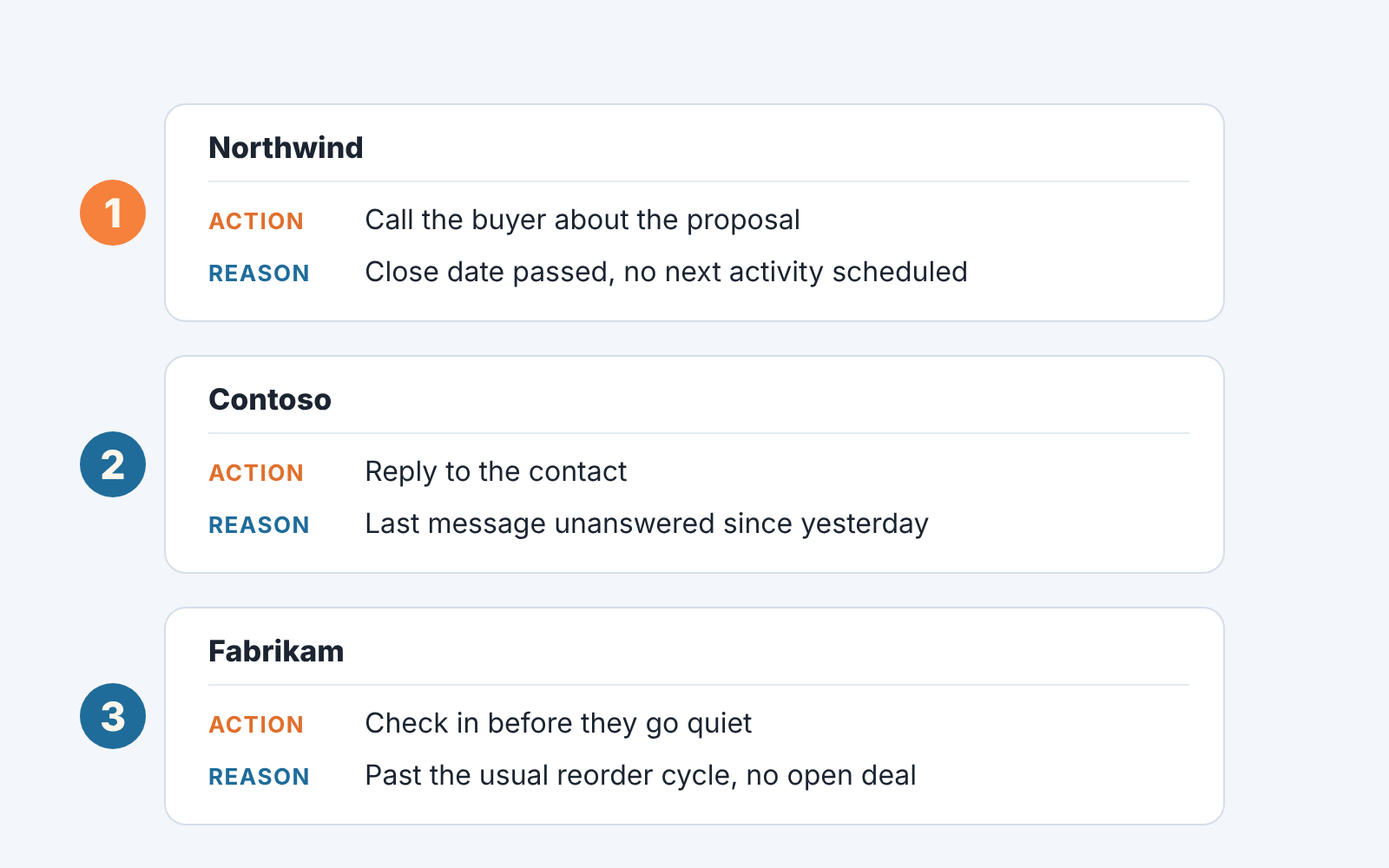
Once a reason has to be written in words, the criteria that cannot be written down fall away, and “big deal” is the first to go. A manager can read fifteen of these in two minutes and disagree with one line instead of with your whole morning. If you want the CRM itself to carry the reason, a next-step rule for Salesforce tasks and priority labels on Pipedrive activities are two ways to put it on the activity. And count “done” as a change in the CRM, an activity closed or rescheduled with a note. The fields that show whether this happens are in sales rep productivity measured from CRM data.
Mistakes: priority by loudest customer, by oldest task, by gut
Without a written queue, reps fall back on three rankings that all look reasonable from inside.
The loudest customer goes first because they are in your inbox, and inbox order is a ranking you did not choose. It turns the day into customer service for the people who complain, while the quiet one with the larger deal and the passed close date waits. Urgency is a real criterion, and the volume of messages is a poor stand-in for it.
The oldest task goes first because it has been red the longest and clearing red feels like progress. Overdue tasks are often overdue because they stopped mattering and nobody closed them. Before working the oldest item, ask whether anything breaks if you skip it. If nothing does, close it with a note. An overdue check for HubSpot task queues is the routine for keeping that red list honest.
The “priority” field in a task manager or a CRM belongs here too. It is a label someone set once, high, medium or low. It records that the item mattered on the day it was created, so use it as an input or a tie-breaker after the five questions.
Gut goes first because it is fast, and it is usually right about the top one. It is wrong about items four through fifteen, where the the day’s real work sits, and it cannot be handed to a colleague or defended to a manager.
How Sales GPS builds the queue
A disclosure, since this is the method we build: we build SalesBond, a sales management layer on top of the CRM a team already uses; we started with Pipedrive. SalesBond works with Pipedrive, HubSpot, Salesforce, Zoho CRM, Microsoft Dynamics 365, Freshsales, Close, monday CRM, Copper, Zendesk Sell, Nutshell, Insightly, Attio, Bitrix24 and Kommo (amoCRM).
Inside it, Sales GPS builds this daily queue from the CRM. Each item gets a priority from 0 to 100 from the same five questions, weighted most heavily on how serious; the weights are in the sales prioritization matrix. The signals come from Deal Health, which checks every deal against more than 20 rules, from a “customer is waiting for a reply” signal for the 11:40 case, and from Repeat Sales, which sends one card per customer who is overdue or leaving against their own buying cycle.
Signals about the same customer merge into one card. Tasks already in the CRM are not suggested again. The board holds 15 items a day by default, and the “why this one is first” under each card is assembled from the data that fired, with no language model writing it. Accepting a card creates exactly one task in the CRM; declining pauses it. Nothing is created without a person clicking.
Where the free CRM audit fits
A queue is only as good as the CRM under it, and most teams have never seen there own CRM summarised. That is what the free CRM audit is for. SalesBond reads the last 30 days of the connected CRM and sends a large PDF report: money at risk, a CRM score, the main findings, how each manager’s deals look, deal health across the pipeline, the pipeline bottleneck, repeat customers, the top-10 clients and up to five “what to fix” cards sorted by money. Seven days later a second PDF shows what changed, if the team has worked on the findings, and the report stays weekly after that.
Read the first PDF as a draft of tomorrow’s queue. The “what to fix” cards are the items that would top a rep’s day, and the repeat customers section is the list of accounts that would arrive as cards. If you want to see which of your deals and customers would be first tomorrow morning, start there: Check your CRM with SalesBond.


