
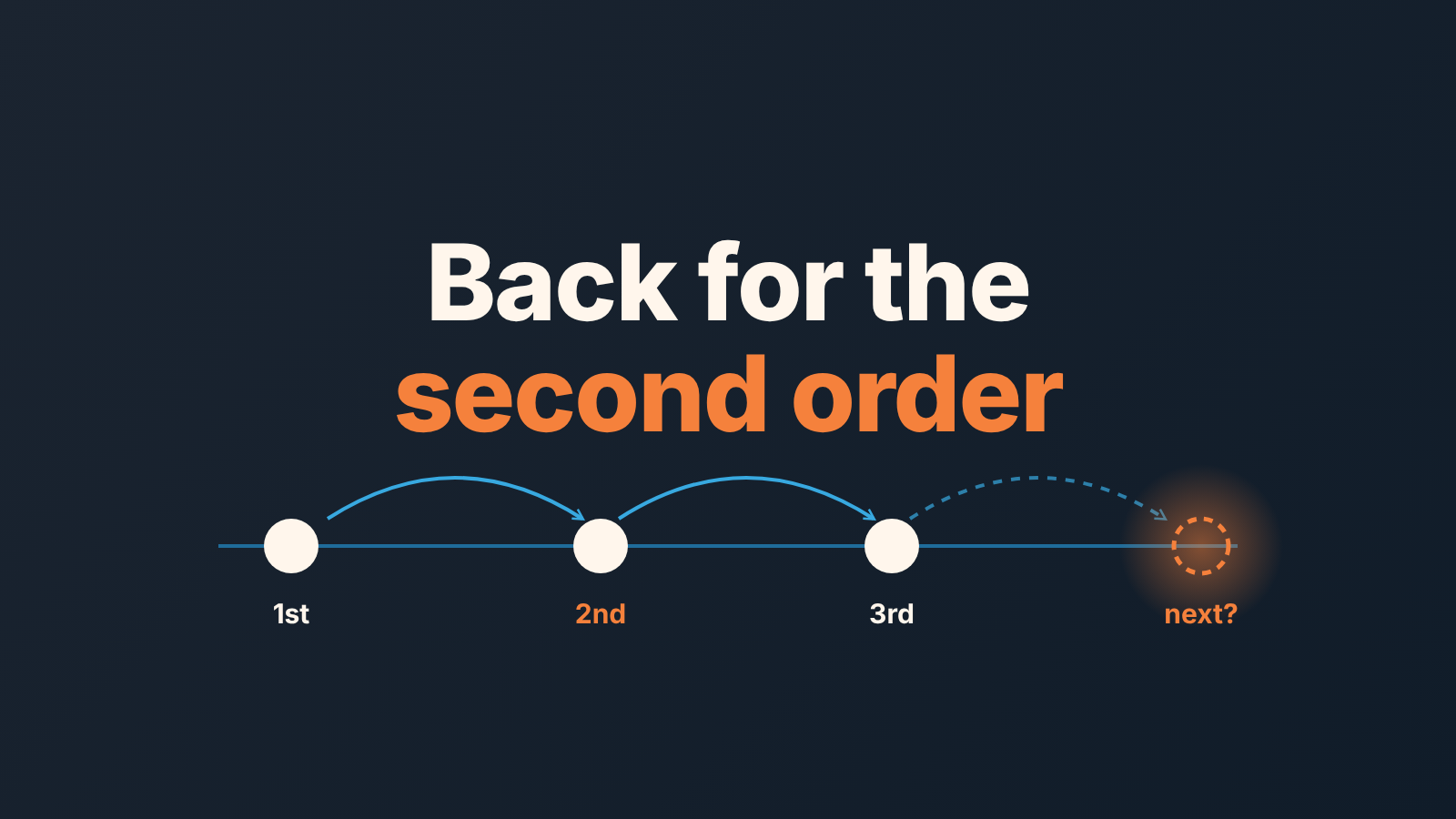
A loyal customer in B2B is one who keeps buying from you: they place a second and third order, and they do it on their own rhythm. You can see it in the CRM as repeat won deals, a steady gap between purchases and no growing delay since the last one.
That is a narrower definition than most search results give. Oracle describes customer loyalty as an ongoing emotional relationship that shows in how willing a customer is to keep buying from you rather than from a competitor (Oracle: What is customer loyalty?). The Philadelphia Fed goes further up and treats a firm’s base of repeat customers as a kind of capital (Philadelphia Fed: The value of loyal customers). Neither is written for a sales team reading its own CRM. Say you run sales with 200 accounts and three reps. You need to know which returning customers will order again this quarter, which new ones are about to become regulars, and which regulars have gone quiet. All three answers are already in the won deals.
What a loyal customer looks like in your CRM
Filter won deals by one customer and sort by close date. Three things on that short list tell you whether they are loyal in the sense that pays the bills.
They came back. Two or more won deals, each logged as its own deal. One deal edited every quarter with a new amount is one purchase with a history. If your team logs reorders that way, fix that first. Repeat orders in Pipedrive: one new deal per order shows how to log each reorder as its own deal.
They came back on time. The gaps between those close dates are the customer’s own buying rhythm. A distributor that reorders every five weeks and a client that renews once a year are both loyal if the next deal lands when their history says it should.
They came back for as much or more. The average order value holds or grows across the orders. A customer who reorders on schedule at a third of their old amount is telling you something and you want to hear it before the amount reaches zero.
We treat these three as the definition, and we would argue with anyone who adds “recommends us” or “answers our survey” to the list. Those are nice. They don’t show up in revenue until the customer buys again.
A hypothetical example, to make it concrete: a regional distributor with 14 orders over three years, roughly one every 11 weeks, at a stable average order value. Their last order was eight weeks ago, so they are on track. The same distributor at week 16 with no order is overdue, and that is when someone calls.
Why the second order is the one to worry about
Why do loyal customers matter at all? Because their next order arrives without the cost of finding them again, and a base of customers with known cycles is a forecast you can check every week. They are also the natural audience for upselling B2B customers who are ready to upgrade. The trouble is that nobody becomes one of them without a second order.
A new customer has one purchase. Nothing in their record tells you whether they are a future regular or a one-off, and you won’t know until the second order either arrives or doesn’t.
That makes the window after the first order the riskiest stretch of the relationship. The rep’s attention has moved to the next deal, and the customer has no habit of coming to you yet. If a competitor gets the second order instead, the account looks fine in every report, because nobody reports on things that did not happen.
Two practical consequences. First, treat the second purchase as a stage with an owner and a date, the same way you treat the first. Second, in any list of customers, keep new customers apart from repeat customers. Mixing them hides the problem. Say 60 of your 200 accounts have bought exactly once: that is 60 open questions, and an average retention number will not show you a single one.
The third order is less a risk than a confirmation. Two purchases give you one interval, and one interval is a guess. The third gives you two intervals and the first honest estimate of the cycle.
Measuring it: repeat purchase rate and the buying interval
The repeat purchase rate, also called the returning customer rate, is the share of your customers who bought more than once in a period. Take every customer with at least one won deal in the last twelve months, count the ones with two or more, divide.
A worked example with made-up numbers, so the arithmetic is clear: 120 customers bought in the last twelve months; 48 of them bought twice or more; the repeat purchase rate is 48 / 120, or 40 percent. Broken down by rep, the same count tells you who is building a base and who is only hunting.
The second number is per customer, and most teams skip it: the buying interval. Take the gaps in days between a customer’s won deals and use the median. Four orders with gaps of 30, 34 and 29 days give a cycle of about 30 days; a one-off project that produced a 90-day gap would drag a mean toward 46 and the median hardly at all. Repeat Sales computes the cycle the same way, as the median interval between purchases. It needs at least two purchases, and it attaches a confidence of high, medium or low based on the number of intervals and their spread.
The revenue side of the same question is in ARPU for a B2B sales owner, and customer lifetime value: the formula and the historical LTV in your CRM puts the historical LTV next to the interval. On a Monday morning the interval is the more useful of the two.
Who is slipping: late against their own cycle, not the team average
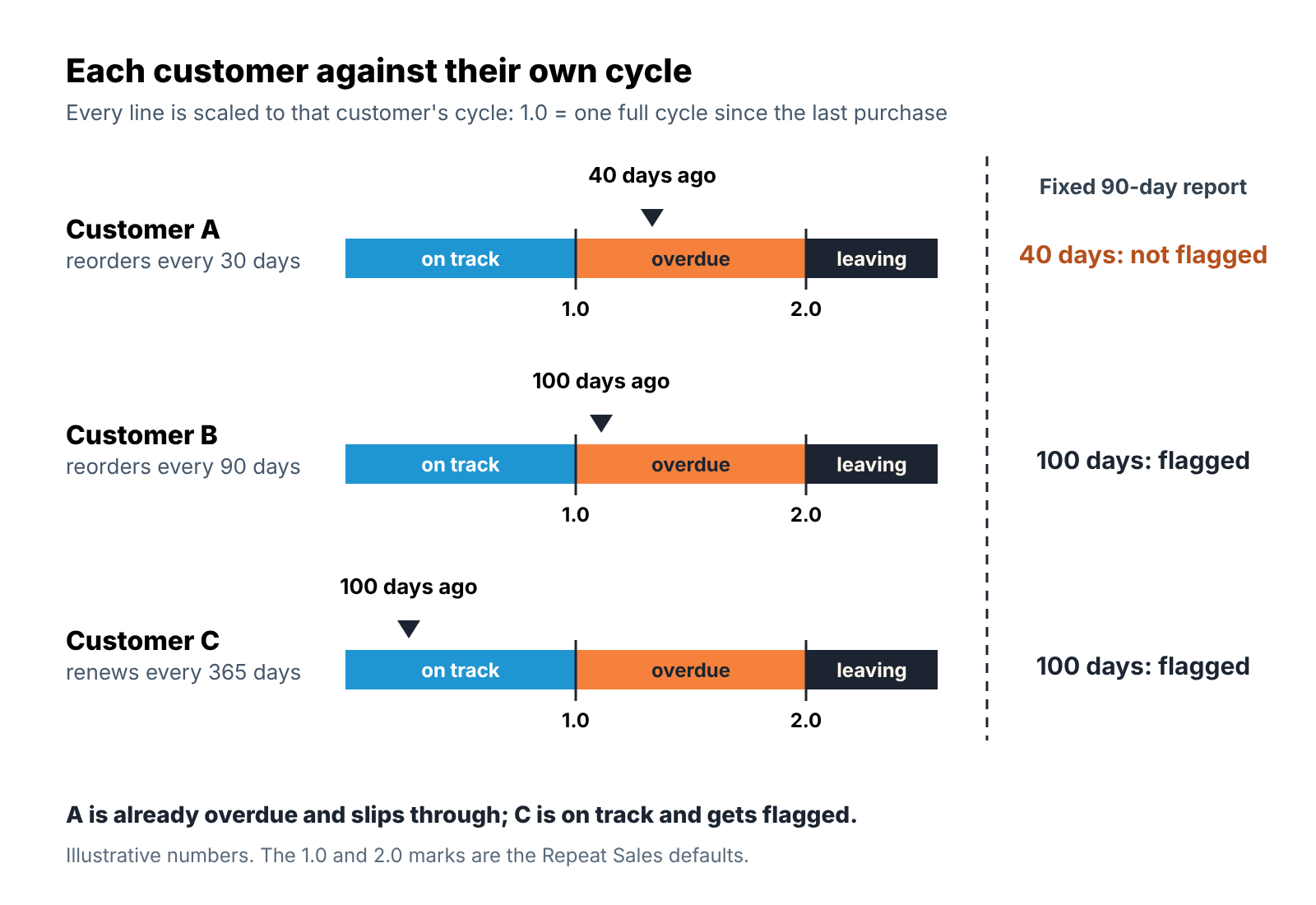
The usual way to find customers at risk is a report of everyone with no order in 90 days. It is wrong in both directions. The weekly distributor who has gone 40 days quiet is already in trouble and won’t appear. The annual client at day 100 is doing fine and will.
Compare each customer with thier own cycle instead. Days since the last purchase divided by the cycle gives a ratio: below 1.0 the customer is on track, above 1.0 they are overdue, above 2.0 they have missed two cycles and are, in plain words, leaving. Those are the default marks in Repeat Sales, and both can be changed in settings. The full set of statuses is in account management by customer status, and the weekly routine for late reorders is in customer retention strategies for late reorders.
What to do after the first order, before the second, and when a regular goes quiet
After the first order:
- Decide who owns the second order, and write that name on the customer record. The rep who closed it is the default; a handover is fine if its date is in the CRM too.
- Ask the customer, at delivery, when they expect to need the next one. Put that date on the record as the expected next purchase. It’s a guess, and a guess from the customer beats no number.
- Create the next deal as soon as the date is in sight, before the order arrives.
Before the second order, one check a week by the owner: is the expected date within two weeks, and is there a contact scheduled before it? If not, schedule one. That is the whole job, and its the job that gets skipped when the pipeline is busy.
When a regular goes quiet, the move depends on how late they are. Just past their cycle: a direct question to the buyer, “you usually order around now, has something changed?”, and the answer written on the record, whatever it is. Past twice their cycle: stop treating it as a reorder and treat it as a lost account you are trying to win back, with a different conversation and usually a different contact.
Three kinds of “loyal” that won’t reorder
The most common is the price-loyal buyer, the discount customer who reorders only when a price is offered. Oracle’s list of loyalty types has the same name for them. Their cycle follows your promotions, and the won deals show it in order dates that line up with your quarter ends. This is also why a points-style loyalty program rarely fits B2B; what works in a reorder business is the plain version, one owner per account and an expected next purchase date with a contact scheduled before it.
Then there is the one big deal. A customer who bought once for a large amount sits at the top of the revenue report and at the bottom of the loyalty list. They are a new customer with a large first purchase, and the the second order is as uncertain as anyone’s.
The third kind is loyal to one person. Loyalty that lives in one contact’s phone leaves when that contact does. If every won deal for an account has the same contact and the same rep, the relationship is one resignation away from being a new customer again. The fix is a second contact on the customer record and a second person from your side who has spoken to them.
How Repeat Sales shows it
Everything above can be done with a filter on won deals and a spreadsheet. A disclosure: we build SalesBond, a sales management layer on top of the CRM a team already uses; we started with Pipedrive. SalesBond works with Pipedrive, HubSpot, Salesforce, Zoho CRM, Microsoft Dynamics 365, Freshsales, Close, monday CRM, Copper, Zendesk Sell, Nutshell, Insightly, Attio, Bitrix24 and Kommo (amoCRM).
Repeat Sales does the counting from this article. It reads the won deals in the connected CRM, treats each one as a purchase, computes the buying cycle per customer and turns the ratio of days since the last purchase to the cycle into a status. It runs per customer and per customer × seller line, so a manager sees both the account and the person behind it.
It has four sections: Overview, Customers, Health and New. New is the one built for the risk in this article. It lists customers with one purchase who are waiting for the second order, so nobody has to remember which of the 60 open questions is theirs.
Two limits, stated plainly. There is no machine-learning churn prediction behind any of this, only the ratio and the thresholds. And SalesBond never contacts a customer or creates a task on its own.
The free CRM audit: your repeat customers and top-10 clients in one PDF
If you want the repeat purchase picture without building the filters, start with the free CRM audit. SalesBond looks at the last 30 days of the connected CRM and sends a large PDF report; two of its sections are repeat customers and the top-10 clients. Seven days later a second PDF shows what changed, if the team has worked on the findings, and the report stays weekly after that. Those two sections show how many of your customers have bought more than once and which ten accounts you can’t afford to lose.
Whichever route you take, the first step fits in an afternoon: pull last year’s won deals, split customers into one-purchase and repeat, and give every one-purchase customer an owner and an expected date for the second order. If you’d rather have the cycles and statuses counted for you every week, sign up for SalesBond.


