
To increase customer retention during slow months, check which of your repeat customers are late for their next purchase by their own buying cycle, and contact them while the call is still a routine reorder. Repeat Sales, the SalesBond product for repeat business, calculates each customer’s buying cycle from past won deals, and its Health section flags the customers who are overdue or leaving, so the manager can create a follow-up task in the CRM. It uses fixed rules, with no machine-learning churn prediction.
Customer retention means keeping the customers you already have buying from you. For a B2B team with repeat buyers, four strategies built on the buying cycle do most of the work: know each customer’s buying cycle, catch overdue customers before they start leaving, rank the late ones by historical LTV, and put the reorder call in the CRM as a task.
Most “customer retention strategies” lists are written for shops and subscription apps: loyalty points, discounts, faster support. None of that tells a B2B sales manager which of the two hundred accounts in the CRM should have reordered by now and has not. This article is about that one question. We build SalesBond, so read the product parts as the vendor describing its own tool, with the limits written next to each claim. It is the second article in a series on growing sales with SalesBond; the first, sales analytics software on top of your CRM, covers the whole product.
The strategy is knowing the buying cycle
A repeat customer has a rhythm. A distributor reorders consumables when stock runs low, an agency renews a retainer when the quarter ends, a clinic buys supplies roughly as often as it uses them up. The rhythm is already in your CRM as a sequence of won deals with dates. Nobody looks at it as a rhythm, because the CRM shows deals and leaves the intervals out. It starts with the second and third order, which is where loyal customers in B2B draws the line in revenue terms.
Repeat Sales reads that sequence and compares two numbers per customer: how often they buy (the buying cycle) and how long it has been since the last purchase. The comparison gives a status: on time, late, or probably gone. There is no rule set like Deal Health’s and no score; the status comes from fixed arithmetic and two configurable thresholds.
The retention strategy that follows is short. Once a week, open the list of customers past their cycle, decide who gets a call, and put the task in the CRM.
Retention in B2B is a timing problem
Here is what usually happens. A good customer buys every two months for a year. Then they do not. Nobody notices, because nothing in the CRM changed: no deal was lost, no stage moved, no activity was marked overdue. The account simply went quiet, and the CRM has no alert for a customer who stops buying.
Six months later the rep calls to say hello and learns they switched suppliers in the spring. By then the account needs a win-back, which takes more work than a reorder call (we wrote about it for Pipedrive teams in winning back churned customers).
The gap between “should have ordered” and “somebody noticed” is the only part of retention that a sales team controls directly. Pricing, product quality and support matter more in the long run, but they are not the sales manager’s lever on a Tuesday. The lever is timing: knowing the customer is late while a call can still be a routine reorder conversation rather than a rescue.
Strategy 1: Know each customer’s buying cycle
Repeat Sales treats a purchase as a won deal of that customer in a sales pipeline. One won deal makes a new customer. Two or more make a repeat customer, and only a repeat customer gets a cycle. This matters for teams that log several orders inside one long-running deal; if your CRM has one deal per account that gets reopened each time, the tool sees one purchase. The fix is a CRM habit, one deal per order, and it is worth doing even without any tool on top.
The cycle is the median interval in days between purchases, shown as “once every N days”. We chose the median rather than the average because one odd gap should not move the number. Take a made-up customer whose last four orders were 40, 45, 43 and 120 days apart, the long one being a summer shutdown. The average says once every 62 days, and the customer would look on time for weeks after they were actually late. The median says once every 44 days, which is how that customer really buys.
Each cycle carries a confidence of high, medium or low, based on how many intervals there are and how much they vary. A customer with two purchases has exactly one interval, the thinnest basis a cycle can have. Read the confidence before you read teh status.
Strategy 2: Catch overdue customers before they start leaving
The ratio is days since the last purchase divided by the cycle. Everything below follows from it, with two thresholds you can change in settings (the defaults are 1.0 and 2.0). The English labels in the interface are still being confirmed, so the names here are descriptive.
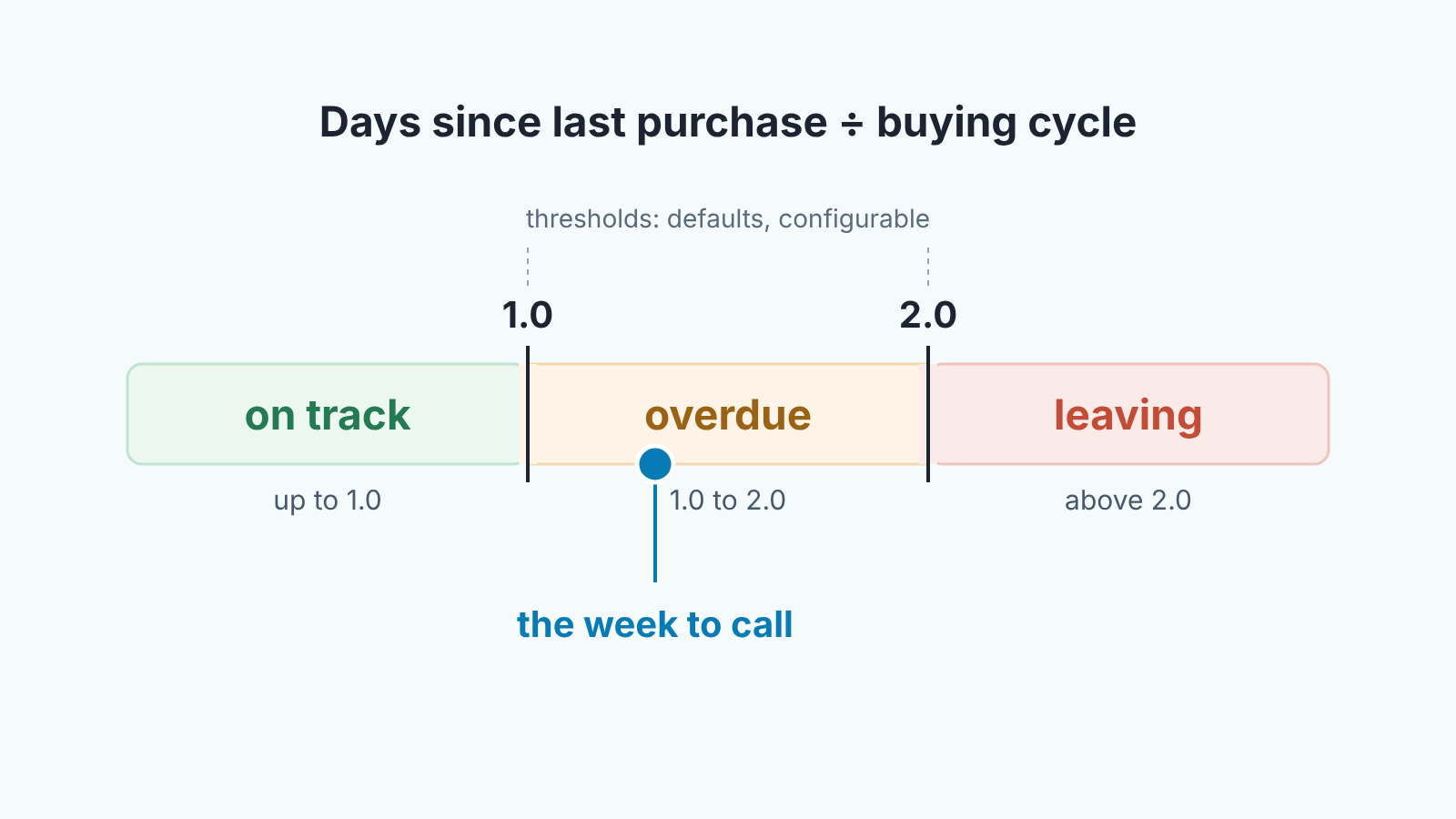
On track means the ratio is at or below the first threshold: the customer is inside their usual cycle. When the expected next purchase is close, the customer also gets a “purchase soon” flag. It is a flag added to the status, and it is the one piece of this that is about selling rather than saving: a rep who calls a day before the usual reorder simply looks organized.
Overdue means the ratio has passed the first threshold but not the second. The customer is later than their own habit. This is the status the weekly routine is built around, because it is the one where a call is still a reorder conversation.
Slow months make the overdue list harder to read. In a quiet month a seasonal customer and a late one show the same status, because both have stopped ordering. The made-up customer with the summer shutdown has a cycle of 44 days, so by mid-August they show as overdue, although their history already holds one 120-day summer gap. For them a short call about when they restart is enough. A customer whose history has no such gap and who goes quiet in the same weeks is the one to call first. Read each overdue status next to that customer’s own purchase dates before you decide.
Leaving means the ratio has passed the second threshold: more than twice the usual gap, by default. Some of these customers come back. Many have already gone. Either way the conversation has changed, and the rep should know that before dialing.
In work is overdue with an open deal and recent contact. Somebody is already on it. The customer stays visible but is not shouting for attention, which keeps the overdue list honest about what nobody is handling.
New is one purchase. No cycle yet, so no judgment about timing. Undefined is a customer whose cycle cannot be determined from the purchase history.
“At risk” in Repeat Sales means overdue or leaving, nothing else. There is no 0 to 100 number, and we think that is right for accounts: a manager can read “late by their own standard” faster than they can interpret a 61, and a score invites the team to argue about points instead of calling the customer. If you want the metric itself, built by hand inside the CRM, the earlier pieces on a customer health metric in Pipedrive and in HubSpot show the fields and formulas; this article does not repeat them.
Strategy 3: Rank late customers by historical LTV
Not every late customer deserves the same attention, and the customer card shows what each one has been worth so far. Historical LTV in Repeat Sales is the actual sum of all won deals for that customer within the viewer’s scope, in the tenant’s base currency, next to the first-purchase date, the average order value and the expected next purchase.
Two things about that number. It is historical: money that was actually won, with no projection of future value. And it is scoped to the viewer, so the same customer can carry a different total depending on who is looking. When someone quotes an LTV in a meeting, ask which scope it came from.
Used with the statuses, LTV gives a sorting rule for the week that nobody has to argue about: overdue customers by historical LTV, highest first. A small account that is leaving can wait for an email. A large one that is overdue gets a call today.
Strategy 4: Put the reorder call in the CRM as a task
Repeat Sales produces the list. It does not act on it, and SalesBond never contacts a customer itself. The action goes through Sales GPS, where each overdue, leaving or purchase-soon customer appears as one card with the customer’s deal signals attached, so the rep sees the deal context before deciding anything.
The card has a “Contact” action. Pressing it creates a task in the CRM, in the system the rep already lives in. No email goes to the customer and no sequence starts. We kept it this narrow on purpose: a reorder call is a judgment, and the person who makes it should own the task, the wording and the timing.
Health is computed per line, meaning customer by seller, and also per team and per company. So when the overdue list comes up on Monday, the manager sees both the account and the rep behind it. That turns “we are losing customers” into something like “Daniel has four accounts past cycle and Priya has one”, which is a conversation you can actually have.
What to say on the call is not something the tool decides. In our experience the plain version works: “You usually order around this time, and I have not seen anything from you. Is everything all right on your side?” If the answer is a delay, you have a date. If the answer is a competitor, you know where the account stands and can decide whether to fight for it.
Where Repeat Sales won’t help
If your sales are one-off, Repeat Sales will not help, and we would rather say so than let you find out after setup. A business that sells a project, an installation or a one-time license has customers with one won deal each. The section will fill with new customers and undefined cycles, and the overdue list will stay empty . The tool is showing you that there is no repeat pattern to watch.
It also depends on the CRM being used the way the mechanism expects: one won deal per purchase, with real close dates. If your team closes a deal months after the goods shipped, or lumps a year of orders into one deal, the cycles will be wrong in a way no threshold setting fixes.
And it will not tell you why a customer is late. A low-confidence cycle, a seasonal customer, a budget freeze and a lost account all look the same at a ratio of 1.3. The status gets the customer onto the list; the conversation finds out the the reason.
The customer retention strategy as a ten-minute weekly routine
This is how we suggest a head of sales uses it, and it is the whole retention strategy for the week.
- Open the overdue customers and start with the highest historical LTV. Skip the ones already in work.
- For each overdue customer at the top of the list, decide: call, email or let it go. Write the decision down even when it is “let it go”.
- For the ones that get a call, press “Contact” on the customer card in Sales GPS. That creates the task in the CRM.
- Look at the leaving list separately. Pick at most one or two for a win-back attempt; treat the rest as lost for forecasting purposes until they prove otherwise.
- Glance at the purchase-soon flags. Those are reorders the team can take proactively this week.
Then stop. Run it every week: at a ratio of 1.2 a call can still turn into an ordinary order, and each further week of silence moves the customer closer to leaving. If the list is growing week over week, the problem is upstream of sales, and the related measure of gross revenue retention will show it in money.
If you want to see which of your own customers are past their cycle, check your CRM with SalesBond. It reads won deals from Pipedrive, HubSpot, Salesforce, Zoho CRM and the other CRMs on our integrations list, and shows the list on your data.
FAQ
What is a good customer retention strategy for B2B repeat customers? Track each repeat customer’s buying cycle and call the ones who are later than their own habit, while the call is still a routine reorder. Loyalty points and discounts help shops; in B2B the lever a sales team controls is timing.
Does Repeat Sales predict churn? No. The status is a deterministic calculation: a median buying cycle, the days since the last purchase, two thresholds. There is no machine learning and no probability of churn. We think this is the right trade for a sales team, because every status can be checked by hand against the deal dates in the CRM, and a manager will act on a number they can verify.
Is there a score, like in Deal Health? No. Repeat Sales has statuses only. A customer is on track, overdue, leaving, in work, new or undefined, and may carry a purchase-soon flag. The 0 to 100 score belongs to Deal Health and applies to deals.
Can I change what counts as overdue? Yes. The two thresholds (defaults 1.0 and 2.0 times the cycle) and the minimum number of purchases are settings. A team with long, variable cycles may want the first threshold above 1.0 so a two-week slip does not fill the list.
Check your CRM with SalesBond. Connect the CRM your team already uses and see which repeat customers are past their buying cycle, on your own data. Check your CRM with SalesBond.


