A sales follow-up email is a short message that moves a deal forward after a meeting, a proposal or a stretch of silence. It carries one clear question or one next step, it goes out when the CRM shows the deal has no next activity or the customer is waiting for your reply, and it reads like a person wrote it. With fifty open deals, the harder part is knowing which five of them need an email this morning, and that answer lives in your CRM data.
Five sales follow-up email templates for five situations
A template earns its place when it fits one situation and takes thirty seconds to edit. Here are the the five we actually use. Each one builds toward a single ask, in the order the AIDA model in B2B sales lays out for a message. Replace the brackets and cut anything you would not say out loud.
After a meeting. Same day, while both of you still remember what was said.
Subject: [Topic]: what we agreed
Hi [Name], thanks for the time today. Here is what I took away: you need [outcome] by [date], and the open question is [question]. I will send [thing] by [day]. If I have something wrong, tell me now and I will fix it.
After a proposal. The document went out and the thread went quiet. Do not ask whether they received it. Ask about the decision.
Subject: [Company] proposal: one question
Hi [Name], the proposal has been with you since [date]. What is the one thing in it that would stop you from saying yes? If it is price, scope or timing, say which and I will come back with options rather than a discount.
Follow-up email after no response. Two nudges, no answer. Give them an easy exit; a “no” is worth more than another week of nothing.
Subject: Should I close this?
Hi [Name], I have not heard back since [date], which usually means priorities moved. If [project] is off for now, a one-line reply saying so is fine and I will stop writing. If it is still on, what would be a realistic next step?
And if this one gets no reply either, stop. Treat the silence after “should I close this?” as the reply, mark the deal lost with a reason, and if the customer has bought before, let their buying cycle decide when they come back onto your list.
The customer replied and is waiting on you. This one answers their question and attaches the next step.
Subject: Re: [their subject]
Hi [Name], here is the answer on [topic]: [answer in two sentences]. Does that settle it? If so, the next step on our side is [step], and I can have it done by [day].
Bringing back a customer who is late to reorder. No open deal, no proposal, just a buying pattern that broke.
Subject: [Product]: are you running low?
Hi [Name], you usually order [product] around this time and I have not seen one come through. If something changed on your side, I would rather know. If it is just timing, I can hold [stock / a slot] for you until [date].
Each of the five has its own trigger, and the trigger decides when the email goes out.
Subject lines and the first sentence: what to write instead of “just following up”
On r/sales, reps trade their go-to “just following up” emails, and the phrase itself is the problem. It tells the reader that nothing happened on your side since the last message, and now you would like them to do something anyway.
Replace it with something that happened, something you owe or a decision you need. “I spoke with our delivery lead and we can start the week of the 16th” gives the reader news to answer, and so does “I owe you the revised scope; here it is.” “Do you want the pilot in Q1 or not until budget resets?” asks for the decision directly. “Checking in”, “touching base”, “circling back” and “bumping this to the top of your inbox” carry no news, so the reader has nothing to answer.
Subject lines follow the same rule. Name the deal or the topic, then the ask: “Acme rollout: start date”, “Proposal: one question”, “Should I close this?”. And do not open with an apology. “Sorry to bother you again” asks the reader to agree that you are a bother.
How many follow-ups and how far apart: set a rule from your own won deals
Every template article has an interval rule. We will not give you one, because we cannot see your funnel, and a rule written for someone else’s sales cycle will either rush your buyers or let your deals cool.
The rule you want is already in your CRM. Open the last twenty or thirty won deals and, for each, count the emails between proposal and signature and the days between them. The middle value is your interval. Then open the lost ones and look at where the thread died: after how many days of silence did the buyer stop answering? That is your ceiling. Keep your cadence between those two numbers.
Then write the rule into the CRM rather than into your head: after a proposal, next activity in N days; after a meeting, next activity before you leave the room. “Set the next activity before you close the deal card” is the habit every CRM signal depends on. If your team runs on Pipedrive, sequences for deal follow-up in Pipedrive walks through the mechanical version.
You may have heard of a 3-3-3 rule. The name gets attached to several different spacing rules, so treat whichever version you heard as a guess and test it against your own won deals.
Which deal needs an email today: four signals in the CRM
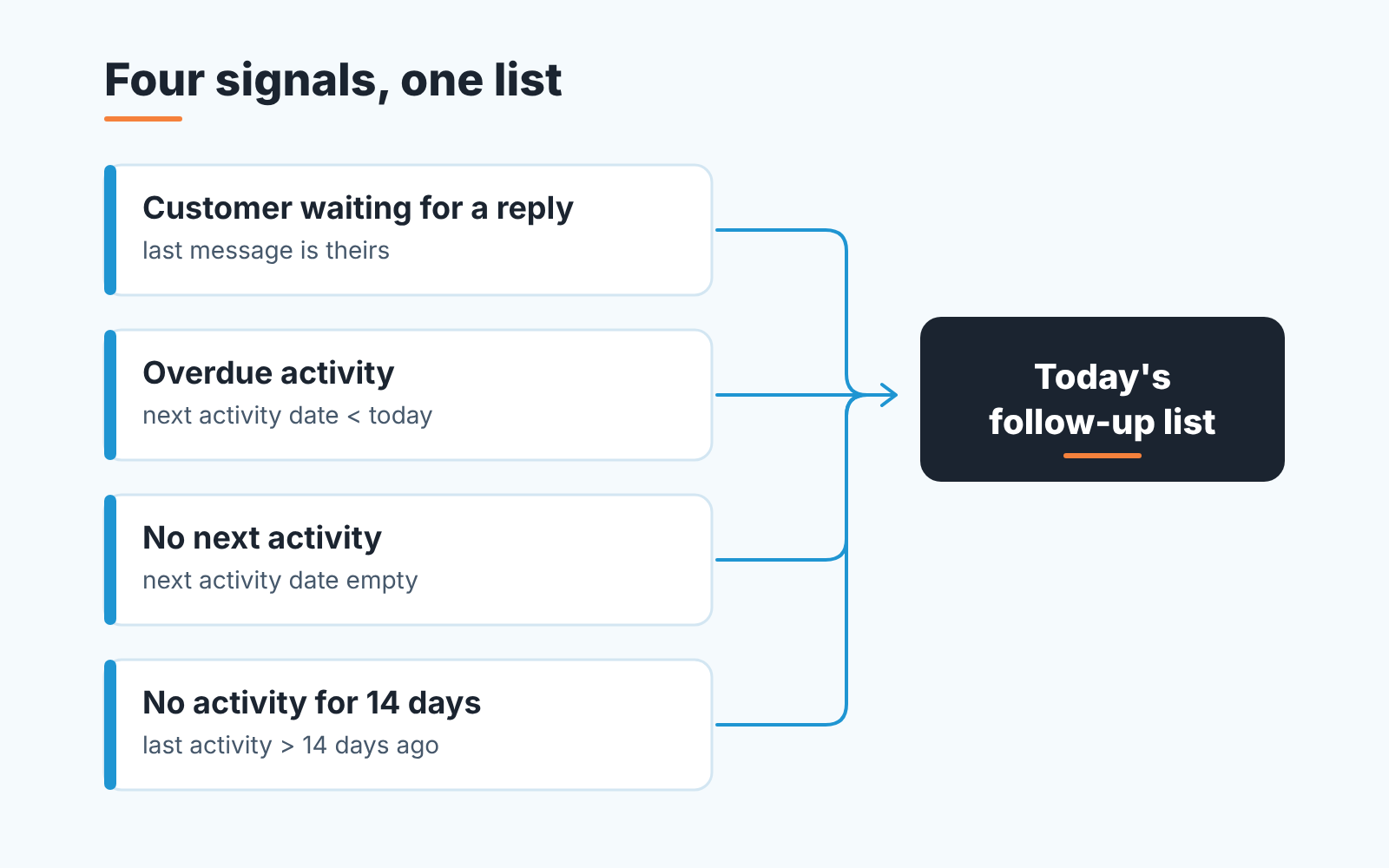
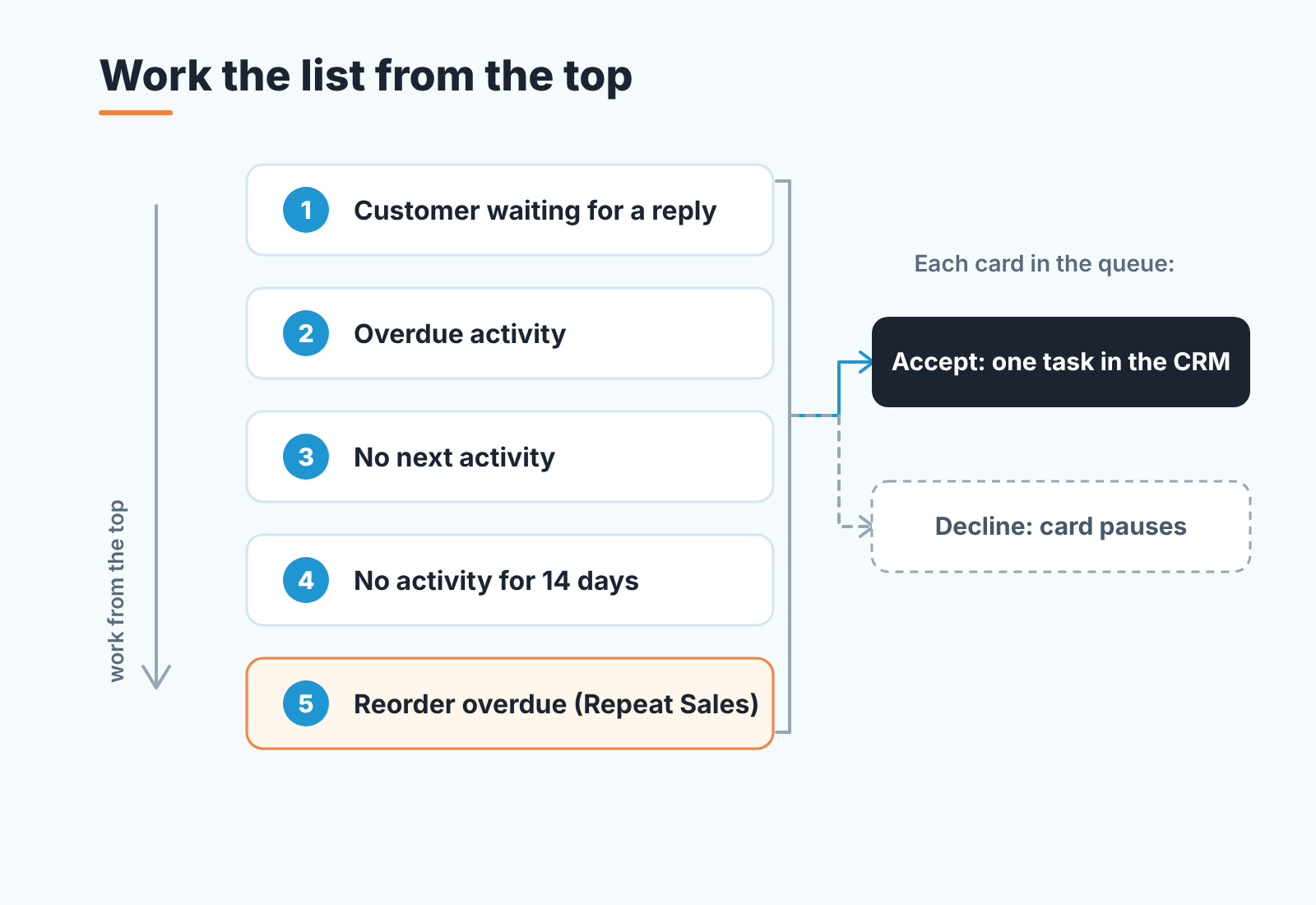
Four CRM signals show which deal needs a follow-up email today: the customer is waiting for your reply, an activity is overdue, there is no next activity, or nothing has happened for 14 days. Work them in that order. All four are visible in any CRM with a next-activity field and an activity log.
The customer is waiting for a reply. The last message in the thread is theirs, and it has a question in it. This is the warmest item on your desk, and the pipeline view hides it, because a pipeline shows deals and leaves the threads out. If your email is synced to the CRM, you can see it on the deal; if it is not, your inbox is the only place it lives.
An overdue activity. Someone, probably you, committed to a date, and the date passed. The deal may still be moving, and your own promise has slipped. Filter open deals where the next activity date is before today.
No next activity at all. The deal is open and nobody has committed to a date, so nothing will remind anyone about it until the stage report at the end of the month. Filter: open deals, next activity date empty. On most teams this list is the longest of the four, and the most embarrassing.
No activity for 14 days. No logged call, email or meeting in two weeks. Some of these are fine (the buyer said “after the board meeting”). Most are a deal going cold without anyone noticing.
The last three are rules in Deal Health, which checks every deal in the connected CRM against more than 20 of them; the full list and the score are in what a deal health score is and how it works. You do not need the product for these three, though. Three saved filters in the CRM get you there, and a next-task report for the owner shows the manual version a manager can run weekly.
Most follow-up advice is written as if every follow-up is a nudge to someone who has gone quiet, and so it dwells on cadence and tone. We disagree with that emphasis. The follow-up most likely to move a deal today is the reply you owe to someone who already wrote to you, which is why that signal sits first in the list above. “Customer waiting for a reply” became its own signal when we built the queue in Sales GPS, because in a pipeline report it looks identical to “no activity” even though the customer is the one waiting.
Late customers: the reorder reminder
The fifth template has no deal behind it, so none of the four filters above will ever surface it. It’s trigger is a buying pattern.
Every customer who has bought at least twice has a buying cycle: the median number of days between their won deals. Divide the days since their last purchase by that cycle. Below one, they are on track. Past one, they are overdue. Past two, they are probably leaving. Those are the default thresholds in Repeat Sales, and both can be changed. A customer who is overdue but already has an open deal and recent contact shows as “in work” rather than overdue, so you do not email someone your colleague called yesterday.
The “running low” email is for the overdue group. A customer past twice their cycle has usually made a decision, and an email that assumes they just forgot will read as if you have not noticed. That one is a call, and it opens with a question. The mechanics and thresholds are in customer retention through late-reorder detection.
How Sales GPS lists them with the reason, and what “accept” does
A disclosure, since we are at the tooling question. We build SalesBond, a sales management layer on top of the CRM a team already uses; we started with Pipedrive. The part that answers “who do I write to today” is Sales GPS.
It collects the signals from this article into one queue. Deal Health violations (no next activity, overdue activity, no activity for 14 days, and the rest of the rule set), the “customer is waiting for a reply” signal, and the customer cards from Repeat Sales (overdue, leaving) land in the same list. Each item gets a priority from 0 to 100 and, next to the number, the reason it ranks where it does: which signal fired, how much the deal is worth relative to the rest of the pipeline, how urgent it is. The reason is written out from the rules, so two reps looking at the same card see the same explanation. The weights are in the prioritization matrix for deals, leads and customers.
Two things keep the queue from turning into noise. If a task for the same deal already exists in the CRM, the card is not created again; the queue checks your existing tasks first. And if three signals fire on one customer (an overdue reorder, an unanswered question, a stale deal), they merge into one card. The default board shows 15 items a day.
Then the part we would not automate. The rep reads the card and accepts or declines it. Accept creates exactly one task in the CRM, on the deal or contact it came from, and that is where it ends. Nothing is created in the CRM without that click, and SalesBond never writes to customers itself. Decline pauses the card, so it does not come back tomorrow with the same reason. SalesBond works with Pipedrive, HubSpot, Salesforce, Zoho CRM, Microsoft Dynamics 365, Freshsales, Close, monday CRM, Copper, Zendesk Sell, Nutshell, Insightly, Attio, Bitrix24 and Kommo (amoCRM).
Want to know how many of your open deals have no next activity right now, before you set anything up? The free CRM audit answers that. SalesBond reads the last 30 days of your connected CRM and sends a PDF report: money at risk, a CRM score, deal health, the pipeline bottleneck, repeat customers, the top-10 clients and what to fix first. Seven days later a second PDF shows what changed. Check your CRM with SalesBond.
Which follow-ups a sequence can send
A timer-driven sequence is fine for a missed call or a voicemail. After a real meeting the buyer can tell a sequence step, and no sequence knows which line of the proposal they hesitated on (follow-up after a proposal has the longer argument). For tomorrow morning that means pulling the four lists and writing the first email by hand to whoever is waiting for your answer.
If you would rather see the queue on your own data than build the filters: Start with SalesBond.