

Quick answer
Time blocking is planning your day so that every window in the calendar has one task or one type of work assigned to it. For a business owner who also runs sales, or for a sales manager, the point is narrower than “be more productive”: it keeps selling, pipeline review and coaching from being pushed out by whatever meeting lands next. Those three jobs have no deadline of their own, so without a block they lose to anything that does.
The version that works for a manager is six block types, placed once for the whole week, with one rule: a block is defended the same way a customer meeting would be. Below is the template, the order to place blocks in, what breaks the plan, and how to see in the CRM whether the calendar is doing anything at all.
Time blocking vs timeboxing and day theming
Time blocking is a way of planning where the day is divided into blocks, each reserved for a single task or a group of related tasks. That is monday.com’s definition, and it is the standard one (monday.com, time blocking step by step). The same guide lists six variants: traditional blocking, task batching, day theming, timeboxing, energy management and Pomodoro (25 minutes of work, 5 of break).
Two of those get confused with the base method, and the difference matters for a manager.
Timeboxing gives every task its own start and end. Time blocking gives one block to a group of similar tasks (Asana, what is time blocking). A manager’s work doesn’t arrive as discrete tasks with known lengths. It arrives as “deal review” or “calls to the three accounts that went quiet”. So you block the type of work and let the contents of the block change from week to week.
Day theming assigns a whole day to one kind of work. We think it fails for an owner for a plain reason: customers don’t know Wednesday is your admin day. A sales manager needs the same block types every day or every other day.
Energy management (hard work when you are sharpest) is worth borrowing as a placement rule. Pomodoro belongs inside a deep-work block and stays off the calendar.
Why this is harder for a sales manager than for anyone else
Asana’s guide is honest about its own limit: when a calendar is already packed with meetings, time blocking “won’t be effective” (Asana). That is a sales manager’s calendar on a normal Tuesday. The guides at the top of the search results are written for someone who controls most of their day. An owner controls perhaps a third of it.
Your blocks compete with other people’s needs. A rep can mark two hours as focus time and lose nothing. A manager who marks two hours loses the slot a customer or the accountant wanted. The cost of a protected block is visible today. The cost of not having one shows up weeks later as a pipeline nobody reviewed.
What a protected block costs is the opportunity cost of the next best use of that hour.
Your most valuable work has no owner but you. Pipeline review, coaching, looking at the numbers: nobody will send you a meeting invite for these. If they are not in the calendar as blocks, they are done in the gaps, which means badly or not at all. We wrote about the jobs an owner cannot hand off in the four jobs and the one weekly hour; each of them needs a block. To decide what else deserves one, sort the week with the Eisenhower matrix first, and give every block an end time, because a block with no end in sight tends to swell, and Parkinson’s law for a sales team explains why a short task takes the whole afternoon.
Interruptions are part of the job. monday.com’s guide puts the cost at roughly 23 minutes to get concentration back after an interruption, and says rapid switching between tasks can reduce output by up to 40%, citing a UC Irvine study and the APA (monday.com). We tried to open both sources and couldn’t, so these are monday.com’s figures, unchecked by us; read them as an order of magnitude. The direction is right, though, and a manager is interrupted more than anyone, because being interruptible is part of what the team pays you for. The answer is a buffer block that absorbs them.
A time blocking template for the owner’s week
Six block types. Here is the template we recommend. The durations are a starting point to adjust. The shape matters more than the minutes.
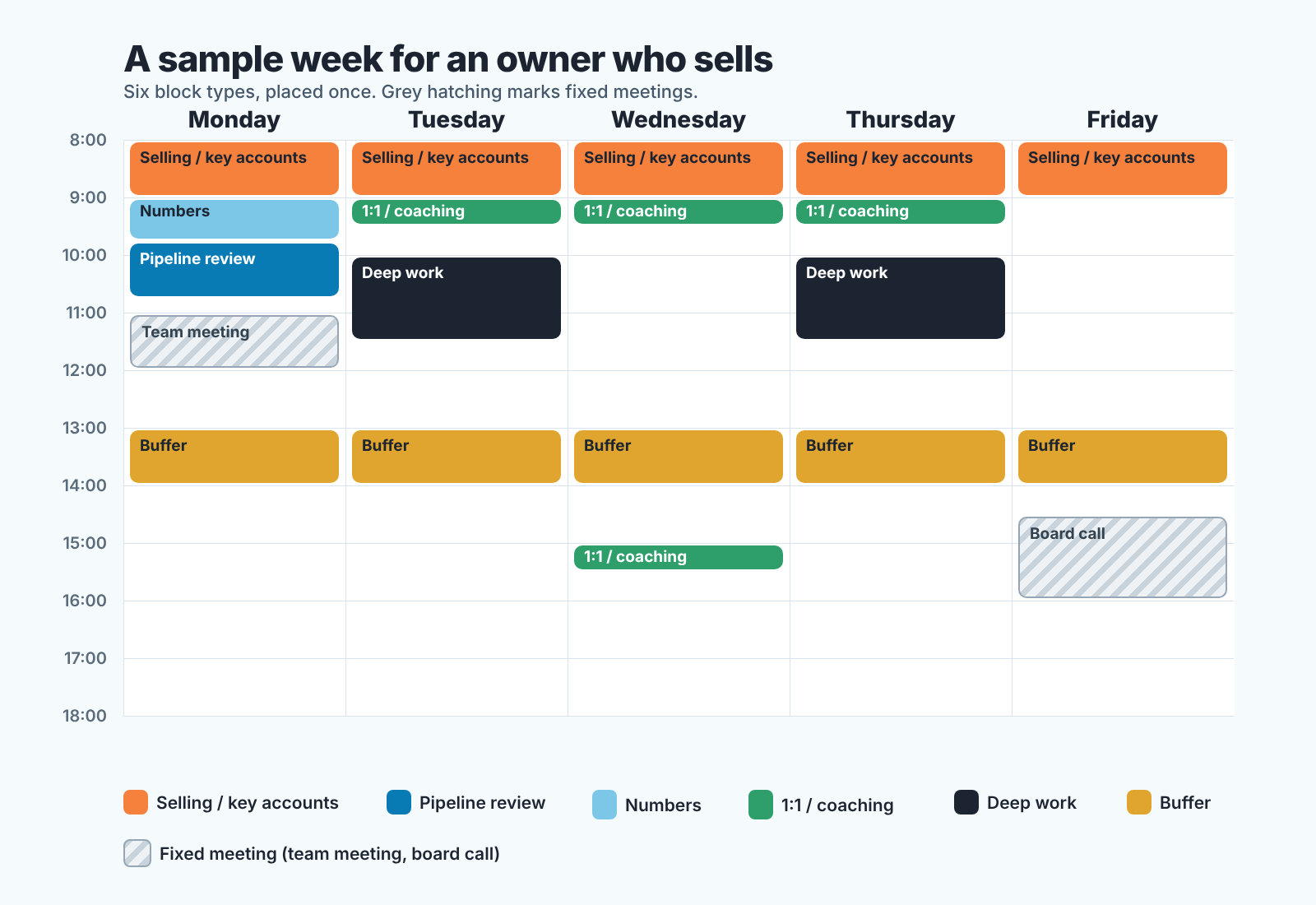
| Block | What goes in it | How often | Protected from meetings? |
|---|---|---|---|
| Selling and key accounts | Your own deals, the accounts only you can hold, calls that need the owner on the line | Daily, 60 to 90 minutes | Yes, like a customer meeting |
| Pipeline review | Every open deal above a threshold, deals with no next step, deals past their close date | Weekly, 60 minutes, plus a 15-minute daily scan | Yes |
| 1:1s and coaching | One rep per slot, their deals open on screen, one skill per session | Weekly per rep, 30 minutes | Yes; only the rep may move it |
| Numbers | Plan against actual, activity counts, conversion by stage, what the dashboard says and why | Weekly, 30 to 45 minutes, right before the pipeline review | Yes |
| Deep work | Pricing, hiring, the proposal nobody else can write, the process you keep postponing | Two or three times a week, 90 minutes | Yes, and the hardest to keep |
| Buffer | Fires, questions from the team, the call that came in, the reply you promised | Daily, 45 to 60 minutes, after lunch | No. This is where new meetings land first |
A few notes on the table.
Numbers and pipeline review are two separate blocks. Numbers tell you where to look; the pipeline review is where you look. Put numbers first and the review on the same day, so the review opens with a question (“why did stage-three conversion drop”) instead of a scroll through every deal. The team-facing version of this, the meetings themselves, is in sales meeting cadence for a small team. The blocks here are your own preparation for those meetings.
The buffer is the block that makes the others possible. Without it, the first fire of the day lands in your selling block. With it you have an honest answer to “can we talk today”: yes, at two.
Coaching gets a block per rep, and the rep can move it. You can’t. That single rule keeps 1:1s alive past the second month, because the person who cancels them is almost never the the rep.
Placing the blocks: fixed things first, then the buffer, then the rest
monday.com’s six steps are prioritize, estimate durations, pick a tool, build a weekly template, add buffers, review weekly (monday.com). The order we use for a manager differs in one place: fixed commitments go in before anything else, because a manager’s calendar is mostly things they did not choose.
Start with what is already fixed. The team meeting, the Monday stand-up, the board call, the school pickup. Put them in first; they are the walls of the week. Then look at the gaps left and be honest about which are real. A 40-minute gap between two meetings is not a deep-work block.
Next, place the buffer. Same time every day, ideally the hour after lunch, when energy is lowest anyway. Doing this second is the whole trick. Added last, the buffer ends up at five in the afternoon, where it is useless.
Then selling. Put it where you are sharpest, usually the first hour and a half of the day, before the inbox has opinions. If you do only one thing from this article, do this.
Then the weekly pair: numbers, then pipeline review, on a day when the data is fresh. We like Monday morning or Friday afternoon, depending on whether your team updates the CRM before the weekend or after it .
Then 1:1s, one per rep, spread across the week so you are not coaching four people in one afternoon.
Deep work goes into what remains, in the largest gaps you can find, 90 minutes or longer. If nothing that size is left, that is a finding in itself: the week has no room for the work only you can do. The fix is in delegation for a sales manager. A cleverer calendar will not find the time.
Last, label the blocks in the shared calendar. Asana’s point about naming a block “Focus time” is that colleagues can see which slots are open for meetings (Asana). For a manager we would go one step further and name the block for what it is. “Pipeline review, Thursday 10:00” on a calendar the team can see tells every rep when deals without a next step will be looked at, and the CRM gets updated on Wednesday evening as a result.
Building the template is one sitting with last month’s calendar open. Making it stick is the Friday reviews in the weeks after.
What breaks the plan, and how to get it back
The plan will break. Nobody’s week-three calendar looks like their week-one template, so the useful question is what to do when it has happened.
The most common break is that meetings take the buffer first and then, once the buffer is gone, the selling block. The fix is the block rule, said out loud: “I have a commitment then, can we do two o’clock?” Say it exactly like that. Nobody needs to know what the commitment is, and you don’t owe them the details.
The second break is skipping the pipeline review because “nothing changed”. Something always changed. What you mean is that you don’t know what changed, and that is the reason to hold the review.
The third is the deep-work block filling with small tasks. Keep the list of what that block is for somewhere other than the calendar, so when teh block starts you are not deciding what to do with it.
The fourth is coaching slots turning into deal reviews. The rep brings a stuck deal, you solve it together, the half hour is gone, and nothing was coached. The rule from the table holds: deals open on screen, one skill on the agenda, with the deal serving as the example for that skill.
And then there is the honest case: there is no room, and no amount of placement creates it. If the owner is the only person who can quote, approve a discount and answer a support question, the calendar will be full of quoting, approving and answering. That is a question of what should leave your desk. Settle the order of everything on your plate with prioritization for an owner or sales manager first; for the deals themselves, the prioritization matrix for deals, leads and customers is how we decide what you keep.
Whatever broke, the repair is the same: monday.com’s sixth step, the weekly review. Fifteen minutes on Friday, inside the buffer. Which blocks held, which moved, which moved three weeks running and should move permanently. Rebuild the template from what held.
How to tell it is working: look in the CRM, not the calendar
Time blocking works when the CRM changes: fewer deals without a next step, fewer slipped close dates, steady activity on the deals you own. A full calendar proves nothing. The calendar is the input. The output shows up in the CRM, in a few specific places, and the way to check is to compare your team’s month before blocking with the month after. We are not going to give you benchmark numbers, because we don’t have sourced ones for your team size, and a made-up target would do more harm than none.
Deals with no next activity scheduled. This is the count the pipeline review block exists to drive down, because that is where those deals get found and given a step. If it is the same after a month of “reviews”, the reviews are not happening or are not reaching the deals.
Deals past their expected close date, and how long they sat before anyone touched them. A close date that slips quietly is the symptom of a manager who is not looking. With a weekly review the slip gets caught in the first week.
Activities logged on the deals you own. Your selling block should be visible here as calls, emails and meetings on your own accounts at roughly the same time every day. If your own deals show no activity, the selling block is being eaten, whatever the calendar says.
The thing you coached. Say your 1:1 with a rep, Maria, was about following up after the proposal, Maria’s deals at the proposal stage should show more follow-up activities over the next two weeks. One skill, one field to watch. Coaching that leaves no trace in the CRM probably didn’t land.
Getting the “before” picture means building four or five reports by hand. If you would rather not, SalesBond’s free CRM audit does it: it reads the last 30 days of the connected CRM and sends a PDF with money at risk, deal health, the pipeline bottleneck and what to fix, then a second PDF seven days later showing what has changed. Run it the week before you start blocking and you have a baseline. Check your CRM with SalesBond. We build it, so read that as the disclosure it is.
FAQ
How much time should a sales manager block for selling? Enough that your own deals show activity every working day. The template starts at 60 to 90 minutes each morning, about the smallest block that fits a real call and the notes after it. Below that, selling becomes something you do between other things, which is the problem the block was meant to fix.
How do I time block in Google Calendar? Create each block as a recurring event, so the week is built once and repeats. Give every block its real name and leave it visible to the team: “Pipeline review” tells reps when their deals will be read, while “Busy” gets booked over by the first person who assumes it is flexible. The buffer is the one block people should feel free to book into.
Time blocking or timeboxing for a manager? Blocking. Timeboxing needs a known list of tasks with known lengths, and a manager’s week rarely has one. Blocking the type of work and letting the contents vary survives contact with a real Tuesday. Timeboxing still helps inside a block: 20 minutes for the numbers, 40 for the deals.
What if I am the owner and the only salesperson? Then the selling block is most of your morning and the coaching block disappears, but pipeline review and numbers stay. They are the only time you look at your pipeline as a manager rather than as the person working it, and that is the view that catches the deal you have been avoiding.


