
Problem solving is a process: name the problem precisely, measure it, find the cause, list options, pick one with an owner and a date, check the result. For a sales manager each of those steps leans on CRM data. The order matters more than any single technique in it, because most bad decisions in sales management are good solutions to a problem nobody measured.
Below, the six steps once in general, then once on a concrete case: demo-to-proposal conversion dropped. If you manage a small team and your CRM already has stages, activities and lost reasons filled in, you have everything the process needs.
What problem solving actually is
Our working definition: problem solving is the work between “something is wrong” and “someone is doing something about it on a date”. Not the fix itself. The route to it.
For a manager that route is most of the job. Reps bring problems up all week; the manager’s part is to turn each one into something measured, owned and checked, instead of a reaction to whoever spoke last.
MIT Sloan Executive Education describes a problem-solving method as a structured approach that moves leaders from ambiguity to insight and then to action, and lists reducing the impact of cognitive bias and introducing repeatable processes among its benefits (MIT Sloan Executive Education: Problem-solving methods). That is the honest reason a sales manager needs one, since the first idea usually arrives before the data does, and with a lot of confidence.
The frameworks differ mostly in how many boxes they draw. IMD’s version has three: frame the problem as one key question, explore alternatives, decide (IMD: There is no one-size-fits-all way to solving problems). The University of Florida’s leadership toolkit uses four, adapted from Gordon Lawrence’s Zig-Zag model: gather facts, brainstorm, apply logic, consider the impact on people (University of Florida HR: Problem solving job aid). Intoo’s workplace guide has five, from defining the problem to implementing the solution. We use six, because in sales management “measure” and “find the cause” deserve separate steps. They’re the two a manager skips most often and the two the CRM can do most of the work for.
The problem-solving process in six steps
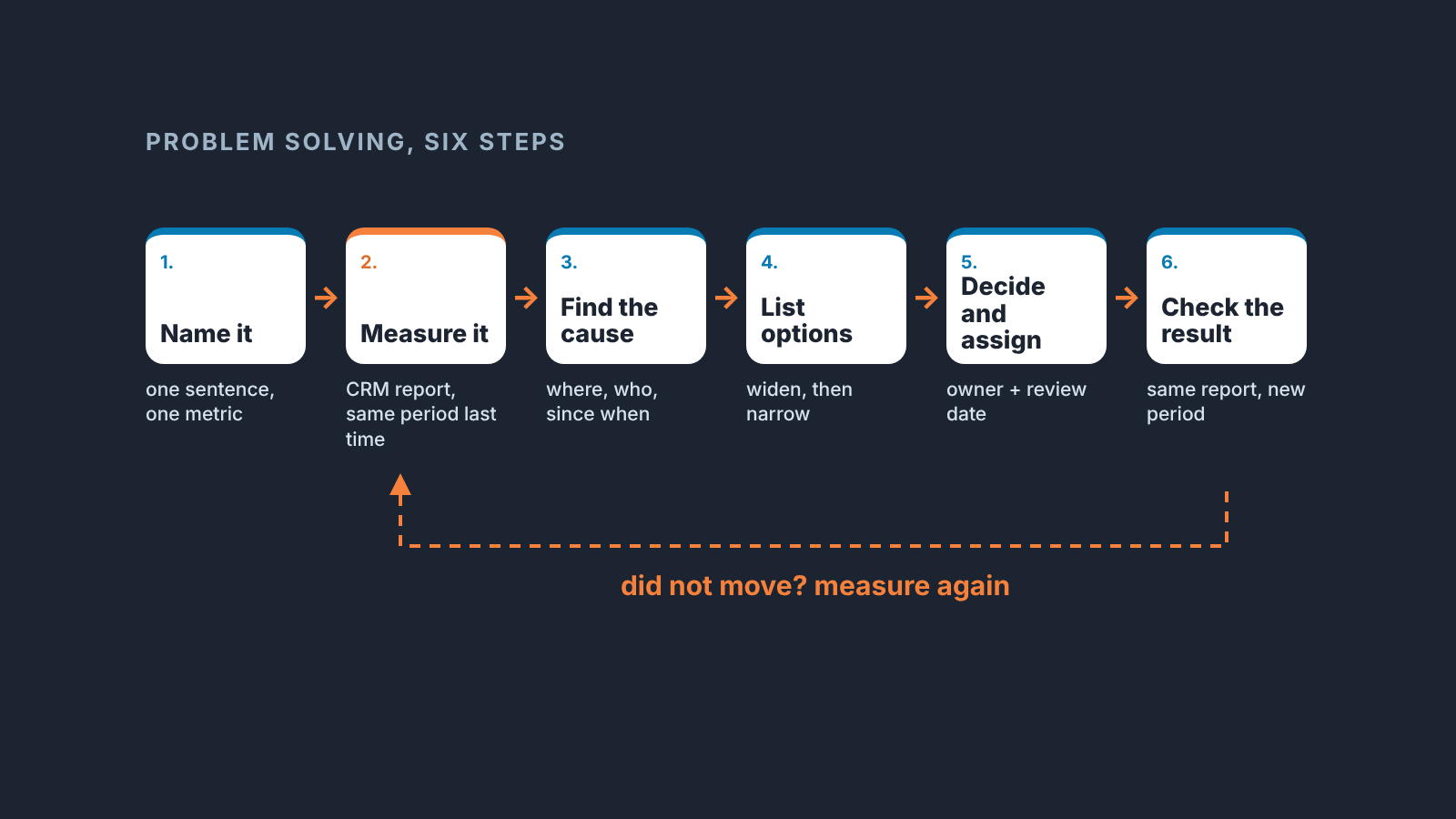
1. Name the problem in one sentence
Smartsheet puts it plainly: the first step in solving a problem is defining it, and then defining where you want to end up (Smartsheet: Creative Problem Solving Techniques). In sales that sentence has a shape we insist on: a metric, a direction, a period. “Demo-to-proposal conversion fell in the last eight weeks” is a problem. “The team isn’t closing” is a mood.
Where to look: the report you were reading when you first felt something was off. Copy the metric from its header, word for word.
2. Measure it
Pull the number from the CRM, and pull the same number for the previous comparable period. Two readings, same definition. Until you have both you do not know whether you have a problem or a bad week.
Where to look: the stage conversion report, filtered by deal creation date and run twice, once per period. If you are on Pipedrive, our walkthrough of stage conversion rates in Pipedrive shows where that report lives.
3. Find the cause
Where in the pipeline, which reps, which deal types, since when. The cause is almost never “the team”. It is a stage, a segment or a change in the market that happened on a date.
Where to look: the same report grouped by owner, then by source, plus a list of stalled deals sorted by the date they entered the stage. The by-owner cut is the one that tells you whether this is a rep problem or a pipeline problem.
4. List options before choosing one
MIT Sloan separates divergent thinking, which expands the field of possibilities, from convergent thinking, which narrows the choices through structured analysis and clear criteria (MIT Sloan Executive Education). Do them in that order and don’t mix them. A manager who judges each idea the moment it is spoken gets a short list. One who writes everything down for ten minutes and judges afterwards gets a long one, and usually one of the ideas is cheap.
Where to look: not a report. Lost reasons and deal notes on the stalled deals are the best raw material. When the list is long, a simple weighted decision matrix does the narrowing without a debate.
5. Decide, and give it an owner and a date
Workhuman’s version of the process breaks the chosen solution into smaller steps, assigns ownership and sets deadlines (Workhuman: Effective Problem-Solving Techniques). We’d add one more date, the review date, because an action nobody re-checks is a wish.
How long should getting this far take? Naming, measuring and finding the cause fit in one working session with the CRM open. Options and the decision are a short meeting. Only the check takes weeks, because it waits for the stage to fill with new deals.
6. Check the result with the same measurement
The report from step 2, run again on the new period with the same filter. If the number moved, close the problem. If it did not, go back to step 3, not to step 1. The problem is still well named; the cause was wrong.
Worked example: demo-to-proposal conversion dropped
Here is how the six steps look on an ordinary Tuesday. The team, the campaign and the readings below are made up for the example; the shape of the reasoning is the part to copy.
The head of sales notices that proposals are not going out the way they used to. The tempting sentence is “reps are slow after demos”. The useful one is “the share of deals that move from Demo to Proposal sent within fourteen days has dropped since September”. Metric, direction, period. She writes it down, because the written version is the one she will check against at the end.
Then she measures. She opens the stage conversion report for Demo to Proposal, filters to deals created in the last eight weeks and reads the number, then runs the same report for the eight weeks before that. The recent reading is clearly lower, the kind of gap you see without a calculator. That’s worth a manager’s week. Had the two readings been within a deal or two of each other, she would have stopped there, set a reminder to re-check in a month and gone back to coaching.
The cause takes three cuts of the same data. By rep: did everyone drop, or one person? By source: are the demos that stall coming from a new lead source? By date: did the drop start on a Monday when something else changed, a price list, a new SDR, a new demo script? Here the drop is shared by all three reps, it started the week a new inbound campaign launched, and the stalled deals are almost all from that campaign. So the cause sits with demos booked for leads who were not ready for one.
Options get ten minutes, no judging. Qualify harder before the demo. Add a short discovery call. Shorten the demo for that campaign. Pause the campaign. Turn the proposal into a one-page summary. Have the SDR sit in. Move the campaign’s deals to a separate pipeline so they stop muddying the number. Only then does she narrow, on three things: cost to try, time to see a result, effect on lead volume.
The decision: a fifteen-minute discovery call before any demo booked from that campaign. Owner, the SDR lead. Review date, four weeks out. It goes into the CRM as a task on the owner with the review date as the due date, and the decision itself is written up in one paragraph wherever the team keeps decisions.
Four weeks later she runs the same report with the same filter on the new period. The campaign’s conversion is back near where it was before the drop, or it isn’t. Either way she knows, and either way she has learned something about that campaign.
Notice what did not happen. Nobody ran a “closing skills” training. Nobody changed the comp plan. Nobody emailed the team about urgency. All three are common first reactions to a drop like this, and all three would have missed the cause.
Which CRM report answers each step
- Name: the header of the report where you first noticed the drop.
- Measure: the stage conversion report, filtered by deal creation date and run for two periods.
- Find the cause: the same report grouped by owner, then by source, plus stalled deals sorted by stage entry date.
- List options: lost reasons and deal notes on the stalled deals.
- Decide: a task in the CRM on the owner, due on the review date.
- Check: the report from step 2, same filter, new period.
Every CRM we have worked with has some version of these reports. The names differ; the questions do not. Two things are worth saying about them anyway.
The cause step only works if stage entry dates and lost reasons are actually filled in. If they are not, the first problem to solve is CRM hygiene, and the weekly checks in our article on what a sales manager checks in the CRM each week are the place to start.
And a disclosure, since this is the step we built a product around. We build SalesBond, a sales management layer on top of the CRM a team already uses; we started with Pipedrive. Deal Health checks every deal in the connected CRM against a set of rules and shows the specific violations, which gives you much of the stalled-deal list for the cause step without building filters. If you’d like the measure step done for you once, the free CRM audit looks at the last 30 days of your CRM and sends a PDF with the pipeline bottleneck and what to fix, then a second PDF a week later with what changed. Check your CRM with SalesBond. The process works fine with the reports you already have, too.
Owner and review date: the task in the CRM
The owner is one person who can change the cause; the review date is when you re-read the number. Managers nod at both and then skip them, so a few concrete rules.
One person, not “the team” and not “sales and marketing”. If two people own a fix, each assumes the other is on it. Pick the person who can actually change the thing: in the example above that is the SDR lead, even though a rep noticed the problem.
The review date is the date you look at the number, which comes weeks after the fix starts. The discovery call starts on Monday; the number gets reviewed in four weeks because that is how long the stage takes to fill with new deals. Put the review date in your own calendar and a task on the owner with the same date.
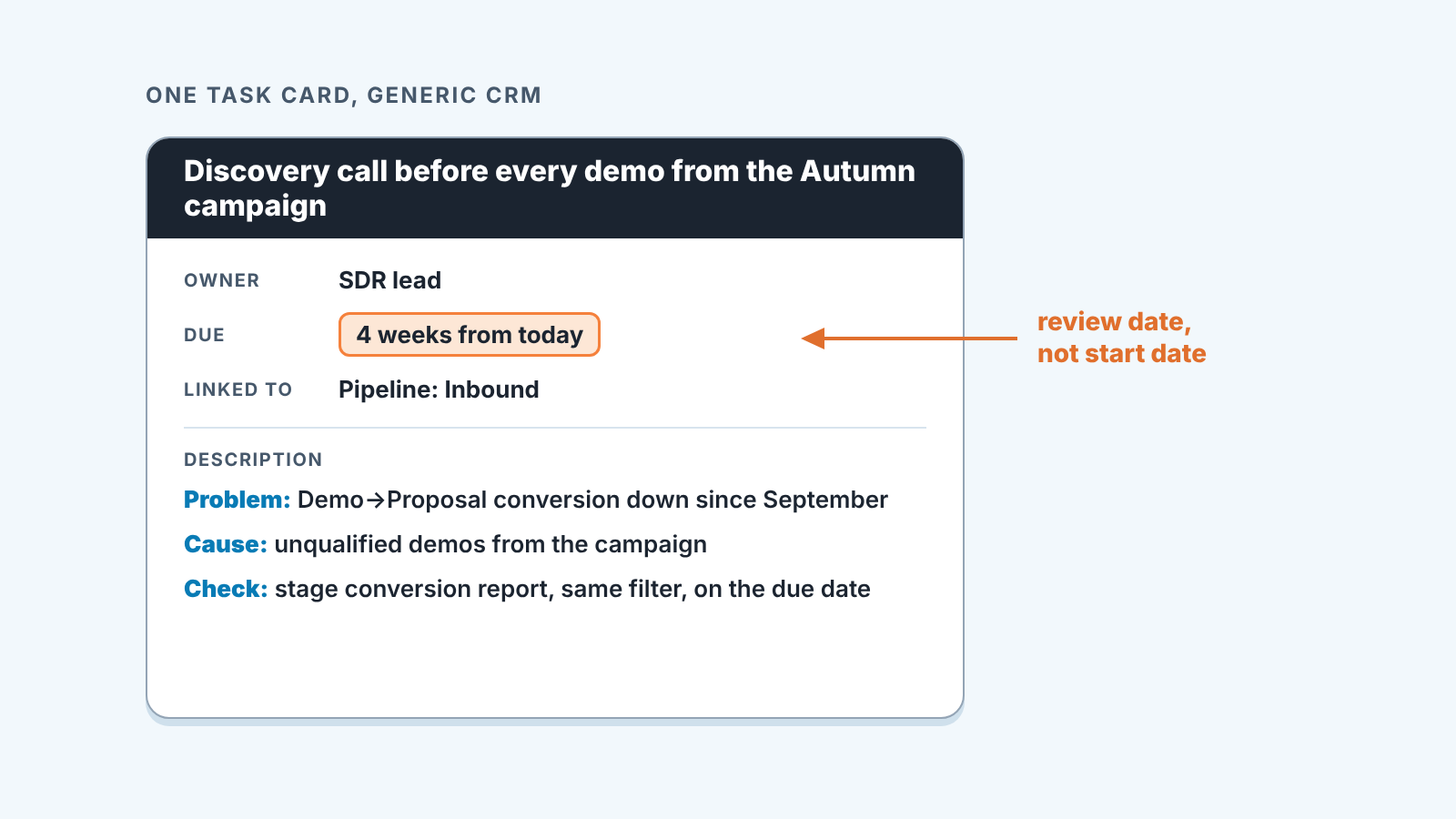
Write the problem sentence, the cause and the check into the task description. Four weeks from now you will not remember why this task exists, and neither will the owner.
One task per problem. If the fix has five actions the owner can break it down. The manager tracks one thing: did the number move by the review date.
Common mistakes, and the one that causes the rest
Intoo’s advice for solving problems at work comes down to resisting the urge to jump straight into solution mode (Intoo: How Do You Solve Problems in the Workplace?). Every other mistake here is a version of that one.
Treating the first sentence as the problem. “Reps are slow” is a judgment about people dressed up as a problem statement. Rewrite it with a metric before doing anything else.
Measuring once. One reading is just a number; a trend needs two. The second reading from the previous period is what turns it into a problem or dismisses it.
Diagnosing on thin data. A pipeline with no stage dates and no lost reasons can’t be diagnosed, only argued about. Then the thin data is the problem, and it comes first: fix the fields, wait a cycle, come back to the original question with something to read.
Solving for the loudest rep. The person who raises the issue is often the one it hurts most, which is not the same as the one its about. Cut the data by owner before deciding whose problem it is.
Firefighting. A pipeline meeting where the manager rescues a handful of deals by hand feels productive. It also leaves the cause in place, and next week there is a new handful. Rescue a deal by hand only when the problem really is that one deal.
Holding on to a problem you don’t control. When the cause sits in pricing, product or a marketing campaign you don’t run, escalate. The process still applies, you just arrive at the owner’s desk with a problem sentence, two measurements and a cause instead of a complaint. That conversation goes very differently.
Reviewing the fix instead of the number. “Did the SDR start doing discovery calls?” is a compliance question. “Did conversion move?” is the question. A fix that was done and did not move the number points to a wrong cause, and that is useful to know.
Where root cause analysis fits
Step three is a whole discipline of its own, and we wrote it up separately: root cause analysis for lost deals, with the five whys. Ask why until the answer is something you can change on a date, and stop when it turns into a statement about human nature.
If the stalled stage is late in the pipeline rather than early, two other reads help. A win-loss analysis for a small team is the right tool when the problem sentence is about deals lost at proposal or negotiation. And if the cause turns out to sit with one rep after all, the fix is a coaching plan; our guide to sales coaching covers how to run that without turning the one-to-one into a performance review.
The best problems to solve are the ones you catch early. That’s what a dashboard is for, and we settled on six numbers for a sales manager’s dashboard, with stage conversion among them for exactly this reason.
So here is the next step. Pick the one number that has been bothering you this month, write it as a sentence with a metric, a direction and a period, and run the report twice. You will know by the end of the the afternoon whether you have a problem worth the other four steps.


