
A small sales team needs fewer sales tools than the top lists suggest. Start with a CRM as the single record of deals, then add a tool only when it removes a task a rep repeats every day, and only if its activity writes back to the CRM. If a tool’s data never reaches the deal record, who on your team is going to read it?
What does that look like for three to ten reps? Three or four reps who mostly work inbound leads can get a long way with a CRM and a way to send quotes for signature. A team that does outbound every day adds sales engagement. If you sell on the phone, add call recording once the manager actually has time to listen. Enrichment and separate reporting come last, and plenty of teams this size never need the second one.
We don’t rank products here. The lists for this search already do that, and each one sorts the market its own way: as of November 2026, Zapier’s roundup picks eight tools by job, from AI orchestration and integrated sales and marketing to budget-friendly CRM, AI lead enrichment and social media sales automation. None of those headings tells a manager with five reps how many of the eight to buy.
What counts as a sales tool
Salesforce defines sales tools as “types of software designed to make sales teams more efficient and effective at selling” and, as of November 2026, lists seven kinds: CRM software, AI-powered tools, sales engagement tools, collaboration tools, sales enablement tools, performance and territory management tools, and sales analytics tools (Salesforce).
That’s wide enough to include your chat app. For a small team we’d narrow it to software a rep or a sales manager opens to move a deal or to see where deals stand. The CRM is the base. After a rep uses any other tool, does the deal record in the CRM know what happened?
If it doesn’t, the manager now has two places to look before every pipeline review.
Six types of sales tools and the job each one does
Vainu’s guide splits the market into 15 categories as of November 2026, from sales intelligence and CPQ to compensation management. For three to ten reps, six types cover almost everything worth paying for: CRM, sales engagement, calls and conversation intelligence, data enrichment, quotes and e-signature, and reporting. The product names below are examples as of November 2026, listed in no particular order and without scores, so you can tell what sits in each of the six categories.
Start with the CRM. It holds deals, contacts, stages, amounts and close dates (plus owners, if you’ve set them up properly), and it’s where the pipeline review happens. Pipedrive, HubSpot, Zoho CRM and Salesforce are examples, and all four appear among the eight picks in Zapier’s roundup. If you’re still choosing, we sorted CRMs by job in CRM tools for a sales team and won’t repeat that here.
Sales engagement runs sequences, meaning a planned series of emails, calls and tasks for each prospect, so a rep doesn’t keep the follow-up schedule in their head. Salesloft and Outreach are two examples. It pays off once reps contact dozens of new people a week. Our piece on what a sales engagement platform writes to the CRM walks through one vendor in detail.
Calls and conversation intelligence covers a dialer, call recording, and transcripts with summaries (Aircall on the phone side, Gong on the analysis side). It saves the rep from typing call notes. It also lets a manager review a call without sitting in on it.
Data enrichment fills in company size, industry, job titles and contact details on a lead. Clay and Apollo.io do this. Picture the rep who looks up every new lead by hand before the first email; that’s who it’s for.
Quotes and e-signature tools produce the proposal, send it, and tell you when it was opened and signed. DocuSign and Dropbox Sign are examples.
Reporting means dashboards beyond the CRM’s own, up to a BI tool such as Microsoft Power BI or Looker Studio that joins CRM data with billing or marketing data. Most of what a head of sales asks on Monday is answered by built-in CRM reports; we drew that line in business intelligence tools for a sales team.
Where do AI tools go? Into whichever of the six jobs they do. An AI note-taker is a call tool. An AI email writer is an engagement tool. Salesforce’s list gives “AI-powered tools” a slot of their own, and we’d push back on that for a small team: treat AI as a seventh category and you can end up paying for three products that all summarise calls.
What each category should write to the CRM
Before a demo, ask the vendor one thing: “Show me the deal record after a rep has used your product.” What you want to see is in the middle column.
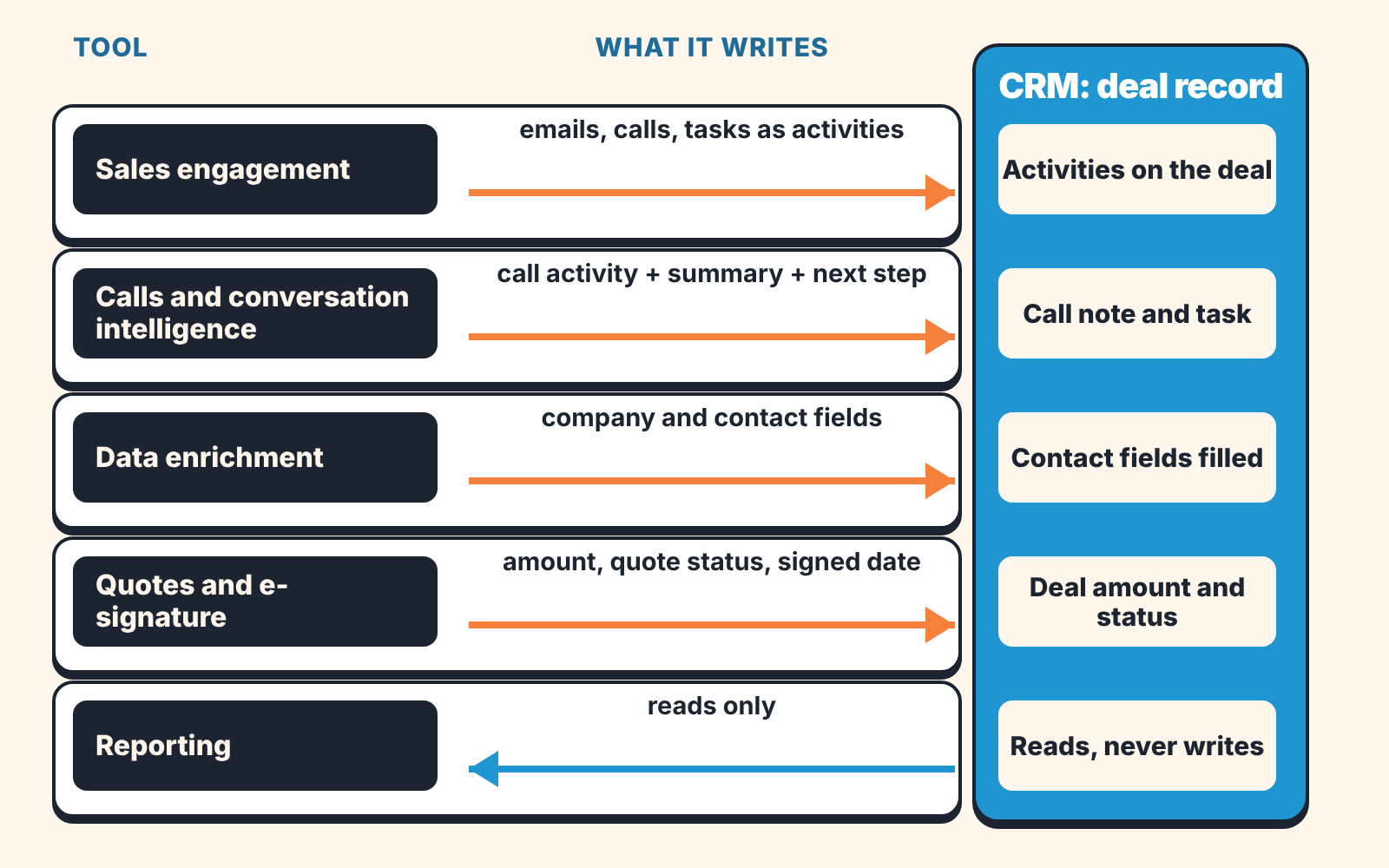
| Category | What should land in the CRM | What usually stays outside |
|---|---|---|
| CRM | Deals, stages, amounts, close dates, owners. It is the record. | Nothing, by design |
| Sales engagement | Each email, call and task as an activity on the contact and the deal; reply and meeting-booked status | Sequence step history, template performance, A/B results |
| Calls and conversation intelligence | A call activity with duration and outcome, a short summary in the note, the next step as a task | Full recordings and transcripts, talk-time analytics, scorecards |
| Data enrichment | Company and contact fields (size, industry, title, phone), with the date they were filled | The vendor’s wider database and its buying-intent signals |
| Quotes and e-signature | Deal amount, quote status (sent, viewed, signed), the signed document attached, the signed date | Document version history, per-page view analytics |
| Reporting | Nothing. It reads the CRM. | Dashboards and the calculated metrics behind them |
The right-hand column is fine where it is. Nobody needs a 40-minute transcript inside a deal note. Trouble starts when something from the middle column stays outside too: the call happened and the deal shows no activity, or the quote went out for a figure that doesn’t match the deal amount.
What a given product syncs, and on which plan, changes often. On the day you buy, read the vendor’s own integration page for your CRM, then test it during the trial with one real deal.
What to buy first, second and third
You’ll often read that a team should cover every stage of the funnel with a tool, so the stack is “complete” from prospecting to renewal. We disagree for teams this size. A complete stack for five reps means six logins, six renewal dates and at least four integrations that someone, usually the head of sales, has to keep alive between deals.
So buy in the order of repeated work.
First, the CRM, and the discipline of using it: every deal has an owner, a stage, an amount, a close date and a next activity. Until that holds, every later tool writes into a mess. Our checklist for picking a CRM by sales job helps if you haven’t chosen yet.
Second, whatever your reps do by hand most often. Ask each rep what they did more than ten times yesterday. “Typed the same follow-up email” points to sales engagement (check first whether your CRM plan already includes sequences and templates). “Wrote up calls” points to call recording with summaries. “Built a proposal in a doc and chased the signature” points to quotes and e-signature. Buy for the most common answer and leave the rest for next quarter.
Third, the tool that fixes a number the manager can’t trust. Lead records with no company size make territory and segment reports useless, for instance, and enrichment fixes exactly that.
Reporting tools go last. They read whatever the first three steps produced.
Before each purchase ask what would break if you switched the tool off in three months. If the honest answer is “nothing, we’d go back to doing it in the CRM”, wait. It’s also worth checking what the CRM already automates; our CRM automation audit for a sales manager and the guide to sales force automation for a small team cover that ground.
Signs you have too many sales tools
Picture the Monday meeting. A rep says they called the customer on Thursday, and the deal’s last activity is twelve days old because the call lives in the dialer. Two reports give two different counts of meetings booked last week, since the calendar tool and the CRM each count their own. Somebody copies phone numbers from the the enrichment tool into the CRM by hand, forty times a week. The same contact turns up in three systems with three different job titles. A tool has exactly one active user, and it’s the person who asked for it. The manager exports to a spreadsheet to get one total. And when an integration stops syncing, can anyone name the person who fixes it?
Any one of these is survivable, two or more usually mean a tool was bought for a feature and nobody decided where its data should live.
A ten-minute audit for the manager
Open a blank sheet with four columns: the tool, who owns it, what it writes to the CRM, and who reads that data. List every subscription the sales team pays for, including the ones on a rep’s own card. Then fill in each row honestly. “Don’t know” is a valid entry, and usually the most useful one.
Here’s a made-up example. Say a five-rep team lists seven subscriptions.
| Tool | Owner | What lands in the CRM | Who reads it |
|---|---|---|---|
| CRM | Head of sales | Everything | Whole team, daily |
| Email sequences | Head of sales | Emails and tasks as activities | Reps, daily |
| Dialer with recording | One senior rep | Call activity, no summary | Manager, sometimes |
| AI note-taker | Don’t know | Nothing | Two reps |
| Enrichment | Marketing | Company fields on new leads | Reps |
| E-signature | Head of sales | Signed PDF, by manual upload | Finance |
| Dashboard tool | Founder | Nothing (reads the CRM) | Founder, monthly |
Three rows need a decision. The dialer and the note-taker overlap, and only the dialer reaches the CRM. So either keep the dialer and turn on its summaries, or connect the note-taker properly and drop the recording add-on. The e-signature tool needs it’s integration switched on, so the signed date stops depending on someone’s memory. And the dashboard tool deserves a conversation with the founder: would a CRM report answer the same monthly question?
That leaves this team with five tools, each with one clear owner.
You can also run the same check from the CRM side. We build SalesBond, a sales management layer on top of the CRM a team already uses. Its free CRM audit looks at the last 30 days of the connected CRM and sends a PDF report covering deal health, the pipeline bottleneck and what to fix; seven days later a second PDF shows what changed. The audit works from CRM data, so if your tools aren’t writing back, you’ll see it as deals with no recent activity that your reps swear they worked last week. Check your CRM with SalesBond.
FAQ
What’s the difference between a CRM and a sales tool?
Every sales team keeps its deals somewhere, and the CRM is that record of deals, contacts and stages. It’s also a sales tool itself, since a sales tool is any software a rep or manager uses to move a deal. For a small team, you’d judge every other tool by what it writes back to that record.
Are free sales tools enough for a small team?
Often, at the start. Free tiers come with limits (users, records, documents per month) and those limits change, so read the vendor’s pricing page on the day you sign up; we quote no prices here for that reason. Then ask the same two questions you’d ask of a paid tool. Does it write to the CRM? Does anyone own it?
Do I need a sales engagement platform?
Probably not yet. You need one when reps run outbound sequences every working day and the CRM’s built-in sequences have become the limit (check your plan, since many CRMs include basic sequences and email templates). A team that follows up on inbound leads and existing customers can usually manage with CRM tasks and templates. How many of last month’s follow-ups went out late?
Where do AI sales tools fit?
Inside the six categories. Judge an AI tool by the job it does and by what it leaves on the deal record. If its summary lands as a note with a next-step task, you’ll use it. If the summary stays in the tool’s own inbox, that’s one more place a manager has to check on Monday.
How many sales tools should a five-rep team have?
There’s no sourced benchmark we’d trust, so we won’t give a number as a rule. The example team above ended on five. A better test is whether the manager can run the whole pipeline review from the CRM without opening anything else; if they can’t, look at which tool is holding the missing data.


