
Salesforce Campaign Influence links an opportunity to the campaigns that helped create it and splits the credit between them. The report is only as honest as two things on the deal: the contact roles on the opportunity and whether those contacts are members of a campaign. If either is missing, the opportunity gets no influence record at all, and the report quietly leaves it out. Marketing owns the campaigns. The sales manager owns the half of the data that makes the link possible, so the check belongs to you, not to the marketing ops admin.
This is written for a head of sales, not a marketer. We skip the attribution models almost entirely. What we cover is what feeds the report from the deal side, a 20-minute check you can run on your own pipeline, and the one rule to agree with marketing so nobody argues about the number later.
What Campaign Influence adds to an opportunity
Think of it as a join table between the opportunity and the campaign, with a percentage on it.
There are two versions, and it helps to know which one your org runs. Campaign Influence 1.0 is the older one, supported only in Salesforce Classic. Customizable Campaign Influence works in Lightning, is on by default for new orgs, and stores each link as a CampaignInfluence record that joins a campaign and an opportunity. Each record carries an Influence (%) and a revenue share. If a Setup search for “campaign influence” shows a Model Settings page, you are on the customizable version (Salesforce Campaign Influence Implementation Guide). The rest of this article assumes that one.
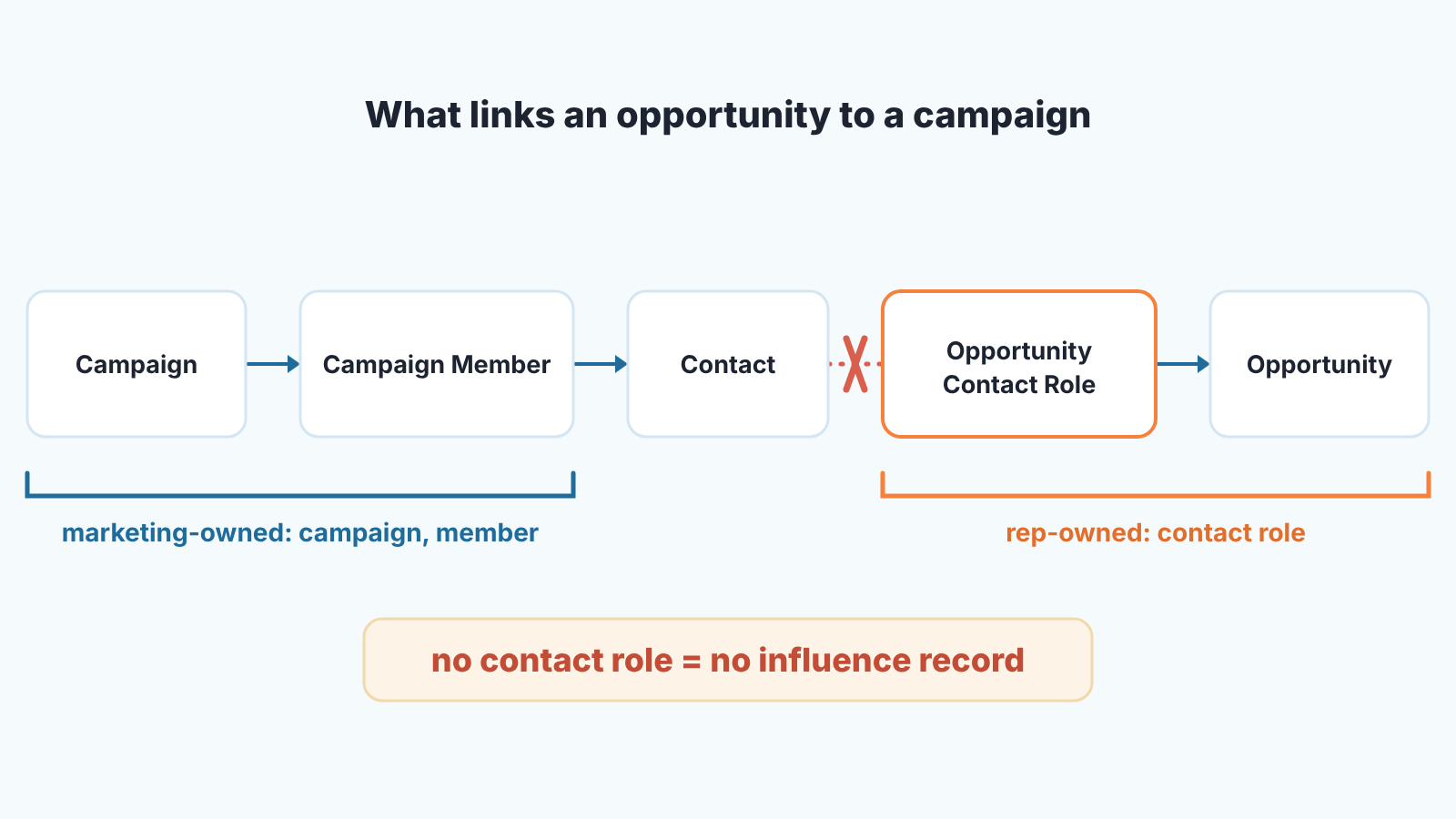
Where does a record come from? Salesforce’s own guide puts it plainly: influence models scan active campaigns for members who also have a contact role on an open opportunity, and create a record from that relationship. Idealist Consulting turns the same idea into a formula worth pinning above your desk: campaign influence = opportunity + opportunity contact role + contact + campaign member + campaign (Idealist Consulting).
The default model, Primary Campaign Source, does something simpler: it gives 100% of the influence to whatever campaign sits in the Primary Campaign Source field on the opportunity. The feature itself is switched on in Setup under Campaign Influence Settings (same guide). Switching it on does not create a single record for a deal without contact roles, though.
Why the related list is empty: contact roles and campaign members
Usually because nobody on the deal is wearing a role. That is the first thing to check, and it’s a rep problem, not a setup problem.
Walk the formula backwards. A campaign member is a lead or contact attached to a campaign; influence only reaches an opportunity through a contact who is both a campaign member and a contact role on that deal. So the list stays empty when there is no contact role on the opportunity, or when the contacts who do have a role were never added to any campaign. A deal that a rep created by hand from an account, typed the amount, picked a close date and never added a contact is invisible to Campaign Influence. It will close won, show up in the pipeline report, and contribute nothing to the marketing number.
The third reason is timing. Marketing can set an auto-association time frame that limits how long a campaign membership counts as influential before the contact lands on an opportunity, and campaign types can be filtered out too. And once an opportunity is closed, won or lost, no new influence records are created for it (Implementation Guide). A rep who tidies up contact roles on the day the deal closes is too late. Member status, by the way, is not one of the filters: the guide says every campaign member counts, whatever their status.
There are admin reasons as well, and they are worth ruling out once: the feature is not enabled, the Campaign Influence related list is not on the opportunity page layout, or the list is showing a different model than you expect, since a related list only displays the model marked as default. That is usually what people mean when they search “why isn’t the Campaign Influence related list showing up”. Rule those out with your admin in five minutes. Then stop looking at the setup and look at the the deals.
The contact role gap is the same one that makes a deal single-threaded, and we wrote about that from the risk side in why single-threaded Salesforce opportunities need a contact role rule. Campaign Influence is a second reason to enforce the same rule: one contact role per opportunity before it leaves the first stage.
Who owns which field
Here is where most of the friction comes from, so its worth being blunt about the split.
The rep owns the opportunity contact roles: which contacts are on the deal, what role each has, and which one is primary. The rep also owns how the opportunity came into being. A deal converted from a lead carries over whatever the conversion carries over, so the conversion step matters more than people think; we covered the mechanics in Salesforce lead conversion field mapping. An opportunity created from scratch starts empty, and the rep has to add the contacts afterwards.
Marketing owns the campaign records, the campaign members, and the auto-association settings that decide how much time can pass between a person joining a campaign and an opportunity being created, and which campaigns count at all. Marketing also owns the choice of model.
Primary Campaign Source: the field nobody owns
And that is the trap. The field often already has a value by the time anyone looks at the deal, and neither side feels it is theirs. Say the lead came in through a webinar form and the real trigger was a partner introduction two weeks later: the field names the webinar, it is wrong, and both sides assume the other one will fix it.
Our position: the rep fixes it, once, when the deal is created, because the rep is the only person who knows what actually happened. Marketing should not be editing a field on a deal they are not working. Put that in writing in the rule at the end of this article.
A 20-minute check: opportunities with no influence record
Run this before the quarterly marketing review, not during it. It needs two reports and five open tabs.
- Build an opportunity report for the current quarter and filter it to opportunities where Primary Campaign Source is blank. Group by owner. This is the first list: deals that came from nowhere, as far as Salesforce knows.
- Open the standard report “Campaigns with Influenced Opportunities (Customizable Campaign Influence)” and group it by Opportunity Name instead of by campaign, with Campaign Name, Contact Full Name, Influence (%) and Revenue Share as columns, the way Idealist Consulting suggests for a first look. Any opportunity from your quarter that’s missing from this report has no influence record at all. One catch: in that standard report the Contact column shows primary campaign members only, and you can’t filter on contact roles there. If you need the deal-first view, ask your admin for a custom report type on Opportunities with Campaign Influence, which the Implementation Guide lists as one of the custom reports you can build.
- Take the five largest deals that appear in step 1 or are missing in step 2. Open each one and read the Contact Roles related list. You’ll find one of two things: no contacts at all, or contacts who are not in any campaign. Write down which, per rep.
- Now the opposite problem. In the step 2 report look for opportunities where the same contact appears under two campaigns that are clearly the same event, say a “Webinar March” and a “Webinar-March-2026” created by different people. Under the even-distribution model, every campaign a prospect touches gets an equal share, so a duplicated campaign halves the credit of the real one. This half is marketing’s to clean, but you are the one who will notice it first because you know which event the customer actually attended.
- Bring two numbers to the review: how many opportunities this quarter have no contact role, and how many have no campaign member behind any contact role. Per rep.
That’s the conversation. Everything else about the report is downstream of those two numbers.
If you already run a weekly Salesforce report routine, the blank Primary Campaign Source filter fits in as one more report, and you will stop needing the quarterly scramble.
Customizable models: when a manual model is worth it
Rarely, for a small sales team, and never before the check above comes back clean.
Primary Campaign Source is the model you get by default. First touch, last touch and even distribution are extra models meant for teams that also use Marketing Cloud Account Engagement, so if marketing doesn’t run it you are probably looking at Primary Campaign Source plus any custom models. A custom model lets users enter influence percentages by hand in the Campaign Influence related list on the opportunity (Implementation Guide).
A model distributes credit. It cannot create it. If a third of your opportunities have no contact role, every model, including a lovingly hand-built one, reports on the other two thirds and calls it the whole. The order of work is contact roles first, campaign members second, a model third. There is also a limit no model fixes: the report only sees touches that were recorded as campaign membership in Salesforce. The podcast a buyer heard last year, the dinner where a customer recommended you, none of it is there. That is a reason to be modest about the number in both directions.
Where a manual model does earn its keep: a long sales cycle with a known handful of touches, say an event, a trial and a reference call, where marketing and sales already agree what each one is worth. Then the percentages are an agreement written into the CRM, not a guess.
The rule you agree with marketing
One sentence, signed by both heads: Sales owns the contact roles and the Primary Campaign Source on every opportunity; marketing owns the campaigns and the campaign members; the Campaign Influence number is reported with the count of opportunities it excludes.
That last clause is the one that makes the report trustworthy. A number that says “this share of pipeline was influenced by campaigns, based on the opportunities that have a contact role, which is this many of the total” is a number a CFO can work with. The same number without the second half is an argument waiting to happen.
Two practical additions. First, when the Primary Campaign Source gets changed after creation, the change should be visible, so turn on field history for that field and settle disputes from the history rather than from memory; we wrote up the setup in Salesforce field history tracking for opportunity audits. Second, agree on a stage. “A contact role before Stage 2” is a rule a rep can follow and a manager can check. “Keep contact roles up to date” is not.
A disclosure, since this is the part where tooling comes up. We build SalesBond, a sales management layer on top of the CRM a team already uses; we started with Pipedrive, and it works with Salesforce. Deal Health checks every opportunity against more than 20 rules, including data checks, and shows the problems per rep so the manager doesn’t have to open deals one by one. That turns the missing-data half of the check above into a standing list rather than a quarterly exercise. It does not fix contact roles for you, and it should not: the rep knows who is on the deal. If you want to see your own pipeline through those rules, check your CRM with SalesBond.


