

BANT in sales means Budget, Authority, Need, Timeline: four things to know about a deal before you invest a proposal in it. In Pipedrive that is four deal fields you fill at a set stage, and the useful part is not the acronym but the “Unknown” values a manager can filter for.
Below is the setup we would use in a small sales team. Which fields, which values, which stage enforces them, and how to read the gaps on a Monday morning without turning it into an interrogation.
One check comes before all four fields: whether the company looks like the profile of the customers you already won.
BANT in two sentences, and why it is still around
BANT asks whether the buyer has money for this, whether you are talking to someone who can say yes, whether there is a real problem, and whether anything will happen soon. According to Pipedrive’s own write-up, the acronym goes back to IBM sales leaders in the 1950s.
So it is old. People keep using it for a boring reason: four questions fit in a rep’s head during a call, and four fields fit on a deal. Newer frameworks handle big buying committees with more care, but most SMB deals are one champion, one budget holder and a vague deadline. For that shape of deal, BANT is enough.
If your deals need you to lead with a point of view instead, see the Challenger Sale for a small team.
Where teams go wrong is treating BANT as a conversation script. We think it works better as a data contract: the rep can learn the answers however they like, but the deal cannot move past a certain point until the four fields say something.
The four BANT fields, and the values that stop free-text mess
The fastest way to ruin BANT in a CRM is four long-text fields. Six months later you have “prob ok”, “need to check w/ CFO”, “Q1?” and nothing you can filter. So three of the four fields get a small set of fixed values, and each of those has an explicit Unknown option. That option is the point.
Budget is a single-option dropdown: Confirmed, Needs approval, No budget yet, Unknown. “No budget yet” is honest and different from Unknown, and Needs approval is the answer you get more often than anyone admits. On the call, the question that fills it is not “what’s your budget?” but “if this made sense, how would the money get approved?” The answer tells you which of the four values to pick.
Authority is a dropdown too (Decision maker, Influencer, Unknown) plus the person linked to the deal. A name alone doesn’t tell you whether they can sign. The question: “Who else needs to be comfortable with this before it goes ahead?” If the answer is a list, you are looking at a single-threaded deal until you meet those people.
Need is the one field where words matter, so it stays short text, one sentence, in the form “they lose X because Y”. Ask what happens today when the problem shows up, and write the answer in the buyer’s terms, not your product’s. “Their dispatcher re-enters every order by hand” beats “interested in automation.” On inbound leads you can let a chatbot ask the need question before a rep ever calls.
Timeline is a date field. Pipedrive already has an expected close date; this one is the date the buyer said out loud. “When would you need this working, and what happens on that date?” The second half of that question is where the real deadline shows up, if there is one.
Create all four as deal custom fields (Pipedrive’s guide to custom fields covers where they live). Name them plainly: “BANT: Budget” sorts together in the field list and makes the purpose obvious to a new hire.
One rule makes the whole thing work. A rep may pick Unknown at any time and nobody gets punished for it. Unknown is information.
Deals that stay Unknown on every field for weeks deserve a closer look; here is how to spot tire kickers.
If you already run a Pipedrive audit now and then, add these four fields to it. A field that is empty on half the open deals tells you more about the process than about the reps.
Which stage should require them (and what Pipedrive cannot enforce)
Pipedrive lets an admin make a deal field required for specific pipelines and stages. When someone moves a deal into that stage with the field blank, Pipedrive prompts them to fill it in first.
The question is where to put the gate. Our answer: on the stage right before you spend real effort. For most teams that is the move into Proposal, or into Demo if demos are expensive to prepare. If your stages are fuzzy, sort that out first; our breakdown of sales pipeline stages is a reasonable place to start.
Don’t require BANT at the first stage. A rep who has had one call and is forced to pick four values will pick whatever gets the the deal saved. Then your data looks complete and means nothing.
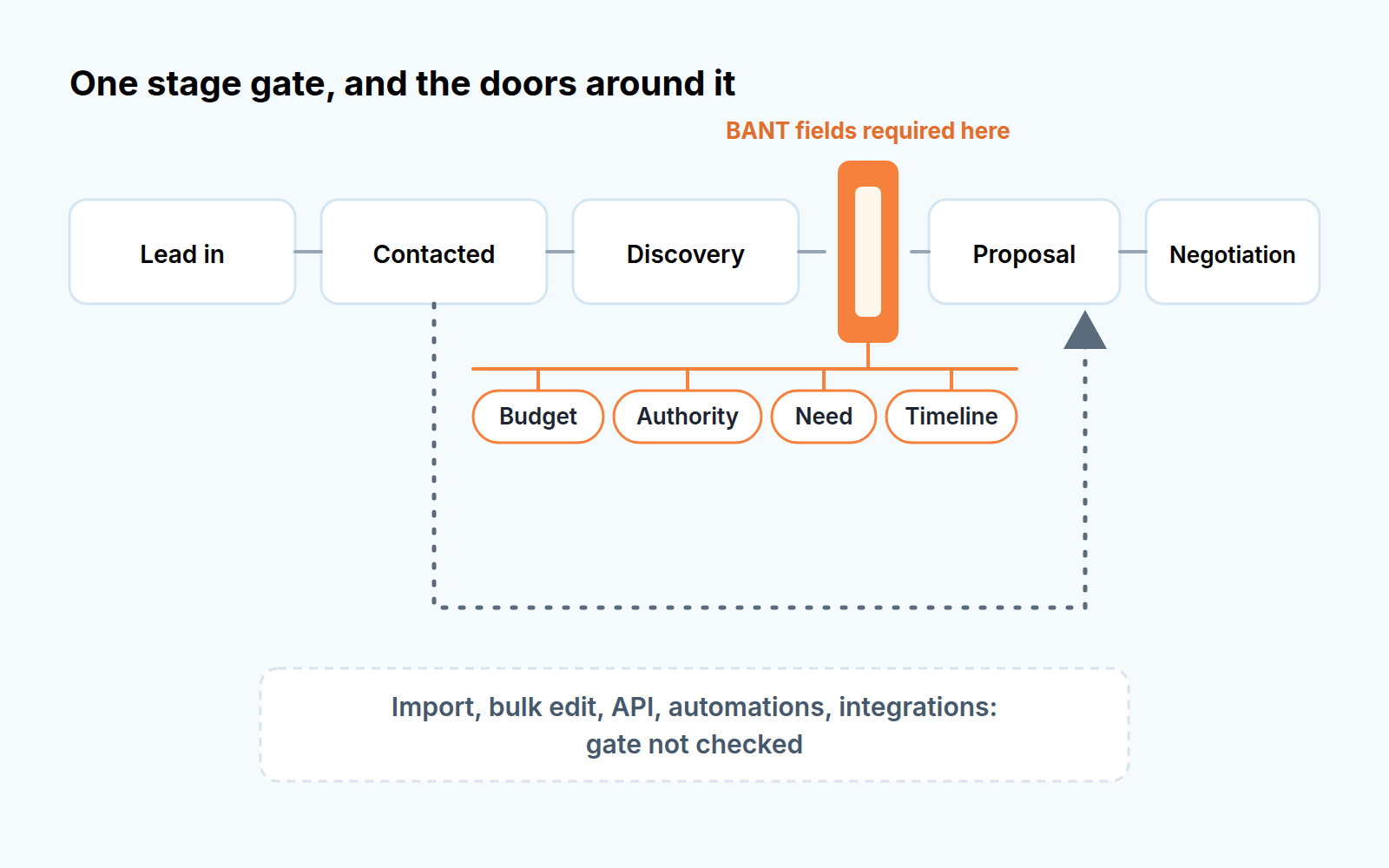
Now the part many setups miss. Pipedrive’s help article says required fields won’t stop a deal from moving if it is updated through import, bulk editing, the API, automations or third-party integrations. So if a workflow automation moves deals to Proposal when a quote is sent, or someone bulk-moves twenty deals after a trade show, the gate is simply not there.
That doesn’t make the gate useless. It means you need a second check that looks at the data after the fact, which is what the weekly review below is for. There is also a softer option: Pipedrive’s important fields can be switched on per pipeline and stage, and instead of blocking anything they show a flag in the deal detail view when the field is empty. We would use that on the stage before the gate, as a heads-up.
Where BANT lies to you
A filled-in BANT record looks like certainty. Often it is not.
Budget is the first liar. Ask about it too early and you get a number the buyer made up to end the question, or a polite “we have budget” that means “someone might approve it if the story is good.” That is why the dropdown separates Confirmed from Needs approval. If a rep picks Confirmed, the next question in the review is simply: confirmed by whom?
Authority lies in a different way. In plenty of small companies nobody signs alone. The owner signs, but only after the office manager and the one technical person agree. BANT pushes you to find one decision maker, and so the rep writes down whoever sounded most senior. The deal then stalls because the actual veto sits with someone who never appeared on a call. When a rep hesitates on the Authority dropdown, that hesitation is the real finding and Unknown is the honest answer.
Need is the one buyers themselves can’t always see. A company that has lived with a manual process for years may not describe thier workaround as a problem at all; it is just how Tuesday works. In practice the rep often has to name the problem before the buyer agrees it exists, and the Need sentence ends up describing the rep’s hope. A decent test: could the rep read that sentence to the buyer without them wincing?
Timeline is the least dishonest field, mostly because it’s a date and dates are easy to check. It still drifts. A buyer’s “end of quarter” moves as soon as another project lands on their desk.
None of this means dropping BANT. Read the four fields as claims the rep is making, with a confidence level, rather than facts about the buyer.
Reading the gaps on a Monday
Here is a hypothetical deal. A 15-person logistics company, Proposal stage, three weeks in. Authority: Decision maker (the operations director). Need: “Dispatch re-types every order from email into the TMS.” Timeline: a date six weeks out. Budget: Unknown.
The rep’s forecast says it’s likely. The fields say something else: a proposal went out three weeks ago to someone who hasn’t said whether the money exists. That is the conversation to have, and it takes two minutes if the data is there.
To find deals like that every week, fold this into your weekly pipeline review:
- Build one saved filter: open deals in Proposal or later where any BANT field is Unknown or empty. Sort by time in stage, oldest first.
- For each Unknown, ask one question: what would it take to find out this week?
- Check the Timeline date against the expected close date. If they disagree, ask which one the buyer would recognize.
- Look for Confirmed budgets on deals that haven’t moved in a while; those are the ones most likely to be wishful.
- Count deals that reached Proposal with a field still empty. They came in through the side door (import, automation, bulk edit) and the gate never saw them.
That last count is a data-quality number worth tracking over time, and it sits well next to the other CRM data quality metrics we track. If you already score deals BANT gaps are a natural input for a deal health score: an Unknown budget at Negotiation should drag a deal down harder than one at Discovery.
One tone note. Run this review as “what don’t we know yet”, not “why didn’t you fill this in”. Reps who get grilled for Unknown learn to pick Confirmed.
When to graduate to MEDDIC
BANT starts to creak when deals get bigger. You’ll notice it when Authority keeps coming back as a committee, when there is a formal procurement step, or when the buyer needs a business case with numbers before anyone talks about budget. At that point one dropdown per letter is too thin, and a framework built for multi-stakeholder deals, like MEDDIC, earns its extra fields.
You don’t need to switch the whole team. Keep the four BANT fields on your smaller pipeline and add a separate pipeline with a richer gate for the larger deals. What carries over is the habit: a few fields with fixed values, one stage that enforces them, and a weekly look at the Unknowns. Start with the Budget dropdown this week and see how many of your open proposals come back Unknown.
Before you add one, check it against the test for opening another pipeline.


