
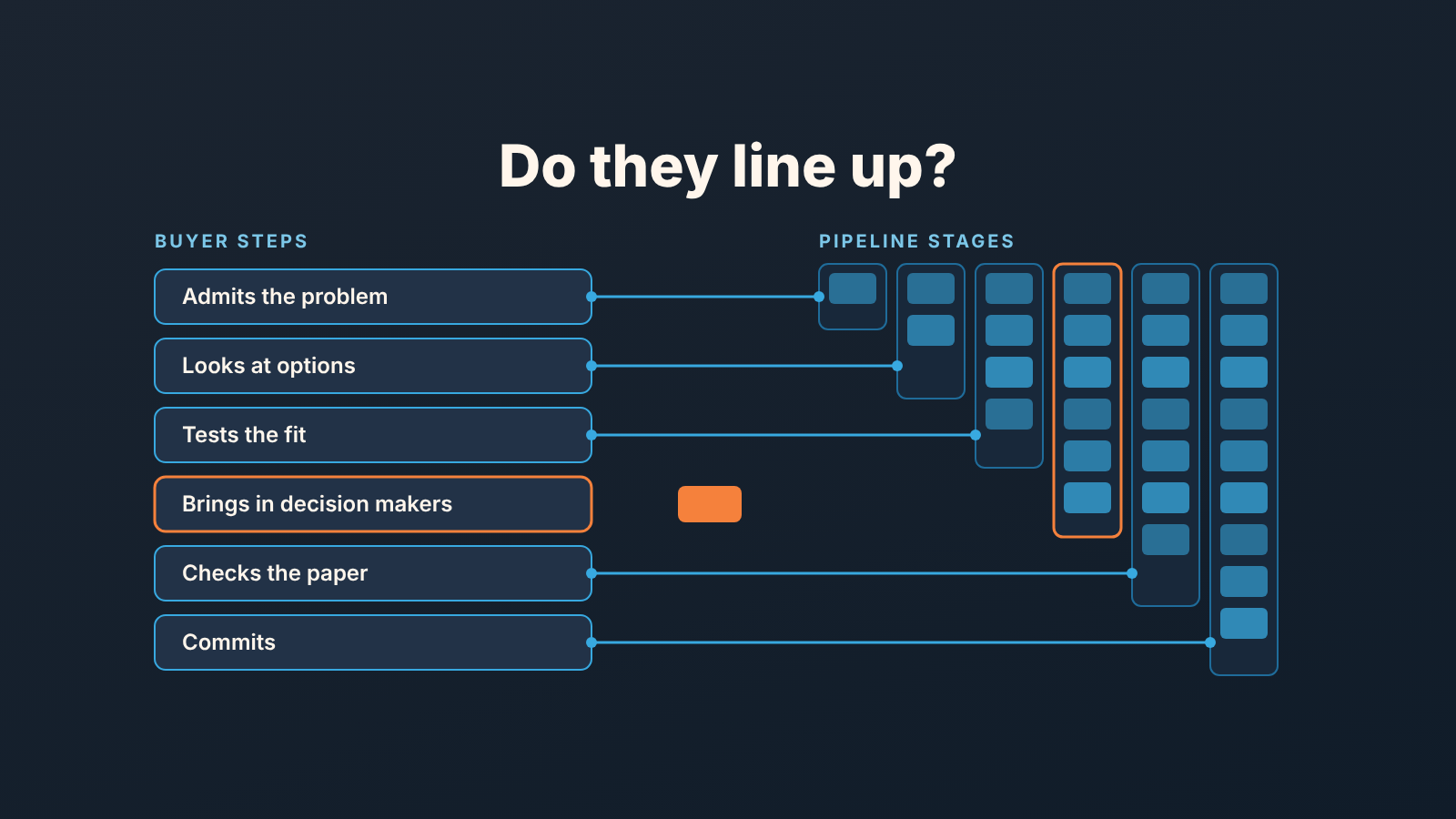
A customer journey map shows the steps a buyer takes from first awareness to purchase and what they think and do at each step. In B2B sales, make it useful by lining each buyer step up with a stage of your CRM pipeline, so every stage ends with something the buyer did. A small team can build that version in an afternoon from the deals it already has.
What goes into a customer journey map, and what sales can drop
A customer journey map is a picture of one type of customer moving through a set of phases, with what they do, think and feel in each. The usual ingredients are a persona, the phases, the touchpoints where the customer meets you, their actions, and their emotions and pain points. HBS Online lists phases such as awareness, consideration, purchase, retention and advocacy, and walks through a T-Mobile example (HBS Online: customer journey map).
How many stages you need depends partly on your business model, and we show how a small team’s model shows up in its pipeline stages and CRM.
That is the UX and marketing version, and it is the one search shows you. Nielsen Norman Group covers when to make a map, its key elements and the rules for a good one (NN/g: journey mapping). IBM separates the customer journey map from the buyer journey map and lists types and components (IBM: what is a customer journey map). All three are worth reading. None of them mention a pipeline.
A B2B customer journey map for a sales team is closer to IBM’s buyer journey map, and we strip it further, down to one row: the steps a buyer goes through before they sign. Noticed a problem. Looked for options. Compared a shortlist. Got the people inside their company to agree. Bought. Thoughts and feelings matter in UX work; in a pipeline they are a rep’s guess about someone else’s head, and nobody can audit a guess. What a buyer did can be checked. So that is what we map.
Three terms, so we use them the same way below. A buyer step is a phase on the buyer’s side (“tests the fit”). A buyer action is the visible thing that proves it happened (“asked for a reference call”). An exit criterion is the buyer action a deal needs before it leaves a stage.
This is not a funnel, either. A funnel counts how many people move from one step to the next; the map says what the step is. If the difference is fuzzy, we untangled it in sales funnel vs sales pipeline.
Buyer steps vs pipeline stages: why they drift apart
Open your pipeline and read the stage names out loud. In most pipelines we get to look at, the stages are named for what the rep does: Qualified, Demo booked, Proposal sent, Negotiation. Every one of those is a rep action. The buyer appears nowhere.
That is why the two lists drift. The rep sends a proposal and moves the deal to Proposal sent. The buyer, meanwhile, is still comparing a shortlist and may stay there for six weeks. Or the reverse: the buyer has looped in their CFO and asked for security documentation, a big step on their side, and the pipeline has no stage for it, so the deal sits in Proposal sent looking identical to a deal nobody has read.
We think this is the most common reason a stage-conversion report lies to a manager. The report is honest about rep activity. It was never told about the buyer. Our piece on what a sales pipeline stage should and should not be is the same idea from the other side: there we fixed the stages; here we start from the buyer and let the stages follow.
Step 1: write the buyer’s steps from your last 10 won deals
Do not draw the buyer’s journey from a template. Pull it from deals you actually closed.
Take the last ten won deals in the CRM, open each one and read the activity log, the emails and the notes from first touch to signature. For every deal, write down what the buyer did, in order, in thier words where you have them. “Asked for a reference customer.” “Forwarded the deck to procurement.” “Requested a security questionnaire.” “Asked for a 12-month price.” Skip what the rep did; you know that already.
Why won and not lost? A won deal shows the whole path, end to end. A lost one stops somewhere, and where it stops is a question for later, once the map exists. We come back to lost deals in the quarterly review.
Ten deals is enough to see the pattern and few enough to finish before lunch. If you have already done an ICP exercise from closed-won deals, you have the list and part of the reading done.
Then collapse the notes into five to seven steps that appeared in most of the ten. A version we see often in small B2B teams (illustrative, not a standard):
- Admits the problem is worth time (replies to the first outreach, or books a call)
- Looks at options (asks what you do, how it compares, who else uses it)
- Tests the fit (demo, trial, reference call, a sample of their own data)
- Brings in the people who have to say yes (finance, IT, the actual user, a boss)
- Checks the paper (security, legal, procurement forms)
- Commits (verbal yes, signed order, first payment)
If you want to tie this back to the textbook phases: steps 1 and 2 are awareness and consideration, steps 3 and 4 are where consideration turns into a decision, and steps 5 and 6 are the purchase.
Notice there is no “receives proposal” step. Receiving a document is not a buyer action. Reading it and replying with questions is.
Step 2: line them up with your CRM stages
Lay your buyer steps from Step 1 next to your current CRM pipeline stages and draw a line from each buyer step to the stage where it usually happens. Left column: buyer steps. Right column: stages, in order.
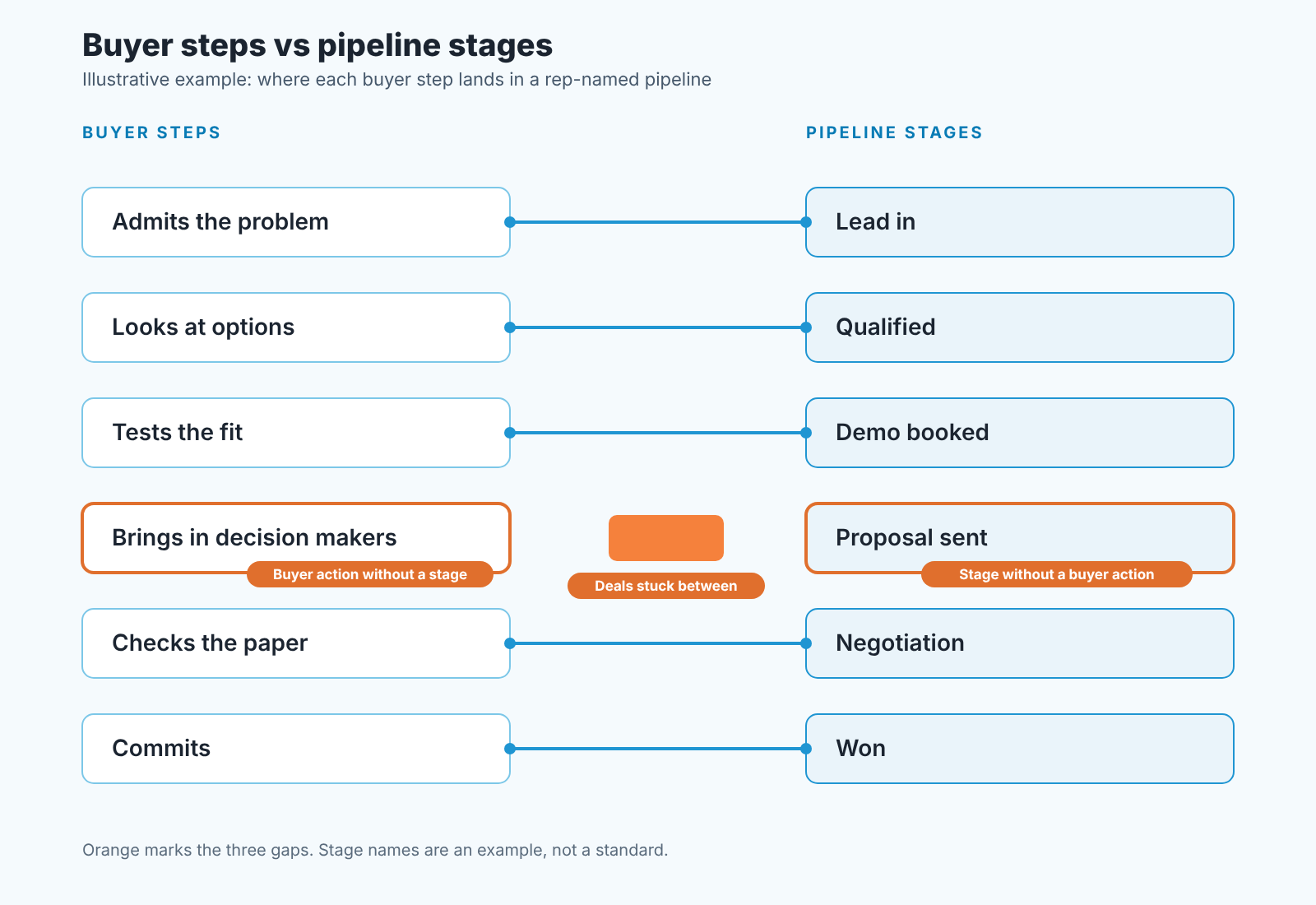
A whiteboard beats a tool here. Done honestly the picture is rarely clean. One stage has nothing pointing at it. A buyer step has nowhere to go. And some deals sit between two steps with nothing in the CRM to move them. Those are the three gaps, and finding them is the real output of the exercise.
Three gaps to look for
A stage without a buyer action. Proposal sent is the classic. Nothing the buyer did puts a deal there; the rep clicked “send”. A stage like this collects deals that look alive and are not. If your stage-conversion report shows a healthy rate into this stage and a poor rate out of it, that is usually the reason: entry is free, exit requires a human on the other side.
A buyer action without a stage. In our example, “brings in the people who have to say yes” has no home. It is often the most telling thing a buyer does before signing, and the pipeline cannot see it. Deals where the buyer has introduced finance and deals where you are still talking to one enthusiast sit in the same column. Your forecast treats them the same.
Deals stuck between. The buyer has finished one step and not started the next, and the stage stays put because nothing in the CRM says “move it”. A deal that got a demo three weeks ago and has gone quiet is between “tests the fit” and “brings in decision makers”. The stage says Demo booked. The stage is lying by omission. The deal review questions that ask what the buyer did catch this every week; the map is the version of that question you draw once.
Count the gaps. On a six-stage pipeline we usually find two or three. Fewer and you may have been too kind to yourself in Step 2.
Step 3: fix stage exit criteria in buyer-action terms
Here is the rule we use: a deal leaves a stage when the buyer does the thing, whatever the rep has done. Write that criterion under every stage name, one line each.
Take the rep-named pipeline from the diagram and rewrite it. This is illustrative; your stages and criteria will differ. Old name, then new name, then what the buyer has to do before the deal moves on:
- Lead in becomes Problem admitted: the buyer replied or booked a call.
- Qualified becomes Evaluating options: they asked how it works or how it compares.
- Demo booked becomes Fit tested: a demo, trial or reference call actually happened, with them in it.
- Proposal sent becomes Proposal in discussion: the buyer came back on the proposal with questions, edits or a date.
- Negotiation becomes Decision group engaged: finance, legal or IT was introduced, or a questionnaire arrived.
- Won stays Won: signed order or payment received.
Three things changed. “Proposal sent” became “Proposal in discussion”, and entry now needs a reply from the buyer, so the free-entry stage is gone. “Decision group engaged” gives the buyer step from gap two a home. And every exit criterion is something a rep can point to in the activity log, so a manager can check it in a deal review without asking “how do you feel about this one”.
Renaming is the easy part. We wrote up how to edit Pipedrive pipeline stages without losing deals, and the same caution applies in HubSpot or Zoho CRM: decide where existing deals go before you touch the stage list.
Some teams want a stage for every buyer step. Resist that. Six or seven stages is as many as a small team will keep accurate. If two buyer steps usually happen within days of each other, give them one stage and put both actions in the exit criterion.
Keep the map alive with five CRM fields
A map on a whiteboard is a photo by Friday. It stays alive only if the buyer actions it describes are recorded as data, and that takes only a handful of fields.
- Last buyer action, a date. Not “last activity”: a rep sending a follow-up is activity, the buyer replying is a buyer action.
- Decision-group contacts: how many people on the buyer side are linked to the deal, with roles. Still one after a demo? Then the deal has not reached “decision group engaged”, however the stage reads.
- Stage entered on, also a date. Days in stage against the exit criterion is how you spot the stuck-between deals.
- Buyer’s next step, short text, and it has to be their step. “CFO review next Tuesday” counts. “Send follow-up” does not.
- Lost reason in buyer terms: “stayed with current vendor”, “no budget this year”, “chose a competitor on price”. Over a quarter this tells you which step of the journey you lose at.
Three of these are dates or counts, which is deliberate, because a manager can filter a date but has to read a paragraph of notes to get the same answer.
A disclosure, since this is where tools come in: we build SalesBond, a sales management layer on top of the CRM a team already uses; we started with Pipedrive. Its Deal Health checks every deal in the connected CRM against more than 20 rules on activity, progression and data, gives each deal a health score and shows which rules it breaks and what to do about it, so a manager starts Monday with a list instead of a filter to build. Check your CRM with SalesBond if you want that list. The map and the exit criteria you still have to write yourself; no tool knows your buyer’s steps until you have.
A review rhythm: map vs data once a quarter
Buyers change how they buy faster than teams change their pipelines. Procurement gets stricter, a security review appears where none existed, a new segment skips the demo and goes straight to a trial. If the map is a year old it describes a buyer who no longer exists.
So we check it once a quarter, and the check is short. Pull the quarter’s won deals, read the activity logs the way you did in Step 1, and ask two questions. Did any buyer step show up that the map does not have? Did any stage fill up with deals where the exit criterion was never met? The first means a missing stage or field. The second means the criterion is not being enforced, which calls for a management conversation. No CRM setting fixes it.
Then look at where the quarter’s lost deals stopped, using the lost reason in buyer terms. If most of them died at “checks the paper”, your sales problem is a security document or a legal template, and no amount of demo coaching will fix it. The map turns a vague “deals are slow” into a named step where the buyer stops, and the team can work on that step.
If you find yourself redrawing it every month, the buyer has not changed that fast; your Step 1 was too thin. Go back to to ten deals and read them again.


