

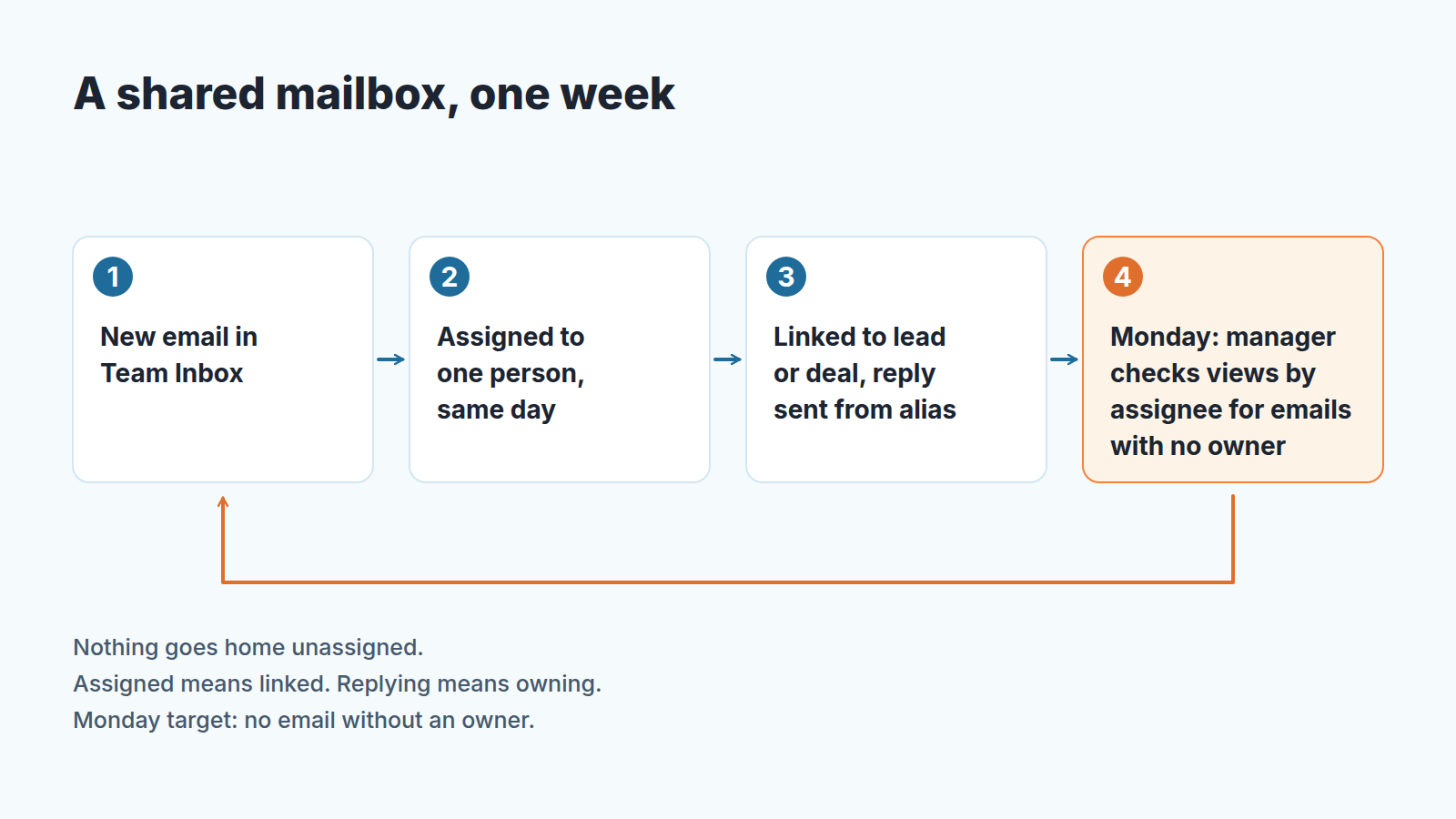
A shared mailbox works when every email in it has a named owner by the end of the day. In Pipedrive that means syncing info@ or sales@ as a Team Inbox, assigning each incoming conversation to one person before they log off, and having the manager go through the views by assignee once a week to catch anything with no owner. Team Inbox is available on Premium and higher plans (Pipedrive: Team Inbox), so if you are on Growth, the rule still applies, but you will be enforcing it in Gmail instead.
The question that sat in info@ for four days
Monday, 9:12 a.m. A procurement lead at a company you have been trying to get into for a year writes to info@ asking whether your volume pricing starts at 50 seats or 100. Four people have the shared Gmail open in a browser tab. All four read it before lunch. Nobody answers, because a box that belongs to everybody belongs to nobody.
Friday afternoon the founder is scrolling the inbox for an invoice and sees the thread. It is still unread-bold on her screen, because Gmail tracks read state per login and she had not opened it. She replies within ten minutes. The buyer writes back on Monday: thanks, they went with a vendor who answered on Tuesday.
No tool fixes that on its own. What a tool can do is turn “who owns this” into a visible field instead of a feeling, and make the list of emails with nobody’s name on them something a manager can open. Team Inbox gives you both. The rules are yours to add.
What Team Inbox is, and the plan it needs
Team Inbox is a shared email account synced into Pipedrive once, by a global admin, so that a chosen set of users can read, reply and assign in it without each person connecting the mailbox themselves. The admin sets it up under My account > Email sync > + Email account, picks team account, and in the pop-up decides who can see and edit the mail, whether visibility goes to all users or a specific group, how far back to sync, and which folders beyond Inbox to pull in (Pipedrive: Team Inbox).
The plan comes first. Team Inbox is only available on Premium and higher plans, so it is not on Lite or Growth (Pipedrive: Team Inbox). On Growth the process below still works; you just assign with Gmail labels and a weekly search instead of a Pipedrive filter.
Then, who can do what. Only a global admin can start or stop the sync. Once it is running every collaborator sees the Team Inbox inside their own sales inbox and can assign conversations, filter by assignee and change visibility (Pipedrive: Team Inbox). For personal mailboxes, Shared vs Private email visibility has its own rules. A few details from the FAQ surprise people in week one. Drafts are shared with every collaborator, half-written ones included. The outbox is shared too, and anyone can cancel a scheduled send. And a Team Inbox cannot be anyone’s default sending account (Pipedrive: Team Inbox FAQ).
One warning from the help article itself: if the admin stops the sync, new mail stops arriving in Pipedrive and any automation that uses that address fails (Pipedrive: Team Inbox). Have the shared address connected by the admin who will still be at the company next year, not by whoever happened to have the password.
Assign by end of day: the one rule
The rule is short enough to say at a stand-up: nothing in the Team Inbox goes home unassigned. By the end of the working day, every new conversation has one name on it, and that name is responsible for the reply, the deal and the follow-up. Not “the team”. One person.
Pipedrive makes that mechanically easy, because a conversation can only have one assignee at a time (Pipedrive: Team Inbox FAQ). There is no “we’re both on it”. That constraint is the point.
Some assignments happen without anyone clicking. According to the FAQ, Pipedrive assigns a conversation automatically when a collaborator sends or forwards it, or when the email is linked to a deal owned by one of the collaborators. Reply to a thread assigned to someone else and it becomes yours, with your name shown in the thread so the team can see who answered (Pipedrive: Team Inbox FAQ). That cuts both ways. A quick “I’ll take this one” reply claims a thread, and a helpful colleague can take over a deal that was not theirs the same way. Agree on it in advance: replying means owning.
Here is the version we would write on the wall:
- Every new conversation in the Team Inbox is assigned to one person before that person’s day ends. Whoever is on inbox duty that day does the assigning; with no duty rota, the manager does.
- Assigned means linked. A prospect’s thread is attached to a lead or a deal before the first reply goes out; an existing customer’s, to the person and their open deal. An assigned email with no deal behind it is a reply waiting to be forgotten.
- The reply goes out from the shared address or its alias, never from the rep’s personal mailbox.
About line two. The team account’s advanced settings include a toggle called “Automatic linking to deals, contacts and leads” (Pipedrive: team account settings). We have not tested its edges well enough to say what it will and will not match, so the rule is written for a human doing the linking. If the toggle links the thread for you, good; the rep still opens the deal and checks it is the right one before replying.
The honest objection is that inbox duty feels like a tax on a four-person team. It is. A day of duty costs about an hour, and the alternative is the four-day gap from the first section. If your lead volume makes even that painful, the problem sits upstream of the inbox, in who gets which lead in a small Pipedrive team. Whether the first assignment should create a lead or go straight to a deal is a separate call, covered in Pipedrive leads vs deals.
Replying from an alias, not from your own Gmail
The other half of “who owns this” is who the buyer thinks they are talking to. If Marek answers an info@ inquiry from marek@yourcompany.com, the buyer’s next question goes to Marek. When Marek is on vacation, it sits in his personal inbox and the Team Inbox never sees it. The first helpful reply has just bypassed the shared address.
So the reply goes out from the shared identity. Verified Gmail aliases can be picked as the sender since a September 2026 update (Pipedrive product updates), and for a team account the setting lives in Email sync under Send email as. Any member with access to the team account can send from a verified alias instead of the main address; the admin clicks Refresh aliases to pull in the aliases already set up in the connected Google account, and they appear in the From field (Pipedrive: team account settings). This is Gmail only, the help article says it does not apply to Outlook, Exchange or other IMAP providers.
If you copy replies to Smart Bcc and the buyer has more than one open deal, read how Smart Bcc decides which deal gets the email.
Two more settings on that page are better decided on the day you connect the account than six months later. The first is the shared signature: a team account carries one signature that every collaborator uses, and a change applies to all of them (Pipedrive: team account settings). Put the shared address in it, not the rep’s mobile number, for the Marek reason above. The second is Default email visibility. “Shared” makes conversations visible to all Pipedrive users once they are linked to an item; “Team only” keeps them to the collaborators on the team account (Pipedrive: team account settings). For a sales address we would pick Shared, since the point of moving info@ into the CRM is that whoever picks the deal up next can read its history.
If replies from the alias bounce or silently fail to send, that is a different problem, covered in why Pipedrive emails fail and the follow-up gaps they leave.
The Monday filter: unassigned
Rules decay. The end-of-day rule will hold for three weeks, and then someone will be sick on the the duty day and nobody will notice for a while. So the manager’s job is not to assign. It is to look, once a week, at what did not get assigned.
Team Inbox lets collaborators filter conversations by assignee (Pipedrive: Team Inbox), so on Monday, before the stand-up, go through the views by assignee and look for conversations with no one assigned. The target is zero. Anything older than Friday broke rule one, and the useful question is what was happening on Thursday that left nobody on the inbox. Usually it was a demo day or a trade show, and the fix is a rota, not a reprimand. Add one line to the same rule for clean-up: archive freely, delete only with a reason, because a deleted thread disappears from the deal history for good.
Two more checks fit in the same five minutes. Sort assigned conversations by assignee and look for the person with three times everyone else’s count: that is either your best closer or the person nobody wants to argue with about ownership, and you should know which. Then skim teh thread titles assigned last week for ones with no deal or lead attached, because that is where rule two quietly fails.
A disclosure, since we are at the point where the thread becomes a deal: we build SalesBond, a sales management layer on top of the CRM a team already uses; we started with Pipedrive. Once that info@ thread is a deal, Deal Health checks it against its rules and flags it when it stalls, which is the same four-day gap one step down the funnel. The Monday check, though, runs on Pipedrive’s own assignee filters and needs nothing else. Check your CRM with SalesBond if the second gap is the one you keep finding.
Back to the buyer. In the week where the rules exist, the 9:12 a.m. email is assigned to Lisa by 10 because she has inbox duty, linked to a new lead with the company name on it, and answered from sales@ by noon. On Tuesday the buyer’s follow-up lands in the same thread, assigned to Lisa, visible to the founder. Lisa is on vacation the week after, and Marek picks it up from the deal, not from a forwarded email. None of that needed an automation. It needed one name on every email by the end of the day, and someone who looks on Monday.


