
A rep’s weekly pipeline generation target is the number of new deals they must add each week so that enough of them close to hit quota. Count it backwards: quota divided by average deal size gives the wins you need; wins divided by your own win rate gives the deals you have to open; that number divided by the weeks in the quarter is the weekly target. Then add one correction for the sales cycle: a deal added later than one cycle before the quarter ends will close next quarter, if it closes at all. So besides the weekly number, you watch how many deals are in by the last week where the cycle still fits.
The quarter you lose in week three
Here is the pattern we see in teams of three to eight sellers. The quarter starts, everyone works the deals that carried over, and nobody adds much that is new, because nobody has to yet. Around week eight the carry-over has either closed or died, the reps start prospecting hard, and the deals they add in weeks nine to thirteen need six or seven weeks to close. They land in the next quarter. The current one is already lost, and it was lost in week three, when the adding stopped.
The usual fix is a coverage number. We wrote about that in how much pipeline coverage a small team actually needs, and it’s a useful check. But coverage is a stock. It tells you how full the tank is today and nothing about the tap, and the tap is what ran dry in week three. The pipeline generation target is the tap: a weekly inflow of new deals per rep, in units a rep can count on a Friday afternoon.
Count deals, not dollars
We set the target as a number of deals, not a value of pipeline added, and the reason is arithmetic. With five reps, a quarter’s worth of new deals is maybe a hundred records. One of them is a $60,000 outlier. If the target is “add $40,000 of pipeline a week”, that single deal lets a rep take three weeks off on paper and still be ahead. In a count, the outlier is one deal. It cannot hide a thin week.
Keep value as the thing you look at afterwards. A rep who adds seven deals a week that are all a third of your median deal is meeting the target and missing the point; you will see that in the value column within a month, and its a coaching conversation, not a reason to turn the target into a dollar figure.
There is also a plain human reason. A rep knows what “two new deals by Wednesday” means. “Keep coverage above 3x” means a trip to a report and a calculator, and most reps won’t make the trip.
How to calculate a pipeline generation target per rep
The numbers below are an illustration, not a benchmark; plug in your own. Take one rep with a quarterly quota of $120,000.
- Wins needed. Quota ÷ average size of a won deal. If the rep’s won deals over the last two quarters came in around $6,000, that is 20 wins. At small volumes use the median won deal rather than the mean, for the same outlier reason as above.
- Deals to open. Wins ÷ win rate. With a win rate of 25 percent by count, 20 wins need 80 deals opened. Count the win rate the same way every time; how to measure sales win rate in Pipedrive shows how to get a clean one.
- Weeks available. A quarter has 13 weeks, so 80 ÷ 13 is a little over 6 new deals a week.
- Rounded to something a person can hold. Six a week, with a Friday check. Six times thirteen is 78, not 80, so round up: two of the thirteen weeks need a seventh deal.
Both inputs come from the rep’s own history, not the team’s, because reps in the same team routinely differ by a factor of two on both. Two quarters is our default window. One quarter at five wins is noise. If the quota itself is what you are unsure of, how to set sales quotas for a small team covers where the $120,000 comes from.
Adjust for your cycle: which quarter a new deal lands in
Six a week is the flow. The cycle doesn’t change the flow; it changes which quarter each deal belongs to.
Suppose this rep’s median sales cycle is about six weeks from deal creation to won (the measurement is in sales cycle length in Pipedrive, and again you want the median). Then a deal created after week seven will, more often than not, close next quarter. Run that backwards and the deals that can close this quarter are the ones created in a 13-week window: the last six weeks of last quarter plus the first seven of this one. At six a week that window holds about 36 deals from last quarter and 42 from this one, roughly the 80 you need.
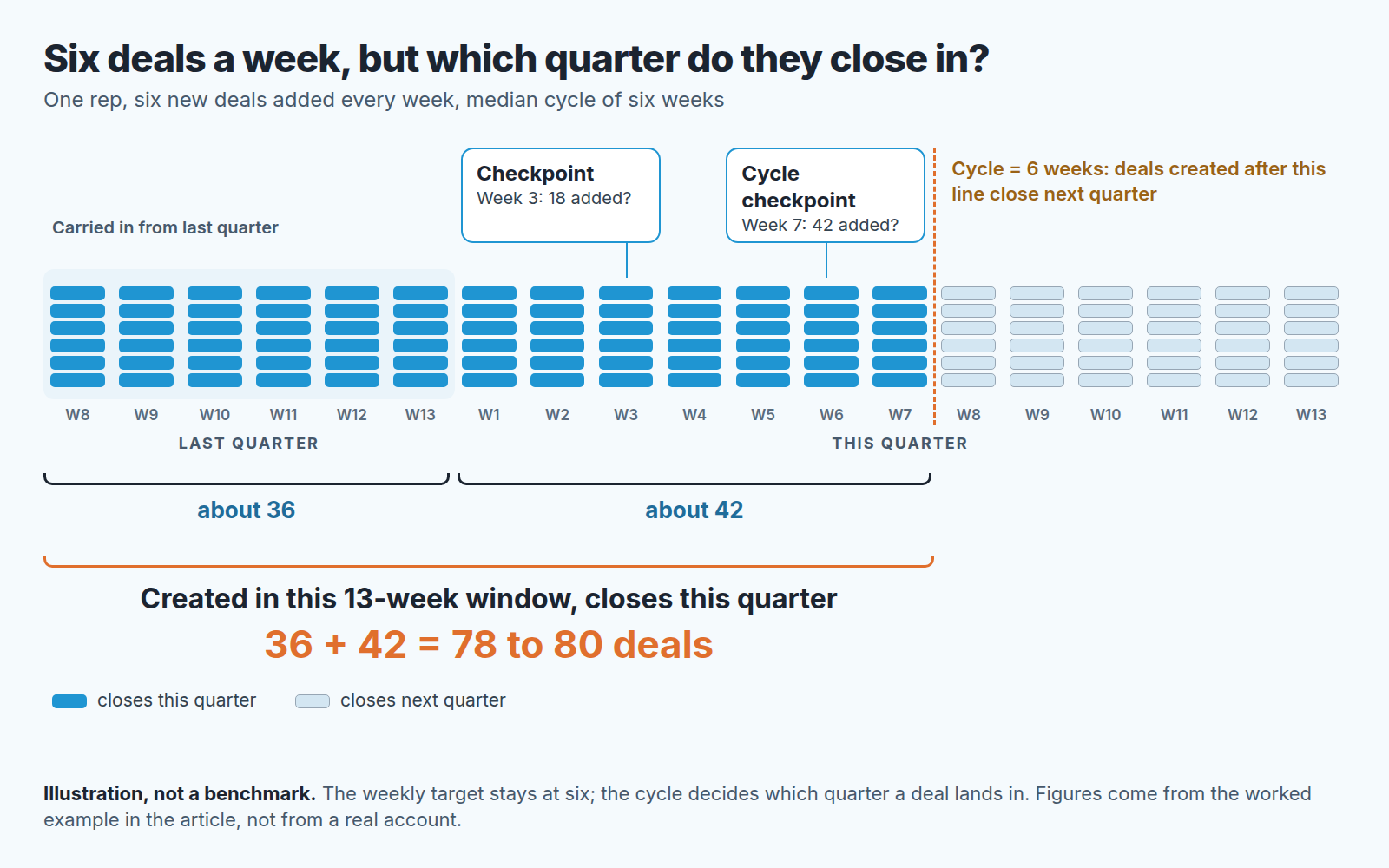
So the target has two checkpoints. The weekly one, six added, is the habit; at week three it reads 18. The cycle checkpoint is 42 added this quarter by the end of week seven, which together with the roughly 36 carried in from last quarter is the inflow this quarter’s wins can come from. Miss it by ten and you know in week seven, not in week twelve.
The 42 assumes last quarter kept the same pace. If the quarter starts with nothing carried over, all 80 have to come in by week seven, eleven or twelve a week: see what to do when the quarter starts with an empty pipeline.
Putting the number into Pipedrive: an “Added” deal goal and a deal-performance report
Pipedrive has a place for this, and it is not a custom field. The Pipedrive Help page on goals in Insights lists three deal goals: Added, which tracks “the number or value of new deals added to your account”, Progressed, for deals entering a specific pipeline stage, and Won. The Added goal is the pipeline generation target. Set the tracking metric to count rather than value, assign it to the rep, and set the frequency to weekly; the same page lists weekly, monthly, quarterly and yearly.
Goals can be assigned to users, teams or the whole company, depending on plan and permissions; team goals need Premium or higher. Active goals sit under the Goals folder in Insights, and “Add to dashboard” puts one on a dashboard. That’s where we would put it: one tile per rep, so the Monday meeting opens on six numbers rather than a discussion.
For the week-seven checkpoint you want the raw count, and the deal performance report gives it. Pipedrive describes it as “an overview of how many deals were started, won and lost” in the account. Its default filter is “Deal created > is > this year”; change it to the current quarter and the started count is your “42 by week seven” number. The chart builder has a “segment by” option, and if owner is among the fields it offers you, that splits the count per rep.
Two things the goal won’t do. It doesn’t know about the cycle checkpoint; that is a date on your calendar, not a feature. And it counts every deal added, including ones that should never have been created. Six records with no contact person and no activity will turn it green. That is why we read activity data next to the count; sales activity metrics for a small team covers which ones.
What to do when a rep is behind the line
A rep two deals behind in week three is a conversation, not a warning. The tone of it decides whether the rep keeps the CRM honest or starts gaming the count.
What we ask, in this order. First, is the input wrong? A rep whose win rate moved from 25 to 35 percent needs fewer deals, and the target should move with it rather than be defended. Second, where did the week go? Usually a large deal ate three days, which is a fine answer once and a problem if it is the the answer every week. Third, what is the smallest thing that gets two more deals in by Friday? Often it’s last quarter’s lost deals whose lost reason has expired.
Sometimes the rep simply has no hours left, because the inflow target has run into the ceiling on open deals in how many deals one rep can really work at once. Then it is a capacity problem rather than a motivation problem, and it belongs in sales capacity planning for a small team.
What we would not do is make the Added goal a bonus trigger. The moment a count pays, the count fills with records and the deal performance report stops meaning anything. The target is a pace so the manager can help early, not a score. For the same idea applied to the whole quarter plan, see sales planning checkpoints for a small team.
A disclosure, since this is where tooling comes up. We build SalesBond, a sales management layer on top of the CRM a team already uses; we started with Pipedrive. Sales Plan is the part that holds a target, a forecast and the gap between them in one place, with the actions behind the gap, and it is where we would want the week-seven line to live instead of on a calendar. Check your CRM with SalesBond. The method works without it, the tool only makes the week-three check harder to skip.
FAQ
Weekly or monthly?
Weekly, for a team this size. Monthly gives a rep four weeks of cover before anyone notices a slow start, and with a six-week cycle the checkpoint lands at the end of week seven, so a monthly rhythm gives you only one reading before it.
What counts as an added deal?
A deal record created in Pipedrive during the period, which is what the Added goal and the deal performance report both count. We add one rule of our own: it has a linked person and a scheduled activity, or it isn’t counted at the Monday meeting. Pipedrive will count it either way.
What if the rep’s own history is too short to give a win rate?
Borrow the team’s win rate and median deal size for the first two quarters, say so, and switch to the rep’s own numbers once there are enough closed deals to trust them.


