
Managing a remote sales team in Pipedrive comes down to three things you can see without asking anyone: where deals have stalled (the rotting marker), what the team actually completed (the activities performance report), and which open deals have nothing scheduled next. Put those three on a shared Insights dashboard and the status call has nothing left to do. Keep the meeting, but keep it for decisions.
Plenty has been written about the rituals and culture of a remote team, and we link to one good list further down. This piece is about the other half of the job, the half the CRM can carry: what each of the three signals looks like, how to set it up, and what we deliberately leave out.
The Monday status call that told you nothing
A composite scene, stitched from a few teams we have worked with. Monday, nine people on a video call, the manager in a different city from everyone else. The ritual goes around the grid: “Acme is moving, they said they’d come back this week.” “Still waiting on legal at Northwind.” “Had a good call with the new lead, I’ll update the CRM later.” Forty minutes. Nobody lied, and nobody said anything you could act on.
Open Pipedrive the same afternoon and a different picture comes out. The Acme deal was last touched three weeks ago. Northwind has no activity scheduled at all. The “good call” is not in the CRM because the rep made it from the car. The meeting surfaced none of that. A status round-robin asks each person to summarize their own week, and people summarize generously.
The reps are not hiding things. The manager, sitting remote, simply has no input other than the summary, so the summary quietly becomes the control system. It is a poor one. It costs everyone an hour, it leans optimistic by design, and it is stale by Tuesday.
When the team sat in one room the manager had side channels: overheard calls, a face after a bad demo, someone staying late. Remote work took those away. More calls won’t bring them back. The CRM, read the right way, can.
Three things you can see without asking
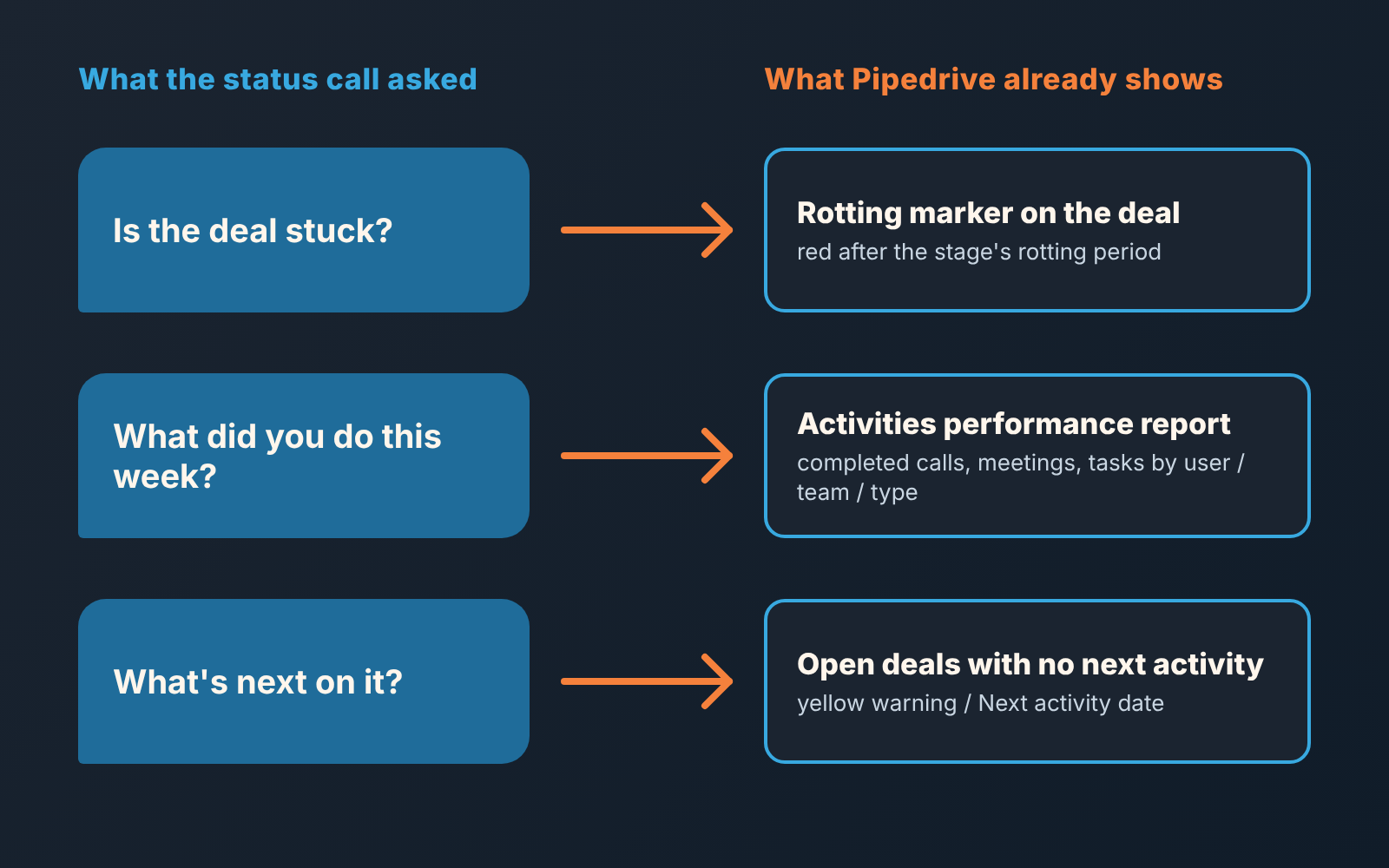
Start with rotting. The rotting period is the number of days a deal may sit in a stage without activity before Pipedrive turns it red; you set it per stage. A completed activity, a note, a file or an email resets the clock, and a new activity or an edit brings the deal back to normal (Pipedrive: the rotting feature). For a remote manager this replaces the overheard silence. Acme would have been red on the pipeline view long before anyone said “they’re moving.” You don’t have to ask the rep whether a deal is stuck. The colour already told you, and it tells everyone the same thing.
One caveat we keep repeating: rotting measures inactivity on the deal record. It says nothing about progress with the buyer. A rep who logs a note every few days keeps a dead deal green. So treat red as “look here,” and go find out what is behind it. Knowing where to look is exactly what the status call was failing to give you.
Second, the activities performance report in Insights. It shows completed calls, meetings and tasks, and you can cut it by pipeline, team, assigned user and activity type, looking at count or duration (Pipedrive: activities performance report). This answers “what did the team actually do this week,” the question the Monday call was pretending to answer. The difference is that the report counts things marked done, not things described. If the “good call” never made it into Pipedrive, it is not on the report. That is a conversation worth having once, with that rep, instead of a doubt you carry about the whole team.
Resist reading this report as a leaderboard. What a remote manager wants from it is a pattern. A rep whose meetings dropped to zero in a week where their pipeline did not shrink is either on holiday or in trouble, and one message tells you which. No need to wait for Monday.
Third, deals with no next step. A deal with nothing scheduled is a deal nobody owns an action on, whatever the rep says about it in the meeting. Pipedrive already flags these: in the pipeline view, a deal with no activities planned carries a yellow warning (Pipedrive: how deals are ordered in the pipeline view). For a list rather than a scan of the board, build a filter of open deals on the Next activity date field, which holds the date of the next scheduled activity not yet marked done (Pipedrive glossary), and save it. Then look at it as often as you look at your inbox. In an office this list stays short because people nag each other across the desk. Remote, it grows quietly, and in our experience it is where next month’s “still waiting” deals are sitting today.
So: where a deal stands, what was done, what is planned. That covers most of what the status meeting was for, and nobody had to present anything.
A dashboard your remote sales team can open
Insights lets you put reports on a dashboard and share that dashboard with other users (Pipedrive: Insights dashboards, Insights collaboration). For a remote team the sharing matters more than the reports. If the dashboard lives only on the manager’s screen, you have rebuilt the status call with a nicer interface: the manager looks, the manager asks, the rep explains. If the whole team opens the same dashboard, the asking goes away. A rep sees thier own red deals before you do and fixes the easy ones.
Keep it small. The activities report cut by user, a deals view that makes rotting visible, the no-next-step filter. We have written separately about which six numbers belong on a sales manager’s dashboard and about how to share an Insights dashboard with the team and what to put on it, so we won’t repeat the setup here. For a distributed team the point is narrower. Everyone looks at the same thing, and Monday stops being the moment the manager finds out.
If your reps are split into teams in Pipedrive, cut the dashboard by team before you cut it by person; team filters keep a regional lead from scrolling through another region’s deals to find their own.
What to leave out
Leave out minutes on calls, hours logged in the CRM and anything a time tracker would give you. It is unkind, yes. The bigger problem is that it answers the wrong question. A manager who can’t see the team is tempted to measure presence as a stand-in for work. Presence was never the point. Deals moving was, and the three signals above look at that directly.
The activities report does have a duration field. We would keep it off the shared dashboard. A long call is not a better call, and once reps know duration is being watched, we’d expect calls to get longer and little else to change. Count of completed activities by type is already more than most managers use well.
Same with “how many calls a day should a rep make.” We get asked this and we don’t answer it. Any number we gave would be invented, and the honest answer depends on the pipeline, the ticket size and the stage mix. Look at what your closed-won deals needed. That is your number.
And leave out the standing status call itself. Not the contact with your team, the round where everyone reports. If a deal needs a decision, that is a different conversation, and it is the one worth keeping.
A shorter remote 1:1
Once the three signals sit on a dashboard the whole team opens, the 1:1 changes shape, because the catching-up is already done. You both looked at the the same red deals before the call.
What’s left is better. Pick two deals from the rep’s rotting list and ask what the buyer would need to see to move. That’s a coaching question. Pick one deal from the no-next-step list, agree the next step on the call, and watch the rep put it in Pipedrive while you are still talking. Then ask the question the dashboard cannot answer: which deal are you least sure about, and why?
Gong’s list of practices for remote sales teams leans the same way, towards 1:1s about coaching and pipeline reviews treated as strategy rather than roll call (Gong: strategies for managing remote sales teams). What it doesn’t cover is which CRM fields let you skip the roll call. That gap is why we wrote this.
We have a separate piece on running the weekly pipeline review in fifteen minutes, so the format stays there. For the remote 1:1 the rule is shorter: if the dashboard already shows it, don’t ask it.
One more thing the remote manager loses and should replace on purpose: the quick “how did the demo go” in the corridor. Send it as a message, right after the activity is marked done. It takes ten seconds. It is also the difference between a rep who feels watched by a report and one who feels known by a person, and it is the part of the office we would actually bring back.
Where this breaks, and what we do about it
All of the above is only as good as what reps put in Pipedrive. Rotting resets on a note. The activities report counts what was marked done. The no-next-step list comes up empty if someone schedules a vague task for next month on every deal. A remote manager has fewer ways to catch that than one sitting next to the team so the hygiene check matters more, not less. We wrote about the reports that show pipeline health and where they go blind, and all of it applies here.
We build SalesBond, a sales management layer on top of the CRM a team already uses; we started with Pipedrive. It exists for roughly the reason this article does: a manager who can’t read every deal every day still needs to know which ones need attention and why, and a dashboard shows the state but not the reason. If you want to see what that looks like on your own pipeline, start with SalesBond.
If you do one thing this week, build the no-next-step filter and share it with the team before Monday. Then, on the call, ask nobody for an update and see what people bring instead.


