
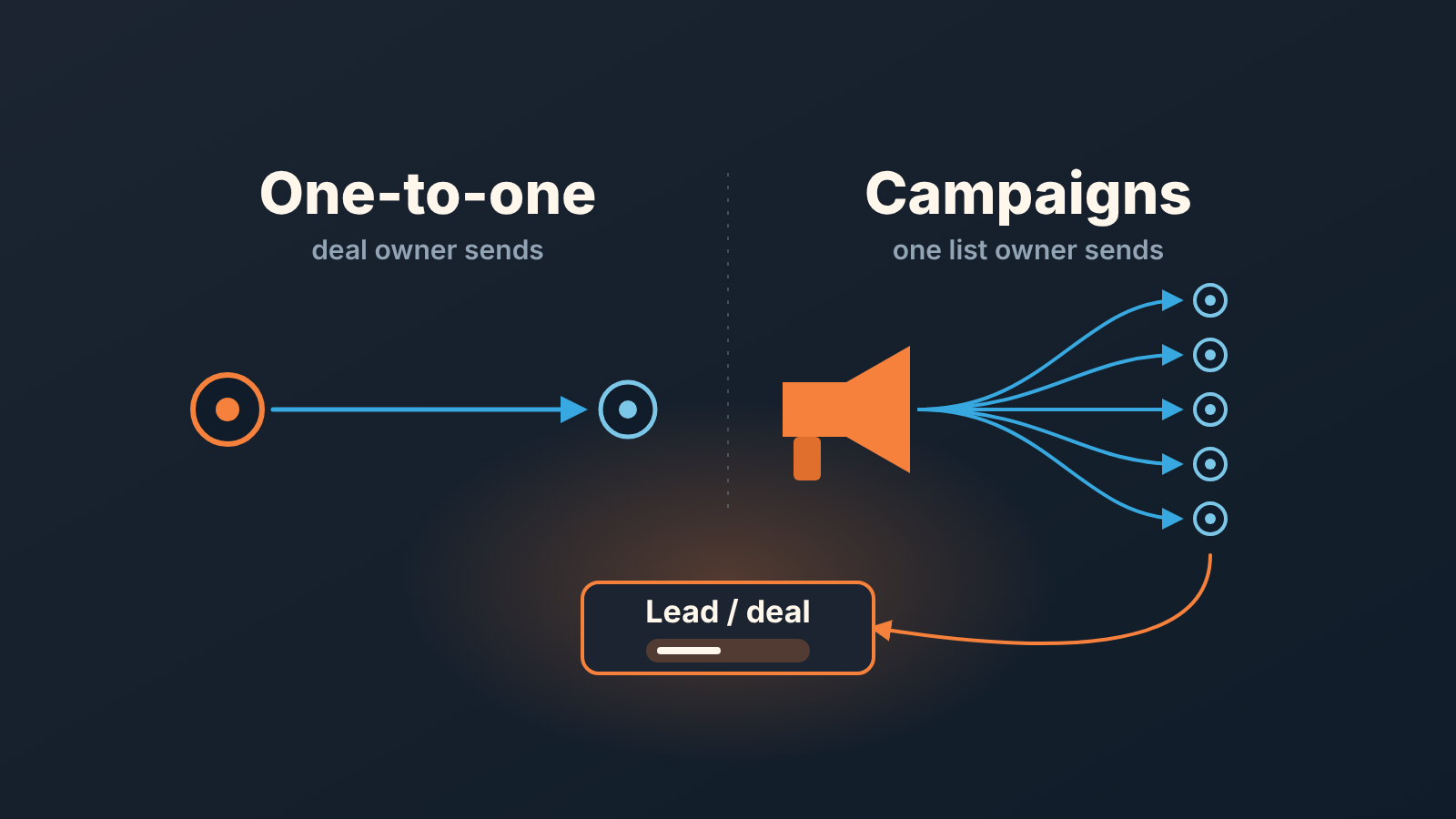
Campaigns by Pipedrive is a paid add-on for running email campaigns inside Pipedrive (Pipedrive: Campaigns by Pipedrive), so it earns its price only when a sales team sends the same message to a segment of contacts. One rep writing to one buyer about one deal belongs in regular email or a sequence, not in a campaign. The rule that keeps both clean in a team of three to ten people: campaigns warm a list, every reply becomes a lead or a deal with exactly one owner, and nobody who is in an open deal gets a mass send without the deal owner’s say.
Two kinds of email, two owners
A made-up scene, assembled from real ones. A six-person team sends a Tuesday newsletter about a new pricing tier, and a prospect answers “yes, let’s talk this week”. Three people see that answer: the office manager who pressed Send, the rep who had a deal with this company last spring, and the rep who got the same person as a fresh lead on Wednesday. By Thursday the prospect has three emails from one company, two of them asking for the same meeting.
Nothing in that story is a Pipedrive problem. It’s an ownership problem.
One-to-one email is owned by whoever owns the deal. It is written for one person and the sender expects to keep the thread. Segment email belongs to the list owner: the one person who decides who gets a campaign and when it goes out. It is written once for many people, and replies are meant to be handed on, not kept. When one person does both jobs for the same contact, or two people do one job, you get Thursday.
So before any talk of add-ons: name the list owner. In a team of six it is usually a founder, an office manager or the one rep who likes writing. One name. Everything below assumes it exists.
What Campaigns by Pipedrive is, and what it costs to find out
The add-on keeps email campaigns, segmentation and the engagement data in the same Pipedrive account as the deals, so nobody exports contacts to a separate mailing tool and imports results back (Pipedrive: Campaigns by Pipedrive, updated September 3, 2026). Campaigns go only to subscribed contacts; what that status means for a small team is in Pipedrive marketing status: it belongs to the email address, not the contact.
There are two tiers, Standard and Premium. Premium adds comparative insights and a campaign-type insights filter, and that’s the whole difference (Pipedrive: Campaigns add-on tiers, updated October 19, 2026). For a team of up to ten, Standard covers everything you would actually use.
Price depends on the tier and on the subscriber limit you choose, from 1k to 100k in steps of 1k. The help page prints no figures. There is a 21-day trial with up to 500 subscribers, and an account review is required before you can buy once it ends (Pipedrive: Campaigns subscription and billing, updated October 19, 2026).
Five hundred subscribers is enough to send to a real segment and see whether anyone answers. Run the trial as a test with a decision date, not as free software.
Do you need Pipedrive Campaigns at all?
If every email you would send has a deal behind it, no. That describes more small teams than vendors like to admit. The “list” is the open pipeline, each message mentions the last call, and the rep would rewrite a template anyway because teh buyer would notice. The repeated part of that work, the follow-up after a demo or a proposal, is what Pipedrive Sequences for deal follow-up covers, and who should be the sender of automated email in Pipedrive settles whose name goes on it. Neither needs Campaigns.
We would also say this plainly: a team where nobody owns marketing should not buy Campaigns. The add-on makes the missing owner visible on day one, when the first reply sits in a shared mailbox. It does not supply one.
The signal that you do need it is a group of people nobody is actively selling to. Deals lost last year on price, now that the price has changed. Trial sign-ups who never booked a call. Every customer, when terms change and all of them must hear it the same week. Writing to such a group one by one isn’t selling, it’s typing, and a rep doing it is a rep not calling.
That is where sending from inside Pipedrive pays: the recipient list is a contact filter in the same account, and the Recipients tab shows which contacts engaged. Clicks are weak evidence on their own (what Pipedrive email tracking proves and what it doesn’t). A reply is the signal that matters.
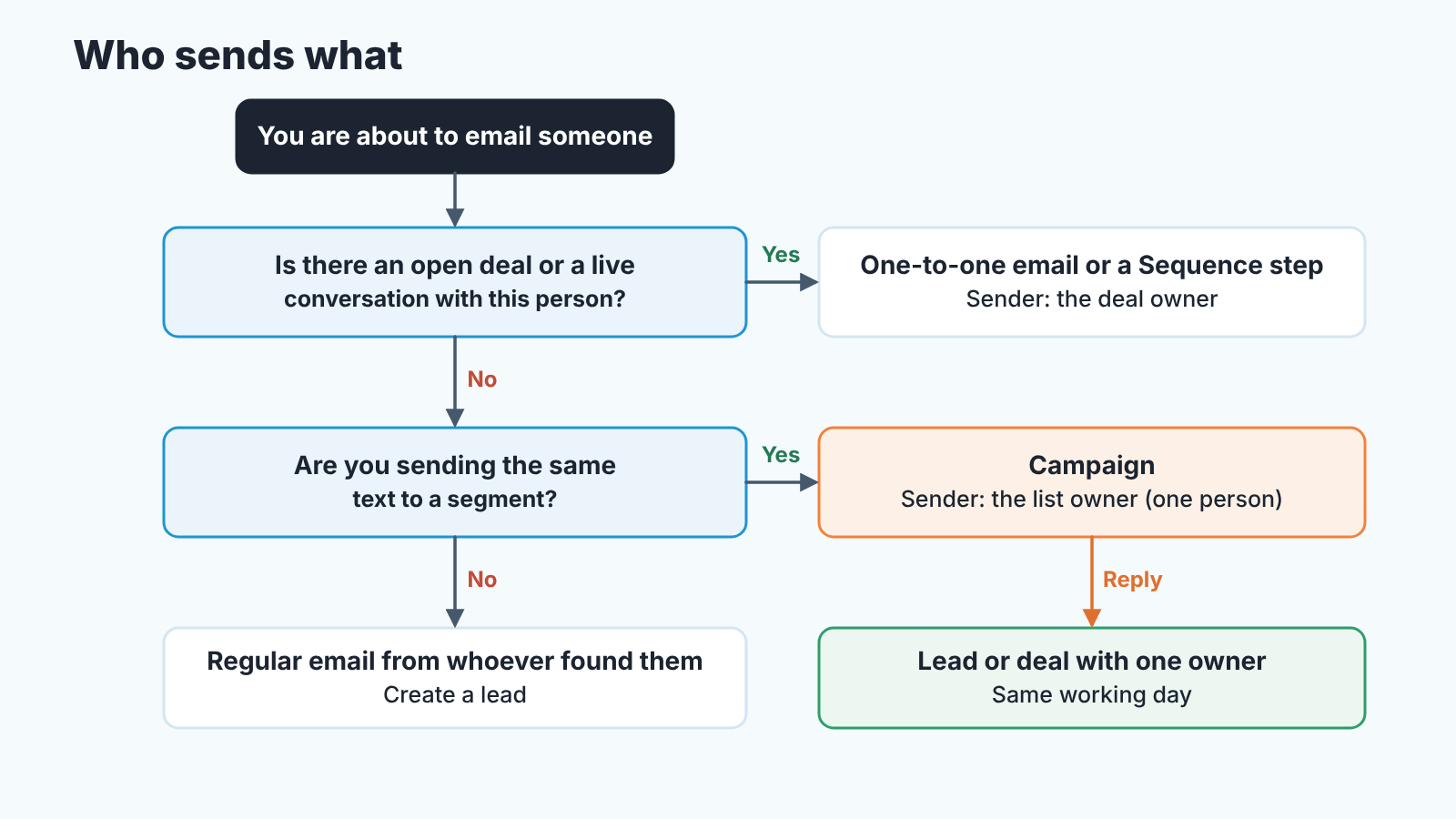
The reply rule: from campaign reply to lead or deal
A campaign reply goes to whoever will own the conversation, as a lead or as a note on their deal, the same working day. It lands in the list owner’s mailbox, and the list owner is the wrong person to answer it. A one-line acknowledgement is fine. A price or a meeting slot is not.
The list owner’s job is to find the person in Pipedrive and hand the reply on. If there is an open deal, the reply goes to the deal owner and a note goes on the deal. If there is none, the list owner creates a lead in the Leads Inbox, notes which campaign it came from, and lets the team’s routing assign it. The line between the two is the one we drew in Pipedrive leads vs deals, and the assignment rules are in lead routing for a small Pipedrive team. Then the new owner answers from their own mailbox, under their own name, before the day ends, and the list owner never writes to that person about the sales question again. If the owner is slow, the list owner chases the owner, not the prospect.
Why the working day and not “soon”? The campaign has just warmed this person, and warmth is the only thing a campaign buys. A reply that waits until Monday is a reply to a colder person than the one who wrote.
Keep open deals out of mass sends
A contact in an active deal stays out of a mass send unless the deal owner agrees. This is the rule teams skip, and the one that costs deals. A buyer in the middle of a negotiation gets the “new tier, discount for new customers” newsletter, and the rep spends the next call explaining it. We have never seen that email help a live deal.
There are sends where the owner will say yes, a terms change to every customer being the obvious case. The decision still sits with the owner, not with the list.
We run it as a calendar step, because the add-on already has scheduling. The list owner builds the recipient filter, schedules the campaign a day out and posts the recipient count and the segment definition to the team. Reps have until a stated hour to pull names they are actively working, and to say so in one line on the the deal. After that hour the campaign goes. A day of lead time feels slow the first time and becomes invisible by the third campaign.
Marketing status answers a different question, who may receive campaigns at all. That one is Pipedrive’s rule; this one is yours.
Once a month a manager can see whether both rules hold in about ten minutes. Every contact who clicked or replied in last month’s campaigns should have a lead or a deal with a named owner, and none of those leads should be older than a working day without the owner touching it. Then take ten names from the last send and count how many were in an open deal at the time. The number should be close to zero, with the owner’s agreement noted on the deal for each one. If the check takes an hour instead of ten minutes, the list owner and the deal owners are not talking, and the check has done its job by showing that.
Where SalesBond fits
The failure we see most often after a good campaign is not a lost reply. It is a deal created on Wednesday, answered once, and then left with no next activity while the rep goes back to the pipeline he already had. We build SalesBond, a sales management layer on top of the CRM a team already uses. Its Deal Health shows those deals with the reason, so the monthly check stops being the only time anyone looks. It doesn’t send campaigns and won’t tell you whether to buy the add-on. Check your CRM with SalesBond if you want the deals that came out of a send to get the same attention as the send itself.


