
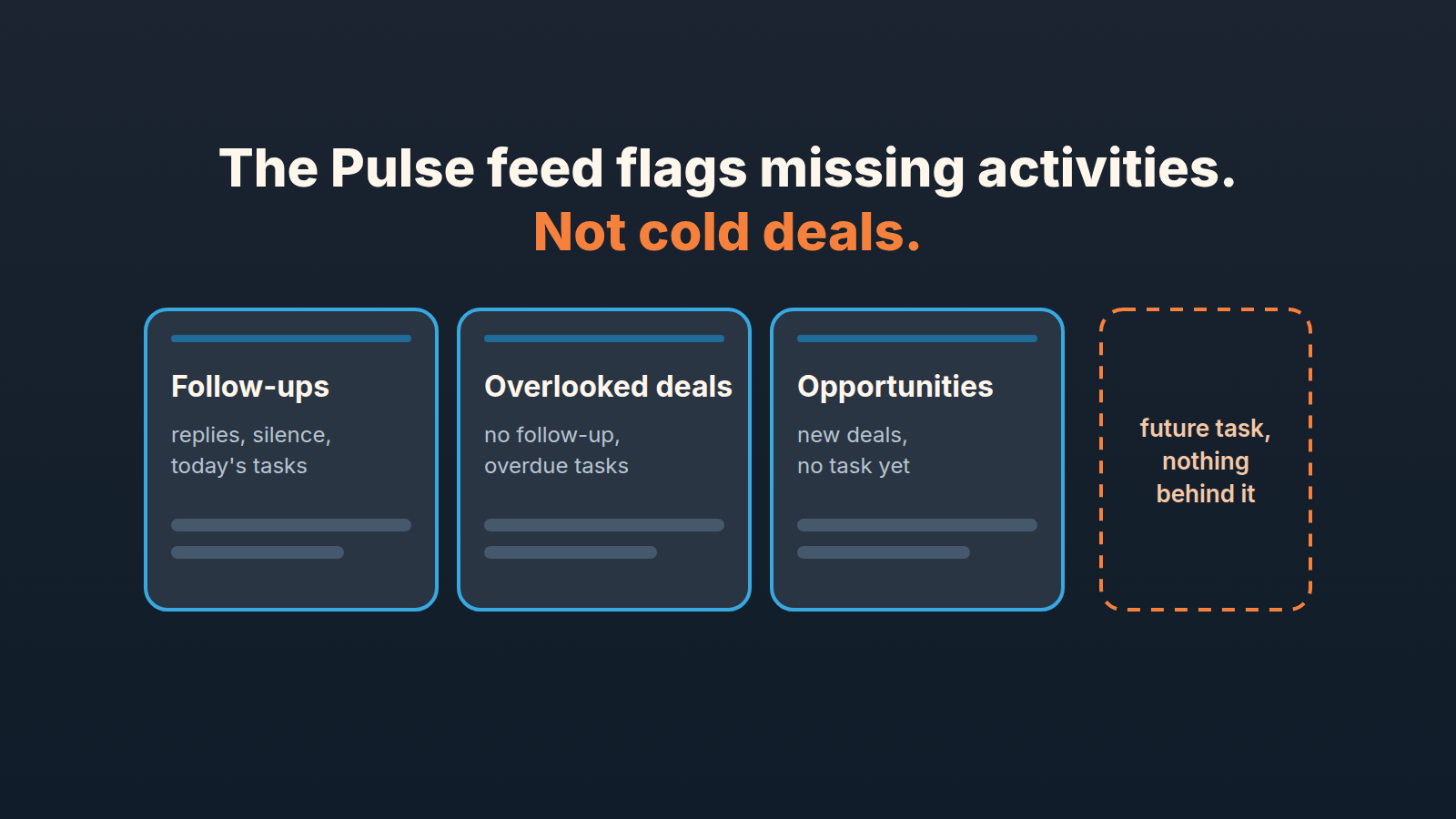
Pipedrive’s Pulse feed shows each rep the open deals assigned to them, grouped by fixed rules: replies and silence in Follow-ups, deals with no follow-up or an overdue activity in Overlooked deals, and new deals with no scheduled task in Opportunities. It is rule-based, not AI, so what it flags is a missing or late activity (Pipedrive: Pulse feed). A deal that has an activity on paper and has gone cold behind it is not something the feed is built to see.
The three tabs are documented well enough. What nobody writes down is what follows from the rules once you take them literally: who the feed is for, which deals it will not surface, and how a manager uses a list designed for one rep at a time.
The Pulse feed is a personal list, and that changes how a manager reads it
The help article says the feed is based on “open deals assigned to you, across all pipelines by default” (Pulse feed). Read that as a rep and it is good news: no shared noise. Read it as a manager and your own feed is a list of your own deals, which for most heads of sales is the three accounts you kept and the renewals nobody else wanted.
Pipedrive’s help does not say whether a manager can open a rep’s feed, switch to a team view, or see the cards a rep has hidden. It documents a feed per user, and that is what we write about.
So the manager’s way in is the rule, not the screen. The triggers are published, which means you can build a list that comes close to them for the whole team with saved filters. That is what the Monday routine below does. The feed stays the rep’s tool. The rules behind it become the manager’s.
Three tabs, and the rule behind each card
Every card in the feed comes from one of these conditions, all from the same help page.
Follow-ups is about live conversation. Cards cover email replies, deals with no reply after 5 days, calls, meetings or tasks scheduled for today, emails opened, links clicked in emails, and email drafts for deals queued for automated sends via Sequences. We covered how a four-step Sequence puts those drafts in front of a rep, so this piece leaves Sequences alone.
Overlooked deals has two triggers. “Deals without follow-up activity” is defined as “No emails or tasks logged after the last contact.” “Overdue activities” are past-due tasks linked to open deals.
Opportunities has one: new open deals assigned to you with no scheduled tasks yet.
Is any of this AI? The FAQ on the same page answers directly: “Not at the moment. The feed relies on data from your account and displays cards based on fixed rules and time triggers.” Pipedrive adds that AI may be introduced in the future. For a manager, fixed rules are the better news, because a rule can be explained to a rep and reasoned about in advance.
One practical consequence. The help page recommends turning on email sync and calendar sync, which “ensures Pulse feed captures your communication history and prompts follow-ups when needed.” A rep whose mailbox is not synced gives the feed less to go on. Pipedrive’s help does not say what each tab shows in that case.
What the Overlooked deals tab actually catches
Picture the deal behind each trigger.
A deal where the rep had a call, marked it done, and then logged nothing. That is the deal the first trigger describes word for word: no emails or tasks logged after the last contact. This is the classic forgotten deal, and the tab is built for it.
A deal with a task dated last Tuesday that nobody closed. A past-due task linked to an open deal is the second trigger, so the deal gets a card when a task is past due. If reminders are the bigger problem, we have a separate post on Pipedrive activity reminders reps keep reading, here the fact we need is that an overdue task puts a deal in the feed.
In practice that is a decent net for one failure mode: the rep did something and then dropped the thread. What the two triggers share is more interesting than what separates them. Both ask a yes-or-no question about activities. Is there one after the last contact? Is one past due? Neither asks what the activity is, whether it means anything, or whether the buyer is still there.
Three deals the rules will never flag
These are not bugs. They follow from the rules as written, and we see each of them in pipelines every month.
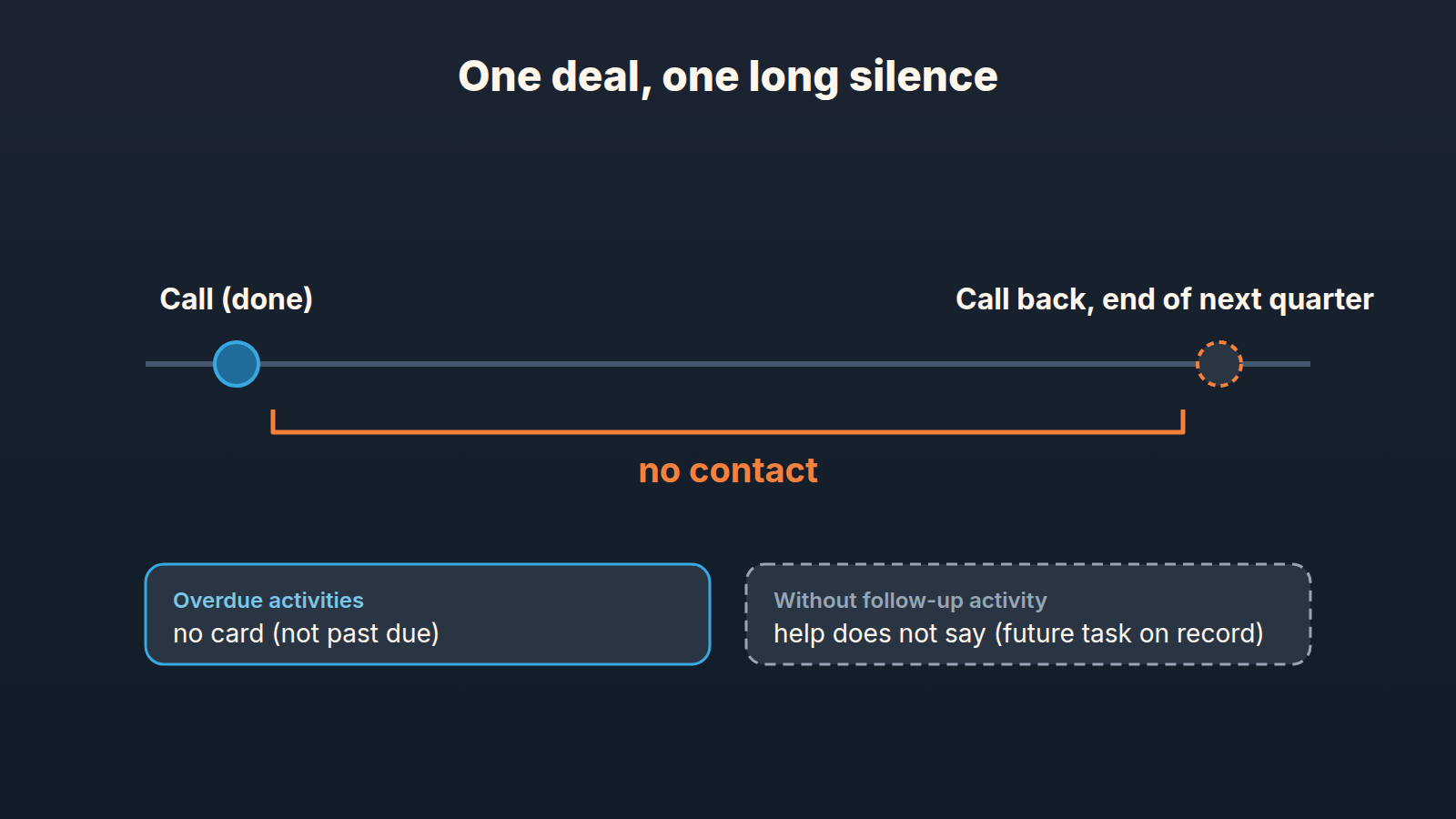
The placeholder task. A rep closes a call and, to clear the deal from every list, schedules “Call back” for the end of next quarter. The task is not past due, so “Overdue activities” stays quiet until that date passes. Whether a scheduled future task counts as a task “logged after the last contact,” Pipedrive’s help does not say. If it does, the deal sits outside both triggers for a quarter. We covered how to tell a real next step from a placeholder separately. For the feed the point is shorter: a rule that checks for a task cannot check what the task is worth.
The deal that is worked but not moving. A rep logs a task every week on a deal that has been in the Proposal stage since spring. There is always something logged after the last contact, so the first trigger has nothing to say. The rep closes tasks on time, so the second has nothing to say either. The activity is real. What the feed has no rule for is that the buyer stopped answering in June and the tasks are the rep calling into a void. None of the triggers on the help page look at stage age, at whether the last contact was inbound or outbound, or at a close date that has been pushed four times.
The deal in the wrong feed. The feed is built from deals assigned to you. A deal assigned to someone who left, or parked under the manager’s own name during a handover, belongs to the feed of that owner, and nobody may be reading it. Pipedrive’s help does not say what happens to cards for deals whose owner is deactivated. Reassigning ownership is the fix.
Hidden cards are a smaller version of the same thing. A rep can hide a card with “Hide suggestion” in the three-dot menu (same page). The help does not say whether it comes back while the condition persists. Treat a hidden card as a decision the rep made, and the deal behind it as still open.
An empty Overlooked deals tab means the activity rules found nothing to flag. It does not mean the buyers are still there.
Five minutes on Monday
The routine is short because most of it already exists.
- Run the three saved filters from our weekly next-activity audit: open deals with no next activity, with an overdue one, and with one far out. For the overdue side across reps, the activities sweep in the reminders post does the same job.
- Put each rep’s Overlooked deals tab next to that list. The first two filters sit close to, but not the same as, the tab’s two triggers. Deals on the far-out list are the ones the tab does not cover. Pick the three that bother you most and ask the rep one question in the deal’s notes, where the answer stays attached to the deal.
Don’t turn this into a meeting. The pipeline inspection cadence has a place for the deal-by-deal conversation, and these five minutes decide which deals get it.
The feed next to the pipeline view and your saved filters
Why bother with the feed at all if filters do the same job? For the rep, it needs no setup, and the card carries quick actions to schedule a task, send an email or open the deal, all without leaving the feed. Clicking a card opens a side panel with the deal detail view, linked activities and the associated contact and organization (Pulse feed).
The pipeline view orders deals in a stage by the next activity date and marks overdue, today, none and future with colored icons; the reminders post walks through them. It shares the feed’s blind spot: a far-future placeholder and a real plan get the same marker.
By default the feed shows all pipelines and stages, and the Filters button lets you pick specific pipelines and one or more stages within them. Once you save your preferences, they’ll be remembered the next time you visit the feed. Inside the tabs you can filter by pipeline stage, card type and Score, and sort by card type, Score, due time or recently added (same help page). Sorting Overlooked deals by Score and working the high-score forgotten deals first is the one place where the feed gets close to judgment rather than presence. If the team does not trust thier scores yet, building a Pipedrive Score reps believe comes before relying on that sort. And if the Overlooked deals tab shows forty cards for one rep, the fix is a batch, not forty clicks; we described one batch of follow-ups across sixty stalled deals.
A disclosure, since the three blind spots above are the gap we work on. We build SalesBond, a sales management layer on top of the CRM a team already uses; we started with Pipedrive. Deal Health checks every deal in the connected CRM against more than 20 rules, in categories that include Activity, Progression, Data and Forecast, and shows the manager the specific violation, the reason and a recommended action across the whole team, not one rep at a time. The feed tells a rep an activity is missing. Deal Health also looks at the deals where the activity is there and the the deal is still wrong. Check your CRM with SalesBond if that second kind is the one that keeps surprising you at month end.


