
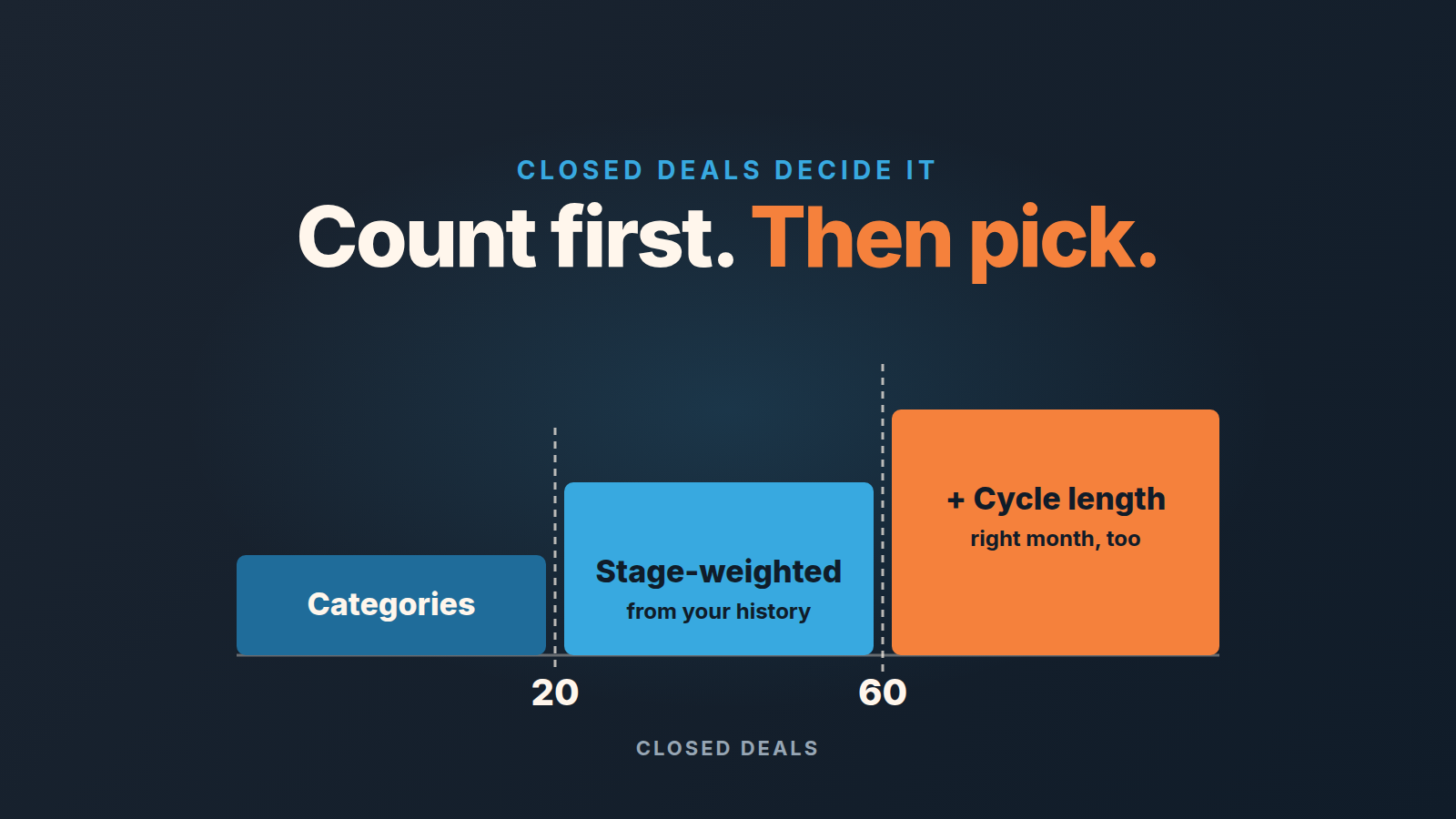
For a small team, the forecasting method is chosen by the number of closed deals in your CRM, not by what the market does or what a bigger company uses. Under about twenty closed deals, forecast by confidence category: commit, best case, pipeline. Between twenty and sixty, switch to stage probabilities taken from your own conversion history. Past that, add cycle length so the forecast lands in the right month as well as at the right total. Every method on this page needs one or two specific things from Pipedrive, and the article says which.
Start with what you have: count your closed deals
Before picking a method, open Insights, create a deal conversion report (Report > Deal > Conversion) and leave the default filters alone: deals created this year, status won or lost (Pipedrive: Insights reports, deal conversion). The number at the top is your win rate. The number you actually need is less glamorous: how many deals went into that calculation. Hover the columns, add won and lost together, write it down.
That count is the only input to the method decision. A team with twelve closed deals and a team with ninety can run the same pipeline with the same stage names and still need different methods: one has statistics, the other has anecdotes. The method guides that rank for this topic list seven to ten techniques and stop short of saying which one is safe at fifteen deals. For a team of three to eight reps, we think that is the whole question.
A small warning on the count. If your pipeline was rebuilt in spring, count only deals that lived in the current stages. Conversion numbers from a pipeline that no longer exists describe a process you no longer run.
Four sales forecasting methods a small team can feed
The longer lists also cover methods we leave out on purpose. Historical or trend forecasting (a straight line, a moving average) needs a revenue history long and steady enough to extend. Lead-driven forecasting needs enough lead volume for lead-to-deal rates to hold still. Regression and AI models need both, plus clean fields; we looked at AI forecasting separately in AI sales forecasting for small teams. A team of three to eight reps rarely has any of that yet. What’s left are two qualitative methods, categories and rep call, and two quantitative ones, stage-weighted and cycle length.
Categories. Each open deal gets one label: commit, best case or pipeline. The forecast is the sum of commit, with best case reported next to it as the upside. The labels come from the rep’s judgment about the buyer, not from the stage. This is the method the small-business guides recommend for an early-stage team (Forecastio: small business sales forecast), and it is the one we recommend first, because it works with zero history. We wrote up the setup and the arguments it causes in commit vs best case forecast.
Stage-weighted. Every deal is multiplied by the probability of its stage, and the forecast is the sum: Forecast = Σ(deal value × stage probability) (NetHunt: how to calculate a sales forecast). Pipedrive does the arithmetic once stage probabilities are set. The catch is where the probabilities come from. If they are the defaults or someone’s guess, the forecast is a guess with decimal places. We took that apart in why stage percentages lie, so we won’t repeat it here.
Cycle length. This one does not change the total; it changes the timing. You take your average days from deal creation to won, compare it to how long each open deal has been in the pipeline, and move deals that are far past the average out of this month’s number. A deal that has sat for twice your cycle is not closing on its expected close date, whatever the rep says. If your sales are seasonal, also shift the comparison by your sales cycle and read the pipeline against the same month a year ago.
Rep call. The rep looks at the list and says a number. On it’s own it is the least defensible method, and it is also the one that catches things no field holds: the champion who went quiet, the procurement step nobody logged. We never use it as the main method. We always use it as the second one. To record the rep call inside the CRM, see how to forecast in HubSpot.
Which method at which deal count
Under twenty closed deals, use categories and nothing else. Eight won out of fifteen closed is 53%. Two more losses make it 47%, two more wins make it 59%, and a forecast that moves that much on two outcomes is not a forecast, it is a mood. Categories do not pretend to a precision you do not have. The rep says commit or best case, you add it up, and the manager’s job is to ask why a deal is in commit, not to argue about whether proposal stage is 40% or 55%. These thresholds are our recommendation, not a published study, and the edges are soft.
Between twenty and sixty, your conversion report starts to mean something per stage, and that is the moment to switch the main method to stage-weighted. Not before, because the per-stage rates are what you are weighting by, and the funnel conversion report can only show the share of deals that reached each stage out of the deals you have (Pipedrive: Insights reports, deal conversion). Twenty deals across five stages is still thin, so round the probabilities to the nearest ten and leave them alone until the quarter ends. Keep the categories running on the side; they become the the check.
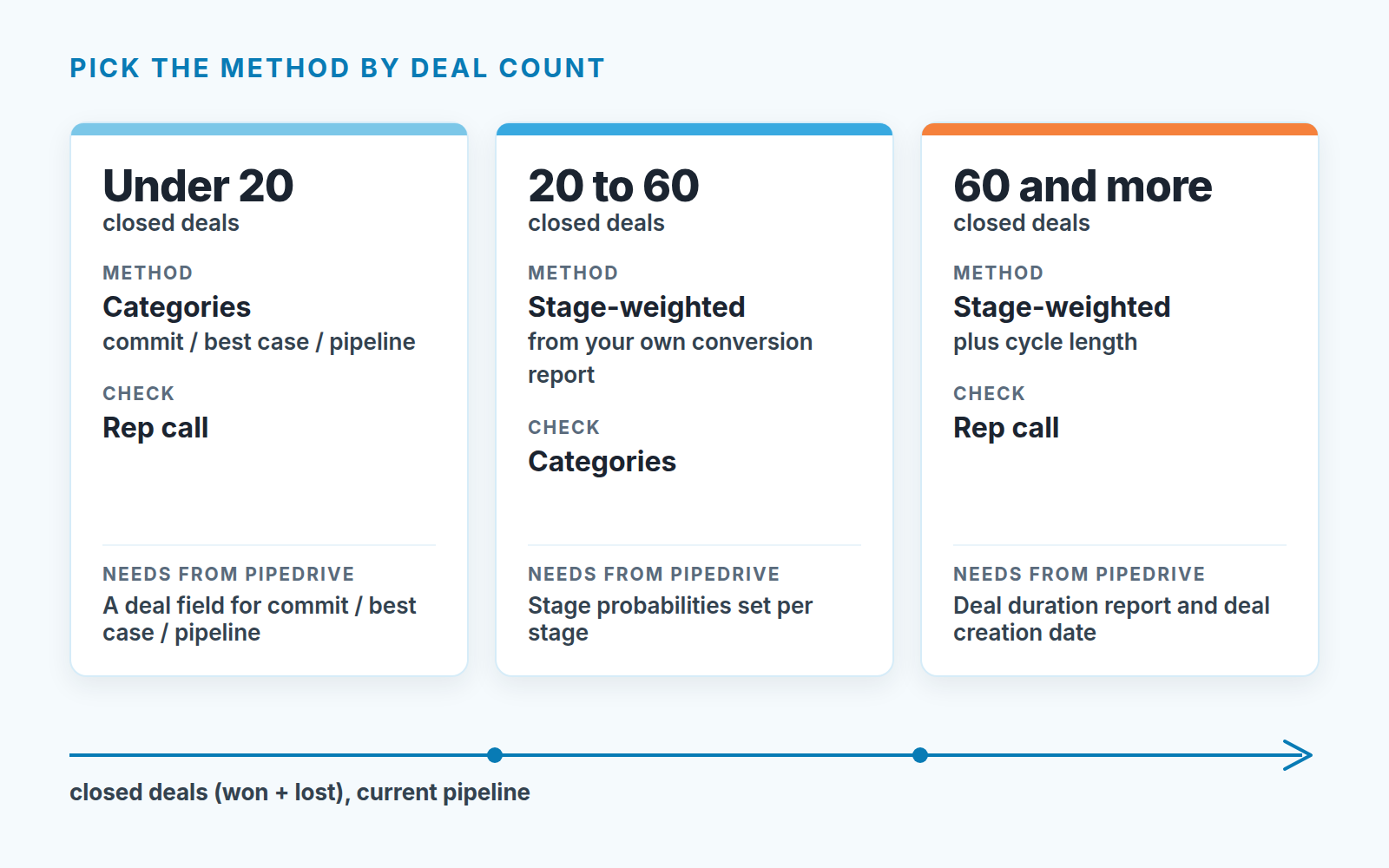
Past sixty, keep stage-weighted as the base and add cycle length. By then the deal duration report has enough deals to make the average sales cycle a real number instead of the longest deal divided by three. This is also where the method that fits a small team starts to look like the bottom-up forecast larger companies run, and we cover reading the gap against a target there.
One more rule overrides the count. If the team sells two very different things, say a $3,000 subscription and a $60,000 implementation, count the deals per pipeline and pick the method per pipeline. Twenty mixed deals are not twenty deals.
What to pull from Pipedrive for each
Nothing here needs an export. The point is to know which screen each method lives on before you commit to it.
| Method | What you need in Pipedrive | Where it lives |
|---|---|---|
| Categories | A field on the deal for commit / best case / pipeline, filled by the rep | Custom field on the deal (setup in commit vs best case forecast); then a deals list filtered by that field |
| Stage-weighted | Stage probabilities set from your own funnel conversion, and a weighted total | Pipeline view, pencil icon next to the pipeline dropdown, a number from 0 to 100 per stage; the weighted value then shows at the top of the pipeline and in the forecast view |
| Cycle length | Average sales cycle in days, and each open deal’s age | Insights > Report > Deal > Duration; the deal’s creation date in the list view |
| Rep call | Expected close date and deal value, kept honest | Deals tab, forecast view, columns by expected close date |
Stage probability is 100% for every stage by default, so a pipeline nobody has configured shows the full value of every deal as the “weighted” value (Pipedrive: probability in Pipedrive). If you have never touched the pencil icon, you are not running stage-weighted, you are running sum-of-everything. The same article explains that a deal probability, set from the deal’s detail view, always overrides the stage probability for that deal. That is useful and dangerous at the same time: one rep setting 90% on a stuck deal quietly raises your forecast. We allow deal probability only as a way to lower a number, never to raise it. How the two interact, and how to find the hand-typed ones, is in Pipedrive deal probability vs stage probability.
The forecast view, on Professional and higher plans per Pipedrive Help, shows for each date column what you would get should you win them all (Pipedrive: the deal forecast view). Read that number as the ceiling, not the forecast. The Insights revenue forecast report, on Growth and higher plans per Pipedrive Help, never includes lost deals (Pipedrive: Insights reports, deal revenue forecast).
For cycle length, keep the deal duration report on its default filter of won or lost deals (Pipedrive: Insights reports, deal duration). Open deals drag the average toward whatever is currently stuck. Stages you deleted are not counted, which matters for the spring-rebuild case above. The long version is in sales cycle length in Pipedrive, and the per-stage side of it in pipeline stage conversion rates.
Run two methods and read the gap
A single method gives you a number. Two methods give you a number and a reason to doubt it, and the doubt is the useful part.
The main method produces the figure that goes to the owner. The second method is run by someone else, in ten minutes, before the forecast meeting. Then you compare.
- Under twenty deals: categories are the forecast, the rep call is the check. Ask each rep for a number from memory before they open the list. Compare it to their commit total.
- Twenty to sixty: stage-weighted is the forecast, categories are the check. Sum the commit deals and put it next to the weighted total.
- Over sixty: stage-weighted plus cycle length is the forecast, the rep call is the check.
Then read the gap, and read it in one direction only. When the rep’s number is above the method you are usually looking at happy ears: deals in early stages the rep is sure about. When the method is above the rep’s number, you are usually looking at deals the rep has already given up on and has not moved or marked lost. Both patterns have names and a fix in sandbagging vs happy ears. At this size we treat a gap under ten percent as noise. A gap over a quarter of the forecast usually means one of the two methods is being fed bad data, and the next section is about which.
We do not average the two. Averaging hides the disagreement, and the disagreement was the point. What the manager does with the figure before it goes to finance is the subject of revenue forecasting for a sales manager.
When the method is not the problem
Here is the pattern we see most in small teams unhappy with their forecast: they have changed the method twice in a year and the forecast is still wrong by the same deals. The method was never the problem. The inputs were.
Stage-weighted assumes the stage is true. Categories assume the rep updated the label since the last call. Cycle length assumes teh creation date and the expected close date mean what they say. In a pipeline where a third of the deals have an expected close date in the past, or a value typed in at discovery and never revised, every method on this page produces a confident wrong answer. Switching between them just changes which wrong answer you get. We put the inputs that matter most in sales forecast accuracy for small teams: expected close date, value, stage, and last activity, in that order.
So before the next method debate, pull the list of open deals with an expected close date before today and count them. Then count the open deals with no activity scheduled. If either number is more than a handful, fix those first and rerun the forecast you already have. We build SalesBond, a sales management layer on top of the CRM a team already uses; we started with Pipedrive. Deal Health checks every deal in the connected CRM against more than 20 rules, such as a close date in the past or no next activity, and shows what to fix. Check your CRM with SalesBond if you’d rather have that list waiting for you than rebuild the filters every Thursday.
If the inputs are clean and the forecast still misses, that is the moment to revisit the method. In our experience it’s rare. Most small-team forecasts are not wrong because of the formula. They are wrong because the formula was fed last month’s pipeline, and the win rate you think you have is not the one in the report.


