

In Salesforce, delete an opportunity only when it was created by mistake, merge it into the original when it is a duplicate, and close everything else as Closed Lost with a reason. Deleting removes the deal from win rate and pipeline history; Closed Lost keeps it. That is the whole rule, three lines long. The rest of this article is about why each line sits where it does, and how to check every two weeks that the team is following it.
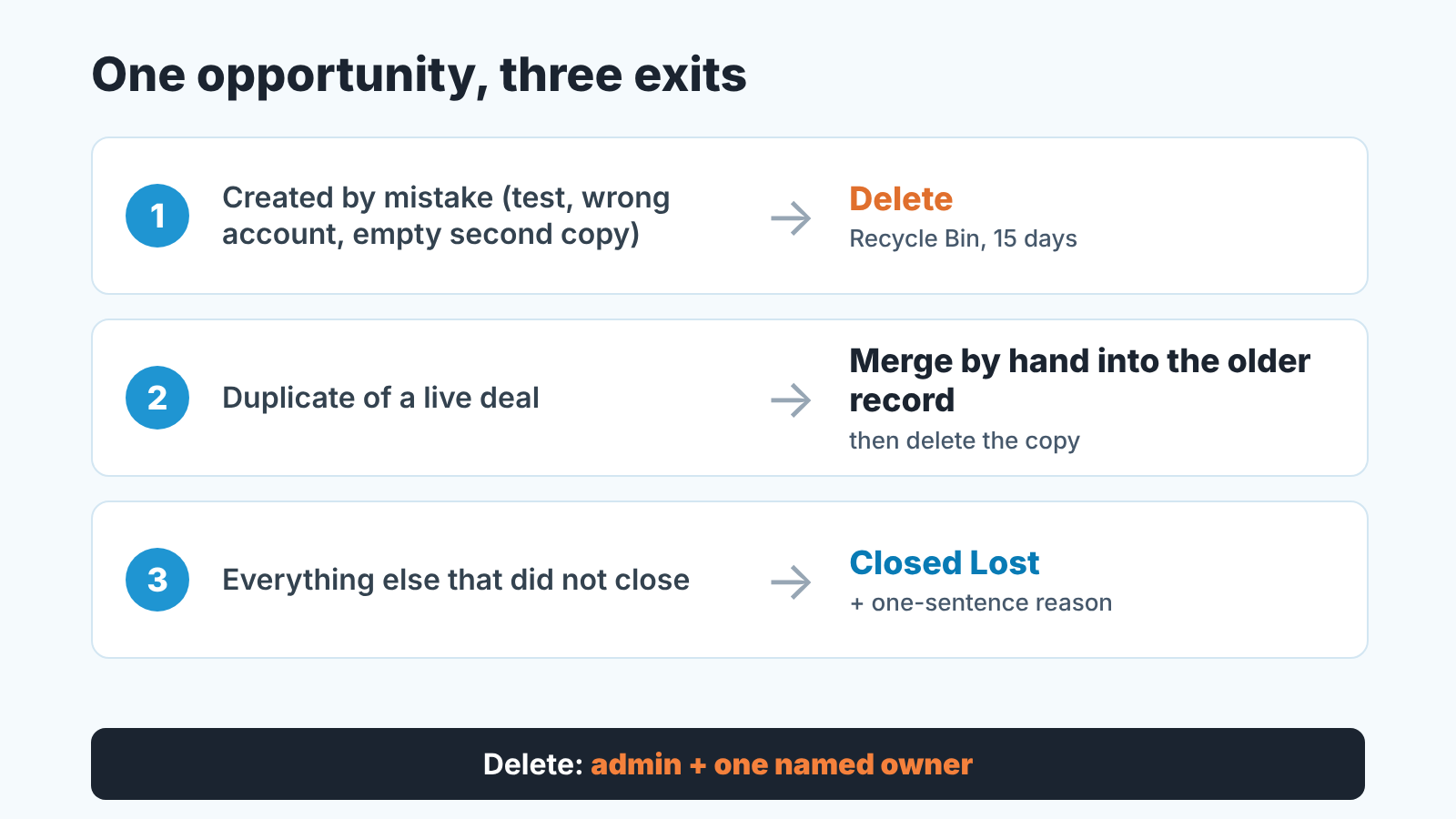
Delete is the one action you cannot undo for pipeline numbers
Deleting takes a few clicks, which is part of the problem. One route in Lightning Experience, from the Kanban view of the Opportunities list (Trailhead: Path and Kanban):
- Open the Opportunities tab and switch the list view to Kanban.
- Click the down arrow on the deal’s card.
- Choose Delete.
List views offer Delete as a row action too (Trailhead: Actions in Lightning Experience). Either way, only a user who holds the Delete permission on Opportunity can remove the record.
Now what deletion does, because most reps have never looked. Salesforce moves the record to the Recycle Bin, where it can be viewed and restored for 15 days before it is permanently deleted (Salesforce Developers: emptyRecycleBin()). In Lightning Experience the Recycle Bin is no longer on the object’s home page the way it was in Classic (Trailhead: Lightning Experience features). The bin has a ceiling too: up to 5,000 records per license. When an org reaches that limit, Salesforce removes the oldest records on its own, as long as they have been in the bin for at least two hours (same source). A five-license org holds at most 25,000 deleted records, so a mass “clean-up” before a quarterly review can start disappearing from the bin without anyone pressing a second button.
The deal does not go alone. A delete cascades: delete a parent record and its children go with it, as long as each child object can be deleted (Salesforce Developers: delete()). For an opportunity that includes the stage history. The OpportunityHistory record, the one that remembers every change to Amount, Probability, Stage and Close Date, “is automatically deleted if its parent Opportunity is deleted” (Salesforce Developers: OpportunityHistory). Your opportunity history report simply has one row fewer, with no marker that anything was there.
Restore is possible inside the window: an undelete brings back the record and the children that were cascade-deleted with it (Salesforce Developers: undelete()). But somebody has to notice, within 15 days, that a deal is missing from a pipeline that is supposed to be getting smaller anyway. What we see instead is a forecast line nobody can explain three months later.
So the first line of the rule: delete only a record that should never have existed. A test opportunity. A second copy a sync created a minute ago, with nothing on it. A deal opened on the wrong account and caught the same afternoon. If the record has ever carried a real stage, a real amount or a real activity it is history. History is not deleted. It is closed.
Closed Lost with a reason: the default for lost deals
A lost deal is data. The point of Closed Lost is that the opportunity stays in reports: it counts in win rate, it keeps its stage history, and it shows which rep carried it and for how long. A deleted deal counts for nothing, and a pipeline where only the winners survive reports a win rate that is fiction.
Here is the test we give managers. Picture the review six months from now. Somebody asks how many deals the team lost at Proposal last quarter, and to whom. If the answer is in Salesforce, the deals were closed lost. If the answer is “a few, I think”, they were deleted.
The reason matters as much as the status. Closed Lost on its own says that something ended. Closed Lost with “incumbent renewed early” says what to do differently next time. Hold the rep to one plain sentence: price, timing, no decision, chose a competitor, went dark. The picklist and the loss report are a separate job. For the manager, the behaviour is the point: a rep closes lost, with a reason, and never clears a pipeline by deleting.
A closed-lost deal also keeps its trail of who changed what, which is what an audit reads (how to read field history for an opportunity audit). A deleted one takes the trail to the bin with it.
Merging duplicates before they split history
The awkward fact first: Salesforce has no standard merge for opportunities. The merge operation supports Lead, Contact, Account, Person Account and Individual, and only records of the same type can be merged (Salesforce Developers: merge()). The Opportunity object’s supported calls include create, delete, update and undelete; merge is not on the list (Salesforce Developers: Opportunity). So when two reps have each logged “Acme renewal”, there is no button that combines the two. There are AppExchange apps built for this; we do it by hand, and that is exactly why it has to be a written rule. Unwritten manual jobs do not get done.
Manual merge, the way we do it:
- Pick the keeper. Usually the older record, because it holds the activities and the stage history.
- Carry over what the keeper is missing: the next step, contact roles, product lines, a newer amount if it is the right one, and the notes that explain the deal. Copy from the duplicate; do not retype from memory.
- Only then delete the duplicate. This is where line one and line two of the rule meet: the copy goes to the Recycle Bin because the deal it describes lives on in the keeper.
Why not close the duplicate as lost instead? Because it is not a lost deal. A Closed Lost duplicate of a deal you later win puts one loss and one win into the win rate for a single customer conversation, and it splits the stage history across two records, so neither shows the real cycle. Every week both stay open, more activities land on the wrong one.
Catching the pair early is the job of duplicate rules; our duplicate rules and matching rules check covers block versus warn and who owns the merge when a rule fires. Once a duplicate opportunity exists, though, it’s simple: merge by hand, delete the copy, and the owner of the older record owns the job.
Who should be able to delete opportunities
Two people. The admin and one named business owner. Not team leads, not the top rep.
In Salesforce that is an object permission: Delete on Opportunity requires Read and Edit on the same object, and Modify All includes Delete (Salesforce Developers: ObjectPermissions). So “who can delete opportunities” is really two questions: who holds Delete directly, and who holds Modify All. The common forum question is how to give a user Delete (Trailblazer Community, 2016); for a sales manager it runs the other way: how to take it away from everyone but two people. We laid out the setup in permission sets for a small sales team.
Every two weeks: deleted versus lost
Ten minutes after the pipeline review. Two questions, and you only need the admin for the second one.
First: how many opportunities were deleted, compared with how many were closed lost? The Recycle Bin keeps deleted records for 15 days, so a monthly look sees only half the month. We attach it to every other weekly review. The healthy picture is a closed-lost count that moves with the pipeline and a delete count near zero. When the two numbers start to look alike, reps are using Delete as their Closed Lost. Open the deleted records and ask one question about each: did this deal ever have a stage and an amount? If yes, restore it while the window is open, close it lost, and add the the reason that should have been there.
Second: who holds Delete right now. The admin reads the names on the restricted set aloud, then confirms that no profile and no Modify All grant it to anyone else. Expect two names. Three is a conversation; six is a cleanup.
A disclosure, since this is the part that gets skipped when the month is busy: we build SalesBond, a sales management layer on top of the CRM a team already uses; we started with Pipedrive. The rule itself costs nothing, and most of its value is in having written it. Once the three lines are on the wall and the two names are known, check your CRM with SalesBond for the rest of your pipeline hygiene.
Write the three lines down and say them on Monday: mistakes get deleted, duplicates get merged into the older record, everything else gets Closed Lost with a reason. Then stop arguing about single deals and watch the two counts. For what else to look at in each opportunity, our opportunity audit for sales managers is the companion piece.


