
Target account selling (TAS) is choosing a small number of companies that fit your ideal customer profile and working each of them personally, instead of sending the same sequence to everyone who matches a filter. In a team of two to six reps the list does not need a platform. It lives in Pipedrive as organizations with a label and a saved filter, and once a week the manager opens that filter and looks for one thing: target accounts where nobody has a next step scheduled.
Picking the accounts is the easy part. Most target lists die because nobody looks at them after the kickoff, and within a quarter they are a spray campaign again with a nicer name. What follows is the setup and the habit that stop that.
Target account selling in two paragraphs, and what it is not
Gong describes target account selling as a B2B approach built around strategically chosen accounts that sit close to your ICP, with a five-step rollout behind it (Gong: target account selling). The useful part of that definition for a small team is the word chosen. An account is on the list because a person decided it belongs there, can say why, and has a name attached to it. Everything else about TAS follows from that decision.
It is not account-based marketing. ABM is the marketing side of the same idea and usually arrives with intent data, ad audiences and a content calendar per account. A six-person sales team does not have a marketing team to run that, and does not need one to pick a few dozen companies and call them. It is also not an outbound campaign. A campaign has a start, a sequence and an end date. A target list has no end date: an account stays on it until it buys, says no, or stops fitting. If your reps describe what they are doing as “the Q4 push”, they are running a campaign. That is fine, but it is a different thing. We wrote about the inbound and outbound split for small teams here, and TAS sits inside outbound as the deliberate, slow part of it.
Build the list from the deals you already won
Do not start from a purchased database. Start from the won deals in your own Pipedrive and the pattern they show, which is what the ICP exercise is for. We have a separate piece on pulling an ICP out of won deals, so we will not repeat the criteria here. The output you need from it is two or three firmographic lines plus a negative line: who you keep losing to, or losing money on, and will not put on the list however tempting the logo.
How long should the list be? Cleverly suggests 25 to 100 accounts as a manageable starting point, depending on deal size (Cleverly: target account selling). For two to six reps we would stay at the low end of that range. The test we actually use is simpler than any number: each rep should be able to name their accounts from memory and say who the likely buyer is at each one. If they need to open the CRM to remember what is on their list, the list is too long for personal work and you are back to filters and sequences.
If you already split work by territory, named accounts are one of the ways to draw those lines, and the per-rep cap there is set by capacity (territory planning for small teams). That is a quarterly decision about who owns what. The weekly habit below is a different thing and sits on top of it.
One more rule we hold to. The list is per company, not per contact. A target account with four contacts in it is still one account. That matters in the next section, because it decides which object in Pipedrive carries the label. It is also why the receptionist belongs on the organization, as one more person record.
Keeping a target account list in Pipedrive: a label, a filter, and the right columns
Pipedrive has no “target account” object, and you do not need one. Organizations plus a contact label do the job, and they do it in the list view where the team already works.
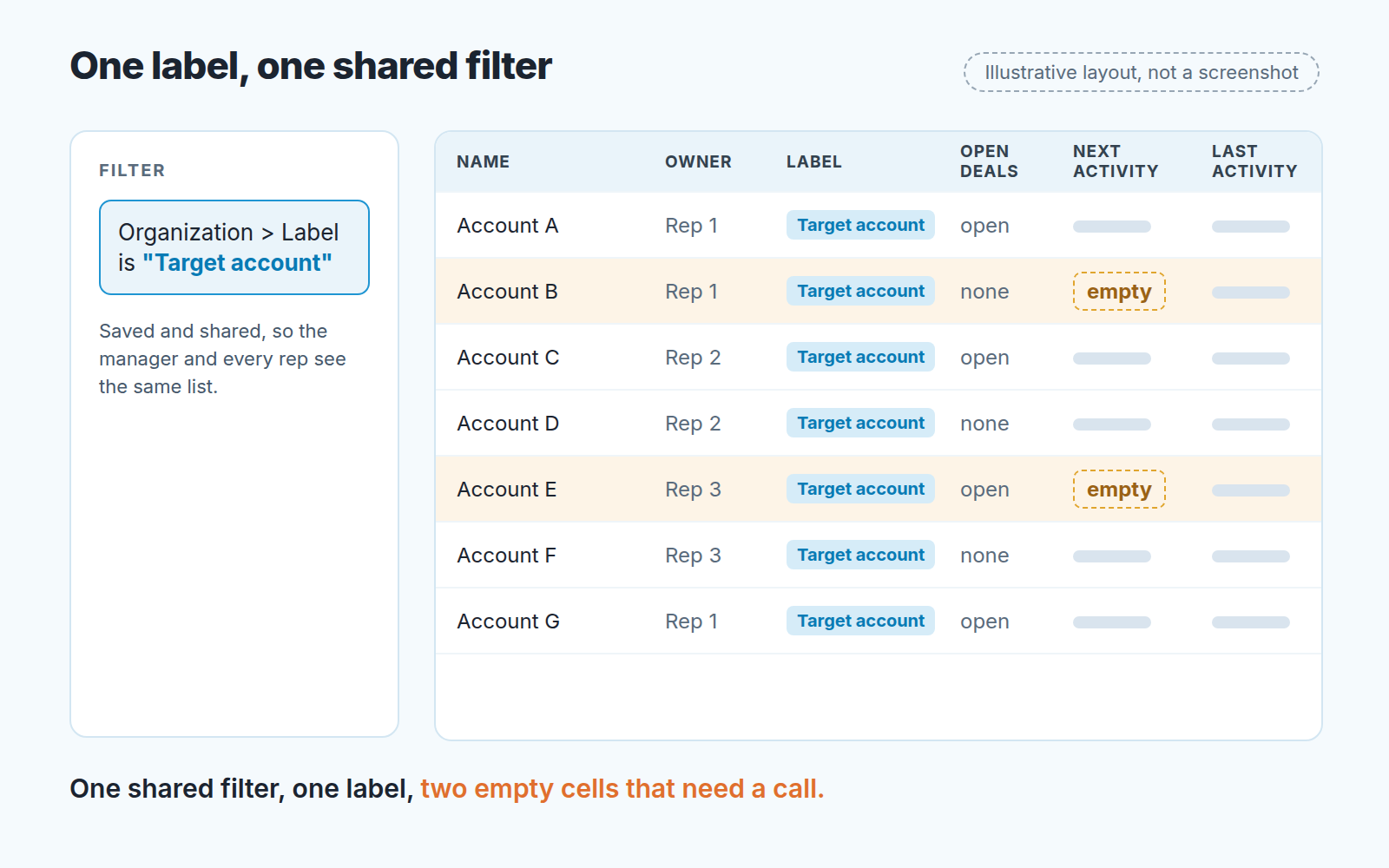
Here is the setup in the order we do it.
- Create the label on the organization. Pipedrive has contact labels for both people and organizations, and you can add your own (Pipedrive: contact labels). Call it something nobody will misread, like Target account. Multiple labels per contact are in a closed beta at the time of writing, so plan for one label per organization. If you want tiers, they go in a custom field, not in a second label.
- Add the labels column and assign in bulk. The same Pipedrive article notes that you assign labels to existing people or organizations directly in the list view once the labels column is on. Switch to Organizations, add the column, select your chosen accounts and set the label in one pass; list view supports bulk editing for exactly this (Pipedrive: list view).
- Decide what to do with parents and subsidiaries. Pipedrive links organizations as Parent, Daughter or Related, and the relationship cannot be edited after it is created (Pipedrive: related organizations). Label the entity you actually sell to. If the buying happens at the subsidiary, the subsidiary is the target account and the parent is context.
- Build the filter and share it. Organizations, label is Target account, saved as a shared filter so the manager and every rep see the same list and the same count. How shared filters and saved columns behave for the rest of the team is covered in this article. The short version: private filters are where target lists go to die.
- Pick the columns and save them with the filter. Deal, person and organization fields can all be used as columns (Pipedrive: customizing columns), so show the owner, the label, the number of open deals, and the dates of the next and last activity. A tier or a “why this account” note goes in a custom field shown as a column. Custom fields exist for filtering and organizing data; access follows global permissions and the number of fields is capped by plan (Pipedrive: custom fields). Two is plenty.
That is it. No new pipeline, no stage called “Target”, no separate spreadsheet that drifts away from the CRM within a month.
Five accounts a week, and a next step on every one
The list is only as good as the habit around it, and the habit we recommend is small on purpose. Every Monday each rep picks five accounts from their part of the list and does one deliberate thing on each: a call to a named person, a note sent after reading their last annual report, an intro asked for. Five, not fifteen. Fifteen is a sequence with extra steps.
The second half of the habit is the the one that gets skipped. After the action, every one of those five accounts has a next activity in Pipedrive with a date. Not “follow up at some point” but a dated activity. This is what makes the filter useful: a target account with no next activity date is not a data gap. It is a decision somebody did not make.
We hold the weekly review on the filter itself, not in a slide. The manager sorts by the next activity date, empty ones first, and asks one question per empty row: what is the next step here, and when? On a list a small team can actually work, that is a short meeting. If the same account is empty two weeks running, the rep either names a step or we take the label off. Removing accounts is part of the method. A list that only ever grows is a sign nobody is working it.
A disclosure, since this is where a tool could help: we build SalesBond, a sales management layer on top of the CRM a team already uses; we started with Pipedrive. Its Deal Health product checks every deal in the connected CRM against more than 20 rules, including Activity and Progression categories, and shows the specific violations with a recommended action for each. Deals on target accounts get checked like any others. An account with no deal at all is invisible to it, though, which is why the organization filter stays the backbone of the review.
This is also where TAS parts ways with the account plans you write for existing customers. A key account plan is about protecting and growing what you already have, and we described the one-page version for small teams separately. Target accounts are the opposite case. You have nothing yet, so the plan is mostly a next step and a reason.
Three numbers that tell you whether the list is working
You do not need a dashboard for this. The shared filter already holds the numbers if you read it with three questions in mind.
Coverage: how many of the labeled organizations had at least one activity logged in the last month. This is the honest measure of whether the list is being worked or admired. Sort by the last activity date and count the stale rows at the bottom.
Share with an open deal: how many target accounts have at least one open deal linked to them. Add the open-deals count as a column, or filter for organizations with at least one open deal linked (Pipedrive: filters, common uses). Early on this will be low and that is fine, but it should move. If after a quarter the share is where it started, either the list is wrong or the outreach is.
Account-to-deal conversion: of the accounts on the list at the start of the quarter, how many have an open or won deal at the end of it. Compare this one quarter over quarter. We do not publish a benchmark for it, because the honest benchmark is your own last quarter, and a list in a six-person team is too small a sample for anyone else’s percentage to mean much.
What we deliberately do not count is emails sent and calls made per account. The moment those become the metric, reps optimize for them and the list turns back into a sequence.
When you don’t need any of this
Target account selling costs attention, and attention is the one thing a small team has less of than a big one. If your sales cycle is a couple of weeks and the average deal is a few hundred a month, the arithmetic does not work. You would spend more time researching an account than the deal is worth, and a well-built inbound funnel or a plain outbound sequence will win on volume alone.
Same story when your buyers are interchangeable. If any company of the right size and industry is as good as any other, a filter already does your targeting, and a named list adds ceremony without adding judgment. TAS earns it’s keep where deals are large enough to matter one by one, where the buyer is a specific person you have to find, and where losing one of them to a competitor would show up in the quarterly number.
If none of that describes you skip it with a clear conscience and start with territory planning for small teams instead. If it does, open Pipedrive this week, create the Target account label, and put your first accounts on it before Monday’s review.


