
An action plan is a short list of specific steps, each with an owner and a deadline, that moves you from where you are to a goal. For a sales team behind plan, the work runs in five steps. Find where the gap sits, pick the places to act, write each action as one row with an owner, a date, an expected effect and a proof in the CRM, turn every row into a CRM task, and check the rows every Friday.
This is the second half of a pair. The first, gap analysis for a sales owner: plan vs closed-won, finds where the month’s shortfall sits. Here we assume you have the number and a rough idea of its source, and ask what to do in the two to four weeks you have left.
What an action plan is when the goal is a number
An action plan turns a goal into work that can be checked: who does what, by when, and how you will know it was done. The generic version adds resources and schedules, but the core is the same everywhere (Wrike, Asana, Atlassian). Envisio puts it well: a strategic plan sets the direction, an action plan turns it into steps, timelines and named people (Envisio).
For a sales owner, the goal is a sum of money by a date. That changes the plan in two ways. Each row needs an expected effect in money, even a rough one, because the month will not fit every row and you have to choose. And each row needs a proof you can read in the CRM, because “we called the stuck deals” is an opinion until the activity log shows it.
This is not a mutual action plan (built with a buyer for one deal) or a performance improvement plan (for one rep). This one is for the team and the month.
When a sales team needs one, and when a diagnosis comes first
A plan written on the third of the month, before anyone knows where the gap is, is a list of good intentions. We have watched teams spend a week “calling everyone” after the owner panicked at the first dashboard. The calls landed on deals that were fine and missed the three that were quietly dying.
So the order is fixed, and each step waits for the one before it.
- Find the gap and where it sits (that is the gap analysis).
- Pick the places to act that match it.
- Write one row per action: action, owner, date, expected effect, proof in the CRM.
- Turn every row into a task in the CRM.
- Check the plan every Friday and cross out or escalate.
If you run quarterly checkpoints on the sales plan, step one already exists at each checkpoint and the action plan is what you write right after it.
One honest exception. If the month is more than half over and the gap is larger than the open pipeline due this month, no plan closes it. Say so, protect next month, and plan for that instead.
Five places to act when the month is behind plan
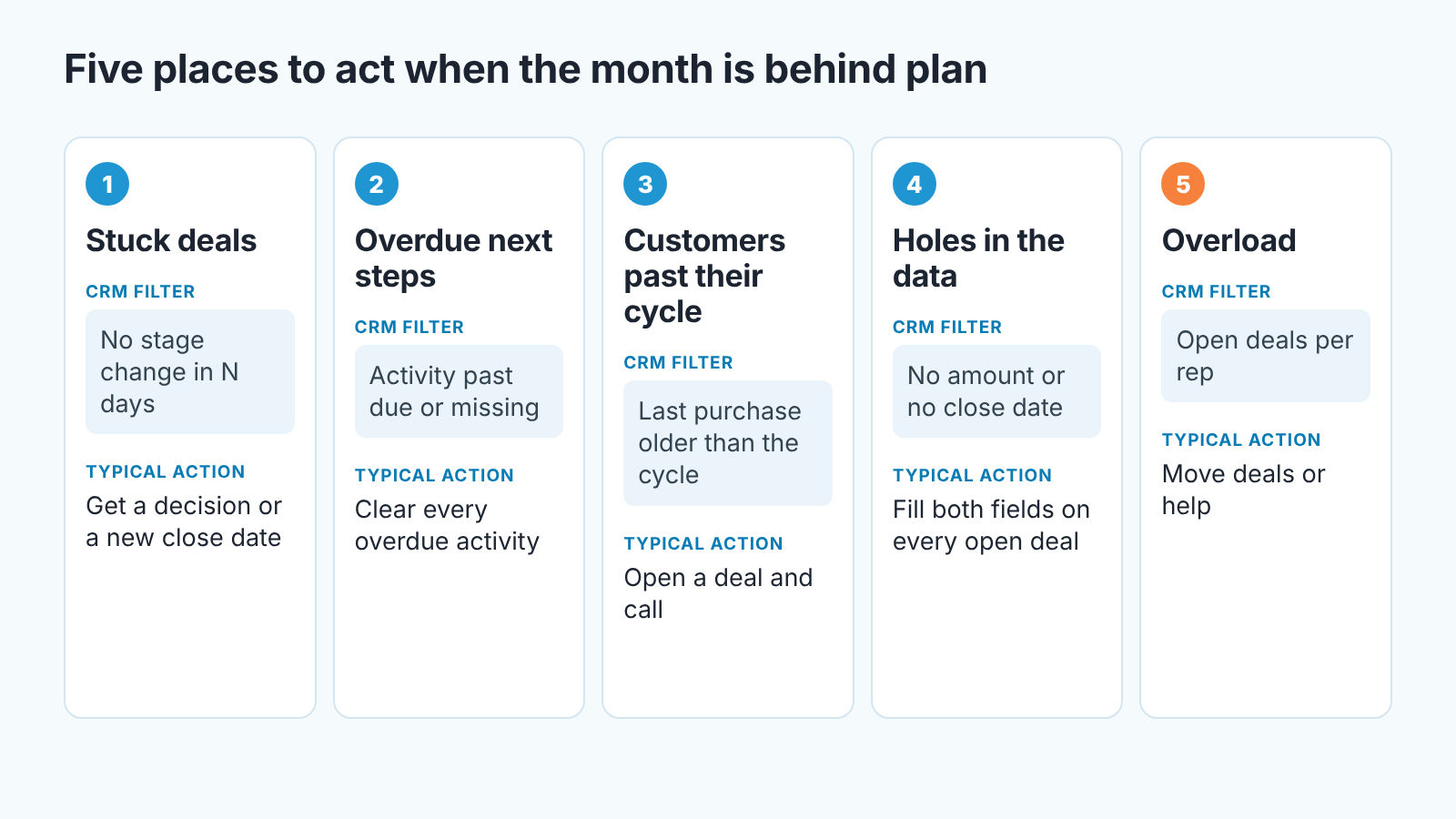
The gap analysis splits the shortfall into four levers (deal count, deal size, win rate, cycle); they tell you what is short. The five places below are where the work happens. Each has a signal you can filter for in any CRM and one to three actions worth a row.
Stuck deals
Filter for open deals due this month with no stage change in two or three weeks, or with a close date already in the past. In Deal Health these show up among the rule violations on each deal.
The action is a decision per deal. Either move it to a real close date next month, or make one call that asks for a yes or no this week. The rep owns that row, and the proof is a changed close date or a logged call with an outcome.
Overdue next steps
Activities past their due date, and open deals with no next activity at all. This is the cheapest place to act because the work is already defined, someone just did not do it. A row here reads “clear every overdue activity on deals due this month by Wednesday”, owner the rep, proof an empty overdue list.
Customers past their buying cycle
In a repeat-order business, some customers’ next purchase is late and nobody opened a deal for it. In SalesBond this is the overdue and leaving list in Repeat Sales, one status per customer against its own buying cycle; we wrote about working that list in retention strategies for late reorders. In a plain CRM, sort organizations by last won deal and compare with how often each usually buys.
The action is a call and an open deal. The proof is the deal.
Holes in the data
A deal with no amount counts toward nothing, and one with no close date is never due this month as far as reports go. You can’t trust the other four places until this one is closed, and it is usually a one-day row: “every open deal has an amount and a close date by Tuesday”, owner the manager, proof a filter that returns zero.
It is also the first thing we look at in a free CRM audit. SalesBond reads the last 30 days of your CRM and sends a PDF: money at risk, deal health, the pipeline bottleneck, repeat customers, what to fix first. A second PDF arrives seven days later with what changed. Check your CRM with SalesBond if you want that list before you write the plan.
Who is overloaded
Count open deals due this month per rep. If one person holds half, the plan moves deals or help, and that is an owner’s row. The proof is a changed owner field on a named set of deals.
The action plan template: one row, five fields
A row that lacks any of these five fields will not survive the week.
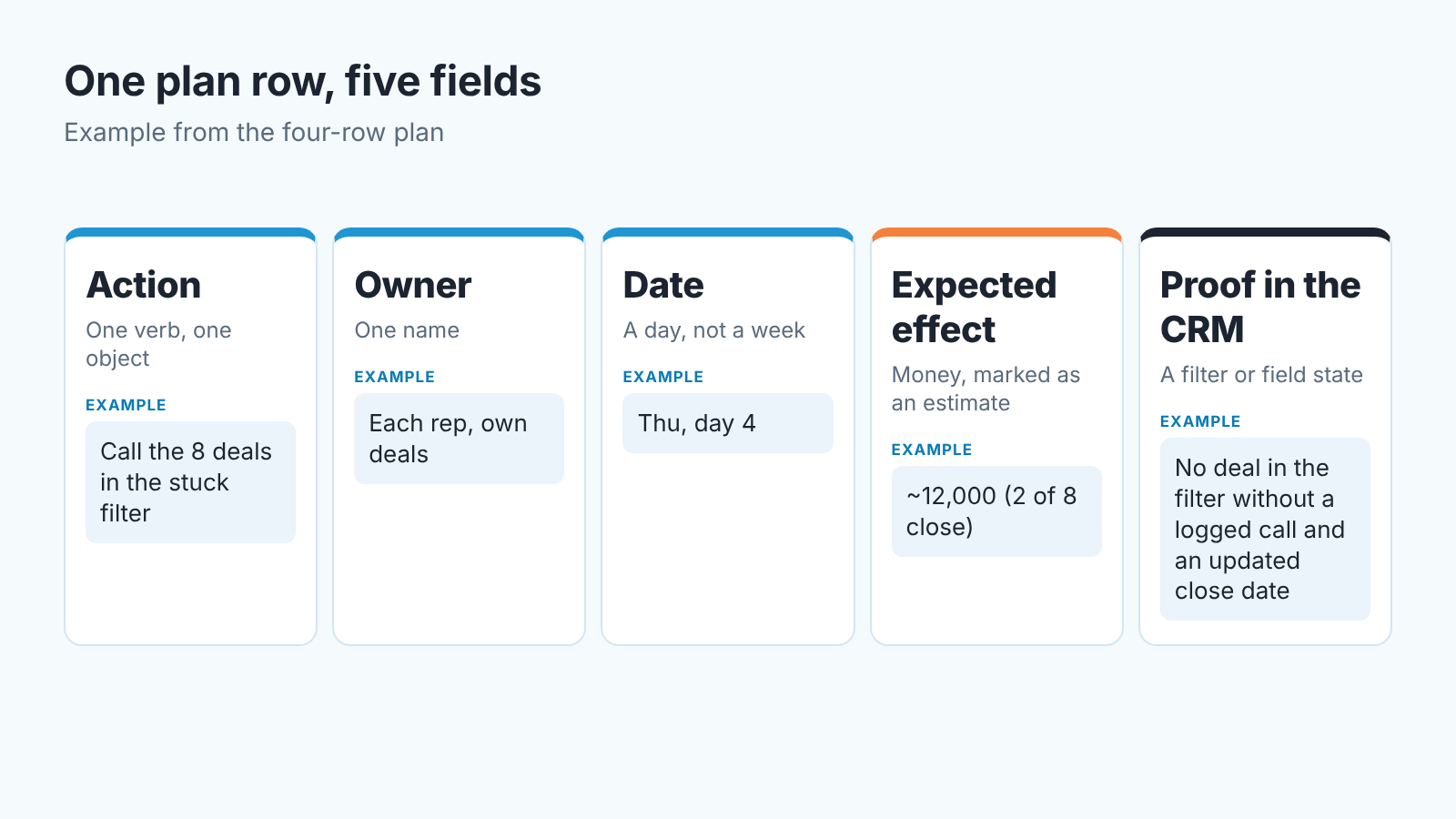
Start with the action: one verb, one object, one list of deals. “Call the eight deals in the stuck filter and get a decision” is a row. “Work the pipeline harder” is not.
Then one owner, by name. Two names means the second one assumes the first one has it.
The date is one calendar day. A vague “this week” gives the weekly check nothing to catch, because the check only works when a date can be missed.
Expected effect means the money you think this row moves, written as an estimate. A made-up illustration: eight stuck deals worth 48,000 in total, of which you honestly expect two to close, is an expected effect of about 12,000. The point is ordering the rows, and noticing when one is not worth its hours.
And the proof in the CRM has to be a state you can filter for on Friday without asking anyone: an empty overdue list, a close date that moved, a new deal on a named organization, an activity logged with an outcome.
Sales action plan example: four rows for a five-person team
The numbers below are illustrative. We made them up to show the shape of the plan; any real team will see its own numbers.
Say the gap after diagnosis is 60,000 with eleven working days left. Four reps, one manager, repeat orders.
| Action | Owner | Date | Expected effect (estimate) | Proof in the CRM |
|---|---|---|---|---|
| Call the 8 deals in the stuck filter, get a decision or a new close date | Each rep, own deals | Thu, day 4 | ~12,000 (2 of 8 close) | No deal in the filter without a logged call and an updated close date |
| Clear all overdue activities on deals due this month | Each rep | Wed, day 3 | ~6,000 (one deal unblocked) | Overdue activity filter returns zero |
| Open a deal for the 6 customers past their buying cycle, call each | Dana (rep) | Tue, day 7 | ~15,000 (2 of 6 reorder) | 6 new open deals on those organizations |
| Move 5 of Marco’s 14 open deals to Priya | Manager | Mon, day 1 | Enables the first row | Owner field changed on the 5 deals |
The estimates add up to about 33,000 of the 60,000. That is a useful result: the owner knows before anything happens that the month will close short, and by how much. The talk about next month can start now, weeks before the 31st.
One action = one task in the CRM
A plan in a spreadsheet dies because the rep’s day happens in the CRM.
So every row becomes a task in the CRM, with the owner and due date from the row and a link to the deal or organization it concerns. A row covering eight deals becomes eight tasks, or one task naming the filter. Put a short prefix in the subject, something like “Plan:”, so a saved filter shows the whole plan in one list.
Reps already have tasks from the the deals themselves, so a plan row that duplicates an existing task is just noise. Check before you create. How a rep should order that daily list is in task prioritization for a sales rep: why this first.
Friday: what to cross out, what to escalate
Twenty minutes, the plan filter open, three possible outcomes per row. Done, with the proof visible in the CRM: cross it out and write what it actually moved next to the estimate. Not done, with a reason you can act on (the buyer is on leave, the quote was wrong): move the date once. Not done with no reason, or missed twice: it leaves the plan. The owner either drops it as not worth the hours or takes it onto their own row with a different approach.
Teams skip that last rule, and it is the one that keeps the plan honest. A row that rolls forward three weeks only teaches the team that missed dates are allowed. If you already run a weekly pipeline meeting, the plan review takes its first twenty minutes, with no separate meeting.
How long should the plan run? The rest of the month or, at most, four weeks. Anything longer is a sales plan, and it belongs with the quarterly checkpoints rather than the Friday list.
How Sales GPS turns signals into tasks without auto-creating them
We build SalesBond, a sales management layer on top of the CRM a team already uses, and the five places above are, more or less, its signal sources. Deal Health checks every deal against more than 20 rules and lists the violations, with a corrective action for each. Repeat Sales produces the overdue and leaving customers. Sales GPS takes both, plus deal context, ranks deals and customers by importance and urgency, and explains the reason behind every priority. We wrote more about the card itself in next best action for a sales rep.
It does not write the plan for you. A person reads each card and decides on it, and an accepted card becomes one task in the CRM. Nothing is created without that click. We think that is the right boundary: the owner of a row has to be someone you can ask on Friday what happened.
If you want to see those cards against your own pipeline before next month starts, start with SalesBond.


