

A chart of accounts is the list of all accounts a business uses to record transactions, grouped into assets, liabilities, equity, revenue and expenses. For a sales team the useful part is the revenue accounts: if products and deal types in your CRM do not map to them, revenue reports in the CRM and in the books will never match.
Every account also has a number. Wikipedia’s entry calls a chart of accounts “a list of financial accounts and reference numbers” (Wikipedia: Chart of accounts, checked November 17, 2026), and those numbers are what an integration between your CRM and your accounting system will point at. This is a sales owner’s reading of the topic, and your accountant still decides which accounts and numbers go in your books.
A chart of accounts example for a small sales-led company
Say a 12-person software company sells an annual subscription, an onboarding package and paid training days. It’s a made-up example. The account numbers are the example company’s own choice (no standard requires these exact ones), so treat your accountant’s numbering as the real one. If you don’t have a chart yet, you can copy the table as a starting template and take it to that conversation.
| Number | Account | Type |
|---|---|---|
| 1000 | Cash at bank | Asset |
| 1200 | Accounts receivable (invoices sent, cash still to come) | Asset |
| 2000 | Accounts payable | Liability |
| 2400 | Customer prepayments | Liability |
| 3000 | Owner’s equity | Equity |
| 3900 | Retained earnings | Equity |
| 4000 | Subscription revenue, new customers | Revenue |
| 4010 | Subscription revenue, renewals | Revenue |
| 4020 | Subscription revenue, expansion | Revenue |
| 4100 | Onboarding services | Revenue |
| 4200 | Training | Revenue |
| 4900 | Discounts given (contra-revenue) | Revenue (contra) |
| 5000 | Hosting costs | Expense |
| 6000 | Sales salaries and commissions | Expense |
| 6100 | Software subscriptions | Expense |
Fifteen accounts, five types. Assets are what the company owns or is owed, like cash and unpaid invoices. Liabilities are what it owes to others, including money a customer paid for work you haven’t delivered yet. Equity is what’s left for the owners once liabilities are subtracted from assets. Revenue is what you earn from selling, and expenses are what it costs to run the business.
How do you organize it? Keep the types in that fixed order and give each one a block of numbers, leaving gaps between accounts (4000, 4100, 4200) so a new account can slot in later without renumbering the rest. Here the first digit tells you the type at a glance: 1 for assets, 4 for revenue. Handy, and optional. Wikipedia’s sample chart uses a different scheme, with 4.0.0 for Revenue and an Adjustments group at 4.3.0 inside it.
A sales owner touches very few of these directly. Closed-won deals that get invoiced land in the 4000s and in accounts receivable; commissions land in 6000. For the wider picture of how a closed-won deal moves through the balance sheet, see the accounting equation for a sales owner.
Notice where the detail sits. Six of the fifteen accounts are revenue accounts, and that’s on purpose.
One deal, booked two ways
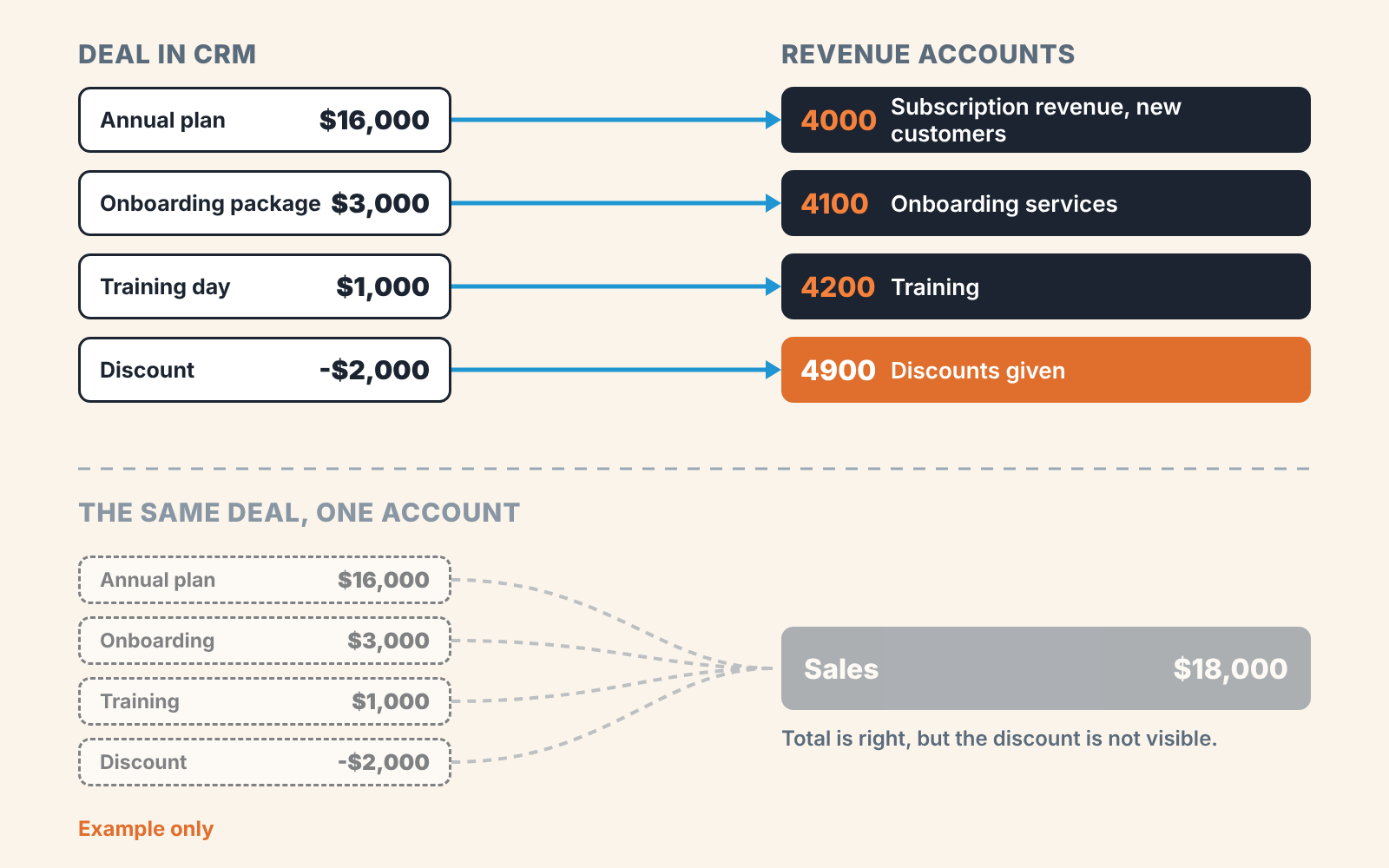
Take a single closed-won deal from the the same example company. The rep attached three products and gave a discount on the subscription.
| Line on the deal | Amount | Revenue account |
|---|---|---|
| Annual plan, 20 seats (new customer) | $16,000 | 4000 |
| Onboarding package | $3,000 | 4100 |
| Training day | $1,000 | 4200 |
| Discount on the annual plan | -$2,000 | 4900 |
| Invoice total | $18,000 |
Account 4900 is a contra-revenue account. It sits with the revenue accounts and carries a negative balance that reduces them, so the list price stays visible in 4000 and the discount shows up on its own line.
With the six revenue accounts above, the books show $16,000 of new subscription revenue at list price, $4,000 of services and $2,000 given away. With a single “Sales” account they show $18,000 and nothing else. Both versions are correct bookkeeping. Only the first one can answer “how much did we discount last quarter?” without somebody opening every invoice. What happens next, the debits and credits and the month-end check, belongs to how this deal then posts in the general ledger.
Which revenue lines does an owner need to see separately?
Usually four: new business, renewals, services and discounts, with expansion as an optional fifth. To check that against your own company, start from the questions you ask in a monthly review and give each question its own account.
How much came from customers who had never bought before? That’s new business, and it’s the number your pipeline exists to produce. How much came from customers renewing what they already had? Renewals usually run on their own win rate and cycle, often with a different owner, and mixing them into new business can make a flat year look like growth. How much was services, such as onboarding or training, which can carry a different margin and stop when the project ends? And how much did you give away in discounts?
If upsells to existing customers are a real motion in your team, give expansion an account. If they happen twice a year, leave them inside renewals.
The usual advice for a small business is to keep the chart of accounts as short as possible, with one sales income account, and to do any splitting in CRM reports. On the revenue side we think that’s a mistake, and here’s our reasoning. CRM reports count deals at the value a rep typed in, on the date the deal was marked won. The books count invoices, credit notes and refunds. When the owner’s only split of new versus renewal lives in the CRM, nobody can check it against money that was actually invoiced. So our recommendation is a separate account for new business and one for renewals. We aren’t suggesting an account per product or per customer: four to six revenue accounts by type of sale is plenty, and product-level detail can stay in CRM product reports or in whatever tagging your accounting system offers (your accountant will know what’s there). The expense side can stay as short as you like. Would you miss a split there every month?
Mapping deal products and deal types to revenue accounts
Here is the mapping for the example company. It’s illustrative, and what matters is the shape: every product in the CRM catalog, combined with a deal type, has exactly one home in the 4000s.
| Product on the deal | Deal type in CRM | Revenue account |
|---|---|---|
| Annual plan | New business | 4000 Subscription revenue, new customers |
| Annual plan | Renewal | 4010 Subscription revenue, renewals |
| Extra seats | Expansion | 4020 Subscription revenue, expansion |
| Onboarding package | Any | 4100 Onboarding services |
| Training day | Any | 4200 Training |
| Line-item discount | Any | 4900 Discounts given (contra-revenue) |
Look at the first two rows. Same product, different account, because the deal type decides. That’s the awkward part, since a connector that passes products to the accounting side may leave the deal type behind (check yours; we haven’t tested every one). There are two ways round it. You can split the catalog entry in two (“Annual plan, new” and “Annual plan, renewal”) so the product alone carries the answer. Or you keep one product and agree that whoever raises the invoice picks the account by deal type. The first means more clicks for reps and fewer mistakes at invoicing, and we’d pick it for any team where reps create the invoices themselves.
Then make the names match. If the CRM says “Onboarding package” and the books say “Professional services, implementation”, every reconciliation starts with a translation. Use one name in both places , and put the account number in the product’s description or code field in the CRM, so a rep can see where the line will land.
What the integration sends to the books
Before you trust the mapping, check what your connector does with the income account, because its default can be one account where the table above has six.
Take Pipedrive. Pipedrive’s help article on its QuickBooks integration (last updated September 3, 2026, read November 17, 2026) describes a “Default account” setting where “you can select the default income account to be used for new invoices”, which can be overridden per invoice (Pipedrive: QuickBooks integration). The same article notes the integration works with QuickBooks Online only. Read that with the example deal in mind. Unless somebody changes the account on the invoice, a renewal and a new sale go to the same place.
According to that article, products linked with the deal are filled into the invoice items automatically, and changes made to existing products in Pipedrive won’t be reflected in QuickBooks and vice versa. The two product lists drift apart unless someone owns keeping them in step. Who is that person in your company?
Other CRMs handle this differently, and the mechanics change between releases. Our walkthroughs cover invoice and payment status for HubSpot and QuickBooks, Zoho CRM and QuickBooks, Salesforce and QuickBooks and the customer record in Pipedrive. For the account mapping itself, open your connector’s current help page and search for “income account”.
Questions to settle with your accountant before you connect anything
Book forty minutes and bring your CRM product list exported to a spreadsheet. It goes faster when the accountant can see the actual product names.
Ask first which revenue accounts exist today and what each one is meant to hold. Your chart may already have a renewals account that nobody posts to.
Go product by product next. Where does each line post, and does the answer change with the deal type (new business, renewal, expansion)? Write the account number next to every product in the spreadsheet. Any product still without a number when you leave is a gap.
Discounts get their own question. Does a discount reduce the product line, or does it go to a contra-revenue account like 4900? And what happens to a deal-level discount that isn’t tied to any one product?
Timing is the question owners skip. When a customer pays for twelve months upfront, does the full amount count as revenue in the month of the invoice, or is it spread across the year? Your accountant decides that under the rules that apply to your company. If it’s spread, the part not yet earned usually waits in a liability account (2400 Customer prepayments in the example), and our piece on deferred revenue and other liabilities shows how that looks from the CRM side. The same answer explains most of the gap between “closed-won this month” in the CRM and revenue in the income statement; see cash vs accrual accounting for a sales owner and the three financial statements and the CRM fields that feed each.
Last, agree who may add a product. A catalog entry a rep creates on a Friday afternoon has no account behind it.
Two mistakes that hide in a tidy-looking report
A single revenue account for everything looks clean. The income statement shows one line that ties to the bank, and the accountant doesn’t complain. The cost arrives a year later, when you want to know whether growth came from new customers or form renewals and the history can’t be split without re-reading old invoices.
Discounts netted silently are harder to spot. A rep lowers the unit price on the deal instead of adding a discount line, so the invoice goes out at $14,000 for a plan with a $16,000 list price, and $2,000 of discount never appears anywhere. Revenue is right. The discount report says zero. If you’ve asked your team to hold price, that zero is the number you’ll be shown.
Both mistakes start in the CRM, with deals closed without products or with free-typed amounts, and a mapping only works on deals where the products are filled in. Filter last quarter’s won deals for ones with no products attached and you’ll see how big that gap is. For the wider state of the CRM those deals sit in, SalesBond’s free CRM audit looks at the last 30 days of your connected CRM and sends a PDF report with money at risk, a CRM score, the main findings and what to fix, then a second PDF seven days later showing what changed. Check your CRM with SalesBond.
FAQ
How should the chart of accounts be organized?
By the five account types, in a fixed order: assets, liabilities, equity, revenue, expenses. Inside each type, accounts are numbered with gaps so related ones sit together, the way 4000 to 4020 hold subscription revenue in the example above. How fine the detail goes is a choice; we’d spend it on revenue.
How many revenue accounts does a small business need?
As many as the questions you ask every month. The example company has six (five that earn revenue plus 4900, the contra-revenue account for discounts). With one product and no services, two accounts for sales and discounts may be enough.
Do CRM products have to match revenue accounts one to one?
No. Several products can share an account, and in the example every training format would post to 4200. What must hold is that each product, combined with its deal type, points to exactly one account.
Who owns the chart of accounts, sales or finance?
Finance, or your outside accountant. Sales owns the product catalog and the deal types in the CRM, and the mapping between the two lists is worth agreeing in writing.
Is a chart of accounts the same as a general ledger?
No. The chart of accounts is the list of accounts with their names and numbers; the general ledger holds the actual entries posted to those accounts over time.


