

A HubSpot sandbox is a test copy of your account where you can try a workflow, a property or a pipeline change without touching live deals. HubSpot’s help lists it only under the Enterprise subscription of each Hub, so a five-person team on Starter or Professional won’t find the button; there is a section for them below. Where you do have one, it earns its keep on two kinds of change: the ones that can stop a rep from saving a deal, and the ones that move deals between stages with no human deciding. Views and dashboards you can build live.
What comes across into a HubSpot sandbox, and what stays behind
HubSpot calls a sandbox a copy of your production account’s features and functionality. You need Super Admin permissions to create one (Settings > Sandboxes > Create sandbox) and to deploy changes back, and creation can take a few hours (HubSpot: Create a sandbox and deploy changes to production).
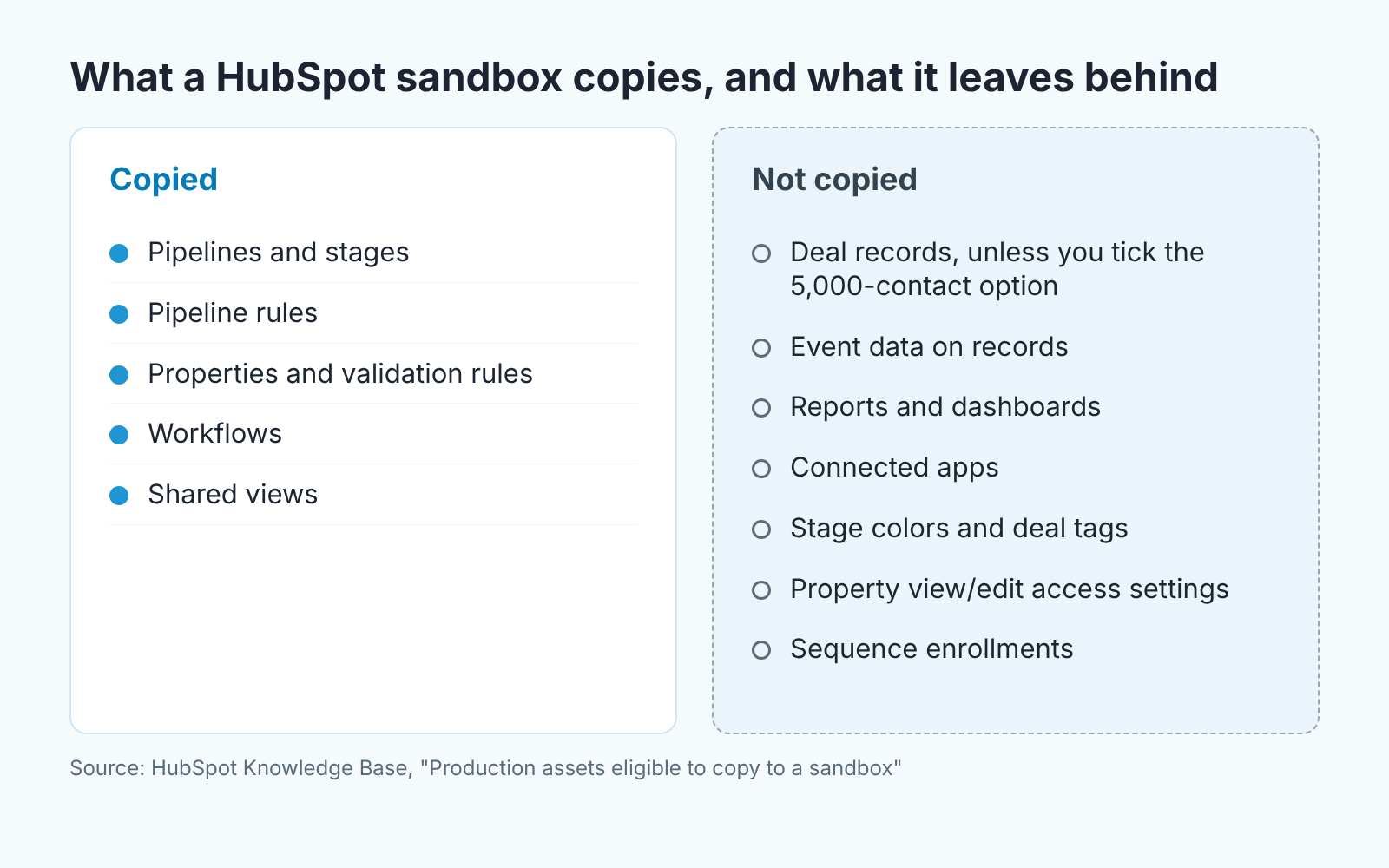
What defines your process comes across: pipelines and stages, pipeline rules, most properties including calculated ones, property validation rules, workflows whose dependencies are all supported, and views shared with everyone or a team (HubSpot: Production assets eligible to copy to a sandbox).
Your data does not. No records come across unless you tick the option for the 5,000 most recently updated contacts with up to 100 associated deals, companies and tickets per contact; later you can import up to 200,000 records per object type. Event data on records stays behind, and so do reports, dashboards and connected apps.
So a sandbox proves that a rule behaves the way you think it does. It can’t show you what the rule does to your numbers, because the report you would read them on isn’t there.
HubSpot has retired legacy standard sandboxes: as of April 30, 2026 they are no longer supported, and deploy to production only works from a new standard sandbox.
Three changes that earn a dry run
Our test is one question: can the change stop a rep from working, or move a deal without anyone deciding to? Three changes pass.
A property made required on a stage. If a deal has to carry a value before it enters Negotiation, the rep who can’t supply it gets stuck, and the deal sits one stage early while the pipeline report says all is well. Which properties deserve that rule is covered in required properties by deal stage; whether the rule blocks anyone is what the sandbox is for.
A workflow that acts on the deal: changing the stage, reassigning the owner, creating a task for someone else. The risk is rarely the action. It’s the trigger. Say one filter is too wide, and three reps each wake up to a dozen tasks they didn’t ask for. Even the one that tasks the owner when a deal goes quiet deserves a dry run if you touch its trigger.
Renaming or merging stages. It looks cosmetic and isn’t: every workflow that triggers on that stage and every view that filters by it now points at something that may not exist. We covered which defaults to rename and why; the sandbox tells you which of your automations notice.
An optional property or an email template you can change live. Not sure if it’s a workflow or a sequence you’re editing? Our note on workflows vs sequences settles it.
Four dummy deals that disagree on purpose
Unless you copied contacts, the sandbox pipeline is empty. Good. Make four deals by hand that disagree: one that should enroll, one that is a single property value away from enrolling and shouldn’t, one sitting on the stage boundary, and one owned by a rep.
That last one needs a word. HubSpot copies only Super Admins, partner admins with elevated access and users with Developer tools access into the sandbox. Your reps aren’t there, so a workflow that tasks the deal owner has nobody to assign to until you add that user yourself.
Then run the change and read the result in order. First, which deals enrolled and, more telling, which didn’t: the “didn’t” list is where a wide trigger shows up. Next, where each action landed: the task on the deal rather than the contact, the owner you expected, the stage you named and not the one after. Then flip the triggering property away and back to see whether a deal enrolls twice. Last, anything that leaves HubSpot. HubSpot tells you to change webhook URLs that point at production endpoints, or the sandbox will call them. Integrations aren’t connected there either, so steps that rely on one stay untested; write that down.
A required property is quicker but hides a trap. Try to save a dummy deal in the stage without the value, then do what reps actually do: drag the card on the board, edit from the record, run a small import that lands deals in that stage. Each path is it’s own test, and the one you skip is the one someone uses on Friday afternoon.
Why your deal IDs won’t match after deploy
First, how a change gets back. You set up the deploy from the production account (Settings > Sandboxes > Set up a deploy); up to 300 changes go in one deploy, and a started deployment can’t be canceled. It carries configuration, and only new configuration: HubSpot’s list of deployable assets says edits to assets that were copied from production can’t be deployed, and a workflow that exists in both accounts isn’t eligible at all (HubSpot: Assets eligible to be deployed to production). A new workflow arrives switched off. A tweak to your existing workflow’s trigger, or a renamed stage in an existing pipeline, you repeat by hand in production once the sandbox has shown it works.
Your dummy deals never travel, which leads to the question behind community threads like “Migration from Production to Sandbox but retaining Record ID”.
HubSpot says plainly that contact, company, deal, ticket and custom object IDs differ between sandbox and production, and association IDs don’t match either. Nothing is broken; it’s a separate account with its own numbering.
It bites when an automation refers to one record rather than a property: a branch that says “if the associated company is this one”, a hard-coded deal in a webhook payload. Those end up pointing at a different record or at nothing. HubSpot’s suggested workaround is a custom property such as External record ID, filled in production by an automation and used in the sandbox as the stable reference.
A sales team can skip it: write rules that refer to stages, properties and owners, never to one record, and the problem goes away.
On Starter or Professional: the two-deal test
Most teams this size are on Starter or Professional (what those plans cost for five seats). The honest substitute is the same test on two live deals, with the blast radius limited by hand.
Create two deals nobody can mistake, say “TEST trigger, delete after 31 Oct”, with a zero amount and you as owner. Zero keeps them out of revenue; the name keeps them out of teh reps’ day.
For a workflow, add one extra condition to the trigger: deal name contains TEST. Turn it on, change a property on both deals, and check who enrolled and who didn’t, where the task or stage change landed, and whether a deal enrolls again when you flip the property back. When both behave, remove the condition at a quiet hour and tell the team what will fire.
For a required property, try to save a test deal in the stage without the value through the record, the board and an import, then open a real deal already in that stage and edit an unrelated field. If that edit is blocked your reps will be blocked too, and you found out on one deal instead of forty.
A stage rename has no partial version. List every workflow that triggers on the stage and every saved view that filters by it before you rename, and open each one after.
The morning after the deploy
Dashboards don’t copy, so the sandbox only proved the mechanics. The business check happens in production, and only if you took a reading beforehand: a screenshot of deals per stage and open tasks will do. The next morning, sort the deals view by last modified date and look for movement nobody chose. Every stage change since the deploy needs a person or an intended workflow behind it, and the task count should grow by the deals you expected to enroll, not by the pipeline. If a deal the change shouldn’t touch has moved, switch the workflow off first and investigate second. And if you made a property required, ask at Monday’s meeting whether anything refused to save last week. That stuck deal won’t show up in any report, because the rule did exactly what you asked and stopped it from moving.


