

In HubSpot, build a deal-based workflow that enrolls open deals with no activity for a set number of days and runs the Create task action for the rep who owns the deal, with a due date. Then open the workflow’s Settings and turn on re-enrollment, or the rule fires once per deal and never again (HubSpot: create workflows). Workflows need Sales Hub Professional or Enterprise, so on Starter this article is a reading exercise and the saved view on deals with no next step is the tool you actually have.
The deal everyone forgot
A composite, but you will recognise it. A six-person team on HubSpot, a pipeline with a Proposal sent stage, and a deal called “Halvard Logistics, 28 seats” that went out on a Tuesday. The rep, Tomasz, meant to follow up Friday. Friday had a demo in it. The following week had a trade show. The deal sat in Proposal sent with a close date in the quarter and an amount that made the forecast look good, and nobody opened it for nineteen days.
The manager found it the way managers usually do: by accident, scrolling the board looking for something else. By then the buyer had asked a competitor for a quote. Blaming Tomasz misses it. He had forty other deals and a memory like everyone else’s, and the CRM knew the deal was quiet on day eight and told nobody.
Most HubSpot teams fix this with a report, which means someone has to open the report. We think the better fix for a deal in a late stage is a task that appears on the owner’s list, with a date, created by the CRM itself. One rule, not a library of automations.
The rule, in one sentence
Here it is, and if you cannot say it this plainly the workflow will not be plain either: when an open deal in Proposal sent or Negotiation has had no activity for 7 days and nothing is scheduled, create one task for the deal owner, due tomorrow.
Three parts. The trigger is the condition the deal has to meet. The threshold is the number of quiet days. The action is Create task. There is no email to the customer in this rule, deliberately; automated chasing is a different subject and it belongs to sequences, not workflows.
The 7 is our assumption, not a HubSpot default. For a team that sells in a four- to six-week cycle, a proposal nobody has touched in a week is already drifting. For early stages the right number is longer and the task is less useful, which is why the rule names the late stages only. Start with one threshold. You can split it later if the team asks, and in our experience they rarely do. Workflows are not the only thing that edits deals in the background, so also review the HubSpot integrations that write to your deals.
Building the deal-based workflow in HubSpot
Of all the HubSpot workflow examples for sales, this is one of the more useful, and it has to be deal-based: deals can’t be enrolled in contact or company workflows (HubSpot: choose your workflow actions). So:
- Go to Automations, create a workflow from scratch, and pick Deal-based.
- Click the enrollment trigger box and set a filter-based trigger on deal properties: Deal stage is any of your late open stages (for us, Proposal sent and Negotiation) and Last activity date is more than 7 days ago. If your editor lets you, also require that Next activity date has no value; HubSpot’s help only documents the “more than / less than X days ago” operators for dates, so check before you rely on it. People skip this one, and then a deal with a demo booked for next Tuesday gets a “chase this” task and the rep learns to ignore the tasks.
- Add Deal owner is known. A deal with no owner has nobody to task; we send those to the manager with a separate filter, or fix the data so there are none.
- Add the Create task action. Title it so it can be found later, for example
Quiet deal: {deal name}, pulling the name and the last activity date from the data panel, which lets you insert deal variables into the task (HubSpot: create workflows). Type To-do. HubSpot’s help describes Assigned to as a user picker and Due date as a date and time, so check in your own action panel how close you can get to “the deal’s owner, due a day out”. One quirk worth knowing: HubSpot changes a task’s type on its own if the title contains “call” or “email” (HubSpot: create tasks), so keep them out of the title. - Before turning it on, HubSpot asks whether to enroll deals that already meet the criteria. Say yes once, on a day you have time to deal with the pile, because the pile is the backlog you were not seeing.
Two notes on the delay step people expect to find here. First, you do not need a delay action to count the quiet days; the “more than 7 days ago” filter does that at enrollment. Building it the other way (trigger on entering the stage, then wait 7 days) counts from stage entry rather than from the last activity, so a deal worked every day still gets a task on day eight unless you add a branch to check.
Second, timing. Filters with a relative date are checked once a day, at the start of the day (HubSpot: set filter enrollment triggers), so a deal enrolls at the next morning check after it crosses the line, not at the exact hour. A short delay until a working hour keeps a task from landing at 02:14 and looking like spam. Keep the workflow short otherwise; the next section explains why.
Why it fires once, and how to make it fire again
By default a record enrolls in a workflow only the first time it meets the trigger (HubSpot: create workflows). For most marketing workflows that is right, you do not want the same welcome email twice. For this rule it is a trap. Halvard Logistics goes quiet in March, gets its task, Tomasz calls, the deal moves. It goes quiet again in May. Nothing happens, because HubSpot already did this deal.
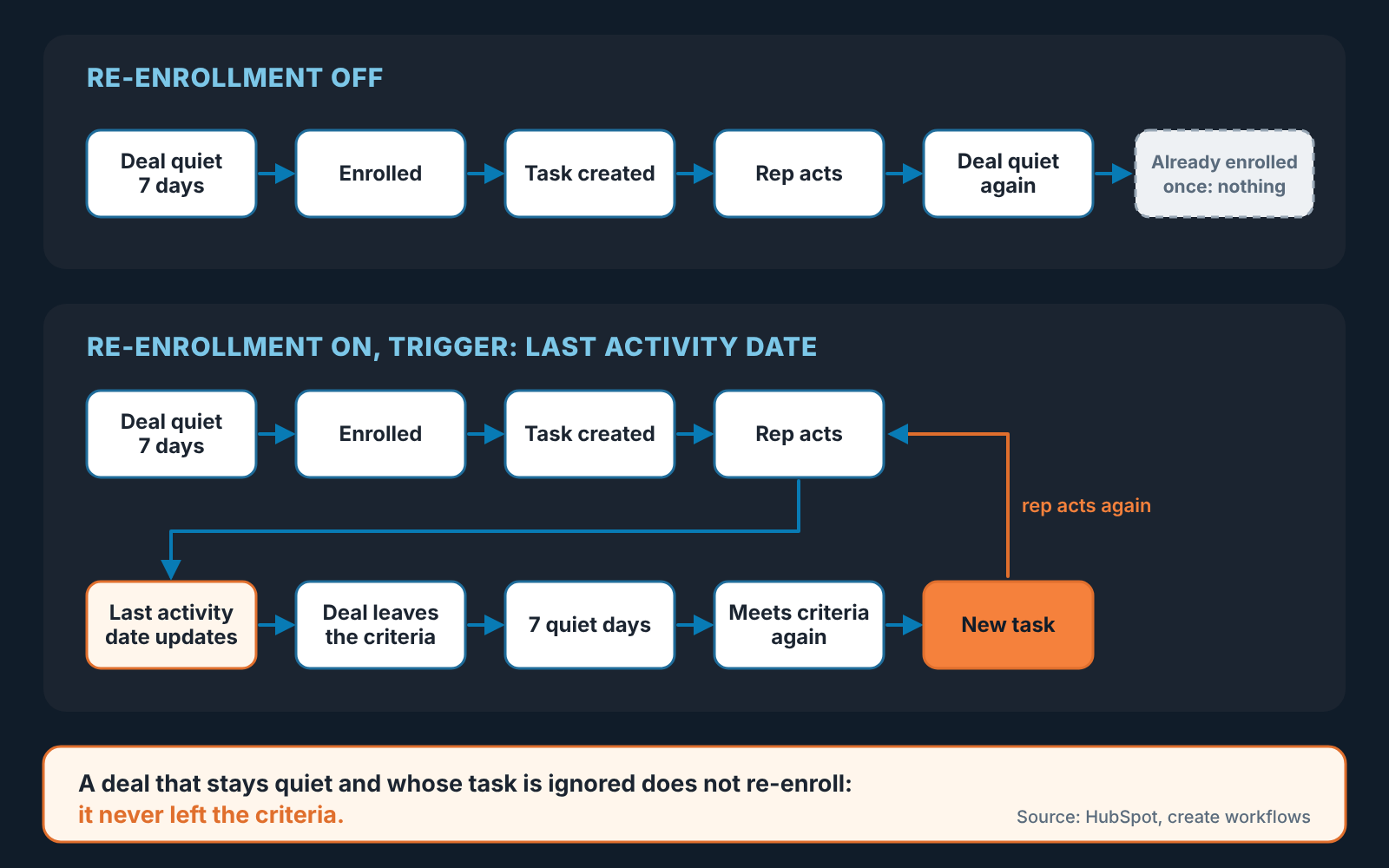
The fix is in the workflow’s left panel, under Settings: switch on Re-enroll and choose which triggers can re-enroll a deal. Pick the Last activity date condition. HubSpot’s own wording is the clearest description of what happens next: records “re-enroll each time they are updated from not matching to matching” the trigger (HubSpot: add re-enrollment triggers). In practice: the rep logs a call, Last activity date moves to today, the deal no longer meets “more than 7 days ago” and leaves the criteria; a week of silence later it matches again and re-enrolls, and a fresh task appears. The rule now follows the deal for its whole life in the stage.
Two limits, both from the same HubSpot article. A deal “won’t re-enroll while it’s already enrolled”, which is why we said keep the workflow short: a long delay or a branch that waits for something turns a two-minute workflow into a two-week one, and during those two weeks the deal is invisible to the rule. And re-enrollment needs the deal to leave the criteria and come back. A deal that goes quiet, gets its task, and is ignored never leaves the criteria, so it never gets a second task. Don’t try to fix that with more automation. That’s where the manager check in the last section takes over. Once the tasks exist, HubSpot task queues are how reps work through them.
Keeping it quiet
Task automation rarely fails by doing nothing. It fails by doing too much, until by week three every rep has a task list they have stopped reading. So before switching the rule on ask how many tasks a rep will actually get.
Our numbers are an example, not a benchmark. A rep carrying thirty open deals, ten of them in Proposal sent or Negotiation, sees perhaps two or three cross the seven-day line in a given week. A rep can live with two or three tasks a week. The same rule applied to every open stage with a three-day threshold is fifteen tasks a week, and those get marked complete in a Friday batch without anyone opening a deal. If the owner lives in Slack, the same workflow can also post the quiet-deal alert in Slack next to the task.
Because the workflow creates the task and ends, and a deal can’t be in it twice, you get one task per quiet period. Don’t add a second workflow for the same symptom “just for Negotiation”; a deal can then collect two tasks on the same day and the rep stops trusting both. The task goes to the deal owner only; copying the manager rebuilds the inbox nobody reads. It’s due the next working day, because a task due the moment it appears is already overdue when the rep sees it. And “Quiet deal: Halvard Logistics” tells Tomasz what happened without opening it, where “Follow up” tells him nothing.
If the team also uses required properties when a deal reaches a late stage, keep them separate from this rule. Required fields fire at the moment of the stage change. This rule fires in the silence after it.
How a manager knows the rule is still alive
Automations die quietly. Someone renames a stage and the trigger stops matching. Someone turns the workflow off during a data import and forgets. Someone changes the task title and the the search the manager relied on comes back empty. Nothing errors. The tasks just stop, and because their absence looks exactly like a healthy pipeline, nobody notices until a Halvard Logistics turns up.
So we give the rule an owner, usually the manager, and a short check that takes less time than reading this paragraph:
- Open the workflow once a week and look at enrollment over the last seven days. Zero enrollments in a team of six with deals in late stages means the trigger is broken, not that the team is perfect.
- Filter the tasks list on the title prefix and on status. Open tasks you expect. A growing pile of overdue ones is a rep conversation or a threshold conversation, and you now know which.
- Spot-check one task against its deal: did the task appear around the day the deal crossed seven days, and did Last activity date actually update after the rep acted? If it did not, the rep is completing tasks without touching deals, and the re-enrollment loop is silently off for those deals.
- After any pipeline change, stage rename or import, open the trigger and read it.
The overdue pile is where the ignored deals from the re-enrollment section surface. A task overdue by a week on a deal quiet for three is the rule telling you its done what it can. That deal belongs in the next 1:1, not in another automation.
If your team is on Salesforce or Pipedrive, the same rule exists there with different plumbing: a Flow that creates a task on a stale opportunity, and a Pipedrive automation, with the limits Pipedrive puts on follow-up automations worth knowing before you build.
The honest limit of this rule is that it watches one signal. We build SalesBond, a sales management layer on top of the CRM a team already uses. Its Deal Health checks every open deal against more than 20 rules at once, no activity being one of them, and flags the deals that need attention without a workflow per symptom. For a small team on HubSpot the single workflow above may be all you need, so build it this week and put the Friday check in the manager’s calendar before you switch it on. If you would rather see every quiet deal and every other kind of stuck one in one place, check your CRM with SalesBond.


