
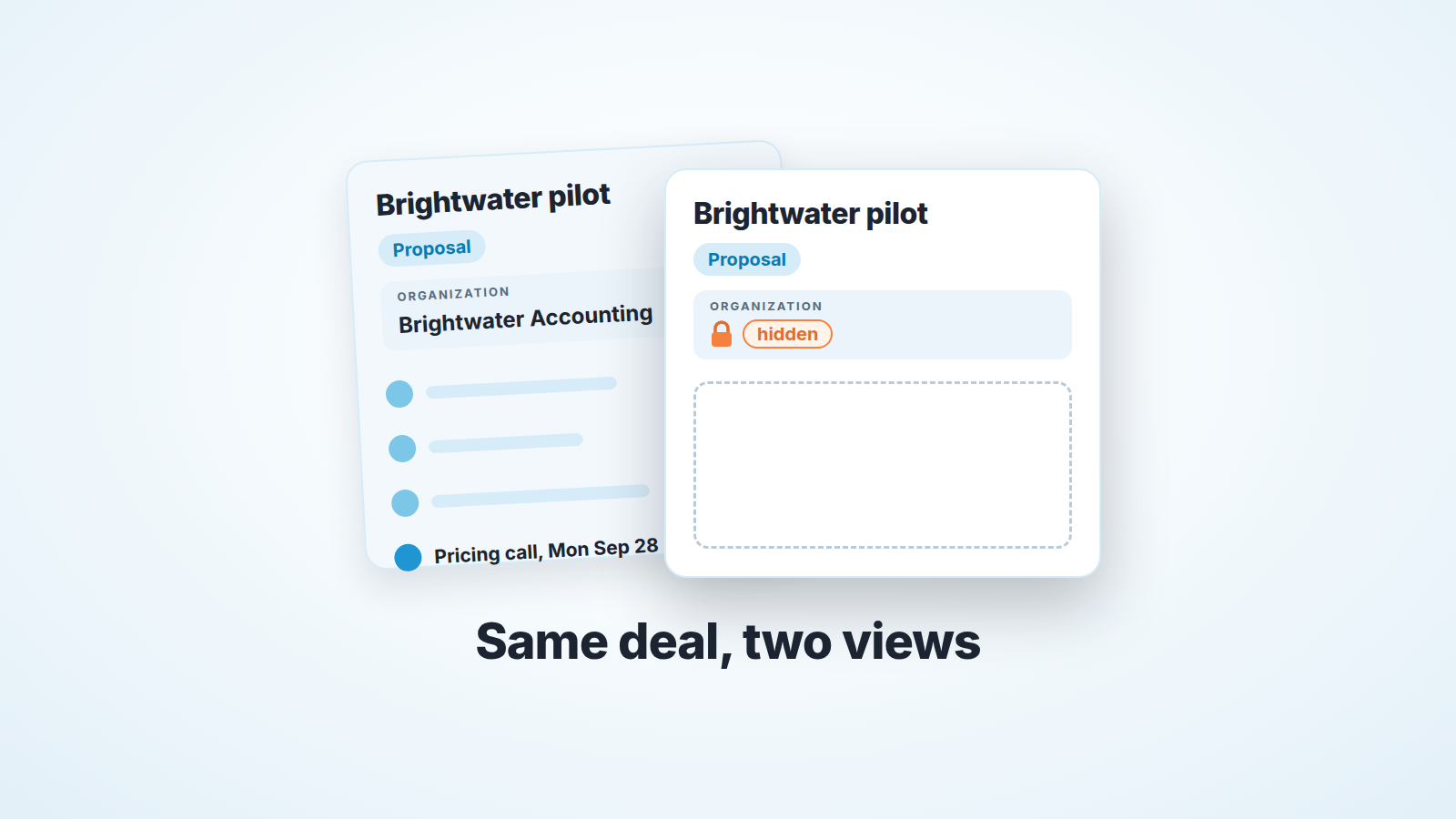
In Pipedrive, an item shows as “hidden” when you lack the permission or the visibility to open it (Pipedrive: why are items shown as “hidden”?). Hidden activities add one more condition: to see an activity, a user must have visibility into all items linked to it, and an activity logged on a deal is automatically linked to that deal’s contact person and organization (Pipedrive: activities). So you can have full access to a deal and still not see a single call logged on it. The deal is not quiet. It is quiet for you, and the fix sits with an admin.
A deal with no history for exactly one person
A made-up team, names included. Five people sell onboarding packages for a payroll product, and all of them sit in the one default visibility group. The founder is the only admin. Owen Marsh leads sales and is a regular user. Selina Aydin is a rep.
Back in the spring the founder met the managing partner of Brightwater Accounting at a referral dinner, created the organization himself and set its “Visible to” to “Item owner”, because at that point it was a favor between two people and not a prospect. Then he forgot about it, which is what founders do with CRM records.
On Thursday, September 10, Brightwater sends an inbound request. The founder transfers the organization to Selina and leaves “Item owner” as it is. She opens a deal with the managing partner as the contact person, both visible to all users. Four activities over three weeks follow, the last a pricing call on Monday the 28th, and on the 29th the buyer asks for a pilot.
On Friday, October 2, Owen does his pipeline walk. The Brightwater deal sits in the proposal stage with no activities on it. Months ago he switched off hidden activities and notes in his personal preferences because the placeholders felt like clutter, so Selina’s four activities don’t appear at all. The only clue is a “hidden” mark on the organization section in the sidebar, and he doesn’t stop to read it. From his chair, Selina has done nothing on this deal since she created it.
He writes “stalled, chase or close lost” next to it and tells the founder the Brightwater number should come out of the October forecast. Selina hears about it on Monday.
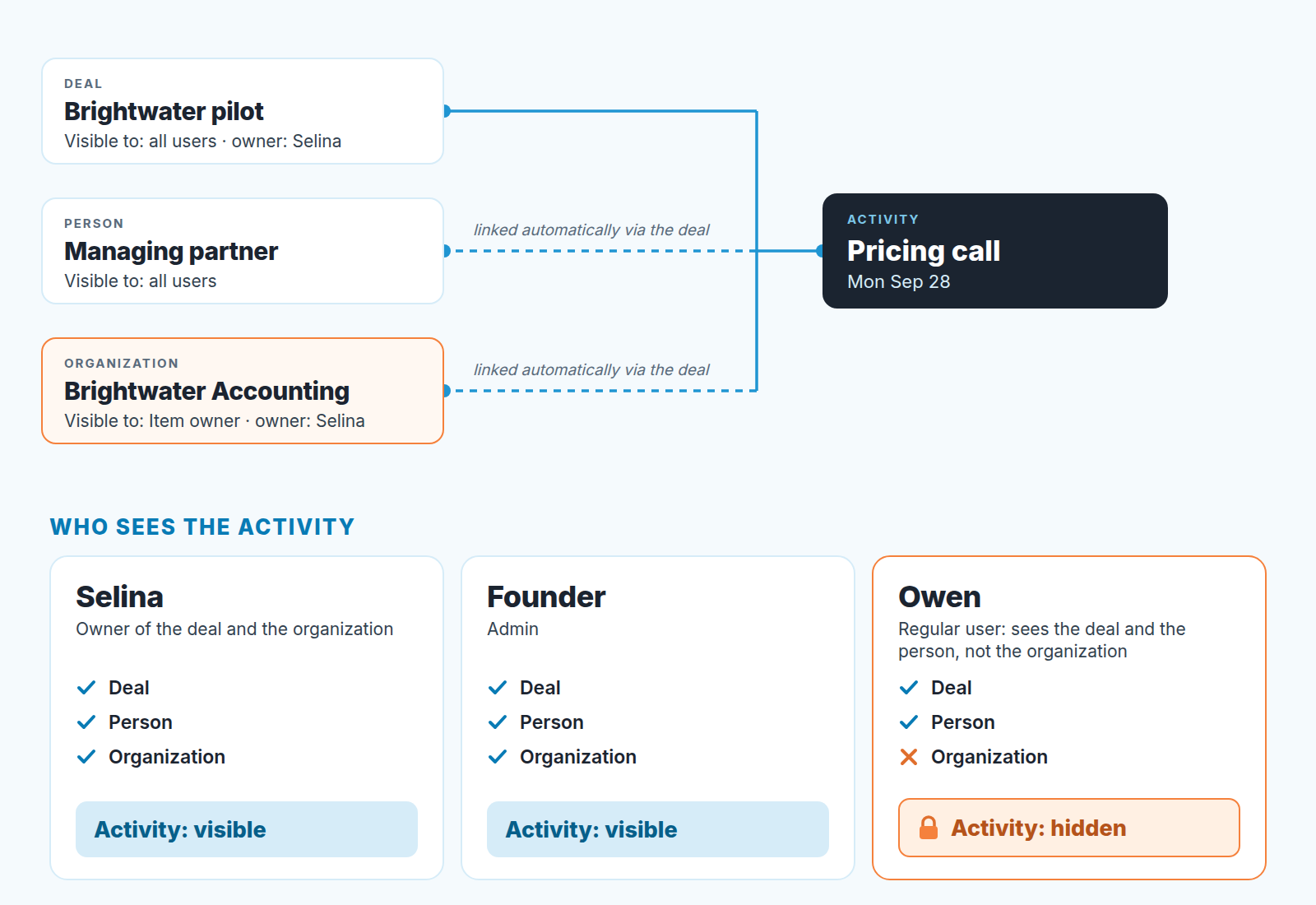
Nobody did anything wrong in Pipedrive’s terms. An “Item owner” organization is visible only to its owner, followers, admins and parent visibility group members (Pipedrive: visibility groups). Here that is Selina and the founder: no followers, and with one group there is no parent group. Owen sees the deal and the contact but not the organization, and every activity on the deal is linked to all three. So every activity is hidden from him, while Selina and the founder see the full history.
What “hidden” means and the two reasons behind it
An item is hidden from you when you don’t have the permission or the visibility to view it, and this shows in three places: the top of the item’s detail view, any sidebar section with blocked data, and the list view (Pipedrive: why are items shown as “hidden”?).
There are two causes: your visibility group doesn’t have access to the item, or your admin has turned off “See the names of items and users they can’t access” under Global permissions, in which case a note appears with the hidden items to explain why. Either way, ask your admin to update the item’s visibility; global admins do it under Settings > Manage Users (same page).
Visibility groups define what users can see, permission sets what they can do, and each item’s own “Visible to” setting overrides the group (Pipedrive: visibility and permissions overview). The “can do” half is in what to set in Pipedrive before a new rep logs in.
Since June 2026 each user can choose in personal preferences whether hidden activities and notes appear in detail views; for users who keep them on, the card explains why the content is hidden and links to that preference (Pipedrive product updates, June 2026). The release describes it for activities and notes, which is how Owen’s card could show no activities while the organization in his sidebar still carried its mark.
An activity needs every linked item to be visible
Visibility in Pipedrive is set per item. A deal, a person and an organization each have an owner and a “Visible to”. An activity is something you link to people, organizations, leads, deals or projects, and its rule takes one sentence: to see an activity, a user must have visibility into all items linked to it (Pipedrive: activities).
The same page explains why that list is longer than people expect. An activity linked only to a deal is automatically linked to the deal’s contact person and organization, and one linked to a person picks up that person’s organization. Log a call on the deal, and you have tied it to three records.
All, not any. One hidden organization hides every call, meeting and task linked to it, however open the deal is. The help page makes no exception for the deal owner: had the founder kept the organization, Selina would have lost sight of her own calls too.
Why does it surprise people? Because the deal is where you look, so you assume teh deal’s visibility decides. The records that trip the rule are the ones nobody opens: an organization created by someone who has since left, or one made private for a reason that stopped mattering. A change on a single item overrides the default for new items (Pipedrive: how can I change the visibility of items?), and nobody audits the overrides, so they outlive their reason.
How that bends a deal review (silence that isn’t silence)
Selina’s card shows four activities and a buyer asking for a pilot; Owen’s shows a deal with no history. Same record, two accurate screens, and no way to settle it by looking harder.
The first distortion is the false stall. Three weeks with no visible activity gets the stalled treatment: chase, discount, or move to lost. Here the buyer had asked for a pilot the day before, so “chase” would have landed on a customer waiting for a proposal.
The second distortion costs more over a year: the false hygiene problem. If Owen sees empty cards on several of Selina’s deals the conclusion becomes “Selina doesn’t log her work”, and that turns into a coaching conversation or a line in her review. The rep is logging everything, and the person judging her can’t know, because the evidence is exactly what he can’t see.
Two related ways for a deal to look silent have their own articles: covering a rep’s Pipedrive deals with followers and Pipedrive email visibility: Shared vs Private.
What we do as reviewers who aren’t admins: before “stalled” gets attached to someone else’s deal, we ask the rep what they last did on it. Selina would have answered in ten seconds. Its cheaper to be surprised in the meeting than in the forecast. If reviews keep turning into card-by-card arguments, the split between inspection and review helps.
What visibility does to Insights and to automations
Insights follows the same visibility rules as items: no separate settings, users see data only for items they can access, and admins aren’t restricted. One line on that page matters for reviews: “Charts and aggregated data remain visible, but restricted records are hidden” (Pipedrive: visibility and permissions overview). So a chart can count work the card won’t show. If Owen’s activity report and the empty Brightwater card disagree, the mismatch itself points to visibility rather than effort. Different totals between you and a rep have other causes too, covered in why you and your rep see different numbers in Insights.
Automations fail rather than skip. If the user who triggers an automation can’t see the items involved (deals, leads, contacts, organizations, projects, activities), it fails (Pipedrive: troubleshooting automations). Owen moving Brightwater to the next stage could set off one that touches the organization, and it would stop on exactly the deal where he already has the least information.
Fixing it: reviewer access, item visibility, followers, and what each one gives up
Every fix is some version of “give the reviewer visibility into the linked item”. They differ in who can do it and what you trade away. One thing that is not a fix: team filters do not change who sees what, so filtering a review by team will not bring back a hidden activity.
| Option | Who can do it | What it fixes | What you give up |
|---|---|---|---|
| Change the item’s “Visible to” (the organization, in the scene), in its detail view or via the “Visible to” column in the list view | An admin; global admins through Settings > Manage Users | The item, for everyone the new setting covers. Its activities appear only for users who also see every other linked item, the contact person included | The reason the override was there. One trap: a regular user who sets another user’s item to “Item owner” loses sight of it after the change (Pipedrive: how can I change the visibility of items?) |
| Make the reviewer a follower of the organization | An admin: they “can give you visibility or change your status to follower” (same page) | “Item owner” items are visible to followers (visibility groups), so following the organization opens the organization | One item at a time; it doesn’t fix the next organization with the same override |
| Make the reviewer a global admin | Whoever manages users and permissions in the account | Global admins can see all items, and admins are not restricted in Insights either (overview) | Rights far beyond reading |
| Keep hidden activities and notes visible in personal preferences | Each user, for themselves | Hidden activities and notes show as hidden, with the reason and a shortcut to the preference (product updates, June 2026) | Nothing but a bit of clutter. It labels the silence; it doesn’t reveal the content |
Deal admin is narrower than it sounds. It opens all deals and leads “regardless of visibility group or ‘Visible to’ settings” (same overview), not organizations, so in the scene it wouldn’t bring back a single activity.
By role, this is what we’d do.
If you own the account, go through the organizations and people with a per-item override and ask whether each one still needs it. Most don’t. Set prospects to the same visibility as their deals, and write down who may create private records and why, as we suggested in who owns the data in a small sales team.
If you run reviews as a regular user, turn hidden activities and notes back on in your preferences, so you can tell a hidden history from an empty one. Then hand the admin the the list of deals where you see “hidden” before the next review. Don’t ask for admin rights to solve a reading problem.
If you’re a rep and your own deal shows “hidden” pieces, Pipedrive’s advice is to contact your administrator: they can give you visibility or change your status to follower (same page). Nothing you can click fixes it, so say out loud in the review that your manager may be seeing less of the deal than you are.
When you don’t need any of this
Plenty of teams never see the word “hidden” and never will. If everyone is in the one default visibility group, new items are set to all users, nobody has overridden a single record, and the person running reviews is an admin, then every activity is visible to every viewer and this article is a curiosity. Leave it alone.
The trouble starts when a team adds visibility restrictions because a guide said it was good practice. On a small team we think a restriction should exist only for a reason someone can say in one sentence: a partner’s contact list that must not reach the sales floor, a founder’s personal network, a deal a departing rep shouldn’t take with them. If nobody can name the person and the record, the restriction has no job except producing hidden activities for the next manager to misread.
So keep everything visible to all users until you have that sentence. When you do restrict a record, think about who reviews the deals linked to it, because the activities disappear for them too. Silence in a CRM is only sometimes silence.


