
A pro forma invoice is a preliminary document that shows what the customer would pay, sent before the sale is completed, and it is neither a quote nor a tax invoice. In a B2B deal it usually answers a customer’s request for budget approval, prepayment or export paperwork, so the seller should record its number, amount and status on the deal and avoid marking a prepaid deal as won until it is paid.
The pages that rank for this term are written by invoicing vendors for the person who makes the document. This one is for the person who owns the deal: what the request tells you, and which three fields keep the pipeline honest while the document is out.
What a pro forma invoice is, and what it is not
It looks like an invoice and it is sent before the sale. It lists the goods or services, prices and terms, and it has to say “pro forma” on it. Hiveage calls it “a declaration of what is to come”. Spelling doesn’t matter, by the way: pro forma, proforma and pro-forma are the same document.
Does it ask for payment? No. It is not a demand for payment, it creates no receivable, and it is not recorded in the books, because no sale has happened yet (Moon Invoice). That doesn’t stop a customer paying against it. Hiveage notes that you can technically receive payment on a pro forma, and Moon Invoice lists advance payment among the terms one carries. So a pro forma can be the document a prepayment is made on, while the real invoice follows once the sale is done. Once the real invoice exists in your accounting system, that system should own its status; for Pipedrive and QuickBooks, see invoice status in QuickBooks.
Is it binding? Moon Invoice says no. Hiveage hedges and says it can be binding in some parts of the world, which is one more reason to ask your accountant before you rely on it.
That is the whole of the pro forma invoice vs commercial invoice question for a seller. The commercial invoice comes after the order is confirmed, requests payment by a due date and goes into the accounts as revenue and a receivable. The pro forma does none of that.
The quote is the harder one. On paper the two can carry the same lines and the same total, and Hiveage even describes a pro forma as “a quote in an invoice format”. The difference is who asked and why. A quote is you telling the buyer the price. A pro forma is usually their finance team asking for that price in a form their process accepts, after the buyer has said yes in principle. In a pipeline that makes it a different moment, and the moment is the next section. If estimates and proposals are also in the mix, which document belongs to which CRM stage sorts those out.
Tax treatment differs by country. We don’t cover it here.
Three moments a customer asks for one
The request almost never comes from the person you have been selling to. It comes from the person behind them.
The first is budget approval. The buyer has agreed and now needs a document to attach to an internal purchase request; Moon Invoice lists “the buyer needs an invoice for internal approval before making a purchase” as a standard reason to issue one. They are not asking to be billed. They want something their approver will sign.
Then there’s prepayment. Your terms say money before work starts, and the customer’s accounts payable will not pay anything that isn’t called an invoice. This is the case that bites pipelines: the document goes out, the deal feels closed, and the money is still a decision the customer hasn’t made.
Export is the third. The customer, their bank or a customs broker needs a document for import pre-approval or to arrange financing before shipment (both are on Moon Invoice’s list of uses). You rarely start this one. The request arrives with a list of fields the buyer’s side needs, and the right move is to pass that list to whoever creates the document.
In all three the customer has said yes to something. So a pro forma is a late-stage document, and a deal that has one should not be sitting in “Proposal sent”.
Who creates it, and why sales still owns the record
Finance or the invoicing tool creates the document. Sales owns the deal record. Both are true at once, and the trouble starts when the second one is forgotten.
In a small team the rep often builds the pro forma from the quote, because the invoicing tool has a button for it. Fine. In a bigger team finance issues it, the rep gets a PDF in an email thread, forwards it and moves on. That’s where the deal goes quiet: the document exists in the invoicing system, the customer has it, and the CRM knows nothing. We’ve seen the same gap at every handoff between quote and cash.
Our rule: whoever creates the pro forma the rep writes it on the deal the same day. Not in a note. In fields, because next week someone needs to filter on them, and nobody filters on notes.
Three fields on the deal: number, amount, status
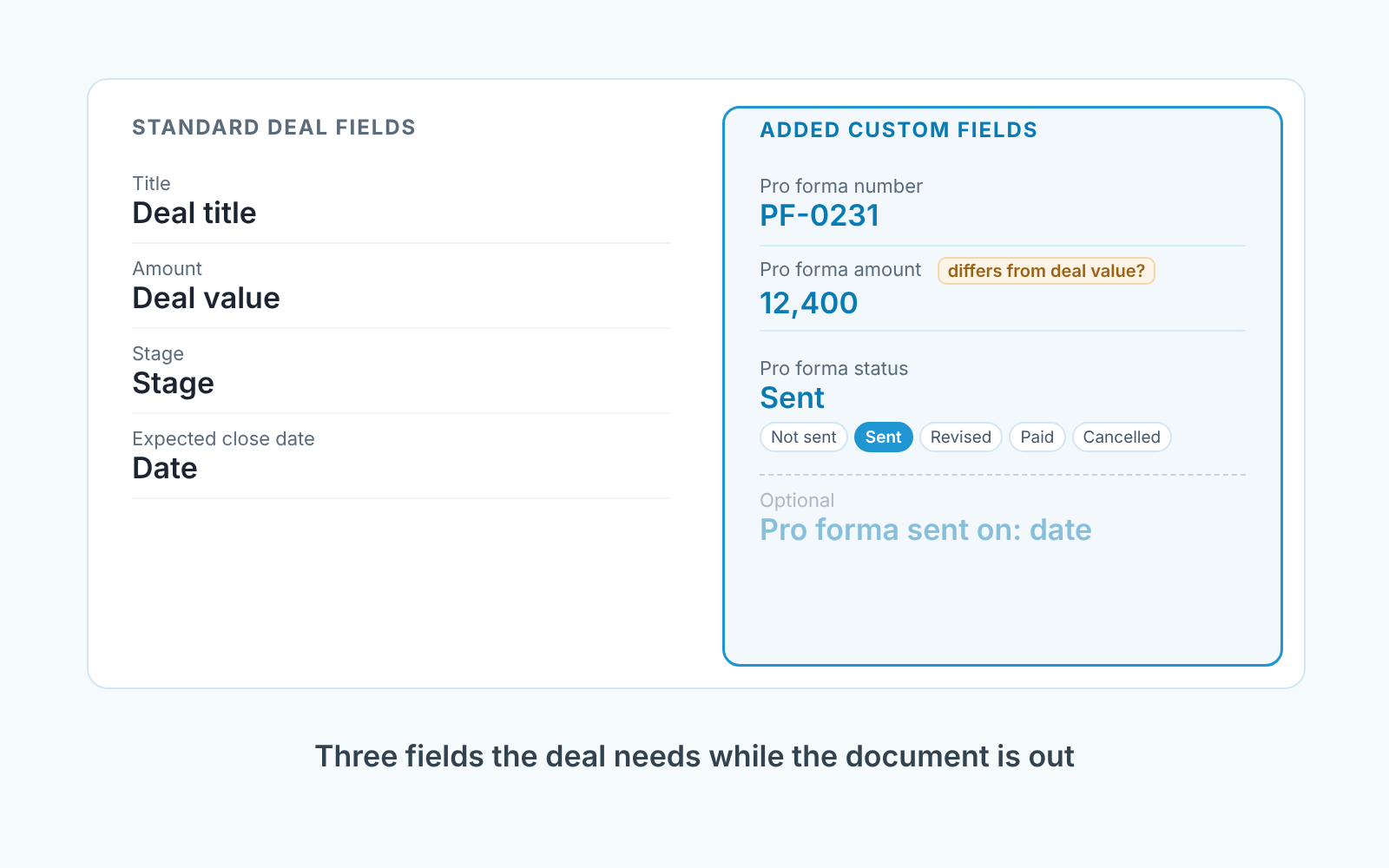
Nothing more until these three are filled on every deal that has a pro forma out.
- Pro forma number. A text field: a custom deal field in Pipedrive, a single-line text property in HubSpot. A pro forma does have a number even though it isn’t final; both Hiveage and Moon Invoice list it among the required details. It is the key that lets finance, the rep and the customer talk about the same document. A purchase order number from the customer goes in its own field, and the PO number before the invoice explains why the two shouldn’t share one box.
- Pro forma amount. A monetary field, separate from the deal value. The deal value is what you expect to win; the pro forma amount is what the document says. They drift apart the moment a line is added or a discount gets agreed on a call, and when they differ, one of them is wrong.
- Pro forma status. A fixed list, not free text (a dropdown select in HubSpot): Not sent, Sent, Revised, Paid, Cancelled. The rep sets Sent on the day it goes out. Finance, or the rep after checking with finance, sets Paid.
If you can afford a fourth field, make it the date the pro forma was sent. Without it you are left with the deal’s last-updated time, which moves every time anyone touches the deal and so says little about the document.
Won or not yet
If the pro forma is for prepayment, the deal is Won when the money arrives, not when the document leaves. If it’s for approval or export and you deliver on account, the status field tracks the paperwork and the stage follows the order. We argue the rule and the stage to park the deal in Signed but not paid: when a deal is really Won. Pick one rule per pipeline and don’t reopen it deal by deal.
Sent a week ago, still not paid
This is the filter that earns the three fields their place. Every Monday, in Pipedrive’s deal list or a HubSpot deal view: open deals, Pro forma status = Sent, sent date more than a week ago. Sort by pro forma amount.
What you are looking at is a list of customers who asked for a document, got it, and did nothing with it for a week. In our experience a quick call sorts each one into one of three piles. The approval is stuck with someone who isn’t the buyer, and you can help the buyer with a one-paragraph justification. Or the amount no longer matches what was agreed, so you issue a revision and set the status to Revised. Or the customer has gone quiet, and a week is early enough to find out why without sounding anxious.
A week is our number, not a law. If your customers’ approval cycles run a month, use two weeks. The point is that the list exists and someone reads it. A deal that stays on it for three Mondays in a row has a problem the rep can name, and thats a better forecast signal than any stage probability.
We build SalesBond, a sales management layer on top of the CRM a team already uses; we started with Pipedrive. Its Deal Health checks every deal in the connected CRM against more than 20 rules and explains what it finds. It won’t read your pro forma fields, so the Monday filter stays yours, but it watches the rest of the deal: activity, progression, data, ownership and forecast. Check your CRM with SalesBond.
Two mistakes we keep seeing
The first is sending a pro forma instead of a quote. A rep who has a pro forma template and no quote template sends the pro forma at the pricing stage, because it looks official. Now the customer’s finance team has an invoice-shaped document for a deal the buyer hasn’t agreed to, and some of them will try to pay it or file it as a commitment. Labelling it “pro forma” is the minimum. The better fix is to keep the quote for pricing and the pro forma for the three moments above. The status field helps here too: a filter on status = Sent with the stage before Negotiation shows every pro forma that went out too early.
The second is forgetting the amount after a revision. The customer asks for a change, the rep issues a new pro forma, and the deal keeps the old number and the old amount. Moon Invoice points out that a pro forma can be adjusted before the order is final, which is exactly why the deal record falls behind. Treat it like revised quote versions: new document, same day, new number and amount on the deal, status Revised. Keep the old PDF attached so the the history is visible, but let the fields describe the one the customer is looking at now.
And one that isn’t a mistake but gets treated like one. A customer with an unpaid pro forma places a new order. Don’t block the new deal on the old document; a pro forma was never a demand for payment, so nothing is overdue. If a real invoice is overdue, that’s a different conversation and we’ve written that one up.
FAQ
Are pro forma invoices payable?
A pro forma is not a demand for payment and creates no receivable, but a customer can make a prepayment against it. The final invoice follows once the sale is completed.
Is a proforma invoice a quotation?
It can carry the same lines as a quote, but it usually arrives later, after the buyer has agreed in principle, and in an invoice format the buyer’s finance team accepts.
What is the difference between a tax invoice and a pro forma invoice?
A tax invoice records a completed sale and goes into the accounts; a pro forma does not. Tax treatment varies by country, so check with your accountant.


